This is topic Help playing 4K content. in forum Digital Cinema Forum at Film-Tech Forum ARCHIVE.
To visit this topic, use this URL:
https://ft-forum.com/ft/cgi-bin/ubb/ultimatebb.cgi?ubb=get_topic;f=16;t=002306
Posted by Kirk Futrell (Member # 5006) on 05-27-2015, 10:22 AM:
First off let me say that I have contacted both Barco and Doremi about the following and both have said as far as they can tell, everything is set up right, including the 4K playlist and the 4K license.
Recently I decided to revisit the issue of determining once and for all if I was actually playing true 4K content from our Showvault w/IMB to our Barco 4K-23B via ESATA connection. So I devised a test pattern that I thought would test the theory beyond a shadow of doubt. A fellow projectionist and I created a 4K image in photo shop that consisted of alternating black and white 1 pixel wide vertical lines. Then we made a 4K dcp of it using both DCP-O-Matic and OpenDCP (the latter was used so we could actually see the outputted jpeg2000 files). We then took one of the jpg2000 files and converted it to a 4K .png to make sure everything still looked good. I then uploaded that image to the Barco as a test pattern. The Barco displayed it correctly on the screen and you could see the individual 1 pixel lines. The DCP's we made also look correct if viewed using "NeoDcp" player.
However when we played the DCP through the Doremi, the image on screen was a gray image, as though it were downscaling the 4K to 2K and combining the black and white pixels. This happens on both of our Barco/Doremi setups. It looks the same in a 2K playlist as a 4K playlist. When viewing the video path for a 4K on the Barco the IMB says 4K and the ICP says 4K (well actually it only shows a 4K icon when in Scope. In flat, there is no icon at all, though both settings look the same on screen and i seem to be using the correct 4K pcf files) . I even tried turning off the scaling on the TI chip. With the scaling off both the 2K and 4K content in a 2K playlist are small on the screen, in a 4K playlist 2K and 4K content fill the screen. This last fact seems a little strange to me. It seems like the doremi is scaling down 4K to 2K for 2K playlists and then scaling up 2K to 4K for 4K playlists. Is it possible the Doremi is scaling 4K down to 2K then upscaling everything back up to 4K to fill the screen ?!?!
What I would love to have happen is that someone with a 4K setup could verify whether the DCP works correctly on their projector setup. I especially want to hear from someone with the same setup and someone with a different setup like a Doremi and anything but Barco or a Barco and anything but Doremi.
I am including a link to the files I have created and pictures of what the image looks like on a white piece of (unperforated) foamboard. The test DCP is very short (1 second) so you may have to pause it.
https://drive.google.com/file/d/0B5BJx3weEYk8QTdCbXdFaFhuODQ/view?usp=sharing
Hopefully the above does not break forum Rule #4 but, if it does, maybe someone can help me figure out a better way for people to access the files.
Posted by Marco Giustini (Member # 4544) on 05-27-2015, 05:33 PM:
Any chance your 4K license on the Doremi has expired?
Posted by Carsten Kurz (Member # 5396) on 05-27-2015, 05:48 PM:
What I can say is that a while ago I created a 4k pixel-level checkerboard pattern in DCP format to see how much 4k detail is actually left from different settings of J2k compression ratio, and I could clearly dissolve the individual checkerboard pixels on screen when played through our Sony.
I have no Doremi/4k combo to test this at hand currently, only a Dolby/Kinoton(Barco).
You should confront Doremi and Barco with photographs of the 4k testpattern vs. the 4k DCP.
- Carsten
Posted by Marco Giustini (Member # 4544) on 05-28-2015, 03:37 AM:
Can you focus your picture so you see the pixels on screen? And how's your convergence? Some projectors/lens combination are sharper than others - which means that others are less sharp. SONY are usually sharper unless you use lots of lens shift.
Posted by Carsten Kurz (Member # 5396) on 05-28-2015, 05:14 AM:
If the 4k png test-patterns resolve to the pixel level on screen, that can be ruled out.
@Kirk: 1s is too short for a DCP. Doremis used to have issues with DCPs so short. Even if they seem to play properly, you should at least prepare 5-10s. I doubt this is causing your issues, but you can never be sure...
The DCP/MXF will be larger with 5-10s, but with static J2k images, ZIP will do a good job to compress them further lossless.
These are two test DCPs created from a 4k 4096*2160 TIF checkerboard. One uses the full DCI 4k container, one a cropped flat container. No scaling/filtering applied during the DCP creation.
The resulting 10s DCPs with a silent 2ch audio track have a size of roughly 47MBytes, but ZIPcompress nicely to around 500kByte because the J2c frames are all the same and the audio is all zero. I used a target bandwidth of 200MBit/s, as some Doremis freak out at higher data rates.
https://dl.dropboxusercontent.com/u/5582554/4kCheckerFullC.zip
https://dl.dropboxusercontent.com/u/5582554/4kCheckerFlat.zip
As this is only for special testing, I didn't adhere to ISDCF naming convention.
This is the source file:
https://dl.dropboxusercontent.com/u/5582554/4k_full_checker.bmp.zip
(yes, it's 4096*2160 8bit RGB, ZIPed to a mere 54kByte)
- Carsten
Posted by Marco Giustini (Member # 4544) on 05-28-2015, 05:30 AM:
Yes but the internal pattern is not an alternate 1-pixel lines test pattern.
Maybe a different pattern should be used, maybe Kirk could use the same Barco focus pattern png file.
Posted by Carsten Kurz (Member # 5396) on 05-28-2015, 05:47 AM:
As far as I understood, he loaded his own 4k pattern into the Barco?
- Carsten
Posted by Marco Giustini (Member # 4544) on 05-28-2015, 07:24 AM:
Ah ok, I missed that.
This is weird. I still would have a look at the 4K license, not sure if when it's missing/expired the Doremi still plays 4K but rescaling 4K to 2K first.
Failing that, you (Kirk) seems to know what you are doing so I don't really know. In theory you should just make sure you're using a 4K PCM file and a 4096x2160 no crop/no masking as a screen file. Make sure the PCFs and screen files are indeed what they say. They should be read only but you never know.
Was the projector upgraded to 4K or did it come 4K from the factory? Is the projector set as 4K in the device manager on the Doremi?
Posted by Kirk Futrell (Member # 5006) on 05-28-2015, 03:17 PM:
I will get a chance to try this stuff out tomorrow morning.
quote: Marco Giustini
Any chance your 4K license on the Doremi has expired?
Marco, If I remember the license is valid for something like 20 years or more. Also Doremi looked at the log files and said it "appears" I am outputting 4K, which corresponds to the fact that if I turn off scaling on the ICP the image still fills the screen when using a 4K playlist on the Doremi.
quote: Carsten Kurz
You should confront Doremi and Barco with photographs of the 4k testpattern vs. the 4k DCP.
Carsten,I've sent everything in the link to both Doremi and Barco. Doremi has been very communicative and genuinely interested/helpful. Barco refuses to look at anything that isn't "distributor created" and hasn't been willing to look at the files.
quote: Marco Giustini
Can you focus your picture so you see the pixels on screen? And how's your convergence?
In the picture titled 4Kdcp, you can see the pixels if you look closely, in the other picture you can clearly see the black 1 pixel lines, so its not a focus issue or convergence for that matter. Convergence is within spec.
quote:
@Kirk: 1s is too short for a DCP. Doremis used to have issues with DCPs so short. Even if they seem to play properly, you should at least prepare 5-10s. I doubt this is causing your issues, but you can never be sure...
I will recreate my DCP test tomorrow to be longer. I will check out your tests files tomorrow, too. Thanks for providing!
quote: Carsten Kurz
As far as I understood, he loaded his own 4k pattern into the Barco?
That's right. One of the files in my above link to the .zip file is the 4K .png I uploaded to our 23-Bs as a test pattern. If I remember correctly it was created in photoshop then repeated in Adobe Premiere so we could create a .tiff sequence then converted to jpg2000 with OpenDcp. We took one of those files and reconverted it to a .png to use as our test pattern, the extra steps being to verify that our DCP was created properly.
quote: Marco Giustini
Was the projector upgraded to 4K or did it come 4K from the factory? Is the projector set as 4K in the device manager on the Doremi?
Installed as 4K by me with my limited training from the Barco installation tech program. I will check the device manager for that option, I don't recall the settings. I imagine I would have set that option if I saw it.
Posted by Marco Giustini (Member # 4544) on 05-28-2015, 04:06 PM:
can you post the DCP? If you RAR it and all the frames are the same it will be very small. Don't ZIP it.
Posted by Carsten Kurz (Member # 5396) on 05-28-2015, 04:11 PM:
Kirk - the OpenDCP 4k DCP features no audio track. Some servers will reject this.
You may want to create this test footage with both OpenDCP and DCP-o-matic. DCP-o-matic will alway create an audio track - silent, if no audio is specified.
- Carsten
Posted by Steve Guttag (Member # 268) on 05-28-2015, 04:54 PM:
In Device Manager...the 4K option doesn't JUMP out at you. The default is 2K.
Posted by Anders Nordentoft-Madsen (Member # 3334) on 05-29-2015, 06:36 AM:
And of course the 4K is set to on in the IMB? This needs to be done every time a playlist is loaded.
Macro sould look something like this:
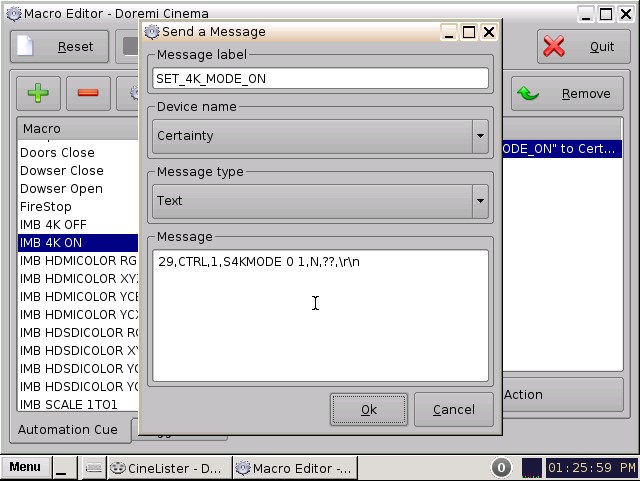
A clever way to make sure it always loaded is to insert the macro into default_cues.xml
Regards
Anders
Posted by Marco Giustini (Member # 4544) on 05-29-2015, 08:36 AM:
Anders,
That is done by setting the playlist properties to 4K, you don't need to run that command every time.
Well, I guess that that would be the same though.
Posted by Anders Nordentoft-Madsen (Member # 3334) on 05-29-2015, 09:29 AM:
Yes you are right of course, but we dont have the ability to set that property in our TMS software, thats why we had to take that strange detour.
Posted by Kirk Futrell (Member # 5006) on 05-29-2015, 12:11 PM:
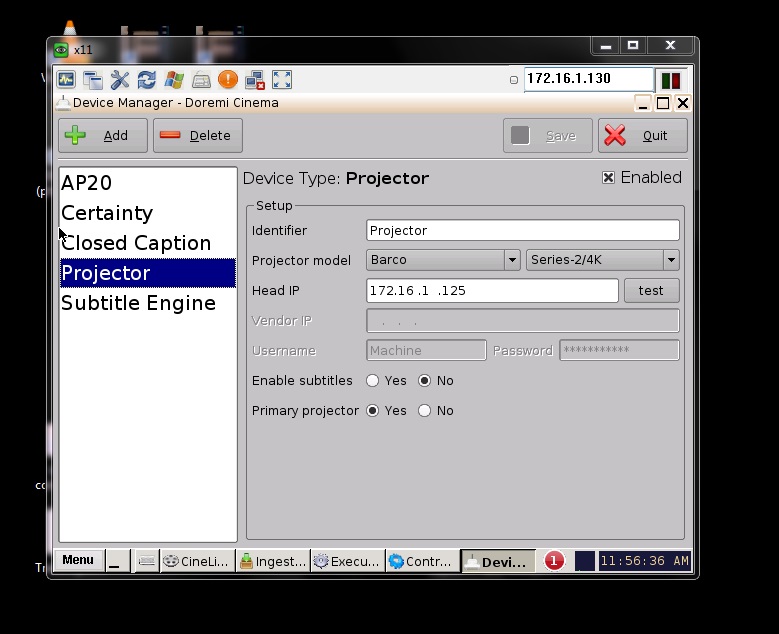
This is what it looks like in device manager on the Doremi.
I tested Carsten's checkerboard patterns and I got a very similar outcome as the one I made. Which is just a gray wash, it looks the same as if you view the pattern on a computer without zooming in on it, because effectively computer is downconverting the image, just like something in the videopath is doing on our projectors or servers.
CARSTEN, when you looked at your tests on screen, did they look correct or did you get a gray image?
I even tried the "set 4K on" macro, but I think that may be left over from before the 2K / 4K playlist button.
Can someone with a Barco/Doremi-IMB 4K setup test one of Carsten's DCPs and tell me what they see?
I have not had time to remake the test dcp to be longer, but I will say that it looks the same in DCP-O-MATIC, OpenDCP, and the CineCanvas trial software.
Another thing to keep in mind is that Doremi has checked my log files and verified that the Doremi at least THINKS it is outputting 4K.
Posted by Marco Giustini (Member # 4544) on 05-29-2015, 02:35 PM:
did you eventually check the validity of the 4K license?
Posted by Kirk Futrell (Member # 5006) on 05-29-2015, 02:48 PM:
quote: Marco Giustini
did you eventually check the validity of the 4K license?
Yes. Expires 2029-12-12 Support4K (IMB)
Posted by Marcel Birgelen (Member # 6801) on 05-29-2015, 03:40 PM:
I guess you've proven your projector displays 4K content just fine via the test pattern.
Also the fact, that without scaling, your 2K playlists end up being 1/4th of the size in the middle of the screen and your 4K playlists end up filling the screen is a sign your Doremi server/IMB is outputting at least 4K worth of pixels whenever in 4K mode.
So, either the JPEG2000 decompression in the Doremi is "somewhat shitty" or some other "magical" filtering or rescaling is happening somewhere, but where?
I'm wondering, have you tried playing back a 2K test pattern with distinguishable 1-pixel attributes in a 2K playlist with scaling turned off? Are you able to see the individual pixels this way?
Posted by Kirk Futrell (Member # 5006) on 05-29-2015, 04:55 PM:
quote: Marcel Birgelen
I'm wondering, have you tried playing back a 2K test pattern with distinguishable 1-pixel attributes in a 2K playlist with scaling turned off? Are you able to see the individual pixels this way?
That sounds like an interesting test. I will try to get one made Monday.
Posted by Marco Giustini (Member # 4544) on 05-30-2015, 06:26 AM:
This is quite a bizarre issue. I do know it should work because I too use a home-made framing chart to set up systems and I can clearly see the rescaling if it's not true 4K. I have recently installed a Doremi IMB on a 4K barco and I know it works with the latest versions.
I have the feeling it's an IMB issue. The projector should just display what is being sent. Somehow the IMB is rescaling it back to 2K - and then back to 4K as you see.
I know it may sound silly but, along with all the other tests you're doing, I would re-flash the firmware on the IMB.
Posted by Carsten Kurz (Member # 5396) on 05-31-2015, 04:55 PM:
quote: Kirk Futrell
CARSTEN, when you looked at your tests on screen, did they look correct or did you get a gray image?
The Sony resolved the individual 4k pixels. I zoomed the lens to actually magnify the image/pixels as much as possible and stepped close to the screen to examine the checkerboard pattern.
Some colored edges due to small convergence issues or lens CA, but it was clear this was a 4k projection. I also intercut this with a 2k version to see the difference. The Sony, though, has no options to configure scaling or 2k/4k mode anyway. 4k is always 1:1, and 2k is always upscaled 1:2 using interpolation- that's it.
I don't think the J2k decompression of the Doremi will render 4k to a blurry grey with this source material. There must be something wrong with the signal processing pipeline, I don't think Doremi/Dolby is selling snake oil with the 4k license. I remember there was something like this in the early revision of the GDC IMB, though.
Hmm, I think I DO know someone with a Showvault/Barco 4k combo. I'll see wether he will try the test pattern.
- Carsten
Posted by Marco Giustini (Member # 4544) on 06-01-2015, 12:59 PM:
I can test it for you straight away but I am using my own framing chart and scaling can be clearly seen if that happens - another reason for using a DCP and not a test pattern.
Posted by Lyle Romer (Member # 1266) on 06-01-2015, 01:47 PM:
When you create and view a 4k checkerboard, how close to the screen (and what is the size of the screen) in order to actually be able to see the black and white pixels?
Posted by Marco Giustini (Member # 4544) on 06-01-2015, 02:29 PM:
I wanted to say that I am playing with a Barco 4K with Doremi IMB and 4K is rendered properly, no scaling. You never know, sometimes they miss some massive bugs without realising but I can confirm it should work.
Silly idea: did you try deleting and re-creating the projector under devices?
Posted by Carsten Kurz (Member # 5396) on 06-01-2015, 02:39 PM:
quote: Lyle Romer
When you create and view a 4k checkerboard, how close to the screen (and what is the size of the screen) in order to actually be able to see the black and white pixels?
In our case: 7,40m for flat equals 2mm for a 4k pixel, slightly more for scope. I usually have to zoom wide to the max to actually get a good visible pattern on the screen, even when standing right in front of it. Our first seat is about 6m away. Screen perf (standard perf) is more visible from there than pixel grid.
- Carsten
Posted by Marco Giustini (Member # 4544) on 06-01-2015, 03:34 PM:
You don't need a 1 pixel grid to check if you are rescaling, which may be hard to see anyway, particularly if your convergence is not 100%. Just use a 2 pixel grid or, better, the Barco focus pattern. The latter clearly show when you are rescaling - try loading it and then rescale even one line under 'scaling', on the screen file. It will be very obvious.
Posted by Kirk Futrell (Member # 5006) on 06-01-2015, 04:06 PM:
I just sent off another detailed report to Doremi this time while playing the 4K of Tales of Hoffman. I'll see what they have to say.
Here is a link to the 1 pixel line tests that are a bit longer and have audio. Not quite as useful as Carsten's checkerboards but here they are, none the less, and I have included the original .tifs .
https://drive.google.com/open?id=0B5BJx3weEYk8fnVYTWJVNXZ5N1JHbEk4Z2NqQUdHRDFUZlVGR1NUOWNzbDZUcEVIY2pvZDQ&authuser=0
quote: Marco Giustini
I know it may sound silly but, along with all the other tests you're doing, I would re-flash the firmware on the IMB.
I've never re-flashed an IMB, I'll see what the guys at Doremi think about that first. I don't want to brick my IMB, is it fairly safe?
quote: Marco Giustini
I wanted to say that I am playing with a Barco 4K with Doremi IMB and 4K is rendered properly, no scaling.
Would you mind using either the test that Carsten posted or the one I posted above, just to make sure we are comparing apples to apples? I really appreciate you checking it out on your end!
quote: Marco Giustini
Silly idea: did you try deleting and re-creating the projector under devices?
Seems worth a shot, after all I did acquire the 4K license after I had installed it.
quote: Lyle Romer
When you create and view a 4k checkerboard, how close to the screen (and what is the size of the screen) in order to actually be able to see the black and white pixels?
FWIW When I ran the 4K test pattern (that worked) and compared it to the 4K DCP (that didn't) you could see the difference from the booth (70 ft), the 4K test pattern appears much brighter because half the screen is white instead of all the screen being gray. To actually see the lines you needed to be about 15 to 20 feet away or closer (don't quote me on that, I can't quite remember.)
Posted by Kirk Futrell (Member # 5006) on 06-01-2015, 06:00 PM:
ALSO: What are the settings on the Barco that could possibly rescale the image without going into the ICP control? Is the only thing that can really cause scaling the PCF files and the screen files if you told it resize the image, which we did not.
Can someone post the names of the proper 4K pcf files and their dates? (screen shot would be fine).
Posted by Carsten Kurz (Member # 5396) on 06-01-2015, 06:19 PM:
Someone emailed me privately and said this could be an issue between openjpeg 4k and the Doremi. That would mean, software using OPENJPEG for compression (like DCP-o-matic and OpenDCP) would create a J2C codestream that the Doremi media block is not able to decompress properly in 4k. So it could be it is either decoding the 4k the wrong way, or falls back to the 2k layer (as 2k media blocks usually do).
I would be puzzled to learn that the Sony can play these 4k J2Cs, but not the Doremi, but it is not impossible. He also supplied a DCP to verify this, but I did not download it yet.
I just created another checkerboard DCP myself with FinalDCP (which uses the Kakadu encoder, so no OPENJPEG is involved).
Please check this out:
https://dl.dropboxusercontent.com/u/5582554/4k_checker_FDCP.zip
- Carsten
Posted by Marco Giustini (Member # 4544) on 06-02-2015, 01:39 AM:
I use opendcp for my 4K content and it's fine, what encoder do they use?
Posted by Marco Giustini (Member # 4544) on 06-02-2015, 03:14 AM:
Kirk,
I tried both DCPs. My Barco is a little shaky at the moment (fan on top) and all I see is a grey screen and I am confident I am not scaling anything here.
I suggest you tried a 2pixel pattern.
Posted by Steve Guttag (Member # 268) on 06-02-2015, 06:02 AM:
This topic seems very interesting. I'm wondering if there isn't a potential problem of 4K IMB/IMS systems not necessarily processing 4K images properly. I know in the early days of IMBs, there was one prominent IMB that definitely couldn't do it (and never will).
Perhaps forum members could run these DCPs on the various IMB/IMS out there and see which ones can actually pass a 4K test pattern unscathed. Please list the make model and software/version numbers used during the test. Include the projector make and ICP version too since that could also affect the end result. Naturally, only 4K systems need apply.
Posted by Marco Giustini (Member # 4544) on 06-02-2015, 08:14 AM:
I don't think, Steve. My 4K chart plays perfectly and scaling can be clearly seen if I scale it.
Unless there's an issue with that particular chart, I am pretty much confident that I could not see the lines because my picture was not perfectly steady - an extraction hose will be installed at some point but there's a fan on top of the projector at the time being.
Posted by Carsten Kurz (Member # 5396) on 06-02-2015, 08:49 AM:
Marco - if the IMB does a 2:1 scale to 2k, or simply discards the 4k layer, you won't see it the way normal scaling is visible for your test-chart.
Two checkerboard 4k pixels will simply be merged into grey.
Even if you suspect your Barco being shaky, you should be able to dissolve 4k Pixels if you simply zoom out with the manual controls on the Barco side panel to magnify the pixel grid as much as the lens allows.
Also, if this is really an issue between OpenJPEG and the Doremi IMB, you would need test material from different encoders to compare - like the one I linked to on the last post of the previous page. All general test charts DCPs may have been created using non-OPENJPEG encoders, but I have never seen a chart that can actually be used to depict 4k vs 2k decoding.
- Carsten
Posted by Marco Giustini (Member # 4544) on 06-02-2015, 12:29 PM:
I see your point Carsten but I have small text on my chart with no anti-aliasing. If I show the chart in 2K from the server it looks clearly re-scaled. That is why I am 100% sure that my chart is played back in 4K.
I'll try again tomorrow, maybe I'll find a way to move the fan away for a test. Trust me, a Barco with a fan on top will shake to the point you won't be able to see the single lines, I could barely resolve the focus test chart.
Kirk, does your Barco have a fan on top - I may have already asked the question, sorry.
Posted by Kirk Futrell (Member # 5006) on 06-02-2015, 04:12 PM:
Kevin at the theatre got a chance to try out Carsten's new checkerboard pattern made with the different encoder today. Unfortunately no change. It looks gray too.
Doremi is going to remote in to my system tomorrow to see if they can see anything going on. I appreciate how much they have been willing to work with me. Barco has been less supportive, even though our extended warranty is with them.
quote: Marco Giustini
Trust me, a Barco with a fan on top will shake to the point you won't be able to see the single lines, I could barely resolve the focus test chart.
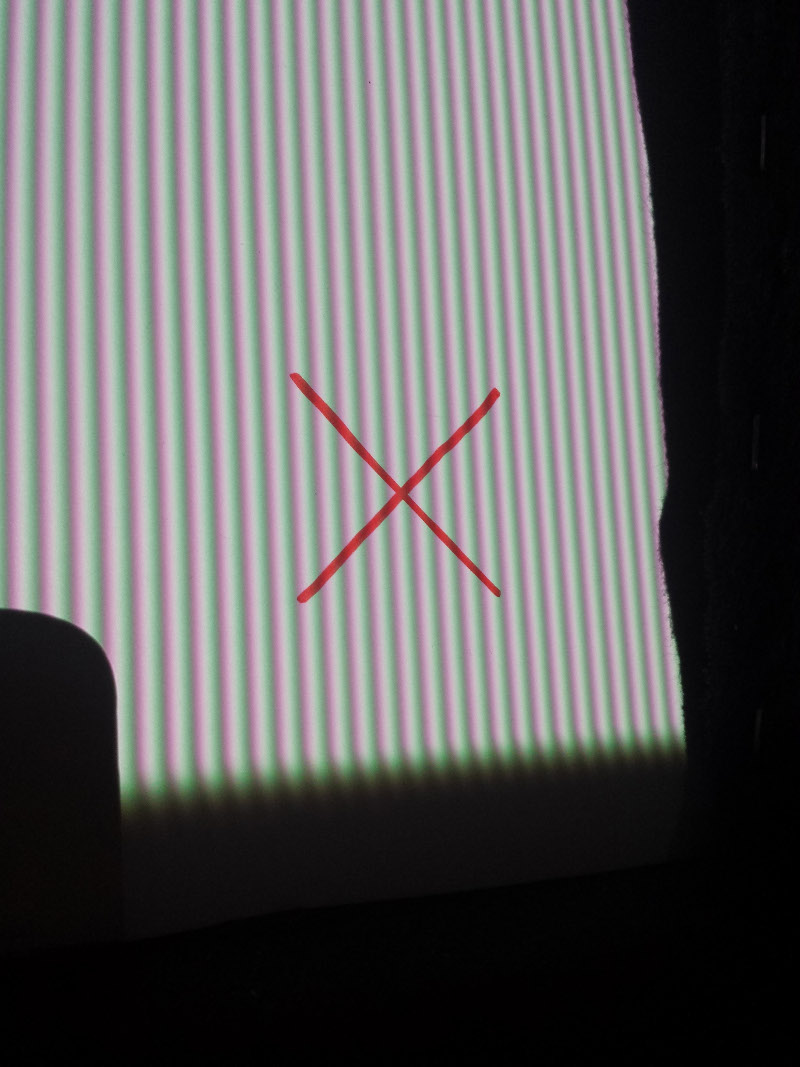
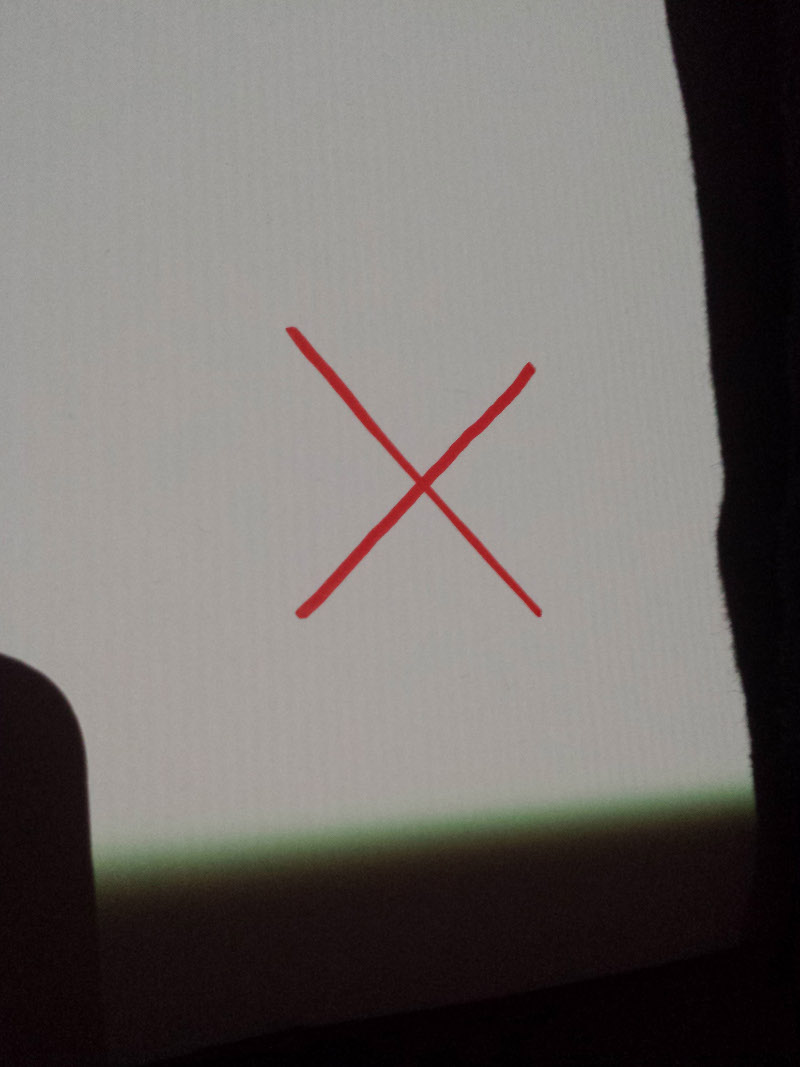
That is not necessarily true. We have a Barco with the heavy invision lens in the hall that we took the original pictures of the problem with. That whole projection booth shakes due to our archaic HVAC equipment being near by. The image shakes visibly on screen even with shock absorption pads, yet You can still easily discern the individual lines when an image from the DCP is used as a test pattern and not played through the Doremi. I'll post the pictures below. The convergence doesn't look spectacular, but it is within spec using the Barco's 4k patterns.
This is the 4K test pattern of vertical lines, on a whiteboard 110 ft from the projector using the Flat lens setting.
This is the vertical lines DCP made with openDCP from the same location:
quote: Steve Guttag
Please list the make model and software/version numbers used during the test. Include the projector make and ICP version too since that could also affect the end result. Naturally, only 4K systems need apply.
I'll try to provide this information tomorrow. I'm starting to wonder if there is an emperor running around here without any clothes on...
Posted by Marco Giustini (Member # 4544) on 06-02-2015, 04:38 PM:
I will try again tomorrow if I can - this is getting interesting! I have downloaded the png file and I will test it from the ICP as you did.
The
Still, I would try with a 2-pixel chart. I feel that we may get some more info on what's happening.
Posted by Carsten Kurz (Member # 5396) on 06-02-2015, 06:09 PM:
Okay, in case FinalDCP still does something strange, here is the line-version of Kirks own test image, corrected by Stéphane, the guy who pointed me to the potential OpenJPEG-Doremi Issue. I don't know exactly what he did - from the CPL I can only assume he uses his own authoring software and worked from Kirks 4k png.
https://dl.dropboxusercontent.com/u/5582554/dcp-4K.zip
Just to mention this - for all my tests, I also checked the intermediate J2k files directly before they were wrapped into the MXF. I have a few programs that are able to decode and display j2k directly - all my 4k tests still showed the 4k checker pattern in the j2c files - this is a crop from one of these 3996*2160 j2c files:
https://dl.dropboxusercontent.com/u/5582554/4kchecker_j2c_crop.jpg
So the 4k pixel pattern is definitely contained in those DCPs and it's up to the media block/projector to show it.
- Carsten
Posted by Kirk Futrell (Member # 5006) on 06-02-2015, 08:52 PM:
Thanks Carsten, I'll check that out tomorrow.
In the meantime here is a really great 4K test pattern that Kevin Doyle at the Belcourt just made. It starts of as the left hand 1st quarter of the image from top to bottom is 1 pixel alternating vertical lines to checkerboard to horizontal lines. The next 1/4 is 2 pixel size of the same thing then 4 pixels then 8. If the first 1/4 from left to right is gray then you aren't showing 4K properly.
https://drive.google.com/folderview?id=0B5BJx3weEYk8fnRHQ096QW4tTzI5VmhLcmtmbGdab0xHX29pbTR3cGpRN1Zobmh3bHFxOVU&usp=sharing
The link should be done uploading in about 10 minutes, but I have to run out so, if it is still processing try again in a bit.
I'm not sure uploading an image of it would even work correctly so if you want to see what it looks like click the link. You will have to zoom in on it.
Posted by Peter Castle (Member # 1997) on 06-02-2015, 11:51 PM:
Just tried most of the test clips on our GDC/NEC combination.
None of them displayed as anything but a grey image.
Posted by Steve Guttag (Member # 268) on 06-03-2015, 12:30 AM:
Which GDC IMB are you using? The older one with the PCIe cable or the current one with the Ethernet cable (or the 3000)? The original can't handle the 4K image. The 2000AR series and the 3000 should be able to handle it.
Posted by Marco Giustini (Member # 4544) on 06-03-2015, 03:21 AM:
I can confirm that the PNG from Kirk works fine and Carten's CPL still displays as a grey pattern.
Interesting. I am unable to check the png file at this time, I'll look into that over the weekend.
Posted by Axel Fransberg (Member # 5630) on 06-03-2015, 04:34 AM:
Hi, I made a 4K DCP based on this image http://www.gpsinformation.org/jack/iso-gd-cb-955s.jpg
Tested it on both a sony R320 and a NEC+IMB/showvault, both rendered it flawlessly in 4K and if you set the doremi to render it in 2K the image resolution drops noticeably. So it doesn't seem like the doremi is downscaling to 2K and then upscaling back to 4K.
Posted by Marco Giustini (Member # 4544) on 06-03-2015, 05:07 AM:
Again I am 101% sure that the system works in 4K with my framing chart. It must be either a mastering issue or a Doremi issue with that content.
Posted by Carsten Kurz (Member # 5396) on 06-03-2015, 05:30 AM:
Axel: Nice test-chart, I'll give that a try, too, just for the fun of it.
To make this a bit easier now with all these DCPs floating around this thread - I created two more ;-)
This time, their checkerboad patterns have additional text to see which encoder was used.
https://dl.dropboxusercontent.com/u/5582554/4kCheckerFlatOpenJPEG.zip
https://dl.dropboxusercontent.com/u/5582554/4kCheckerFlatKakadu.zip
Axel - can you test these two as well on the NEC/IMB combo?
Also, anyone trying this - please make sure your DLP is focused properly, and if possible, try to zoom into wide as much as possible to enlarge the pixel grid as much as possible. On small screens with a bad lens, shaking, or bad focus, this pattern can easily get fuzzy. You will also most probably have to step close to the screen, or use binoculars from the booth.
- Carsten
Posted by Kirk Futrell (Member # 5006) on 06-03-2015, 07:59 AM:
Marco
You are welcome to post your 2 pixel pattern and I will look at it to see if it does anything interesting. The reason I am insisting on a using the tests that Carsten and I made is that in theory there are an exact number of pixels on 4K chip(s) and if you use 1 pixel widths on your 4K DCP pattern created from a 4K image, then you should see those corresponding pixels on screen in the exact same position on the chips
as in the file. Any deviation and there is some scaling or processing of the image going on. With anything over 1 pixel I think you may be able to scale it down and still have it look much the same. I admittedly don't know the in and outs of how scaling works. I am just under the impression that with a DCP, as far as pixels are concerned, that if you put one in the file it should show up on the chips in the same place.
Posted by Kirk Futrell (Member # 5006) on 06-03-2015, 09:17 AM:
quote: Axel Fransberg
Tested it on both a sony R320 and a NEC+IMB/showvault, both rendered it flawlessly in 4K and if you set the doremi to render it in 2K the image resolution drops noticeably.
Thanks for posting this info! For the sake of consistency, would you mind testing either the one I made or the one Carsten made. That will keep our tests, comparing apples to apples.
Also here are my firmware version numbers:
Showvault: 30.07t normal and alternate
Doremi Software: 2.6.4-0
SM: 5.0.31-0
Barco: 1.13.190
TI: 4.3.448
Posted by Peter Castle (Member # 1997) on 06-03-2015, 09:42 AM:
quote: Steve Guttag
Which GDC IMB are you using? The older one with the PCIe cable or the current one with the Ethernet cable (or the 3000)? The original can't handle the 4K image. The 2000AR series and the 3000 should be able to handle it.
Steve,
We have a 2000AR. We've checked the server. The section regarding downscaling is greyed out - it must detect that the projector is 4K and not allow it.
We've also checked the projector to ensure we're using the correct 4K settings.
I'm concerned that the DCPs are OK.
Axel. How did you make a DCP of that image? It is 5700 x 3761.
That means scaling would be needed to get it to 4096x2160 DCP.
Posted by Kirk Futrell (Member # 5006) on 06-03-2015, 10:12 AM:
quote: Peter Castle
I'm concerned that the DCPs are OK
You can download a trial copy of neodcp: http://www.neodcp.com/
Use it to view the dcp in 4K, there is a list of scaling options from 4K 1:1 on down so you can check the file. Also Carsten and I checked the ones we made with OpenDCP by pulling out the jpeg2000 files and viewing them individually.
Posted by Axel Fransberg (Member # 5630) on 06-03-2015, 11:06 AM:
I did test one of the checkerboard patterns, it turned out gray on both the sony and the NEC. Evidently there is something in the signal path that causes it on that particular pixel pattern. A test DCP with which you could measure how many lines can actually be resolved would be nice, then we could test if there is any significant difference between projectors and servers.
Peter, yes I down scaled it.
Posted by Kirk Futrell (Member # 5006) on 06-03-2015, 11:19 AM:
quote: Axel Fransberg
A test DCP with which you could measure how many lines can actually be resolved would be nice
I know there is a lot of posts and DCPs to keep up with but I already posted this one that is as you describe. Check it out there are 2 images in the file you can look at to see. If the far left 1 pixel section is gray, something is happening to not do a true 1 to 1.
https://drive.google.com/folderview?id=0B5BJx3weEYk8fnRHQ096QW4tTzI5VmhLcmtmbGdab0xHX29pbTR3cGpRN1Zobmh3bHFxOVU&usp=sharing
Posted by Carsten Kurz (Member # 5396) on 06-03-2015, 12:01 PM:
Interesting hunt for 4k this is ;-)
Axel - could you please download these last two DCPs from the top of this page, one made with OpenJPEG, one with Kakadu, and compare? Both will show the encoder used on screen.
I tested ALL 4k DCPs posted in this thread today on our Sony 515, and they resolved 4k, no doubt. I zoomed the flat image out to 12m (our normal flat width is 7.20m) - even then, a pixel is only 3mm wide. You need to check focus thoroughly to actually see the checkerboard pattern, no way to do this right from the booth.
Stéphane suggested that OpenJPEG has the resolution layer numbering wrong, which could make some media blocks to use the wrong (2k) layer for 4k. He also supplied metadata to me to prove this. If true, obviously, the Sony 515 media block doesn't fail on this. But maybe the older LMT300, Doremi, etc. does? You need to play both an OpenJPEG AND Kakadu encoded DCP to verify this.
This is a photo I took today from Kirks original 4k line pattern, projected onto a white paper to get rid of the screen perforation:
https://dl.dropboxusercontent.com/u/5582554/4k_lines_sony515.jpg
(yes, this was a spot with perfect convergence - it's not like this everywhere ;-)
I also created a full black background with single white 4k pixels evenly distributed over a flat screen to see how J2k/the Sony would cope with it. Those single pixels were all visible in full white, none blurred, colored, or filtered away, aside from the obvious convergence issues in parts of the screen. The max convergence error for our machine is around 1-2 perf hole diameters of our screen, and only horizontal, on the right part of screen. I prefer to average convergence out towards the middle first, then balance sides. Didn't travel much since the installation anyway.
I also projected a full-screen 50% grey to make sure I wasn't simply mistaking the SXRD pixel grid with the checker-board pattern, but honestly that can't happen on a Sony anyway since the SXRD pixel shape is so different. 50% grey was simply grey, with only very low contrast lines visible.
- Carsten
Posted by Axel Fransberg (Member # 5630) on 06-03-2015, 12:12 PM:
I think you are confusing image resolution and pixel resolution, they are not the same thing.
Actually the numbers in the chart I used are 100xlpph so a NEC+showvault can at least resolve 2000 lines per height according to my test.
Posted by Carsten Kurz (Member # 5396) on 06-03-2015, 03:47 PM:
As long as we are not going into low contrast lens MTF or shaky Barcos, these machines can be considered 'digital' displays, that is, 2k or 4k containers are displayed 1:1 on screen (unless scaling mode is activated). Lines per something is an analog measure. It doesn't make sense here. Kirks setup quite obviously has no problem in resolving detail, as the internal test bitmaps of his Barco clearly show his machine is able to display a 4k raster. Just when it comes to his media-block, it unexpectedly drops to 2k.
This is a Sony 515 screen-photo of the Belcourt Test-DCP that Kirk linked to earlier in this thread. The one with horizontal and vertikal lines and checkerboard at *1,*2,*4,*8 pixel spacing from left to right.
It's the upper intersection between 1* and 2* spacing, between vertikal lines and checkerboard. It resolves all of these features. You can see our standard perf screen at the sides.
https://dl.dropboxusercontent.com/u/5582554/belcourt.jpg
As you can see on the upper left qudrant of that A4 paper held in portrait orientation, around 34 vertical b/w lines cover around 10cm of paper width. That breaks down to around 3mm per projected imager pixel, and is compliant with the 12m projection width at 4096pix resolution with the lens at it's 1:1.90 (wide) setting.
Next is simply a 'real' 50% grey taken at roughly the same distance:
https://dl.dropboxusercontent.com/u/5582554/sony4k_grey.jpg
(pretty boring, except for my trigger finger shadow)
- Carsten
Posted by Axel Fransberg (Member # 5630) on 06-03-2015, 04:02 PM:
But does the belcourt DCP show any diffrence between only minimal scaling and scaling down to 2K? I don't have time to go and test it but I would guess the 2 pixel lines and blocks would be rendered fine in 2K.
Posted by Carsten Kurz (Member # 5396) on 06-03-2015, 04:15 PM:
Yes, that's what Kirk want's to see - on a 2k system (no matter where that bottleneck is - media block or projector/imager), the leftmost part will be 'grey' because the 4k alternating b/w pattern is downsampled to a 2k solid grey. Or, if Stéphane is right, with OpenJPEG encoded DCPs, some mediablocks do not even touch the 4k resolution layer (a J2k specific), with more or less the same result.
On 4k end-to-end systems, that left part should be lines, checkers, lines. His 4k media block + 4k Barco should be able to render it that way - but for unkown reasons, it doesn't, although Kirk seems to have checked all config options that deal with this.
The 2*, 4*,8* segments should be rendered 1:1 by every current DCI system, 2k or 4k.
Yes, in theory it could be other scaling factors involved, as from 4096 to 3996, but these are not common to be configured on these systems, and would leave different feature artifacts. And, no matter what scaling factor it actually is - Kirk says he has disabled all scaling and downsampling, he want's to achieve a 1:1 projection, as DCIs intention is for both 2k and 4k.
- Carsten
Posted by Axel Fransberg (Member # 5630) on 06-03-2015, 04:30 PM:
My thinking is that the doremi might be lets say 3,999K and then that test pattern doesn't work but there really isn't any real problem to worry about.
Posted by Kirk Futrell (Member # 5006) on 06-03-2015, 11:50 PM:
quote: Carsten Kurz
This time, their checkerboad patterns have additional text to see which encoder was used.
Carsten - I forgot to tell you that I tested the openJPEG and the Kakadu DCPs and they both show up as gray images on screen, that was actually while a Doremi technician was logged in making sure everything looked right on the equipment setup end. Although one of the images may have been ever so slightly less dark.
ALso, can you post or PM me a link to the all black with white spots DCP, I would like to see what happens with that one
When we play the test DCP we made that shows 1,2,4,8 pixels (the "Belcourt Test", I hope that name sticks, and that the test is proven useful!), the area with 1 pixel widths is gray, and the others show up correctly.
Posted by Carsten Kurz (Member # 5396) on 06-04-2015, 07:27 AM:
Hi Kirk - we should not yet give up the idea of an OpenJPEG issue - Stéphane came up with another idea and did a successful test on his own. Maybe it's a combination issue...
Try these two:
https://dl.dropboxusercontent.com/u/5582554/4k_TEST_Flat_BLANK_OJPEG.zip
https://dl.dropboxusercontent.com/u/5582554/4k_TEST_Flat_BLANK_Kakadu.zip
These are blanked versions of the Belcourt pattern - only the 1Pix-2Pix intersection is left in them, to reduce overall picture complexity.
https://dl.dropboxusercontent.com/u/5582554/4k_blank_.jpg
Don't need the 4Pix and 8Pix segments any more now.
- Carsten
Posted by Carsten Kurz (Member # 5396) on 06-06-2015, 05:59 AM:
This moving animated checkerboard pattern shows that the Doremi IMB decodes 4k only up to a certain picture complexity - one can see the full 4k checkerboard up until about half of the screen is filled - then it flashes briefly - and switches to 2k completely.
https://dl.dropboxusercontent.com/u/5582554/4K-checker-dissolve_TST_F_XX-XX_NS_4K_Carsten_20150604_OV.zip
It's not an input datarate issue, as the frame sizes are actually quite small, far from even the normal 250MBit/s rate (and 4k IMBs need to be HFR capable anyway at much higher bandwidths).
So, small patches of 4k checkerboard can serve as a '4k decode indicator' for the whole image. A real world test would need to use typical, yet detailed, 4k flat images with a small patch of the 4k checkerboard as an insert. If the checkerboard is visible, this issue is probably not critical in considering the Doremi IMB as 4k capable.
Remains the question wether this is just a decoding flaw with this particular pattern, which could be solved with a firmware update for the Doremi IMB, or wether it's a general weakness with the Doremi IMB.
I'll see if I can prepare a test sequence with real cinematic images.
Aside from that, it has been confirmed that the Doremi IMB is not able to decode 4k at all if the DCP has been encoded with the OpenJPEG encoder, which is used by all free DCP creation software like DCP-o-matic, OpenDCP, etc. There seems to be a misinterpretation of the resolution layer numbering. The examples above have been created with the Kakadu encoder. Thanks to Stéphane for additional testing. He has one of those rare setups with a Sony SRX-R320 served by a Doremi + IMB-SA - and that Doremi IMB has the same issue. At least the XCT-M10 in Sonys SRX-R515/510 does neither have the 4k checkerboard nor the OpenJPEG issue. Don't know yet for the LMT300.
- Carsten
Posted by Marco Giustini (Member # 4544) on 06-06-2015, 06:33 AM:
Fantastic! That would explain why my framing chart is decoded properly, it is quite simple with a few area with detailed focusing targets.
Unbelievable. I am curious to check a few things on my next 4K machine with Dolby server, I noticed that my 2K framing chart was not scaled perfectly, I could see sort of 'ghosting' lines where colours were changing. Being a 2K to 4K scaling, it should have been harmless. When I'm back to the Doremi install I will try comparing the ICP scaling to the Doremi scaling.
Thanks Carsten!
Posted by Kirk Futrell (Member # 5006) on 06-10-2015, 04:24 PM:
quote: Carsten Kurz
Aside from that, it has been confirmed that the Doremi IMB is not able to decode 4k at all if the DCP has been encoded with the OpenJPEG encoder, which is used by all free DCP creation software like DCP-o-matic, OpenDCP, etc.
Before we say it is confirmed, I would like to add that we did play your OpenJPEG version of the 2Kvs4K checkerboard that is primarily blank and the 4K did work with our Doremi IMB/Barco.
So it appears that its not an OpenJPEG thing, but a strange complexity of the image with either the lines test or the checkerboard.
Carsten and I are trying to come up with some real world tests that include a small 4K checkerboard inside of 4K images or 4K video. So the questions continue.
Posted by Carsten Kurz (Member # 5396) on 06-10-2015, 04:37 PM:
Wow. That' even more strange...
There is a bit of a mystery about the resolution layers in the J2C that are created by OpenJPEG and Kakadu - OpenJPEG creates 6 Layers, Kakadu 7. The highest would normally be the 4k layer in 4k J2Cs. So there seems to be room for misinterpretation. One would think that the DCI J2C profiles rule this out. So far I am not sure wether this is an OpenJPEG or a Doremi issue.
I will have to prepare more test sequences to find out.
Moving images are not needed, because J2C is intraframe, there are no dependencies between subsequent frames as far as the decoding is concerned. Of course there could be things like buffering etc. that are not strictly related to decoding, but could still cause issues within a specific image sequence.
Also, it is not easy to create real demanding 4k footage. The fact that you have a 4k camera doesn't mean it will deliver the kind of footage that can challenge the IMB they way the checkerboard or line patterns do.
That said - my opinion is that you should relax a bit - the tests show that your system is configured properly and will play 4k in general. If the flashing we have seen always occurs when the IMB falls back to 2k (and/or back to 4k), we would have heard about that issue more often, as that would render the Doremi IMB useless for 4k operation. So for now it is safe to assume that the Doremi IMB will play 4k MOST of the time (or never ![[Razz]](tongue.gif) ) . Wether there are other encoder dependencies, I don't know.
) . Wether there are other encoder dependencies, I don't know.
Kirk, you could indeed try to encode another 'small patch' pattern test with your OpenDCP.
- Carsten
Posted by Kirk Futrell (Member # 5006) on 06-10-2015, 05:00 PM:
quote: Carsten Kurz
That said - my opinion is that you should relax a bit - the tests show that your system is configured properly and will play 4k in general. If the flashing we have seen always occurs when the IMB falls back to 2k (and/or back to 4k), we would have heard about that issue more often, as that would render the Doremi IMB useless for 4k operation.
I just got back from the beach, I'm done relaxing ![[Wink]](wink.gif) . I'm NOT starting up a class action law suit, I'm just curious and appreciate all of your help.
. I'm NOT starting up a class action law suit, I'm just curious and appreciate all of your help.
There are still a couple of things that I am curious about. When we play the 4K DCP that is entirely filled with the checkerboard, I don't see any flashing it just plays from 2K from the beginning, that being said maybe the flashing is occurring in the black before the image begins playing and I can't see it. So another good test might be a reverse of the one you made that starts out with all checkerboard and then slowly blanks out the image until gone. This would make sure that the image that has been deemed too difficult to play in 4K and downconverted would not prevent the entire playlist item from playing in 4K. What I am worried about is that maybe some content is too difficult to play in 4K and I would never know it, since I have no 2K version to compare it with. The server/IMB might make that decision at the beginning of the film and not try 4K on that clip again.
The reason I worry about this is because I have very closely examined 4K DCPs in a 4K playlist vs. the same film in a 2K playlist and cannot spot the difference, even when using a camera upclose to the screen and taking a photo so that I can visually compare the 2 side by side.
We can continue this conversation off forum, but I wanted to clear up the openJPEG 4K information, as I know the folks who make those DCPs programs work very hard on them, and I don't want to cast a shadow of doubt on those programs.
Posted by Marco Giustini (Member # 4544) on 06-10-2015, 05:51 PM:
I've heard that some 4K movie are just 2K upscaled. Marketing.
Get a good RED 4K test clip and play it back in 2K. You should see the difference - even though I never tried to do so.
Posted by Carsten Kurz (Member # 5396) on 06-10-2015, 06:11 PM:
Kirk - the problem with comparing 4k vs 2k on a 4k projector is - you are NOT comparing 2k vs. 4k, but upscaled 4k with 'real' 4k. It IS hard to see a difference between the two.
If you'd REALLY compare 2k vs. 4k, you would see four 4k Pixel building a single 2k Pixel in a 2*2 cluster. You WOULD see that difference.
So, 4k projector and 4k IMB/decoding stack up on each other. And in my opinion the 4k projector is the more important part in that pair, because the 4k pixel raster and the upscaling makes the 2k pixel raster of 2k systems invisible for the audience.
- Carsten
Posted by Carsten Kurz (Member # 5396) on 06-11-2015, 05:39 AM:
Stephane confirmed the blanked test pattern works also in the OpenJPEG variant on his DoremI/Sony combo. Could be that the Doremi IMB simply drops to 2k with OpenJPEG content earlier than with Kakadu encoded (it's a known fact that Kakadu compresses to smaller files - but again, it is not a datarate issue, even the full screen files are well within the conservative 250MBit/s boundary, and the IMB should support up to 450MBit/s).
More testing ;-) this time, also with wrapping back to demonstrate wether the IMB will recover to 4k from temporary 2k fallback.
- Carsten
Posted by Peter Castle (Member # 1997) on 06-11-2015, 08:32 AM:
I've tried Carsten's moving animated pattern.
Our GDC2000AR/NEC3240 still generates grey every step of the way.
Am worried.
Posted by Carsten Kurz (Member # 5396) on 06-11-2015, 08:44 AM:
This this one as well:
https://dl.dropboxusercontent.com/u/5582554/4k_TEST_Flat_BLANK_OJPEG.zip
But maybe it's a setup issue in your case. And really make sure your system is focused exactly to the point. It doesn't need much to miss 4k detail, depending on projected size, lens quality and focus setting.
- Carsten
Posted by Kirk Futrell (Member # 5006) on 06-12-2015, 05:37 PM:
It's confirmed that the IMB will flash the image and recover to 4K from 2K as the checkerboard pattern disappears from the screen in sections going to blank.
Thanks Carsten, I will pass this new info on to Doremi/Dolby.
Powered by Infopop Corporation
UBB.classicTM
6.3.1.2