This is topic Christie CP2220 doesn't turn on properly in forum Digital Cinema Forum at Film-Tech Forum ARCHIVE.
To visit this topic, use this URL:
https://ft-forum.com/ft/cgi-bin/ubb/ultimatebb.cgi?ubb=get_topic;f=16;t=002308
Posted by Roberto Simancas (Member # 8787) on 05-28-2015, 07:59 PM:
I'm having a problem with a CP2220 Projector. When i try to turn it on all three status leds are blinking and it stays like that. I'm starting to think is something about the LVPS but i'm not sure.
What can i do to find what is causing this?
Thanks for your help
Posted by Stephan Shelley (Member # 8587) on 05-28-2015, 08:18 PM:
Do you mean when you first turn on power to it or when you touch the power button on the touch pannel?
Posted by Roberto Simancas (Member # 8787) on 05-28-2015, 08:25 PM:
when i first turn on power to it, also the TPC doesn't turn on either
Posted by Stephan Shelley (Member # 8587) on 05-28-2015, 09:22 PM:
The fact the tail lights light up indicates the standby powersupply is good. Check to make sure the cable to the TPC is connected properly. Also there is an off on switch inside the TCP it may have gotten turned off. I am going to try and send you a service bulletin about that. Beyond that your TPC may have gone bad. You could try the emergency power on button on the PIB board. If you have another Christie projector try the TPC from it.
Posted by Roberto Simancas (Member # 8787) on 05-28-2015, 10:02 PM:
Ok, i'll check that.
Here is whats happening, when everything is connected properly the TPC doesn't turn on, the three status led are blinking and the stand by led of the PIB is also blinking.
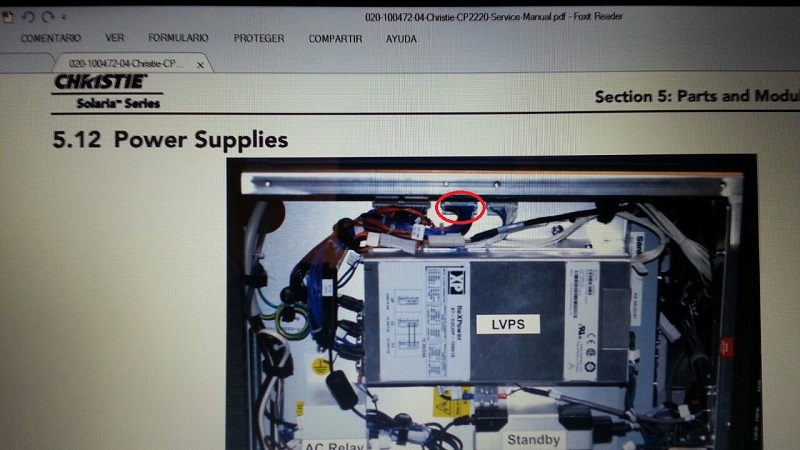
When I unplug the connector that i marked in the image and turn the projector on, the TPC turns on, status led are turned on like they supposed to be and also the PIB's leds, of course it gives me some alarms because that connector is unplugged.
Posted by Stephan Shelley (Member # 8587) on 05-28-2015, 10:26 PM:
All my projectors are running at the moment but will check what that connector goes to. I checked the interconnect diagram. Looks like it might send the standby 24v to the environmental board. I suppose it is possible that the standby power supply is week. You might have a problem with the environmental board or something that is connected to it. The error messages you get when you power up with that unplugged do they relate to that?
Posted by Roberto Simancas (Member # 8787) on 05-28-2015, 10:40 PM:
The movie theater is closed and to tell you the truth i don't recall exactly what it said, so tomorrow i'll post exactly the message that i got, sorry for that.
Thanks for your help so far, I really want to fix this problem
Posted by Marcel Birgelen (Member # 6801) on 05-29-2015, 12:00 AM:
Just an idea, but maybe you could unplug everything from the environmental board besides the connection to the LVPS? That could give you an indication if it's caused by the environmental board itself or something connected to it.
Posted by Stephan Shelley (Member # 8587) on 05-29-2015, 02:12 AM:
Checked on a machine here and that plug feeds the environmental board.
You could also try another standby power supply.
Posted by Roberto Simancas (Member # 8787) on 05-29-2015, 09:21 AM:
I tried with another LVPS and i got the same problem, so in conclusion, the problem is with the environmental board?
Posted by Stephan Shelley (Member # 8587) on 05-29-2015, 08:49 PM:
You tried swapping the Standby LVPS right? It is the small one at the bottom of the image you posted. The main LVPS does not come on till you touch the power on button.
Once you eliminate the Standby LVPS I would do what Marcel recommends. If no problems with everything unplugged from the environmental board and no problems starting up then 1 by 1 plug things in till the problem happens.
Posted by Brad Miller (Member # 2) on 05-29-2015, 10:52 PM:
Hi Roberto, just saw this.
Yes your problem is the environmental board. You need ASSY PCB EVB part #003-111059-02
Be sure to cut all power to the unit before swapping. When the projector wakes up if it asks you where to restore the settings from, just select "TPC".
Powered by Infopop Corporation
UBB.classicTM
6.3.1.2