This is topic Dolby DSS200 Version in forum Digital Cinema Forum at Film-Tech Forum ARCHIVE.
To visit this topic, use this URL:
https://ft-forum.com/ft/cgi-bin/ubb/ultimatebb.cgi?ubb=get_topic;f=16;t=002312
Posted by Marcial Feliciano Ramos (Member # 1989) on 06-04-2015, 10:23 PM:
What is the highest version I can update a Dolby DSS200 with a NEC2500 (Type 3 board)?
Thanks
Posted by Marco Giustini (Member # 4544) on 06-05-2015, 01:19 AM:
There's another thread on the matter. I cannot remember on top of my head of type 3 is supposed to work but the easiest way is to temporarily switch the server to TLS encryption (unless it's already set to TLS) and test it.
If it works then you can install whatever you want.
If it doesn't then you could try the certificate recovery procedure but if that does not help then you're stuck to 4.3.5-13.
Posted by Dave Macaulay (Member # 813) on 06-05-2015, 06:48 AM:
Make sure your board is capable of Cinelink TLS before updating the server: you CAN NOT revert to previous software after you install a DCI compliant version.
The interface boards are complicated and some versions are buggy - even though one should work, it may not. I would hesitate to use DCI firmware if the projector interface board doesn't have the security encapsulation: most of the board covered in a hard black block. It may do TLS but the entire system will not be DCI compliant (the secure card is required) even with current versions... and what's the point then?
No encrypted content has yet required full DCI compliance to unlock. That may come, yes. Dolby has non-DCI versions that you can use with the current Jupiter client: that's the main problem with older versions as far as I know, but probably you also need compatible versions if you have a show store library system? I don't have any experience with those.
If there are no compelling reasons to install a DCI version, don't. You don't gain much and could be left with "pink snow" until you get a new ($$$$) interface card.
Posted by Steve Guttag (Member # 268) on 06-05-2015, 07:01 AM:
The vast majority of our series 1 systems do NOT have the GORE board...only those with VPF requirements got them. However, just about all of our systems are now on a DCI compliant version of Dolby software (most are on 4.8.4 now). A compelling reason to move to a more compliant version will likely be the SMPTE packages that will be increasing in distribution as well as the many/many subtitle handling improvements. 4.8.4 also starts the show instantly after hitting play (or via schedule start)...prior versions recheck licenses at show start.
But, as others have stated...first switch the encryption to "TLS" to test your projector for compatibility...if it works then you are good to go.
Note, if you have a DSS100/DSP100 system, you CAN revert back to 4.3.5.x but you cannot revert back on a DSS200 (the CAT862 is permanently altered from 4.4 onward).
If you have no immediate needs for the improvements in current versions, then I agree with the argument to stay at 4.3.5.9. That was a very stable version and boots up faster.
Posted by Marcial Feliciano Ramos (Member # 1989) on 06-05-2015, 09:36 AM:
Thank guys. I will working on that on Monday and will let you know.
Posted by Leo Enticknap (Member # 534) on 06-05-2015, 01:00 PM:
As Steve says, the main reason why simply leaving your server on 4.3.5.13 might not be an option is subtitles in SMPTE DCPs. We were getting a steady uptick in DCPs with subtitles that simply wouldn't display, and things got to the point at which our programmers were pretty much demanding that I took action (in particular, after a major festival last year in which we had to play a BD backup of a show with the director present: the BD had a very low bitrate and only 2.0 audio, and he wasn't pleased).
So, thanks to the help and suggestions of Steve and Marco in particular, I was able to recover the TLS certificate and update the DSS200 software.
If it weren't for the subtitle problem, we could have carried on with 4.3.5.13. The only other issue I was experiencing with it was that it had a relatively small total number of DCPs it would let you put in a show playlist (can't remember how many, but we were always hitting the limit for awards shows with lots of clips and slides - that sort of thing), which went away with 4.8.4. But that was a minor problem I would have lived with if it weren't for the need to address the SMPTE subtitle issue.
Posted by Marcial Feliciano Ramos (Member # 1989) on 06-08-2015, 08:39 AM:
I will post here since its from the same brand and model and not create another thread.
Since Friday, one DSS200 server stop receiving SPL's from the LMS. I can ingest/transfer all other content but only the SPL's are not transferring. First, they appeared in the content progress but never actually finished and now it doesn't appear anything.
It started Friday at 7pm and before that everything was fine.
Posted by Steve Guttag (Member # 268) on 06-08-2015, 10:59 AM:
Which LMS?
And, when in doubt, reboot both ends of the "problem" (the TMS and the server).
Posted by Marcial Feliciano Ramos (Member # 1989) on 06-08-2015, 02:38 PM:
Cinedigm.
The weird thing is that everything was Ok until Friday at 7pm then the spls stop transferring.
Posted by Steve Guttag (Member # 268) on 06-08-2015, 03:48 PM:
Often, there is a reason for that (naturally). Go to Schedule Viewer for that screen and see if there are any shields for the shows that aren't transferring. MANY times I've seen a trailer that needed a KDM get put into the pack and that will keep shows from being built.
Rebooting the server and the TMS still wouldn't hurt anything. Note, with a Cinedigm TMS system, there is normally an associated NOC to support it...have you called them (if they exist)?
Posted by Marcial Feliciano Ramos (Member # 1989) on 06-08-2015, 05:19 PM:
Back to the original thread, Dolby send me the KDM's for the upgrade. I followed the steps of the upgrade and its stuck in the Dolby Cinema Splash Screen. It says connecting to server (searching) and it has been 45 minutes and nothing. This is nornal or should I take another route?
Posted by Steve Guttag (Member # 268) on 06-09-2015, 05:53 AM:
That is NOT normal. You can try rebooting (power cycling) and re-running the upgrade. However, you may find that you have to unconfig the show store to get the Show Manager to return (I forget if it is option 2 or 3 on the Unconfig). Note, Unconfig Option 2 will lose your serial commands (if any) and Unconfig option 3 will lose your GPIO settings if they are not the factory defaults.
Posted by Marcial Feliciano Ramos (Member # 1989) on 06-09-2015, 11:05 PM:
Thanks Steve. I re-run the upgrade and everything came together nicely.
Question, does the DSS100 handle cue's like the DSS200 via GPIO?
Posted by Steve Guttag (Member # 268) on 06-10-2015, 05:29 AM:
Yes, the DSS100 also has GPIO (with actual relays on the outputs, like the 200 and 220, not high-current relays but relays).
Note, the DSS100 can only update as far as 4.7.3.3
Posted by Marcial Feliciano Ramos (Member # 1989) on 06-12-2015, 07:47 PM:
Steve,its the same pin-out as the DSS200 and the same way to upload the config file for the cues?
Posted by Steve Guttag (Member # 268) on 06-12-2015, 11:14 PM:
I'm reasonably sure it is the same...definitely the same GPIO file. I've used the GPIO on something like 2 systems so I don't have the pinout memorized.
Posted by Marcial Feliciano Ramos (Member # 1989) on 06-15-2015, 02:14 PM:
Steve, what is the highest non-DCI version for a DSS100 and DSP100?
Posted by Marco Giustini (Member # 4544) on 06-15-2015, 03:37 PM:
Same as DSS200: 4.3.5-13
Posted by Mike Renlund (Member # 4675) on 06-15-2015, 04:25 PM:
The last version of the DSS100/DSP100 before DCI compliant software was released was 4.7.0.
GPIO was planned but not included in the DSS100. The DSS200 and DSS220 are the only DSS servers that support GPIO because they have the CAT914z board. The XML configuration file for the CAT914z is loaded during the config script.
Mike Renlund
Dolby Laboratories
Posted by Steve Guttag (Member # 268) on 06-15-2015, 07:23 PM:
So the GPIO connector on the back of the DSS100 was essentially dead? Perhaps the "failsafe" terminals did something but one couldn't fire the GPO or receive on the GPI?
Posted by Sam D. Chavez (Member # 1841) on 06-16-2015, 02:07 PM:
Steve incorrect? Say it aint so.
Posted by Mike Renlund (Member # 4675) on 06-18-2015, 04:07 PM:
Failsafe did work. None of the other functions were used. When I was in exhibition and installing 100 series we were using the NA10 for our automation
Mike Renlund
Dolby Laboratories
Posted by Marco Giustini (Member # 4544) on 06-18-2015, 05:11 PM:
Thanks Mike for correcting me, I forgot that the DSS100 went DCI a little later.
Posted by System Notices (Member # 2357) on 03-11-2018, 11:59 AM:
It has been 996 days since the last post.
Posted by Steve Guttag (Member # 268) on 03-11-2018, 11:59 AM:
Dolby is now up to 4.9.1 (18). The big "feature" in 4.9.1 is the ability to jump over the first part of a clip (double-click on the clip while building a show) and specify the desire entry point (e.g. past an attached preview). It is not entirely clean in that one should precede the clip by a black clip.
For those that missed it, 4.9.0.96 added in telemitry to the UI so one can see what the actual resolution/frame rate/container are rather than merely depending on what someone typed in. 4.9.0 had all of the various Closed Caption fixes in it.
Posted by Leo Enticknap (Member # 534) on 03-11-2018, 01:27 PM:
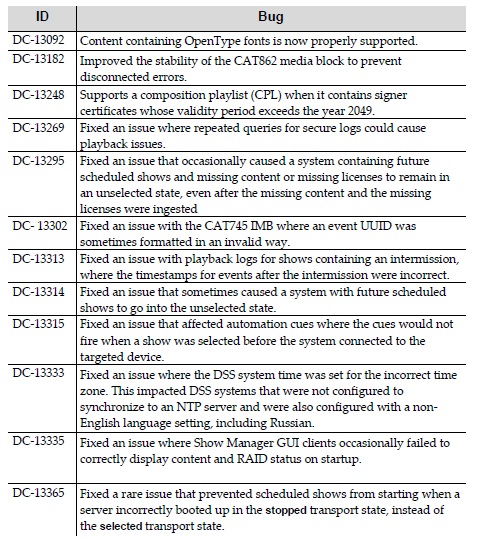
Here are the 4.9.1 (18) fixes:
Posted by Alexandre Pereira (Member # 9295) on 03-11-2018, 11:13 PM:
Hi Leo - do you think this upgrade will actually fix my super annoying Cat682 No Transport issue on the DSS200?...I finally figured out it has nothing to do with the connection to the CP2000SB but like the DSS100 Showplayer to Showstore RJ45 cable connection.
Posted by Leo Enticknap (Member # 534) on 03-12-2018, 09:50 AM:
DC-13182 looks like it might, but that's as much as I could say.
Posted by Carsten Kurz (Member # 5396) on 03-12-2018, 10:10 AM:
The 'Disconnected/No Transport' issue turned up in almost every Dolby DSS release notes I have seen. Part of that issues seems to be an overly sensitive software, but there is also a physical reason for these errors to appear - the external and/or internal short link cable or passthrough connectors between ShowStore and Media Block. One should check and replace these cables if that problem comes up. As far as I know, one can also remove the slot cover holding the passthrough RJ45 sockets and connect a direct cable to reduce the risc of a connection loss.
- Carsten
Posted by Steve Guttag (Member # 268) on 03-12-2018, 11:53 AM:
"Disconnected" does not refer to a cable. In a less than intuitive manner, it refers to the OS being disconnected from the "Show Store." What is confusing is that the Show Store is on the same thing as the OS/UI (the DSS100/200/220). "Transport Not Available" refers to the Show Player (DSP100, CAT862, CAT745). If the "Mediablock" is given as the reason, then the link cable is the likely culprit. If "can not communicate with the projector" is the reason given, then the projector is off, or there is an IT problem communicating with the projector. Note, it takes time for it to recognize a projector that just came on line.
As for the link cable, if I EVER have to open a DSS200 to check that cable, BOTH of them (internal and external) are removed and I run a single 2-foot cable from the CAT862 out through an empty card slot and into the link port on the back. The problem NEVER returns. Thy zip tie that link cable internally way too tight, in my opinion.
Posted by Carl Martin (Member # 1146) on 03-18-2018, 01:25 AM:
asking again, in the correct thread this time! dumb question: how does one check what version software one has on the dss200?
Posted by Stephan Shelley (Member # 8587) on 03-18-2018, 01:55 AM:
system tab>theatre devices>screen server. Last thing is version. That is it.
Posted by Steve Guttag (Member # 268) on 03-18-2018, 04:26 AM:
Oh, there is a much easier way. Click the Dolby logo in the lower left corner of any page. That will pop up the splash screen with the version.
To close it click anywhere on the splash screen.
Posted by Carl Martin (Member # 1146) on 03-18-2018, 03:36 PM:
thanks stephan (and steve), it was buried deeper on that page than i thought. we're on 4.8.10.4.