This is topic Audio Description and 7.1 Sound in forum Digital Cinema Forum at Film-Tech Forum ARCHIVE.
To visit this topic, use this URL:
https://ft-forum.com/ft/cgi-bin/ubb/ultimatebb.cgi?ubb=get_topic;f=16;t=002337
Posted by Michael Sharples (Member # 8905) on 06-20-2015, 01:57 PM:
We can currently screen DCP films in 5.1 with audio description but not in 7.1. I take it this is because the channels carrying the AD data in 5.1 are used to carry the left and right rear data in 7.1. I am also assuming there is a fix for this, if so what is the nature of the fix and how easy is it to do?
We have a CP750 processor.
Posted by Stephan Shelley (Member # 8587) on 06-20-2015, 02:48 PM:
Actually the rear surround channels are on 11 & 12. You have a board or cable that puts 11 & 12 on the 7 & 8 input on the CP750. Both Odyssey and Ultra Stereo have solutions to breakout the HI/VI and move channels 11 & 12 to the 7 & 8 inputs.
Posted by Carsten Kurz (Member # 5396) on 06-20-2015, 03:51 PM:
Michael - get the current CP750 manual (at least rev. 5), you will see 7.1 and HI/VI operation explained in it. It's a bit complicated as some signals are rerouted.
- Carsten
Posted by Marco Giustini (Member # 4544) on 06-20-2015, 05:55 PM:
It's weird that you have AD in 5.1 but not in 7.1. The 750 will route channel 8 to the AUX phono socket on the back, which feeds your AD device. As mentioned, the back surround channels are 11 and 12.
Main question is: is your system 7.1? If your channel 8 is properly routed, it should always be routed.
Posted by Pete Naples (Member # 761) on 06-21-2015, 01:32 PM:
I suspect whomever wired the system didn't connect CH7/8 from the server to DIG2 input on the CP750.
Run a channel check DCP with HI/VN in both modes to really see what's going on.
Posted by Marco Giustini (Member # 4544) on 06-21-2015, 02:56 PM:
Yes but... if 7/8 are still wired to 7/8 input, then you wouldn't have 7.1 out of that system.
What you say is correct but if they can hear AD in 5.1 it means that channel 8 is wired to channel 8 - which mean they cannot have 7.1!
Michael, have you ever tried running a Dolby channel ID on your system? As Pete says that will tell you the truth ![[Smile]](smile.gif)
Posted by Harold Hallikainen (Member # 5405) on 06-21-2015, 03:11 PM:
As Pete mentions, Dolby did an interesting workaround in one of their updates. In that case, AES/EBU inputs (8 channels) get routed to 8 channels of analog out, great for 7.1. Two channels of S/PDIF on Digital Input 2 get routed to the "7/8" RCA jacks on the back of the unit. So, you need to get tracks 11 and 12 (rear surrounds) to AES inputs 7 and 8, and tracks 7/8 (HI/VI) to digital two to come out the RCA jacks.
Harold
Posted by Marco Giustini (Member # 4544) on 06-21-2015, 04:13 PM:
That's correct, of course. But if the system is 7.1 that means that channel 11/12 are routed to input 7/8 for 7.1 to work.
If AD works in 5.1, I would expect that channel 7/8 are routed somewhere - DIG2 if the system is set to 7.1.
My impression is that the system is in fact set to 5.1, channel 7/8 are routed to 7/8 which works well in 5.1. Now, can you select "Dolby 7.1" on a CP750 which has been set to 5.1 in the general settings?
Posted by Pete Naples (Member # 761) on 06-22-2015, 02:06 AM:
That's my point. I've come across countless systems where the site believes it to be 7.1 capable but actually due to input mis-wiring or processor misconfiguration, it's never playing real 7.1 ![[Wink]](wink.gif)
Posted by Marco Giustini (Member # 4544) on 06-22-2015, 06:32 AM:
I'll pretend I didn't read that... ![[Frown]](frown.gif)
Posted by Pete Naples (Member # 761) on 06-22-2015, 12:26 PM:
Don't. I've lost count how many '7.1' systems I've been asked to fix. The ones with 6 power channels.... The ones where HI/VN is booming out of the rear surrounds....
I could go on.
Posted by Carsten Kurz (Member # 5396) on 06-22-2015, 01:47 PM:
I'm not sure, but I think Datasat added explicit 5.1, 7.1+HI/VI signal routing patterns in one of their more recent software updates. When you had a previous 7.1 configuration and applied the software update, it somehow defaulted to a 5.1 afterwards. I you didn't check after the software update, you would think your system was still 7.1, but in fact was 5.1 with too much surround level applied, until you went in and adjusted to the proper 7.1 routing preset.
- Carsten
Posted by Michael Sharples (Member # 8905) on 06-25-2015, 10:28 AM:
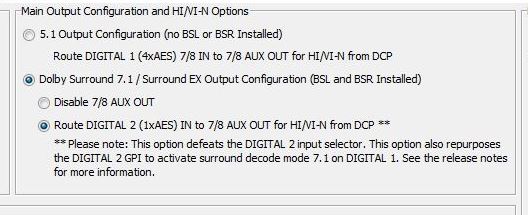
Thanks for the responses. I managed to get the audio description to work through the general settings of the CP750 software, 7/8 Aux out were disabled for the 7.1. Once i changed that to the route digital 2 option audio description was working. I will be sure to run a channel check anyway though. Thanks again
Posted by Marco Giustini (Member # 4544) on 06-25-2015, 02:48 PM:
I was not aware that that option was format dependent. As far as I know it's either enabled or disabled. Hence, your AD either works or it doesn't.
Posted by Michael Sharples (Member # 8905) on 06-25-2015, 03:03 PM:
Posted by Marco Giustini (Member # 4544) on 06-25-2015, 03:26 PM:
Yes, it is saying that Digital 2 is being used for HI/VI and the sound routed to AUX 7/8.
It does not say that that only works when in 7.1 mode! You said the AD was working when in 5.1 mode and not when in 7.1 mode.
That setting is not supposed to be touched, it is set during installation and depends on how the sound processor is wired by the installer.
Once it's been set, it works, in any format.
Posted by Michael Sharples (Member # 8905) on 07-01-2015, 10:47 AM:
Just ran the dolby 7.1 test dcp from FreeDCP.net. Definately getting 7.1 channels, but as per the picture, AD is only available for 7.1 via digi 2. We use digi 2 for the satelite so this setting will need to be changed depending on what we are screening.
Posted by Marco Giustini (Member # 4544) on 07-01-2015, 11:07 AM:
Just use DIG 3!
That setting you mentioned is NOT supposed to be touched once the system has been installed.
Leave the system as it is in 7.1 with AD on DIG 2 routed to AUX 7/8 and use DIG3/DIG4 for your needs.
Posted by Steve Guttag (Member # 268) on 07-02-2015, 05:29 AM:
If you have to use the CP750 as an AES audio switcher and all four inputs are taken...you can use an D/A converter including USL's DAX-202 to handle just the ADA stuff. If the Toslink input is available, there are cheap coax to toslink converters too.
Posted by Michael Sharples (Member # 8905) on 07-02-2015, 01:46 PM:
Thanks, i'll look into the D/A converter option as we currently use all four inputs inc. the toslink.
M
Posted by System Notices (Member # 2357) on 11-21-2017, 06:59 PM:
It has been 873 days since the last post.
Posted by Rollins Brenton (Member # 10265) on 11-21-2017, 06:59 PM:
Sorry for necroing this post but I am having kind of the same problem. Had smpte coming from back speakers and would have to turn back speakers off. We upgraded to USL UPC-28C. We were told by a dealer we had to get a breakout box from 16RJ-7.1-DRM-SNY the cp750 to connect to the USL UPC-28C. Well, that got rid of the AD coming from the back speakers. I also upgraded the cp750 to the latest firmware. It seems we have 7.1 now as I can hear the sound effects and movies from all around. I cannot for the life on me get AD back and working which is probably the breakout box 16RJ-7.1-DRM-SNY. I see people saying use digi2, would that require me to get a bnc to speaker wire cable and hook that up to the USL UPC-28C. Any help would be appreciated. I can post pictures if needed
Posted by Harold Hallikainen (Member # 5405) on 11-21-2017, 07:16 PM:
The CP750 started as an 8 channel processor, so you could do 7.1 OR VI, but not both. But, several years ago, they did a firmware upgrade that let you use 8 channels of the Digital 1 input while simultaneously sending the Digital 2 input to the CH7/CH8 RCA connectors. As I recall, the Digital 2 input is unbalanced, so a transformer is required to take AES/EBU pair 4 from the server and drive the Digital 2 input. I imagine Dolby makes a board that includes the transformer and does the appropriate routing such that server output channels 7 and 8 end up on the Digital 2 input, and sever output channels 11 and 12 end up on the CP750 channel 7/8 input. The end result is 7.1 audio from the digital 1 input ending up on the main analog outputs. The server output channels 7 and 8 (AES/EBU pair 4) go through a digital to analog conversion between the Digital 2 input and the CH7/CH8 outputs. These outputs can drive the IRC-28C. For the HI input of the IRC-28C, you can use either the HI output of the CP750 or the CH7 output. The HI output is generated in the CP750 and will always be present no matter what the content is. The CH7 output is HI delivered in the DCP, but not all content has an HI track, and not all content is DCP. Therefore, I think it's generally better to use the HI output. The CH8 output can drive the VI input of the IR-28C.
I ASSUME there is an adapter that handles the required split of AES/EBU and provides the transformer for driving the digital 2 input. Does anyone know where to get this?
Thanks!
Harold
Posted by Sam D. Chavez (Member # 1841) on 11-21-2017, 08:01 PM:
Odyssey has such dongles available.
Posted by Steve Guttag (Member # 268) on 11-22-2017, 06:39 AM:
A couple of corrections.
Yes, the CP750 came out as an 8-channel processor BEFORE 7.1 so AES Pairs 1-3 would come out of the Main output and pair 4 could come out of the Aux 7/8. WHEN 7.1 came out, the software update came out with it to allow all 8 channels to be used on the 4xAES input and output and usurp Digital 2 as the D/A decoder to feed Aux 7/8. On the General Settings Tab of the CP750 set up software, you can configure the CP750 as a 5.1 or 7.1 processor and how to decode it. You can tell the CP750 that you will use an external AES decoder and merely mute Aux 7/8 or that you want to use the Digital 2 decoder.
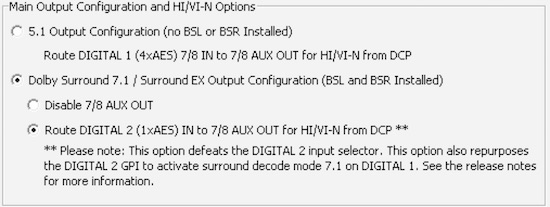
Harold is correct that Digital 2 is an unbalanced input (AES3-id) so you should convert AES3 (balanced 110-Ohm to 75-Ohm unbalanced). It being a BNC type input implies that it is looking for a 1V nominal signal too.
Odyssey does make a board for the CP750 that will allow one to run two RJ45 (CAT) cables (and when they are carrying AES audio, they are supposed to be shielded, by the way) to the CP750 and it will break out pair-4 to a terminal block (it is selectable to be pair 4 or pair 8). You then have to convert it, as mentioned above to the proper impedance and go from balanced to unbalanced. In the Odyssey documentation, they show one merely taking an ordinary video cable and cutting an end off to jam the wires to the + and - terminals (no conversion). I have complained to Odyssey about this "design." I believe, now, that Odyssey has a proper transformer option that will take you from BNC to a terminal block so you just have to run a pair of wires a few inches. (The transformer part gets attached to the CP750 via the BNC.
Canarie has in-line transformers that can do the job that have XLR inputs and BNC outputs. Canarie also has a version that has a 10dB pad in it to get the voltage into the proper range. They work fine if one is using conventional AES cable but are a bit bulky/heavy to break out typical CAT cable pairs.
Another option that Odyssey has, if the server has a normal pin configuration on the DB25 connector (e.g. a Dolby DSS configuration) is a breakout board that will divert pair 4 to an RJ45 connector and let the rest pass through (it is a small board with a male/female DB25 and the RJ45 between them). You then run an ordinary CAT cable to the sound rack where they have another module that is RJ45 in and BNC out (again, it connects directly to Digital 2). It takes pair 4 (the white/brown and Brown) and sends it out of the Coax.