This is topic Can I control 2000s with vnc? in forum Digital Cinema Forum at Film-Tech Forum ARCHIVE.


To visit this topic, use this URL:
https://ft-forum.com/ft/cgi-bin/ubb/ultimatebb.cgi?ubb=get_topic;f=16;t=002343

Posted by Raz Tovy (Member # 8295) on 06-25-2015, 02:42 AM:
 
Hi,
I have Christie 2000s.
Can I control 2000s with vnc or bowser?
With my 2000zx i control it with bowser.
Tnx all.
 
Posted by Steve Guttag (Member # 268) on 06-25-2015, 05:49 AM:
 
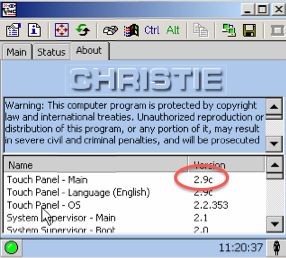
Yes, the CP2000 can be controlled via VNC...however, your TPC has to be on a suitable version (I don't recall which version allowed it but there is no harm in updating to 2.9c...there is a 2.9d but I've yet to see the benefit of it and its package is not like other versions so I've avoided it).

You do have to turn VNC on EACH TIME the TPC is rebooted in order to use VNC. Issue the command (VNC1) to port 5000 and that will turn vnc on. Again, on each power cycle, it will have to be turned on again. There isn't any password for the VNC so there is that.
 
Posted by Raz Tovy (Member # 8295) on 06-25-2015, 06:26 AM:
 
Hi Steve , Thank you for answer.
How I turned on the vnc server?
How I send VNC1? Do i need a software?
 
Posted by Steve Guttag (Member # 268) on 06-25-2015, 11:01 AM:
 
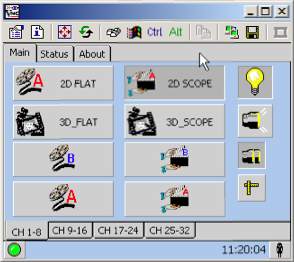
I typically use PuTTY...it is a freeware program. Set the Port to 5000 and the IP to the IP of the touchpanel (not the DLP). Merely type (VNC1) <cr>

That will turn it on. You can then use your favorite VNC program to log into the TP (at its address).
 
Posted by Raz Tovy (Member # 8295) on 06-28-2015, 12:49 AM:
 
Hi,
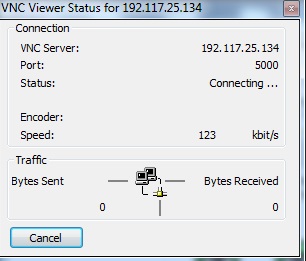
I tried and I can`t get in.
 -
 -
 -

I'm stuck in connecting...
 
Posted by Marcel Birgelen (Member # 6801) on 06-28-2015, 03:59 AM:
 
Why is your projector on public IP addresses?

From where are you connecting? The same subnet?

Are you able to ping the projector's IP adresses?
 
Posted by Raz Tovy (Member # 8295) on 06-28-2015, 04:48 AM:
 
I am connected to the same network with my computer, with the same subnet.
I am able to ping to the addresses.
 
Posted by Greg Routenburg (Member # 1742) on 06-28-2015, 06:26 AM:
 
You're trying to connect with VNC on the wrong port.

You use port 5000 with putty to enable VNC.

You use the default VNC port to connect with VNC. It's port 5800 if I'm not mistaken. I just leave my VNC viewer set to the default and it works like a charm for me.
 
Posted by Raz Tovy (Member # 8295) on 06-28-2015, 08:17 AM:
 
Hi Greg,
The default port is 5900.
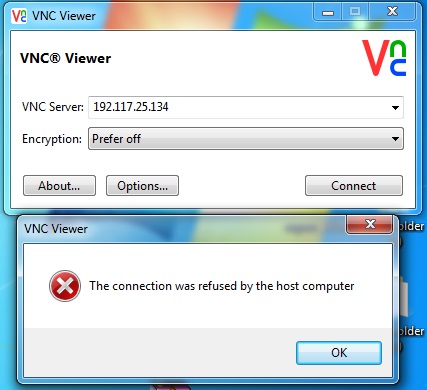
Unfortunately it also does not help and i get:
"Failed to connect to server !"
 
Posted by Greg Routenburg (Member # 1742) on 06-28-2015, 10:24 AM:
 
Make sure you have encryption disabled or it won't connect.

I also found that not all VNC viewers like to play nice with the CP2000. The one that I found to be most stable was RealVNC viewer. You can leave the encryption setting to "Let VNC Server Choose" and it works.
 
Posted by Steve Guttag (Member # 268) on 06-28-2015, 10:44 AM:
 
It is definitely port 5900 to use for VNC (since there is just the one display).

 -

 -

 -

Again check your TPC version number...I'm pretty sure there is a minimum version level for VNC. I recommend 2.9c as being VERY stable.

 -

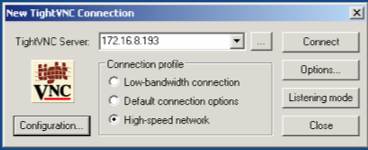
Try using TightVNC...I KNOW it works with the CP2000.

The point about your complex using PUBLIC IPs is a valid one. Internal IPs should be "private" IPs. That is, if you are going to use a class c IP scheme...they should be all of the from 192.168.x.x

192.117.x.x is a public ip (probably exists out on the internet). Something definitely seems amiss there though this should not be the VNC problem.
 
Posted by Marco Giustini (Member # 4544) on 06-28-2015, 11:11 AM:
 
What Steve said: it does not work with UltraVNC - there may be a setting for it but I don't know, just use tightvnc.
 
Posted by Greg Routenburg (Member # 1742) on 06-28-2015, 12:11 PM:
 
If he can ping and establish connectivity with putty then regardless of his network scheme, it should work. We can't assume what his company has done with their corporate network. We're only seeing a very small part of the picture here. It is unusual though Steve, you're right.
 
Posted by Dave Macaulay (Member # 813) on 06-28-2015, 01:07 PM:
 
It is definitely advisable to NOT use "public" routable addresses for a local intranet like the projection system network. It won't cause a problem if there's no internet connectivity but still a bad idea as some future requirement might add an internet connection. The projection systems will probably stop working if that happens.
If you have a facility local network and an IT policy mandating that all network devices be on it, the site firewall should be configured to block outside access to the projection devices. Off-site access should only be through a VPN. Allowing connections from the system, ie for NTP, is reasonably safe.
I've come across lots of people who think the entire 192.x.x.x space is reserved for local networks: it is not, only 192.168.x.x.
The 172.x.x.x is similar: only 172.16.x.x - 172.31.x.x is reserved.
The entire 10.x.x.x subnet IS reserved if you really need more than the 1 million+ hosts that 172 allows (up to a full class A address space with 16,777,214 usable addresses).
I usually set up the projection devices on a /24 class C network inside the 10.x.x.x reserved space. Some multiplexes need a /23 network to allow a sensible addressing scheme where each device address has a simple correspondence to screen number.
 
Posted by Steve Guttag (Member # 268) on 06-28-2015, 03:15 PM:
 
I think, in theory you might get away using public IPs behind a router unless you end up trying to access a site using that IP subnet. A router inherently does a NAT translation and presents "you" as its WAN IP on up the chain until you actually hit the internet. Hence, if you use the "Whats My IP" you don't see your private IP, you see the public IP of the device that is actually on the internet. Certainly, it is very bad practice.

As for IP ranges, it all depends on the screen count and devices per screen, naturally. While I typically service low-screen count theatres, my IP allotment is typically pretty high per screen. By the time you allow for all of the traditional DCinema stuff, add in A/V equipment, DSP on the sound, maybe scaler, controllers...etc. It all adds up. Even typical DCinema systems are needing more IPs than some system original planned on. ADA devices now will consume one, some booth monitors now have one and who knows what else will be coming that might need one here or there (and multiply that by screen count).

One beauty of the Dolby IP scheme was that you had a near limitless IP range. Each auditorium got its own 128 device range (even more than my complex systems have ever needed!). However a key to it was that each server had an internal router to allow one on a Theatre Network to "see" the individual auditorium networks. One also had to set up a routing table to your computer knew what gateway (server) to use to get there.

I do think any well designed IP scheme for cinemas should have the screen number in the IP address somewhere. If a tech sees the IP address of the projector, server in one screen within the complex, it should be pretty short order to figure out the rest of the complex.
 
Posted by Marcel Birgelen (Member # 6801) on 06-28-2015, 04:13 PM:
 
quote: Steve Guttag
Again check your TPC version number...I'm pretty sure there is a minimum version level for VNC. I recommend 2.9c as being VERY stable.
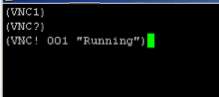
I'm just guessing here, but he got a (VNC! 001 "Running") back from the projector. Wouldn't a version without VNC give either an error or nothing in return?

So I guess it's either an incompatible VNC client, a local setting or maybe a local firewall or "Internet security" thing. TightVNC should indeed work, RealVNC should also work, but you need to disable encryption (Prefer off).

quote: Steve Guttag
I think, in theory you might get away using public IPs behind a router unless you end up trying to access a site using that IP subnet.
If you consider 192.0.0.0/8 as a private subnet as a whole and you assign it to your end, you will most likely run into trouble sooner or later. Those IP addresses are live and in use and if you want to access a resource behind it, you will only get to your gateway and no further. The other way around will also lead you into trouble and is often harder to debug. I've had to debug those kind of SNAFUs where sysadmins used all kinds of non RFC1918 IP ranges as local addresses...

quote: Steve Guttag
I do think any well designed IP scheme for cinemas should have the screen number in the IP address somewhere. If a tech sees the IP address of the projector, server in one screen within the complex, it should be pretty short order to figure out the rest of the complex.
Ideally, you indeed should do that. Although if you're managing a NOC for example with permanent IPSec tunnels to a central site, you'll see that even if you're in control of the IP numbering on the sites themselves, the 10.0.0.0/8 range will grow rather small for structured sweetness, unfortunately.
 
Posted by Steve Guttag (Member # 268) on 06-28-2015, 06:10 PM:
 
Of all of the Class-A 10.x.x.x ranges I've seen in the industry...they all had the screen number in there somewhere. The most popular I've seen is what I call the "Cinedigm" scheme. I don't know if they created it or went with it but others have used it as well. It was designed around a 40-screen complex (worst case) and does have the screen number in there to a degree. That is, screen 1 will end in 1 for each device assigned to screen 1. Thus, in their scheme, a server 1 is assigned to 111, projector 1 is assigned to 191, sound processor is 31...etc. They do use a /23 range so you are burning two numbers per complex. But that still allows for an awful lot of complexes.

I don't know of any DCinema NOCs so big that it hasn't worked for them.

I know of another scheme where they limited each screen to 10 devices thus one can see the screen number (up to 24 screens) as well as the device within the IP address.

I've only seen one NOC, this far, around here that didn't do some sort of keeping the screen number in the IP address and it was a royal pain dealing with it. They cut up a range for the "media" and then each auditorium. It was very limiting in the number of devices it could handle and had to be abandoned when the IP demands exceeded the allotted subnet.

I think I've found that it was version 2.7 of the TPC that allowed VNC. I'd still upgrade to 2.9c...it is just a very good version.
 
Posted by Raz Tovy (Member # 8295) on 06-29-2015, 01:20 AM:
 
Hi all,
My TPC version is 2.8.

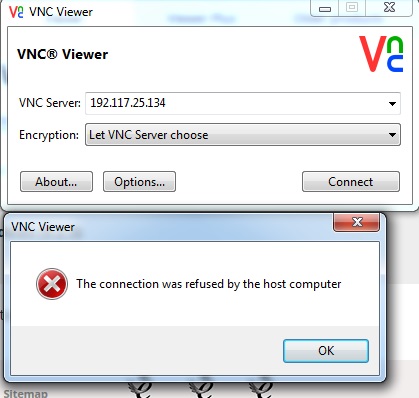
I try RealVNC viewer and it does not work:
 -
 -

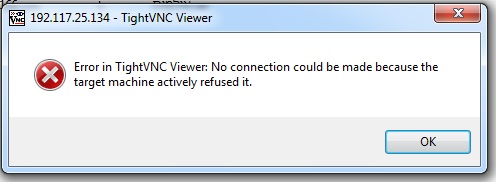
I try TightVNC Viewer and it does not work:
 -

We use 192.117.xx.xx in our local use.
We don`t connect this network to WWW.
 
Posted by Steve Guttag (Member # 268) on 06-29-2015, 05:24 AM:
 
Try turning your firewall off the duration of the experiment to see if you are getting a block there.
 
Posted by Raz Tovy (Member # 8295) on 06-29-2015, 05:49 AM:
 
Unfortunately the same error.
 
Posted by Greg Routenburg (Member # 1742) on 06-29-2015, 11:07 AM:
 
By chance does the computer that you're trying to use have a wifi adapter or second NIC that is connected to the internet? Also, do you have a default gateway configured anywhere? Because you're using a network range that is technically in the public domain, regardless of whether it's connected to the internet or not, Windows will try with all it's might to get any traffic bound for that address to the outside world. This is why it's recommended practice to only use private IP ranges for internal networks unless you're prepared to manually change the windows routing table (not recommended). If so, disconnect all network connections from the computer except for the one connected to the projection network. Make sure that you don't have a default gateway configured anywhere. Afterwards, do a reboot of Windows to ensure that it's routing table is clear and then try connecting.

For the record, I'm a huge fan of the Dolby system. Not only have they setup routing within each server but they're also running OSPF Area 0 which allows other routers to interface with it seamlessly allowing select monitoring and control from other networks within the complex. With a proper router, access lists and IP filtering can be setup to ensure security. All in all, it's extremely flexible.
 
Posted by Raz Tovy (Member # 8295) on 06-30-2015, 01:37 AM:
 
Hi,
First a huge thanks to everyone for the help.
I have over 100 Projectors and 100 severs.
I have lots of 2210/20/30 4220 CP2000zx/b.
The cp2000b the only one I can not connect to it, ping-yes, vnc-no
I connect to all from my pc no problem.
I also try to connect the cp2000b frome the cinema and changing computer and OC (xp,win7) without success.
 
Posted by Marcel Birgelen (Member # 6801) on 06-30-2015, 02:36 AM:
 
Have you tried upgrading the TPC then? And you're connecting remotely? Correct? Have you tried it IN the same subnet, to make sure there is no device in between that's blocking the port?

Still, running this stuff on public IP addresses... bad idea, I hope you at least run some kind of firewall in front of it. You really should reconsider this kind of setups...

quote: Steve Guttag
They do use a /23 range so you are burning two numbers per complex. But that still allows for an awful lot of complexes.
If you're using a /23 per complex, a full /8 allows you to subnet it into 32K+ smaller subnets, that should be sufficient for most NOCs out there. But they usually run into other problems, like chains forcing their own IP ranges and potential overlapping IP spaces as a result...

The most beautiful solution would be a "no-brainer" implementation like 10.s.r.d, where s is your Site ID, r is your Room or Screen ID and d is your Device ID. The problem here is that this will give you only 255 site IDs (you'd probably need one or two of those "site IDs" for your own operation too), which doesn't scale for bigger operations.

The obvious solution is that we invent a time machine now, go back a year or 15 and start implementing IPv6 right away, we might also want to correct a few other mistakes while we're at it. [Wink]
 
Posted by Raz Tovy (Member # 8295) on 06-30-2015, 02:57 AM:
 
I will try to upgrading the TPC this week.
I tried it in the same subnet,without success.
 
Posted by System Notices (Member # 2357) on 07-12-2018, 03:25 PM:
 

It has been 1108 days since the last post.


Posted by Alexandre Pereira (Member # 9295) on 07-12-2018, 03:25 PM:
 
When you upgraded the TPC did that help. I have V29 and it does not connect either.
 
Posted by Ioannis Syrogiannis (Member # 3235) on 07-24-2018, 12:16 PM:
 
To anyone interested:
a) I saw that the projector was connected to a doremi server.
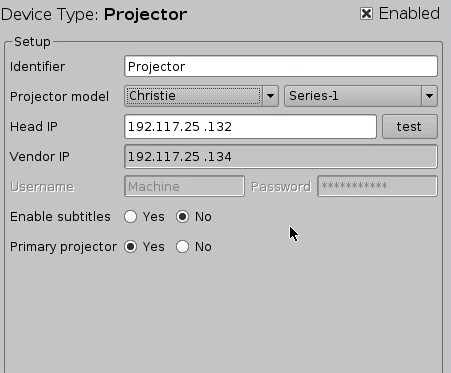
Series 1, so it should be a DCP2000 or its brother with the CRU unit. You can set the command (VNC1) as a macro for not having to use putty (I am all for putty, I am just suggest other ways).
b) Did you by any chance try to use VNC 4.1.3 32bit viewer?
c) Some feedback would be nice...
 
Posted by Ioannis Syrogiannis (Member # 3235) on 07-25-2018, 02:48 AM:
 
Please read "I am just suggesting other ways" where "I am just suggest other ways".
My reply editing time window is well passed and I am not just suggest. :-P


Powered by Infopop Corporation
UBB.classicTM 6.3.1.2