This is topic Change volume to a dolby processor from Sony projector in forum Digital Cinema Forum at Film-Tech Forum ARCHIVE.
To visit this topic, use this URL:
https://ft-forum.com/ft/cgi-bin/ubb/ultimatebb.cgi?ubb=get_topic;f=16;t=002348
Posted by Ariel Vocal (Member # 6912) on 06-27-2015, 08:37 PM:
Hello everyone!
Lately I have been bringing DCP's amateurs with varied levels of sound, especially advertising, also in Latin American Spanish version of the last movie of Dragon Ball Z that has very low sound level. I wonder if there is a way to modify the contents of a volume between presentation of a Sony SRX projector 515P processors to Dolby CP650 and 750 ... is possible to create some kind of cue in the automation server? how Doremi servers
Thank you very much for your help! ![[Smile]](smile.gif)
Posted by Marco Giustini (Member # 4544) on 06-28-2015, 03:30 AM:
sure, just ask your installer to properly install the 515!
The 515 supports 650 by serial, 750 by serial and by ethernet.
Posted by Ariel Vocal (Member # 6912) on 06-28-2015, 12:42 PM:
Thank you, I ask the installers can control the volume of processors from the projector, but only helped me with changing channels using the serial port , which in fact is in the manual installation of the 515 , which I care about is making the management of volume from the projector , and that apparently can not help me , someone here will have idea how to do ?
thanks quote: Marco Giustini was the last to post
Posted by Marco Giustini (Member # 4544) on 06-28-2015, 02:00 PM:
if you can control the inputs by serial, you must have the volume cues as well.
Probably what you have is GPO cues which are connected to the AUTOMATION connector.
If your installer is a Sony authorised installer, they must know how to set up a Dolby processor!
Posted by Dave Macaulay (Member # 813) on 06-28-2015, 04:23 PM:
If if the server really connects to the CP650 or CP750 via serial (why not use the network?) you can adjust volume level. You will need to revise the serial control string library to add the necessary commands.
If they used GPIO control, not much you can do unless you get your processors on the management network or use serial control.
Posted by Carsten Kurz (Member # 5396) on 06-28-2015, 05:11 PM:
The Sony installation manual has passages how to enable network/serial control für CP650 and CP750. It's actually a bidirectional protocol and if everything is set correctly, the Sony will display the available formats configured in the CP, and shows a list of preconfigurable volume/fader settings in the Cue-List.
Yes, some installers take short cuts and only configure format changes through GPO.
- Carsten
Posted by Marco Giustini (Member # 4544) on 06-28-2015, 05:17 PM:
I wouldn't call it a shortcut, it's easier and faster to use the Ethernet!
Posted by Ariel Vocal (Member # 6912) on 06-28-2015, 11:20 PM:
Thanks guys!
In fact, the installer could not help much in this area, that is why I turn to the forum, currently managing automations via the GPIO ports is configured as shown in the image.
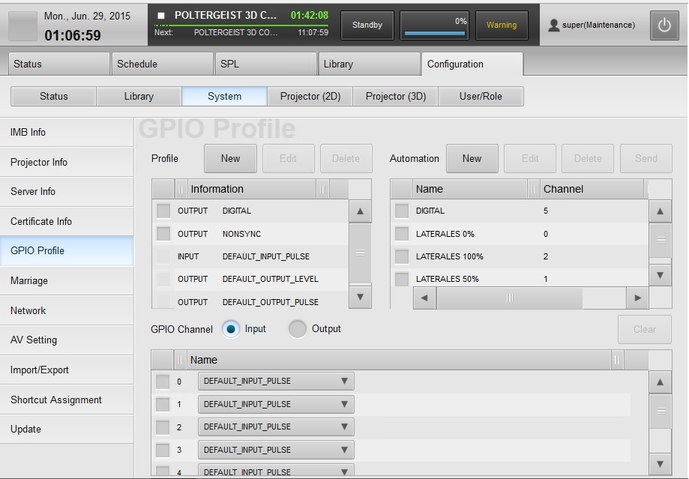
opt for the GPIO settings that involved not modify the .ini file of initiation. Now if I set the server communication with the processor via the Ethernet port, I should have to modify the file to register SMSMgrServer_Custom.ini processor type and form of communication, once this the Sony server should show me preconfigured control options channel and (what interests me) volume level control ??
Posted by Carsten Kurz (Member # 5396) on 06-29-2015, 04:29 PM:
Yup. Looks like your installer indeed took a short cut and configured only the bare essentials...
Obviously you know the super login credentials, so I suppose you should get the installation manual and complete the steps to enable rs232/network control for your CPs.
The format and volume cues will show up only if the communication with the audio CP is correctly configured and successful. You can still use the existing GPO cues if needed. GPIO control and RS232/network control is completely independent. Except for the CP IP address (if using network control), there is nothing to be configured in the GUI.
- Carsten
Posted by Mike Moreno (Member # 4887) on 07-01-2015, 06:05 PM:
I made the same cuestion long time ago and tech support from sony doesnt seem to know how to do it.
I read on the manual that there is a sr232 port that will control the cp650 but i didnt try it yet.
if some one know the correct configuration or connection Ariel and I will apreciate.
Mike moreno
Mexico
Posted by Marco Giustini (Member # 4544) on 07-02-2015, 01:55 AM:
Sony tech support does know that.
You just need to modify the INI file and that is it.
Posted by Carsten Kurz (Member # 5396) on 07-02-2015, 03:27 AM:
Besides the manual, there is also a TechNote, it is the same procedure for the LMT300.
- Carsten
Posted by Marco Giustini (Member # 4544) on 07-02-2015, 06:22 PM:
I wanted to add that I am not mentioning how to do that on here because I feel it's not a basic procedure and a only qualified technician should do that. Sorry, I don't mean to keep it secret, I am just saying that it is an easy procedure for an installer and it is clearly explained as Carsten says.
Posted by Carsten Kurz (Member # 5396) on 07-03-2015, 11:38 AM:
As a matter of fact, CP750 control through Ethernet is a default config in SMSMgrServer.ini - all one needs to do is to plug in a network cable between Sony Control network and CP750 and input the CP750 IP address in the Sony Network config GUI. Only other supported CPs or connection methods need a change to the SMSMgr_custom.ini.
(and while it is clearly mentioned in both the installation manual and the Sony CP technote, I'll say: NEVER mess around with SMSMgrServer.ini, always use SMSMgrServer_custom.ini to change/override settings)
So, if there is a CP750 for one auditorium, connect and test it first, then advance from there.
- Carsten
Posted by Mike Moreno (Member # 4887) on 09-14-2015, 04:26 PM:
following on this, i set up the IP from the cp750 in to the sony, now how i can create an audio cue to movfe the volume from the audio processor
miguel moreno
Mexico
Posted by Sascha F. Roll (Member # 9043) on 09-14-2015, 04:35 PM:
When creating a SPL the volume cues appear in the list together all the other automation cues (projector, gpio), from 0.0 up to 9.9.
Posted by Carsten Kurz (Member # 5396) on 09-14-2015, 04:41 PM:
If the connection works, format and volume cues show up automatically in the Sony cuelist. If they do not show up, the connection doesn't work. Per default, the SRX-R510/515 have CP750 cntrol over ethernet enabled in the INI file.
So all that's needed should be to have the CP750 on the same subnet as the Control-Port of the S10 server, properly cabled, and have the right CP750 IP configured in network config dialog on the S10. And of course, first time, reboot the S10, it want's to see the CP750 at boot time.
- Carsten
Posted by Mike Moreno (Member # 4887) on 09-19-2015, 05:55 PM:
yes it works on cp750.
i have to try with a cp650 and the other connection.
thanks
Miguel Moreno
mexico
Posted by Hakan Bicer (Member # 7471) on 05-03-2016, 09:52 AM:
we must add these line to SMSMgrServer_custom.ini file
#Audio processor control
com.sony.dcinema.serial.impl.AudioDeviceManagerImpl.audioProcessorClassPath=com.sony.dcinema.serial.impl.CP750Control
com.sony.dcinema.serial.impl.CP750Control.defaultVolume=7
com.sony.dcinema.sms.messages.MsgBodyGPIOControlList.CP750VolumeList=3,3.5,4,4.5,5,5.5,6,6.5,7
com.sony.dcinema.serial.impl.CP750Control.connection=Ethernet
com.sony.dcinema.serial.impl.CP750Control.ethernetTimeout=1
Posted by Carsten Kurz (Member # 5396) on 05-03-2016, 03:07 PM:
No, Hakan, you don't.
At least if these settings have not been changed before by the installer. CP750 control via Ethernet is the preconfigured default on the Sony 510/515. All you need to do is to configure the CP750 IP address in the 510/515 network setup (GUI). The CP750 volume cues will then show up in your cues list (if the CP750 is powered on).
These original settings are set in the SMSMgrServer.ini, and can/need to be overriden if needed in the SMSMgrServer_custom.ini
ABSOLUTELY NEVER touch the SMSMgrServer.ini, only use SMSMgrServer_custom.ini for changes to the default config!
A standard 510/515 has these settings active in the SMSMgrServer.ini:
---
com.sony.dcinema.serial.impl.AudioDeviceManagerImpl.audioProcessorClassPath=com.sony.dcinema.serial.impl.CP750Control
com.sony.dcinema.serial.impl.CP750Control.defaultVolume=5.8
com.sony.dcinema.sms.messages.MsgBodyGPIOControlList.CP750VolumeList=0.5,1,1.5,2,2.5,3,3.5,4,4.5,5,5.5,6,6.5,7,7.5,8,8.5,9,9.5,10
com.sony.dcinema.serial.impl.CP750Control.connection=Ethernet
com.sony.dcinema.serial.impl.CP750Control.ethernetTimeout=1
----
The easiest way to get a grip on these settings is to create a full log - it will contain all system config files, including these two INIs, and you can easily open them on a standard PC using notepad, etc. to have a look at both INI files. Then you can educate yourself about which settings need to be changed in the custom.ini.
Then add them on the Sony using vi.
- Carsten
Powered by Infopop Corporation
UBB.classicTM
6.3.1.2