This is topic Straight Outta Compton White Screen and Silver Screen versions in forum Digital Cinema Forum at Film-Tech Forum ARCHIVE.
To visit this topic, use this URL:
https://ft-forum.com/ft/cgi-bin/ubb/ultimatebb.cgi?ubb=get_topic;f=16;t=002386
Posted by Justin Hamaker (Member # 2165) on 08-08-2015, 04:47 PM:
Received the content for Straight Outta Compton for the 8/14 release. The package comes with 8 CPLs - 5.1 & 7.1 OC and CC for both a white screen and silver screen.
This is the first time I recall seeing this for a non-3D movie. It seems like there was something a year or two ago that had different version for white and silver screen 3D, but I don't recall what it was.
Does anyone know what it is about this movie that required the different versions?
Posted by Stephan Shelley (Member # 8587) on 08-08-2015, 05:18 PM:
The letter NATO sent out said it has to do with color timing and the low light scenes. It may be the low light scenes get too washed out on silver screens with the white screen version.
Posted by Marco Giustini (Member # 4544) on 08-08-2015, 06:14 PM:
Why a Silver screen would wash out low light level content?
I feel there is no technical reason for a "silver screen version"
Posted by Stephan Shelley (Member # 8587) on 08-08-2015, 07:55 PM:
silver is more reflective and brighter image parts would make the shadow details invisible. Has to do with contrast ratios.
Posted by Monte L Fullmer (Member # 2797) on 08-08-2015, 08:02 PM:
...and Silver screens are more directional with reflected light. You practically have to sit ten feet on each side of the center string line to enjoy the presentation. Otherwise, light reflection really drops off for those who sit on the side.
2D on a silver screen is outright horrible when it comes to reflected light, yet gives more contrast than a white screen.
Posted by Marco Giustini (Member # 4544) on 08-09-2015, 05:16 AM:
I agree silver screens are horrible.
Can you compensate the hotspot on a silver screen? No, it will follow you depending where you sit. And it depends on the screen frame and the throw. I've seen just ONE properly installed Silver Screen with no hotspot.
Silver screens are more reflective - have higher gain. It means they are more efficient (this is, in my opinion, not true, but that's the theory). So you need a smaller lamp, it does not mean your picture will be brighter.
What about Dolby 3D then? To have 4.5fL in 3D you WILL have about 40fL in 2D. Shall we make "Dolby 3D" CPLs then?
Sorry, I cannot think of a single reason why we should have a "silver screen" CPL. To improve a Silver Screen presentation there is only one way: install a White Screen.
Posted by Carsten Kurz (Member # 5396) on 08-09-2015, 07:48 AM:
Get both KDMs and see wether you notice the difference.
- Carsten
Posted by Steve Guttag (Member # 268) on 08-09-2015, 08:37 AM:
Wow...I'm agreeing with Monte ![[Razz]](tongue.gif)
Here is the thing. The color balance IS different on a Silver screen versus white...ever compare colors on silver versus white. Put up either a stepped or continuous pattern of the primary colors on a silver versus white...it isn't uniform over the luminance range. Silver screens give the colors a decidedly metallic look.
Then lets also be realistic...the more offset you are from center of the screen, the more the light level is going to fall off. As a consequence, most of the image you are looking at will NOT be at the center level but at something considerably less. Why optimize for the hot-spot? Optimize for the median.
quote: Marco Giustini
Can you compensate the hotspot on a silver screen? No, it will follow you depending where you sit.
You probably mis-phrased that. Because curving the silver screen CAN compensate for the hot spot to a great degree but I think you meant "can you compensate for the hot spot in the DCP itself" and to that...the answer is mostly no. You could for a single seated position if you know the properties of the specific screen and theatre (not practical).
A curved silver screen:
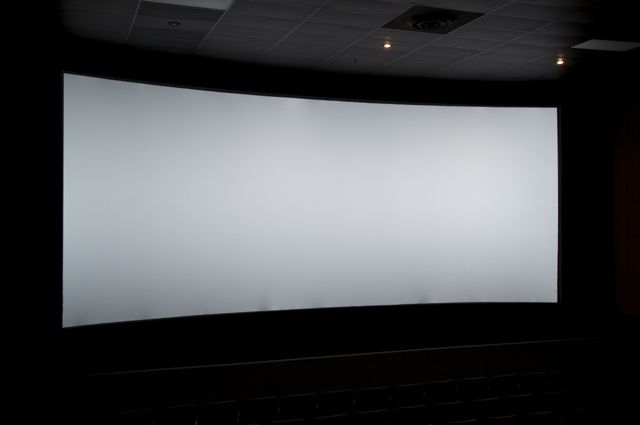
The hot spot is effectively spread out over the width of the screen. In fact, it is curved just a bit too much in that the hot spot is on the FAR side of the screen from where you are sitting.
As opposed to a typical flat or very shallow curved (1:20) screen where the hot spot is right in front of you.
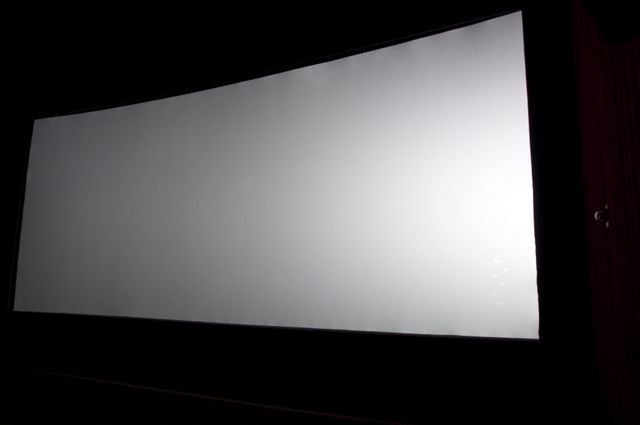
The other realities of silver screens is that the image IS DARKER with the way people set up systems. They home in that center brightness spec as if it is the ONLY spec. That is, one should be at 14fL in the center (or 4.5fL for 3D or 7fL for the maxbright 3D). But the full spec also defines the sides and corners and if your screen gain is higher than 1.3 and not curved, you'll NEVER meet spec. Your image will effectively be DARKER than a matte white screen running a lower center brightness if you were to add up the total light reflected back over the entire surface of the screen in each you'll find that the silver is much less...hence, they typically look darker. And yes, a Dolby 3D running at 4.5fL will appear brighter than a silver screen running at 7fL. Likewise on 2D, a matte white screen running 12fL will appear brighter than a silver screen running at 14fL.
I would presume that they are trying to not make the silver screen theatres look so bad and probably lowered the contrast of the image to attempt at compensation for the horrible screen characteristics. However, just like you can't EQ out a bad room but perhaps you can improve it...you can't undo the harm of a silver screen but perhaps you can improve the situation.
Posted by Adam Martin (Member # 641) on 08-09-2015, 10:57 AM:
"Gravity" and "Thor 2" were your other titles with silver screen versions.
Posted by Marco Giustini (Member # 4544) on 08-09-2015, 12:03 PM:
quote: Steve Guttag
You probably mis-phrased that. Because curving the silver screen CAN compensate for the hot spot to a great degree but I think you meant "can you compensate for the hot spot in the DCP itself" and to that...the answer is mostly no. You could for a single seated position if you know the properties of the specific screen and theatre (not practical).
Probably I didn't put that down very well, apologies. But we are on the same page.
What I meant is that you cannot compensate for the hotspot with a CPL. Sure, you can try and minimise it by installing a properly curved frame in a large auditorium. But a "silver screen" CPL cannot compensate for the hotspot: as mentioned it will change its position depending on where you sit.
Whether it can compensate anything, honestly I doubt it. I fell it's like when they reduce the HF on consumer mixes to compensate for God knows what.
And I quote you 101% on the brightness thing. That's why I said (here or on another thread) that silver screens are supposed to give you more light. That's not true because what installers then do, they just measure the tiny little hotspot and set the brightness there.
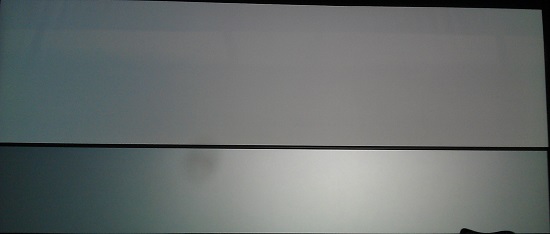
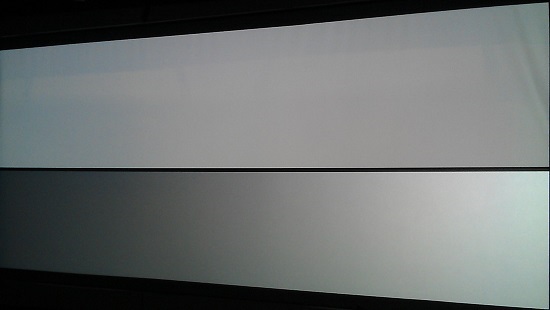
And now two pictures that speak for themselves. Top: white screen. Bottom: silver screen.
Posted by Monte L Fullmer (Member # 2797) on 08-12-2015, 12:51 AM:
Thx Steve, and this is what I have to face with: flat silver screens.
To an example: the location mgr came to me and told me that the bulb is way out of focus in the 3D house, which is playing regular 2D content - he sees the hot spot to the right side since we're standing on the entrance ramp to the seating area, which is audience left.
It was just like the image that Steve posted.
I told him to walk across to the other side and tell me where the hot spot is when he got over there.
He was embarrassed that the hot spot followed him over.
I told him, "Welcome to the world of digital 3D presentation when you use a silver screen." Then explained to him what I posted above.
Now, I had to explain to him that when folks comes to us saying that our speakers are not working properly, that we were ahead of multi channel sound LONG before the concept of home cinema was ever heard of, we know what we are doing, and how it's supposed to sound like.
I just only ingested the white screen content and left the others on the drive.
-Monte
Posted by Jim Cassedy (Member # 4115) on 08-12-2015, 05:52 PM:
Just curious- - are there different KDM's for the "White" & "Silver" screen
versions, or do you need a different KDM for each?
Posted by Justin Hamaker (Member # 2165) on 08-12-2015, 06:21 PM:
Jim, different KDM for each version. So you would potentially get 8 different keys - 5.1 CC and OC for each and 7.1 CC and OC for each.
Posted by Justin Hamaker (Member # 2165) on 08-13-2015, 02:45 AM:
I watched the silver screen version tonight on a silver screen and didn't see anything unusual about the look of the picture. There were scenes where some of the characters were wearing bright white t-shirts and the shirts looked just like white t-shirts. I didn't do any freeze frames to analyze particular scenes, but there was nothing that looked off from a normal movie.
Posted by Steve Guttag (Member # 268) on 08-13-2015, 05:15 AM:
I would think it would be in the blacks that the silver screen version would be different to not lose black detail on a silver screen.
As far as KDMs go...EACH version of any title would have a different KDM. If you run a pre-release screening mastered in February, and then run the release version mastered in March...they will be different keys too. The same way that 7.1 versions need different keys than 5.1 or Open Caption versus Closed Caption. Everything must match up exactly.
Powered by Infopop Corporation
UBB.classicTM
6.3.1.2