This is topic Change the VNC inbound port on an AP20 and/or DSS200 in forum Digital Cinema Forum at Film-Tech Forum ARCHIVE.
To visit this topic, use this URL:
https://ft-forum.com/ft/cgi-bin/ubb/ultimatebb.cgi?ubb=get_topic;f=16;t=002419
Posted by Leo Enticknap (Member # 534) on 09-23-2015, 10:45 AM:
I wondered if there's any way to do this.
I have an AP20 and a DSS200 on the same VPN and I want to be able to establish VNC connections to both of them from the outside.
I initially tried to make this work by using Dolby Show Manager for the DSS200 and VNC for the AP20. I forwarded all the ports my firewall tells me that Show Manager is trying to use to the DSS200 in the router's firewall settings (1098, 1099, 4444, 4445, 49648, 49651 and 61616), but without success - it won't connect from an external IP.
So I'm down to VNC, which uses port 5900 by default. Problem: neither the AP20 nor the DSS200 lets you change the inbound port from 5900 to something else, and unless I can do that, I can't connect to both remotely, both using VNC and both at the same time. To make this work, I need to set up port forwarding on my router settings such that the correct port goes to the correct machine. Neither manual mentions a way of changing the VNC port, and I can't find anything online, either. Does anyone know of any undocumented way? Obviously, I only need to change the port on one of the machines. Many thanks in advance.
Posted by Scott Norwood (Member # 30) on 09-23-2015, 10:51 AM:
Assuming that you are using NAT and have access to the router/firewall, you can just redirect different inbound ports to port 5900 of the DSS200 and AP20.
For example, you could port 5900 on the external address to port 5900 on the DSS200 and 5901 on the external address to port 5900 on the AP20.
Then, you need a client that lets you specify the port number. Connecting to the external address at port 5900 will connect you to the DSS200 and connecting to the external address at port 5901 will connect you to the AP20.
BUT, VNC is not secure and should not be used directly over public networks. You really should be tunneling this over ssh or a VPN. If you do this, then none of the NAT translations above apply, since everything runs over ssh or the VPN.
Posted by Leo Enticknap (Member # 534) on 09-23-2015, 10:59 AM:
It's on a VPN, which has been set up such that when you connect to the VPN, it's as if you are plugged directly into the router in the booth (the firewall defining the VPN is upstream of the booth router). If that booth router's settings lets me translate incoming on 5901 into 5900 on a given local IP, I'm guessing that should work. I'll see if this can be done when I'm in this afternoon - many thanks.
Posted by Marco Giustini (Member # 4544) on 09-23-2015, 03:22 PM:
I can access different devices via VNC when I VPN on a network. Yes, the port is the same but the IP is not! Why should you need a different port?
Posted by Steve Guttag (Member # 268) on 09-23-2015, 06:16 PM:
What he said!
Posted by David Buckley (Member # 2600) on 09-23-2015, 08:39 PM:
This seemed so obvious that it cant possibly be the case, but reading the thread three times, I may have a slightly different understanding.
Perhaps the issues is that this is a host-to-lan VPN, and thus at the host end (ie at home) there is only one IP address, and thus the choice of what to connect to at the far end is made by what port one connects to at the local end, through a mapping table.
In such a case, in every router I've needed to configure, it is possible to set both the source port and the destination port independently, even though they are usually set the same.
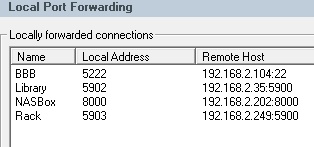
In the image below, which is a SSH VPN configuration, there are two VNC connections to different hosts, named Library and Rack, both on port 5900, but at the local end they are on different ports (5902 and 5903) on the same local IP address, which isn't shown.
Posted by Marco Giustini (Member # 4544) on 09-24-2015, 04:38 AM:
Leo,
The description you give us
quote: Leo Enticknap
It's on a VPN, which has been set up such that when you connect to the VPN, it's as if you are plugged directly into the router in the booth
qualifies your VPN as any VPN I've encountered. If it works locally when you're plugged into the router, why shouldn't it work remotely?
Posted by Leo Enticknap (Member # 534) on 09-27-2015, 06:43 PM:
Apologies for the delayed response - a busy few days.
The problem is that I don't have control over the router through which the connection comes into the building from the outside world. The booth router is downstream of that, and our IT guy has set the "outside world" router up such that when I log on to the VPN, I then have one internal IP address that takes me to the booth router. I've just checked the settings of the booth router (Netgear FVG318) and there doesn't seem to be any way in the port forwarding page to say "Please direct an incoming connection on port 5901 to 192.268.40.30:5900" (or whatever address). There probably are routers out there that can do that, and so the solution to this may be a new router.
Posted by Frank Cox (Member # 6258) on 09-27-2015, 07:03 PM:
The router that you have can do it, no need to change it.
Inbound Rules (Port Forwarding)
Posted by Scott Norwood (Member # 30) on 09-28-2015, 12:19 AM:
A cursory review of that page does not show a way to redirect to a different port on the inside machine.
On a Cisco router (the real ones, not the "Cisco Small Business" ones), the command that you want is this, assuming that your inside host is 10.1.1.3 and your external address is 172.24.1.2:
ip nat inside source static tcp 10.1.1.3 5900 172.24.1.2 5900 extendable
This re-directs port 5900 on the outside address to port 5900 on 10.1.1.3. You can change either port numbers as necessary to re-direct from an arbitrary number to a different arbitrary number, including re-directing multiple external ports to port 5900 on multiple internal hosts.
This is not esoteric or difficult stuff, so maybe a firmware update for the Netger box would include support for doing this.
Posted by Leo Enticknap (Member # 534) on 09-28-2015, 12:57 AM:
Thanks Scott - I can't see any way of doing this with this model of router, either. It can forward a given incoming port to a given local IP, but only on the same port. It's running the latest firmware version. It looks like a new router if this is going to be made to work.
Posted by Frank Cox (Member # 6258) on 09-28-2015, 02:29 AM:
another web page about this router

It appears that the setting for port translation is under LAN WAN RULES on that router. Note the checkbox for "Translate to port number"
Posted by Marco Giustini (Member # 4544) on 09-28-2015, 02:30 PM:
If you VPN on that router, you're not on the WAN anymore, you land on the LAN and you won't need any port forwarding.
Any chance that you're not actually using VPN but you're simply dialling an external ip which takes you to ONE device?
Posted by Steve Guttag (Member # 268) on 09-28-2015, 02:53 PM:
If I read it right...he is saying that he is VPNing to ITs router which gets him to the WAN side of HIS router and that his router does not have any direct internet access. So...what he is getting to is not his network except any port forwards he puts on his WAN side.
A rather cumbersome way to be...each device would have to have a separate port number so you could access them all. Seriously, you should consider putting a cheap computer on YOUR network and just remote into that. A side benefit, if you are doing any transfers/updates...etc...and there is internet trouble, you never affect a live server.
Posted by David Buckley (Member # 2600) on 09-28-2015, 06:34 PM:
This is not an unusual setup at all, either with or without a VPN, particularly when one finds oneself in a situation where one does not have control of the equipment.
quote: Leo Enticknap
... our IT guy has set the "outside world" router up such that when I log on to the VPN, I then have one internal IP address that takes me to the booth router.
So from the perspective of the gear inside the booth, there is a single router to the outside world, pretty much the same as a home DSL. The VPN gets Leo to the one IP address that his booth exposes. So what needs to be set up on the booth router is an inbound connection with port forwarding, which is on page 4-6 of the manual, and Frank has posted a screenshot from the manual which is the exact screen necessary to set this up.
The only wiggle is that you will need to add a pair of custom services, one for each destination, manual, page 4-12. When you set up the service, make the start and end ports the same, they are the port you will connect to from the remote connection.
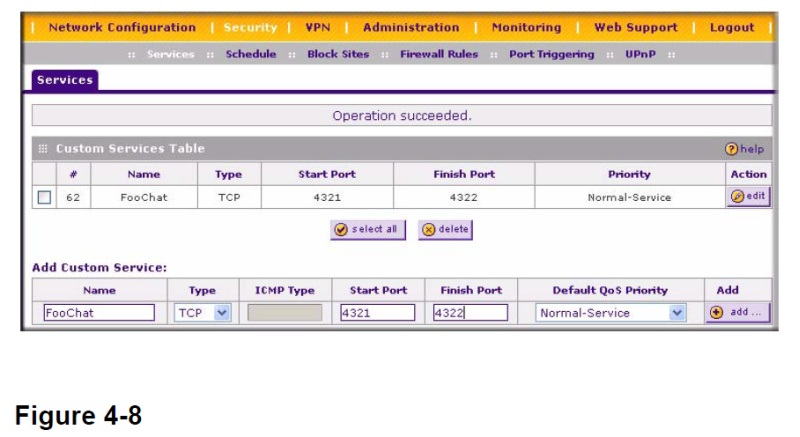
Once you've set up the services, you can then set up a port forward to connect each service to the two VNC targets.
Powered by Infopop Corporation
UBB.classicTM
6.3.1.2