This is topic NEC NC2000C AC On Fan Location in forum Digital Cinema Forum at Film-Tech Forum ARCHIVE.
To visit this topic, use this URL:
https://ft-forum.com/ft/cgi-bin/ubb/ultimatebb.cgi?ubb=get_topic;f=16;t=002430
Posted by Justin Hamaker (Member # 2165) on 10-02-2015, 03:42 PM:
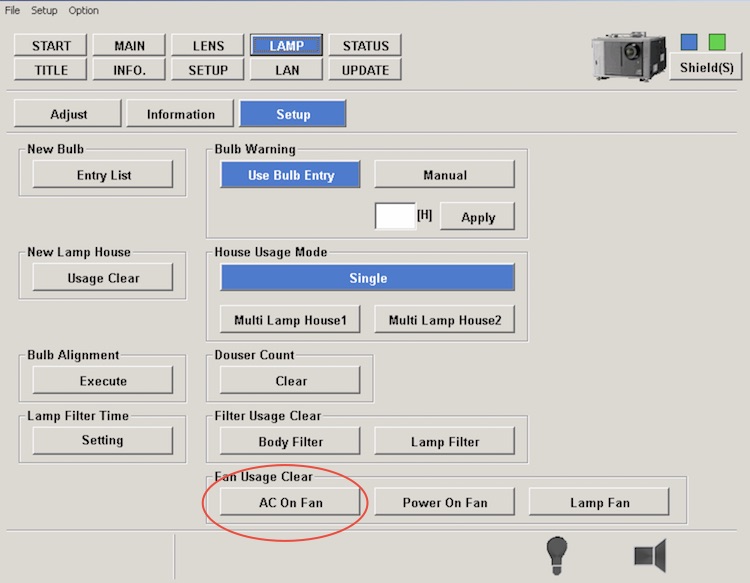
Last night we got an error on our oldest NEC NC2000C. The code was "220 AC On Fan Exchange Time". To clear the error you change the AC On Fan (Fan 6) and reset the time.
Reset the fan on the Lamp>Setup screen using the button at the bottom of the screen.
Problem is I can not figure out which is Fan 6 on the diagram.
For what it's worth, apparently this fan is a consumable which is rated for 20,000 hours. The projector where it failed was installed in August 2010 - so 5 years life in our situation.
Posted by Steve Guttag (Member # 268) on 10-03-2015, 03:14 AM:
Justin,
Actually that fan is rated for about 100,000 hours with a 10% failure rate...so you are going to be pretty safe at 50,000-60,000 hours. NEC just puts an exchange time of 20,000 hours, for some reason...I guess to ensure it doesn't fail. You should be able to clear the error via the DCC, on the ever intuitive LAMP>SETUP section.
As for the fan locations...they are in the service manual. Unlike the "Room of Requirement" the section is only visible when you aren't looking for it!
In the NC2000 service manual, it is in the "Troubleshooting" section, page 4-6.
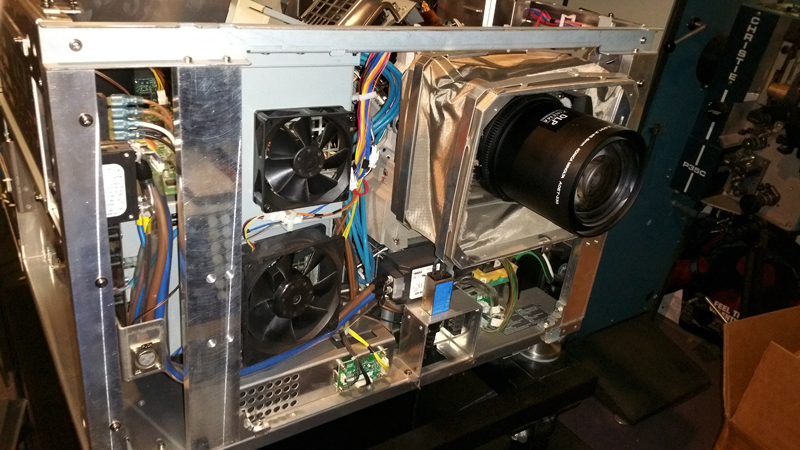
The fan you are going for is the lower fan on the front of the projector. This fan runs whenever AC is applies to the projector, including in standby mode.
Posted by Justin Hamaker (Member # 2165) on 10-03-2015, 03:25 AM:
Thanks for the input Steve. I was able to reset the hours, but now I feel better about not changing the fan. Between our 2 theatres we have a total of 12 of these projectors. Do you think this is an item we should keep on the shelf at both locations? Or is the failure rate low enough that we deal with it as it happens. Does the failure of this fan take the projector off-line, and if not, does running without the fan potentially damage something?
Posted by Steve Guttag (Member # 268) on 10-03-2015, 03:01 PM:
I have yet to change one. The cost is low enough that I suggest having one on site for all locations. It blows on the card cage so those are the items that would suffer if it failed. It may very well take you off line...you can experiment by unplugging it and see if it shuts you down.
We plan to go 40,000 - 60,000 hours before changing it ourselves. You can monitor the fan speed to and see if it is running low...thus far, none of our has.
Posted by Justin Hamaker (Member # 2165) on 10-03-2015, 03:33 PM:
Thanks again Steve.
Posted by System Notices (Member # 2357) on 05-25-2017, 02:52 AM:
It has been 599 days since the last post.
Posted by Philip Jones (Member # 6677) on 05-25-2017, 02:52 AM:
How do you clear the hours on this fan? I see Steve above said it is in the Lamp Setup menus but I can't see one to clear the fan hours?
Posted by Steve Guttag (Member # 268) on 05-25-2017, 06:51 AM:
Posted by Philip Jones (Member # 6677) on 05-25-2017, 07:08 AM:
Hmm mine doesn't look like that, it doesn't have any of the bottom options.
Will post a picture when I'm in the office later.
Posted by Mark Gulbrandsen (Member # 72) on 05-25-2017, 08:49 AM:
Then you have an older version of DCC. You need to get the latest version and replace yours. Those buttons have been there quite literally for many years now.
Since the AC On and Power On Fans are projector critical fans I am replacing them at 5 year intervals. They are not very expensive even from NEC. If you are a "cinema penny pincher" then you can buy the exact fans on line and splice the old fans cable on to the new fan. But replacing those fans is way cheaper than replacing what could fail if they happen to stall out one night when you aren't around.
Mark
Posted by Philip Jones (Member # 6677) on 05-25-2017, 09:03 AM:
Oh right.. makes sense. We've had this version since the projectors were installed 5 years ago. Where can I get the latest version?
I've ordered another fan but just wanted to make the error go away while I'm waiting for it to be delivered. It was £28.
My next question is how easy is it to swap and is it going to trigger any tamper alerts etc?
Posted by Leo Enticknap (Member # 534) on 05-25-2017, 09:27 AM:
I haven't worked on a 2000, so I couldn't say how easy that fan is to get to; but on a 2500, most of the fans are pretty straightforward. There is one large one behind and below the lamphouse that looks like an absolute pig to swap out if one ever had to, but other than that, nothing in there looks too alarming to me.
On a series 1 NEC, once all the panels are properly buttoned up and the anti-tamper switches closed, you should be good to go again. On a series 2, however, there is a security code procedure needed to clear the tamper alert, plus remarrying the secure input board(s).
You need to be registered on the NEC partner site to download the latest projector software packages (which include the Communicator for Windows and touch panel apps).
Posted by Steve Guttag (Member # 268) on 05-25-2017, 10:08 AM:
Fan 6 (AC On Fan) is the lower fan on the FRONT of the projector that blows on the card cage.
If you have access to the service manual, the fans, locations are identified.
If your projector is current on its software AND you have current Java, then using the web interface, you can download the version of DCC that was current for the software on your projector right from the web interface of the projector (point your browser to the IP address of your projector).
Posted by Mark Gulbrandsen (Member # 72) on 05-25-2017, 12:20 PM:
You have to remove the front panel of the projector to replace those two fans. There is also a shield screen around the lens that has to be undone to get the front panel off... I can do it in about 30 minutes. Very easy job unless your projector is right up against the port, in which case you may need to move it back.
Mark
Posted by Philip Jones (Member # 6677) on 05-25-2017, 01:25 PM:
Ah that looks more involved than I had thought, and coupled with the fact that our projector is tight up against the porthole I will leave it to the professionals.
Thanks for the help and advice.
Posted by Mark Gulbrandsen (Member # 72) on 05-26-2017, 01:17 PM:
Yes, some times moving the projector for access is more work than replacing the actual fans is....
Mark