This is topic Bringing Projector & Server out of storage (2 years w/o power) in forum Digital Cinema Forum at Film-Tech Forum ARCHIVE.
To visit this topic, use this URL:
https://ft-forum.com/ft/cgi-bin/ubb/ultimatebb.cgi?ubb=get_topic;f=16;t=002496
Posted by Michael Wilkinson (Member # 2389) on 11-22-2015, 04:53 PM:
Hey guys so if the topic has been covered already please point me the right direction.
I recently came across a Christie CP2220 and Doremi SV4 server that I'd like to mess around with and get working. The original installation was between two and three years ago and, basically, never used. Both the projector and server were stored without power ever since.
I've powered up the server and there are "(missing)" messages next to serial, firmware, etc. I haven't got as far with the projector as I'm first in need of lamp door keys (and to re-install the lamp). Will both the server and projector require replacement boards to get them back online? Any other surprises in store? Thanks.
Posted by Scott Norwood (Member # 30) on 11-22-2015, 05:01 PM:
The Christie outer door keys are the same for every Christie that I have encountered. All that you should need to do is find another Christie and get a locksmith to make duplicate keys. The "secure" keys are unique to each machine, as far as I know.
Posted by Carsten Kurz (Member # 5396) on 11-22-2015, 05:24 PM:
Great idea to store such items without proper maintenance. There are batteries which, when depleted, render expensive boards useless, both in the server and projector.
Start with the server, boot it up, if successful, log in, go to diagnostics and create a detailed report to a USB stick.
Dolby/Doremi have an online log analyzer tool that will tell you major issues that the server might have. Feed the compressed log file to it and you will quickly receive results.
http://support.doremitechno.org/index.php/faq/digital-cinema-player/69-how-to-generate-a-detailed-report-log-file
http://www.doremilabs.com/downloads/manuals/DiagnosticTool_UserManual_000169_v1_7.pdf
http://loganalyzer.dolbycustomer.com/
Do you have Doremis installation and user manuals?
- Carsten
Posted by Michael Wilkinson (Member # 2389) on 11-23-2015, 12:42 AM:
Carston,
Thanks for the info; I fully expected some issues and to answer the question about who what and why I believe that a government agency had control of the equipment for the majority of the time hence the reason for improper storage.
I've downloaded the user/install manuals for the SV4 and started looking through them.
Nevertheless I'm going to login to the server tonight (fortunately the  was still good) and see what it can tell me. I'll post the details here.
Scott,
I actually found a 35mm Christie door key laying around and that didn't work; guess it at least has to be digital. ![[Smile]](smile.gif)
Posted by Michael Wilkinson (Member # 2389) on 11-23-2015, 02:23 PM:
Here's the diagnostic. The system says "No Dolphin Board" during boot up
Software 2.2.3-0 is not the current release
Please install the current supported release 2.6.4:
Make sure to read the Release Notes
Download the Installation Package
Ingest the Package and reboot (There is no need of a DLM for this upgrade)
Note: The upgrade process is always done in the order of SW (Software), SM (Security Manager), FW (Firmware), hotfixes and then any option pkgs. The unit must be rebooted between each individual package installation.
Ethernet speed is 100 Mbps only
Network eth0 Speed has a speed of 100 Mbps only
HDD Failure (frozen)
in drmreport/doremi/log/kern.log :
Line 116:Nov 23 12:15:22 Doremi-1 kernel: ata5: exception Emask 0x50 SAct 0x0 SErr 0x40d0800 action 0x2 frozen
NOTE: This notifcation is that there is an issue with the hardware you are connecting to the server for ingest or export. For DCP2000, DCP2K4 and Showvault that it is ATA5 (CRU) or ATA6 (DVD) are ingest drives, and not part of the content raid.
Please remove the media and have it tested by the distributor of the drive. For the IMS1000 the ata2 an external drive plugged in via USB or eSATA. (ata3 is the internal raid card)
NTP no server suitable for synchronization found
in drmreport/doremi/log/time.log :
Line 257:[Mon Nov 23 11:59:02 2015][ERROR]: ntpdate: no server suitable for synchronization found
Edit the configuration file /doremi/etc/ntpservers and specify a valid NTP server under the variable: NTPSERVERS="" Found a NTP server close to your location at www.pool.ntp.org, or if you have an TLMS, set the target at the IP address of the TLMS server. To make sure the server is available from the Doremi server ping it from a terminal window.
It is highly recommended to use NTP, if the server drifts and RTC goes outside the allowed amount it is not covered under warranty
RX errors on Ethernet port
This message is showing that the system has detected network errors on one of the server Ethernet ports.
This type of error is normally outside the server. Please check all physical network connections. If the network runs through any switches or routers, try a direct connection between the server and projector.
If these errors are on the auditorium network, server to projector and this is the network that the SM (Security Manager) uses, this can cause show stopping issues.
RealD DLM has been issued for 228373 and not missing
The license being for the wrong eSN is normally because the unit may have had a Dolphin upgrade,
so the eSN has changed and the license was not upgraded at the same time.
Please go to the License Manager and delete the license that does not match the new Dolphin card.
Please request a new license (DLM) on the ticketing system.
Posted by Carsten Kurz (Member # 5396) on 11-23-2015, 05:05 PM:
I guess first thing would be to have the Dolphin board reserialized. I think that costs around 375US$ or something:
---
DOL12 (Dolphin DCI FIPS 1.2) re-serialization policy update
Created on Wednesday, 26 November 2014 18:21
The new policy will be the same for units in warranty or out of warranty:
Repair and return i.e.
No advance replacement of the mediablocks
The Dolphin mediablock must be shipped to us, will be re-serialized, and shipped back to you
The cost of the repair will be lower: 375.00 USD plus the cost of the shipment
Please note that we are still unable to re-serialize a mediablock (Dolphin DCI FIPS 1.2) if any of the following conditions are met. In those cases, the only option will be to purchase a new mediablock
The SM (Security Manager) is missing
The mediablock is in rescue mode, and cannot be recovered
The date is greater than the current year
---
If you send the full detailed report to Doremi, they will probably also tell you other things. That SATA issue is a bit strange, as it refers to ingest drives, the CRU slot (is there a drive/carrier inserted into the CRU slot?), not the boot (flash) disc or the RAID. Did you also run the RAID diagnostic?
- Carsten
Posted by Dave Macaulay (Member # 813) on 11-23-2015, 05:50 PM:
Since this is a ShowVault there's no Dolphin card. Once the projector is powered up and the network connected it will find the IMB in the projector and you will have a security manager version etc. The software refers to the IMB as a Dolphin card during boot and in some of the "missing" messages.
You don't do anything to install the IMB, once the projector is powered and all connected - and the network settings plus device manager set up for the server to talk to the projector - the server finds the IMB and presto! there's an IMB in device manager. You usually need to reboot everything at least once after getting them to talk before they actually work properly.
The IMB battery should last 4+ years so I don't think that will be a problem. I would ask Doremi about it though, if it's been off for a couple of years you may want to replace that battery soon after getting the system running. If it has gone dead, the IMB has to be sent back to Doremi and reserialized.
You will also need the PCIe-4 cable between the server and IMB.
If the server is in the Christie pedestal, that may be in place?
Posted by Carsten Kurz (Member # 5396) on 11-23-2015, 06:38 PM:
Alright, sorry, missed the SV4 part. The IMB battery should be good for 5 years, so it could be still okay, or reaching EOL. I would certainly replace it now, there is a detailed procedure here:
http://support.doremitechno.org/images/Portal/Cinema_Players/ShowVault-IMB/Documents/IMB_Battery_Replacement_P rocedure_001556_v1_0.pdf
In that case, there will be no serious issue with the projector enigma board battery, since it is not used when an IMB is present. I would still check it. But if it's there, it will probably be dead anyway by now.
You should also get current software for both projector and server. For the Doremi, installation is trivial, for the Christie, it could be a bit more complicated to get the necessary files and apply them in the right order. An experienced tech may be needed. But you should still be able to run the system as is for the time being.
- Carsten
Posted by Michael Wilkinson (Member # 2389) on 11-23-2015, 08:16 PM:
Dave, Carlston:
Great info and thanks for the IMB battery tip. Assuming that it isn't already too late I'll change the cmos battery as soon as the projector is up and running.
I am getting a "secured clock battery has not been replaced on time" message from the SV4 so I don't know if that's internal or referring to the IMB. All of the cabling is connected between the SV4 and projector however I don't think it's possible to get the projector out of standby until I get access to the lamp door and install the lamp.
The software update took all of two minutes. "Trivial" was right. The bottom HDD of the 4 has no lights on it so maybe that's the dead drive; or just a spare. Truthfully I haven't read that part of the manual yet to know. The SV4 seems happy and healthy otherwise so I'm really not sure where that message comes from.
The only movie on this thing is Hunger Games from March of 2012. Trailers are from around the same time frame.
Thanks Scott for sending some keys my way!
Posted by John Eickhof (Member # 323) on 11-23-2015, 08:52 PM:
Hey Mike, if that machine came from Davis, there was a complete set of keys in the box with the lens and other small parts.
Posted by Michael Wilkinson (Member # 2389) on 11-23-2015, 09:00 PM:
Hey John,
I have every key for the projector and server except the lamp door key! Believe me I dug around for them.
Posted by Dave Macaulay (Member # 813) on 11-23-2015, 09:44 PM:
All Christie external doors use the same key, since always - probably Christie 35mm consoles used the same key. The lamp cover takes the same key as the other locks. The inner top "secure area" lid uses a Medeco security key, this is unique to each projector (or unique enough that you are very unlikely to find two the same). Christie factory techs have a master key for those, but they don't let that key out of their sight.
Posted by Michael Wilkinson (Member # 2389) on 11-23-2015, 10:17 PM:
I have ALL of the keys, including the Medeco's, EXCEPT the lamp door key. I found a Christie 35mm lamphouse key (a leftover from about 7 or 8 consoles I sledgehammered) and, sadly, they finally changed the locks!
Posted by Dave Macaulay (Member # 813) on 11-24-2015, 05:57 AM:
Send a pic of this lock.
2220 projectors come with only two different keys - the silver cheapo one for all locks except the secure cover, and the Medeco key for that.
There is only one type of "low security" lock on the projector, PN 003-003081-01. They are all keyed alike.
If the lock has been changed for some reason, drill it out and replace it with the correct one.
Posted by Carsten Kurz (Member # 5396) on 11-24-2015, 06:21 AM:
That 'battery has not been replaced' is a software warning, it doesn't actually measure the battery voltage, it is a scheduled exchange interval. But it is obvious you should source suitable cells and swap them soon. Then you can reset the battery warning message.
quote: Michael Wilkinson
The bottom HDD of the 4 has no lights on it so maybe that's the dead drive; or just a spare.
The 4th slot has no drive, so it is normal there is no light on it. You can extend the RAID capacity by upgrading it with a drive same size/type as the other three.
The warning seems to refer to the CRU slot on the left side. Is there something inserted into it?
- Carsten
Posted by Dave Macaulay (Member # 813) on 11-24-2015, 08:57 AM:
The battery warning comes up if the IMB is not connected, as well as after 4 years if it is. Just another quirk of the software.
Almost every server package you run through the log analyzer shows "frozen" errors on CRU or USB drives, I'm not too sure why. Usually there's quite a lot of useless data in storage/clranup when there are a lot of those errors listed, so it has something to do with failed ingests.
Posted by Michael Wilkinson (Member # 2389) on 11-24-2015, 04:55 PM:
Carsten, Dave:
I'm not going to worry too much about the battery warnings until I get the system completely powered up. I've left the projector plugged in for a couple of days and connected the internal UPS in case that will be of some help.
I have the medeco keys for the projector and all of the keys for the server. The lamp door lock looks quite original. Another member of the forums is sending a key this way so we will soon know. I wasn't too keen on drilling into one of these projectors if it could be avoided.
The three HDDs, USB and CRU slots seem to be fine.
There is an identical HDD in the 4th slot that does not light up. Presumably a spare. The RAID configuration states that it is healthy.
Thanks everyone!
Posted by Stephan Shelley (Member # 8587) on 11-25-2015, 02:28 PM:
There was a bug in earlier software that gave a premature battery change warning. If you do replace the secure clock battery make sure you power up the IMB in the projector for a while to charge up the capacitors. These keep the clock going for a few minuets while the battery is being changed. Make sure you know how to do marriage before you pull the IMB out of the projector.
Posted by Tim Sherman (Member # 569) on 11-25-2015, 04:01 PM:
Isn't the 5 year shelf life on the battery in the IMB good for 5 years only if it has power? I thought the life of the IMB battery was the about the same as a enigma battery if not powered.
Posted by Dave Macaulay (Member # 813) on 11-25-2015, 05:07 PM:
It's a replaceable silver cell and should be fine powering the IMB RTC for 5 years.
Posted by Carsten Kurz (Member # 5396) on 11-25-2015, 05:31 PM:
It is certainly a conservative number. Once the system is running, I would still replace them, and follow the detailed instructions precisely.
- Carsten
Posted by Stephan Shelley (Member # 8587) on 11-25-2015, 05:37 PM:
Tim these are replaceable coin batteries much like on the motherboard.
The the rechargeable batteries in the gore interface boards on the series 1 are like the enigma boards.
Posted by Steve Guttag (Member # 268) on 11-26-2015, 04:17 PM:
The one that is scaring me is the non-replaceable ICP certificate battery. It is soldered in, has a 10-year life and I've not heard of a procedure to put a backup battery on line during the change.
Posted by Marco Giustini (Member # 4544) on 11-26-2015, 05:25 PM:
I thought there was a way to keep the ICP charged by an external PSU. Maybe we will go around with one of those when the battery has to be replaced (how?)...
Barco will sell lots of Alchemy's then
Posted by Dave Macaulay (Member # 813) on 11-26-2015, 05:25 PM:
Let's see if any are still working after 10 years when we'd have to think about that battery...
And surely TI has an excellent plan to deal with that! When have they ever let us down? *** just some sarcasm, please don't answer that question ***
Posted by Carsten Kurz (Member # 5396) on 11-26-2015, 08:24 PM:
Always surprising what Google brings up with the right key words ;-)
http://www.manualslib.com/manual/434247/Nec-Nc900c.html?page=87
But is that really the ICP certificate keeping battery? The description sounds more as if it is for the projector controller board. Yet they do refer to the ICP multiple times.
- Carsten
Posted by Steve Guttag (Member # 268) on 11-27-2015, 02:08 PM:
That is the ICP RTC battery. That is user changeable and is the ever popular CR2032 coin. It has a life of 5-7 years and the worst that happens is that the ICP clock resets...most projectors set the ICP clock on boot up (For Christie it goes by the TPC clock...a fix they made after getting burned on the ZX and M going log crazy when the PCM module clock would die and then mess up the logs)...Barco on Installation>Advanced>Clock gives you the option to set the clock once or set it via NTP (so on boot up it will set the ICP clock).
As for 10 years...the first series 2s (ICP based) hit the streets in 2010...so we are about 4.25 years before the first ICPs should start to drop. Again, this is the certificate battery, not the RTC battery.
Posted by Dave Macaulay (Member # 813) on 11-27-2015, 03:52 PM:
It's actually a BR2032 and TI recommends not using a CR2032.
Posted by Carsten Kurz (Member # 5396) on 11-28-2015, 05:06 AM:
Why do they have one exchangeable, including a change backup cell, and then another one non-exchangeable? Most systems worldwide have been installed within 2-3 years. A lot of people will be very angry at the manufacturers and integrators once this will begin to pop-up in a couple of years. And all because of a stupid coin-cell worth 1US$.
- Carsten
Posted by Steve Guttag (Member # 268) on 11-28-2015, 06:35 PM:
Thanks Dave for pointing this out...it make me go and read the service for the ICP again...
The actual battery is a BR2330. In fact, there is the passage:
quote:
The coin battery (Panasonic BR2330) mounted on the ICP board provides electrical power for
maintaining tamper detection, time, and date information while the power to the projector is
off. If the battery voltage drops, the tamper detection circuit is activated and the security
key is erased. Once the security key has been erased, the projector requires repair at the
factory.
This leads me to believe that I was misinformed at a factory training class. Looking at the pictures of the ICP, there is what appears to be a capacitor next to the coin battery and perhaps that has an approximately life of 10-12 years but if you change your coin battery within 7 years, you should get at least 14-years and odds are, so long as only one is changed at a time, you are good. If it is a capacitor, I wonder why they would think it is life is so short.
The fact that this passage in the manual indicates that the BR2330 would reset the Security Key makes me question the information I was provided. It also means that Christie and Barco susceptible to key loss (certificate loss) too...even if they have another means to keep the clock going. My gut tells me that the two are wired in parallel with perhaps a diode to allow the replaceable battery take precedence if it is present and working at proper level.
Posted by Carsten Kurz (Member # 5396) on 11-29-2015, 06:35 PM:
I have seen ICPs with a rechargeable LiButton Cell soldered next to the primary 2032. However, it is possible there have been different production runs with some being rechargeable Li cells and others using supercaps.
The question is, will there ever be a warning on some software level, like there is e.g. in Dolby and Doremi servers for their media block battery? There should be a sticker on every ICP faceplate with an exchange date scheduled ;-)
- Carsten
Posted by Michael Wilkinson (Member # 2389) on 12-03-2015, 06:09 PM:
Thanks again for the key Scott!
..and hello again. The lamp is in the machine and....absolutely nothing changed. There are solid RYG indicators on the back panel, one green led just below the lvps, another led on what I presume is the power supply for the lvps, a solid orange light on the TPC ethernet jack, a green light on the TPC ethernet jack that flashes in series of 12 times, plus a solid standby, flashing run, and blinking PIB light on the PIB. Everything else is dead. I'd rather not do the emergency start for now.
One other thing to note is that there is reference to a switch on the TPC-I took the back cover off also to no avail.
Christie suggested a possible short in the the PIB or IMB. They didn't seem to know the solid red, yellow and green status led thing.
How's this for a challenge?
![[beer]](graemlins/beer.gif)
Posted by Stephan Shelley (Member # 8587) on 12-03-2015, 06:59 PM:
Does the screen of the TPC do anything? There is a info sheet on the Christie website about pib troubshooting. The blinking yellow run light indicates communication issue between the pib and tpc. The blinking green pib light indicates it has booted up and running correctly. Make sure the tpc is plugged in correctly. Could be a bad tpc. Try the emergency start and see if it does anything. The dowser should open and lamp should come on. Contact me privately or by email and I could email you the info sheet.
Posted by Michael Wilkinson (Member # 2389) on 12-03-2015, 08:34 PM:
Stephen:
The TPC is completely dead; Christie mentioned a power switch but I didn't find any inside or out.
The three solid indicators on the back make me suspicious. I was also thinking to hotwire the 24v power supply on the TPC (while disconnected from the projector) to see if I can get that booted up on its own.
Given that the projector is sitting on the floor I was trying to avoid the emergency start temptation. But I do have an emergency in line duct fan that I can throw on there for the occasion. (I was just wondering how to go about shutting it back off other than to pull the plug or breaker)
I'll message you in a bit once I have another chance to dig into this.
Posted by Stephan Shelley (Member # 8587) on 12-03-2015, 08:46 PM:
The three taillights lit at once is a normal part of the boot sequence. After they all light up they go out and then the yellow comes on indicating the projector is in standby. The red may come on if there is an error. All three staying on is an indication that the boot sequence has stalled. There is an info sheet on the power switch on the tpc as well.
Posted by Michael Wilkinson (Member # 2389) on 12-04-2015, 01:06 AM:
Stephan,
Thanks for the docs.
The TPC is an Advanta (or something like that) model 650 so it doesn't look like there is a power switch on or within. The troubleshooting leds point to the PIB status as okay but unable to connect to the touch computer.
I don't have any ethernet couplers handy so it looks like I'll wait until tomorrow to try the PIB-FIT troubleshooter.
So Emergency Start anyone? If that succeeds in lighting the lamp, opening the dowser, etc. how would one go about a proper shut down without the TPC? (or do I literally just kill the breaker)
OKAY SO I JUST WENT AND PUSHED THE EMERGENCY START. LAMP LIT. ICP ALL LIGHTS CAME ON WITH THE "SOFTST" BLINKING, PIB NOW HAVE ADDED THE 'POWER" LED TO THE LIST OF WORKING INDICATORS BUT STILL GETTING THE TPC ERROR AND NO IMB ACTIVITY.
ALL THREE BACK PLANE LIGHTS ARE STILL LIT SOLID.
I'M WONDERING IF THE TOUCH PANEL CLOCK BATTERY COULD CAUSE A FAILURE?
Posted by Stephan Shelley (Member # 8587) on 12-04-2015, 08:37 AM:
Sounds like your TPC is dead.
On the IMB is the Showvault powered up and connected to the projector and IMB? The PCIexpress cable needs to be connected and an Ethernet cable from the PIB to the server. You will need trial and error or do some investigating to figure out eth0 or eth1. If you do trial and error it will have to sit a few minuets to do the handshacking. Were showvault and projector connected to each other in a past life? The projector and one of the Ethernet ports need to be on the same network. Also I think it is in device manager the projector needs to be defined there including the IP of the projector. Without the TPC on the projector you have no idea what that is. If they worked together before the should now.
Posted by Michael Wilkinson (Member # 2389) on 12-04-2015, 05:34 PM:
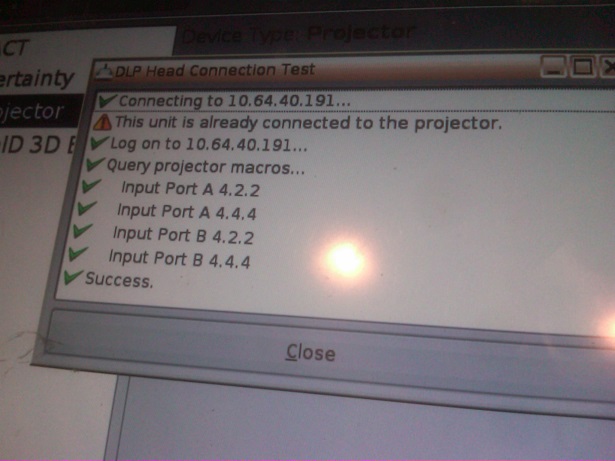
This is the message I'm getting. The PIB is still showing solid green standby & power. The run is flashing yellow, the PIB is blinking green. Which suggests that the TPC is an issue but the other concern I have is that the ICP and IMB lights are off and the back panel-all three lights are still solid. Is this a normal state until the TPC allows a proper start?
I also re-seated the PIB, ICP & IMB just to be sure.
The IMB itself doesn't have any indicators but there are now green PWR & CBL leds above the ShowVault's PCI Express connector.
The Emergency Start did not allow non encrypted content to play. There is still "Marriage is not active" warning coming up.
Posted by Stephan Shelley (Member # 8587) on 12-10-2015, 03:36 PM:
The three tail lights lit and the flashing yellow run are all indicators of the problems with the TPC. Green standby, power and flashing green on the PIB all indicated normal operation of powersupplies and PIB. Do the IMB and ICP on the PIB board lite solid green as well? LD not being lit would indicate that it is not installed and not needed with an IMB.
As you removed the security ring to reseat the boards you have broken marriage. At this point you need a working TCP to perform marriage.
Posted by Michael Wilkinson (Member # 2389) on 12-13-2015, 04:56 PM:
The IMB and ICP lights are off in the scenario I described.
The good news is that the server does recognize the connection to both the PIB and IMB. Also there are no longer any clock battery warnings coming up.
It looks like the screen is dead on the TPC; it does ping when connected to a network. Is there some tiny reset switch somewhere that I need to find? Even the manual mentions one but no one here can find it. It's an Advantec TPC650H.
I ordered a TPC just in case.
Powered by Infopop Corporation
UBB.classicTM
6.3.1.2