This is topic Barco DP2k-10s not using max. light output in forum Digital Cinema Forum at Film-Tech Forum ARCHIVE.
To visit this topic, use this URL:
https://ft-forum.com/ft/cgi-bin/ubb/ultimatebb.cgi?ubb=get_topic;f=16;t=002497
Posted by Marlon Martins (Member # 8823) on 11-23-2015, 01:04 AM:
Hi, i'm burning neurons on this one.
A while ago, the projector on the cinema i was helping to set up had a few weird light problems. after a LPS failure, the light output went basically to 10% of "nominal" output let's say. but the thing is, outside the lamp housing is clear that the lamp is in good shape and power, by the light on the outside of the housing, but on the projection itself, was barely visible. Changing the lamp fixed it, but only partially.
First, the light output around the housing was equal, but the light output of the projection was still not great. with a luxmeter, was measured 50 lux at bottom of the screen. its not a proper fl measure, but allow to keep a record of how the lamp is. setting the output to manual (at 255) or CLO, the light was still at 50 lux. (and in the lamp configuration, its shows at maximum power, 2200W, 85A)
then, a technician came to see it and it changed "something" and the light output went to 97 lux. but the lamp is still a t 2200W, it put on CLO mode (tried and the light output is still 50 lux) but i would assume using it on manual at maximum would get the max output, but no luck. tried everything i could imagine that affects the output, and again, no luck.
so, the main question: it there any "trick" on this projector for max light output? cause it does not appear to be on the light itself, but on the projector. lens is clean, lamp is properly aligned, and yet, 50 lux on screen (making worst on 3D due to polarize and glasses losses)
thanks in advance ![[Wink]](wink.gif)
Posted by Marco Giustini (Member # 4544) on 11-23-2015, 01:21 AM:
What is the size of your screen?
Posted by Marlon Martins (Member # 8823) on 11-23-2015, 02:04 AM:
Width is 8.6 meters if i recall
Posted by Ian Freer (Member # 1940) on 11-23-2015, 09:54 PM:
The following may not be pertinent as the results are a very significant drop in light, but thought I'd suggest it just in case as I am not familiar with the 8/10x Barco's and how the lamps mount into the lamp house...
A trap I've seen people fall into with the C series was the lamp was not sitting fully back in the slots in the Cathode mount.
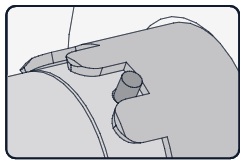
I have someone slide the lamp all the way in, but not quite hold the lamp tight enough so when they tightened the allen screw they pushed the lamp forward just enough for the pins to move out of the slots then tighten against the upper edges of the slots accidentally.
This pushed the lamp arc far enough forward that while there was some light making it to the screen, there was a very significant lack of light output...
Just a thought...
Posted by Monte L Fullmer (Member # 2797) on 11-24-2015, 03:02 AM:
I usually rotate the bulb in the castle nut until I feel it slide in farther and knowing that the pins are in the castle part of the rear nut, preventing full rotation.
I add the 5mm allen bolt and turn the bolt until its threaded in the cathode adapter but leave it loose.
I'll add the UV filter front end assembly with holding up the bulb to meet the anode seal end pin to the UV filter anode mount.
I hold the bulb back into the castle nut while I snug down the 5mm Allen bolt. Just don't tighten down too much, being that adapter is solid brass, for one of the mgrs here on a change out at on theatre, snapped the end off of an adapter by getting hefty with the allen tool.
If the Anode connector is at the bottom of the module, I have the anode cable also down at the 6:00 position since the cable is on the short side. For the B units, the connector is at the 3:00 position and I do the cable accordingly.
Another issue with the cathode adapter is the lock down allen set screw: That has to be snugged down real good, but still not too tight. If that doesn't get locked down, a possible overheating and assembly burn up can be the results (also with poor light emissions), since that lockdown setscrew makes direct contact with the cathode seal collar.
It's presumed that the threading of the adapter to the end of the bulb is suffice, but that setscrew is the key for direct contact.
-Monte
Posted by Marco Giustini (Member # 4544) on 11-24-2015, 06:00 AM:
has this screen ever reached proper brightness readings in the past?
Posted by Marin Zorica (Member # 1716) on 11-24-2015, 09:14 AM:
Something is not clear here, you said that even you change light output setting in normal mode, say from 200 to 255 you have same light on screen? What did you use for measuring light? Some photografp luxmeter, maybe is bad!? Also, when you move slider for current adjustment on communicator, do you see screen brightness changing?
Posted by Marlon Martins (Member # 8823) on 11-25-2015, 03:01 AM:
thanks for the tips. will look into the lamp to see if anything is not properly mounted.
@Marco:
yes, with a 1000 hours ushio was measured 97 lux at the screen. now it has a 400 hours lamp, new power supply, but 50 lux on screen. on settings the lamp seems fine, running at max power
@Marin:
the light output slider works properly, reducing or increasing i can see the light output changing, the luxmeter is doing a proper reading, and the power measurements from the lamp are changing accordingly. but at the max settings, (255) the light output to the screen is still about half of what was before.
Posted by Carsten Kurz (Member # 5396) on 11-25-2015, 04:15 AM:
Even 97lx at the screen is far below what should be there. Did you compare this with other screens, using a full-white test DCP?
- Carsten
Posted by Marin Zorica (Member # 1716) on 11-25-2015, 04:53 AM:
Than probably lamp/reflector/lamphouse is not properly aligned
Posted by Dave Macaulay (Member # 813) on 11-25-2015, 05:32 AM:
The "ball joint" thingy in the lamphouse cathode receiver can slide forward and destroy the abilty to focus the lamp, I've found a few like this. You can't peak the Z axis adjustment however.
I avoid using CLO on S projectors, the CLO reading varies with image brightness. It seems impossible, since the CLO sensor is before the prism... but it does. Some units do it more than others. I thought it had been corrected with a software fix because I found some where the difference is slight, but recently upgraded a few with no change - pretty severe change in CLO sensor reading between white and black patterns.
I think the 10s would be underpowered for an 8M 3D screen. The Barco calculator includes it only if optical loss and lamp life output decay are set very low: ie it should give adequate light with a new lamp, perfect port glass, and no colour correction (reads 0.314/0.351 on uncorrected white). Add much optical and lamp loss, and the 15C is the smallest projector recommended.
Posted by Marlon Martins (Member # 8823) on 11-25-2015, 11:19 AM:
i tried the lamp adjustment on the housing, all tree axis have a "peak" output when adjusting (like very low, low, mid, high, mid, low, very low..), so, does this means the lamp is properly set? or it would be peaking at the limit of the Z axis screw?
@Carsten
only one screen for now, in a few weeks another one will be installed, so i could compare both projectors output at same distance (the projector is the same, but in a bit smaller screen)
Posted by Marin Zorica (Member # 1716) on 11-25-2015, 01:17 PM:
The real thing is to check does lamp actually lights at proper current and voltage, because as you said that happend after LPS replacement, it could be that reading were wrong, even i doubt on that.
Next, if lamp and lamphouse is ok, that it could be light engine problem, in case somebody open it, it can be that cold mirror or integrator rod was moved and now missaligned....as you said LPS was changed, it could be that somebody touch cold mirror assembly??
Posted by Marlon Martins (Member # 8823) on 11-25-2015, 02:33 PM:
the inside of the lamp housing seems ok (i cleaned a wile ago, the mirror, uv filter, etc..
the thing is, the old lamp and PS had the same problem, and looks like only the configuration was changed when the light changed from 50 to 97 lux.
i dont know was was changed, but i will look into the lamp to make sure the problem is not there.
Posted by Phil Ranucci (Member # 3820) on 11-25-2015, 03:26 PM:
Check what fl level is set in the macro configuration file.
When setting the power level, what is the max fl the display shows? Compare that number to the number in the macro.
I'm betting on mirror misalignment.
The setscrew and adaptor have torque settings, 2.5 nM and the cable is 9 nM. ( B and C series)
Posted by Tim Sherman (Member # 569) on 11-25-2015, 03:50 PM:
What about the setting in the macro. If the lamp mode in the macro is set to clo that will over ride manually changing it on the lamp settings page any time a macro is launched.
Posted by Stephan Shelley (Member # 8587) on 11-25-2015, 03:53 PM:
With the new LPS you should recalibrate the clo if you are using clo.
Posted by Marco Giustini (Member # 4544) on 11-25-2015, 04:21 PM:
The CLO senses the light after the integrator rod. The LPS does not affect the CLO.
What lux meter are you using?
As Phil said, select a 2D macro, set the lamp at minimum and make a note of the fL shown by the communicator - whatever value that is.
Then set the lamp at maximum and write down the value.
Then report back here ![[Smile]](smile.gif)
Posted by Marlon Martins (Member # 8823) on 11-25-2015, 04:46 PM:
@Phil:
i changed all the macros to manual 255.
the fl value is not irrelevant? cause on the bottom you specify the reference value, so can be any arbitrary value.
i'm setting all to manual and max setting, so its irrelevant, no?
@Tim:
all macros set to manual.
@Stephan/Marco:
not using CLO.
im using a lodestar luxmeter. i know it measuring correctly cause i have some older measures from various light sources and all are the same. also, its "clear" how the screen is dim. very noticeable.
will make the readings as you suggested.
i want to thanks all of you for trying to help me again and again
Posted by Marco Giustini (Member # 4544) on 11-25-2015, 05:33 PM:
yes, the fL value won't be an actual value but I want to see what the light sensor reads between min and max. It may tell us if there is anything massively wrong before the light sensor.
Don't mean to patronise you but can you quickly tell us how you align the lamp on your projectors?
Posted by Marlon Martins (Member # 8823) on 11-25-2015, 10:56 PM:
i put the screws in the mid range of their travel area, adjust Z first (back and forth and let stay in the highest brightness from the luxmeter reading) then do the same for the x/y. back and fort till max light output. then do all over again but with smaller movement range, for fine-tunning all axis. third time for extra-uber-hiper-fine-tunning.
Posted by Marco Giustini (Member # 4544) on 11-26-2015, 04:24 AM:
Ok,
Go under INSTALLATION/LAMP/LAMP ALIGNMENT.
Do the lamp alignment again by looking at that graph, don't use your luxmeter. Write down the current value when you begin and again when you finish.
Make sure you are not showing a moving image while doing that.
Posted by Carsten Kurz (Member # 5396) on 11-26-2015, 05:23 AM:
What 3D system is installed on this screen/projector?
- Carsten
Posted by Marlon Martins (Member # 8823) on 11-26-2015, 12:40 PM:
The technician came today and he wasn't able to solve the problem. (and he is a very experienced one)
they will install the new projector in this room (DP2K-19B) and the 10s to the new room, then it will do a proper analysis of the problem (see the housing, mirror, update the projector, etc.) also, trying a new lamp.
i wasn't able to do my testings ![[Frown]](frown.gif)
the 3D system is a Volfoni Smart Crystal Horizontal:
http://www.volfoni.com/en/product/Cinema/SmartCrystal%20Cinema%20Horizontal
Posted by Carsten Kurz (Member # 5396) on 11-26-2015, 02:17 PM:
Wondering wether you could kill that much light with a f*cked up blank time setting. Of course normally that wouldn't apply to 2D, but, who knows...
- Carsten
Posted by Marlon Martins (Member # 8823) on 12-11-2015, 07:41 PM:
Problem solved. the technicians came, and installed the 10s on the second room. they readjusted the lamp on the lamphouse, cleaned everything, and BAM, 110 lux.
they said the mirror was very very dirty. cleaned all "accessible" optics without opening the projector itself. not sure which of the two caused the problem, as i arrived they had done both (i would ask to do one step at a time and test the output to find the cause), but at least, now we know is one of them. the lamp was not changed (is the one that measured 50 lux)
they also said maybe the lamp was not properly fit as mentioned in this thread. guess you guys really know the pitfalls
now they will schedule proper cleaning every 3 months to avoid dust buildup
thanks again guys ; ![[beer]](graemlins/beer.gif)
Posted by Carsten Kurz (Member # 5396) on 12-12-2015, 08:08 AM:
Did you already spend some brains on where the dust actually emanates from, and wether it would be possible to reduce that source?
- Carsten
Posted by Marlon Martins (Member # 8823) on 12-12-2015, 12:58 PM:
maybe drywall dust. cause the second room was made with drywall, and the dust was there for a long time. the projection rooms are far apart, but the corridors can take dust from one to another.
but the dust was "brownish", like those very thin dust that accumulate over PC components. looks just like "regular" dust that came from cooling fans
i will keep an eye on the luminosity, so we will see if it dims more than should over time
Posted by Monte L Fullmer (Member # 2797) on 12-12-2015, 05:38 PM:
Is the drywall been coated, for unfinished drywall will keep on emitting dust until it gets sealed.
-Monte
Posted by Marco Giustini (Member # 4544) on 12-12-2015, 05:51 PM:
I keep seeing S machines where the right hand side of the main filter - looking from the front - does not adhere the foam sealing around the chassis, letting unfiltered air in.
A shame as the filters, this time, are pretty good.
Posted by Marlon Martins (Member # 8823) on 12-12-2015, 10:44 PM:
half of the drywall is "open", but not for long. a few more weeks they will finish the second room.
will also look at the filters. thanks
Posted by Carsten Kurz (Member # 5396) on 12-14-2015, 08:56 PM:
The Barco DP2K-6E service manual mentions a 'Dust Rubber Kit' in the lens mount section, it also mentions that early models of that machine may not be equipped with that Dust Rubber Kit. As the 10s uses identical lens types and mount, you may try to find out wether that Dust Rubber Kit exists for the 10Sx as well. It seals the lens mount/opening from dust.
- Carsten
Posted by Marco Giustini (Member # 4544) on 12-15-2015, 12:37 AM:
Why can't Barco seal the area around the lens and prism exit as Christie do?
Posted by Carsten Kurz (Member # 5396) on 12-15-2015, 02:42 PM:
Well it seems they just learned it ;-)
We just ordered a DP2K-6E - I'll keep an eye on that rubber kit... ;-)
- Carsten
Posted by Magnus Eriksson (Member # 6085) on 12-15-2015, 02:57 PM:
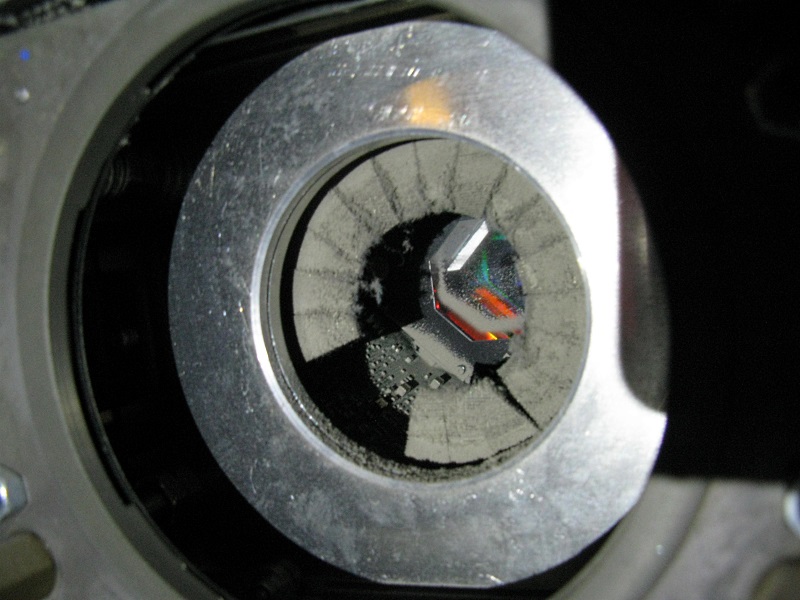
Lens mount I examined recently on a DP2K-8s. Light output an image quality was, well, ![[bs]](graemlins/bs.gif)
Posted by Marco Giustini (Member # 4544) on 12-15-2015, 03:40 PM:
Same here. Mine was actually worse.
Clearly a design flaw.
Posted by Marin Zorica (Member # 1716) on 12-15-2015, 05:46 PM:
That is for sure new standard for DIRT!
Powered by Infopop Corporation
UBB.classicTM
6.3.1.2