This is topic Doremi DCP-2000 raid problems in forum Digital Cinema Forum at Film-Tech Forum ARCHIVE.
To visit this topic, use this URL:
https://ft-forum.com/ft/cgi-bin/ubb/ultimatebb.cgi?ubb=get_topic;f=16;t=002498
Posted by Jose Angel Velasco (Member # 4706) on 11-25-2015, 08:40 AM:
I have an used purchased DCP-2000 server. After a problem with the raid, I reinitialized the raid. The three disks, appears as "working online", and with their icons in green, but the two raid partitions althoug appears with "healthy" in their status, the icons are in amber.
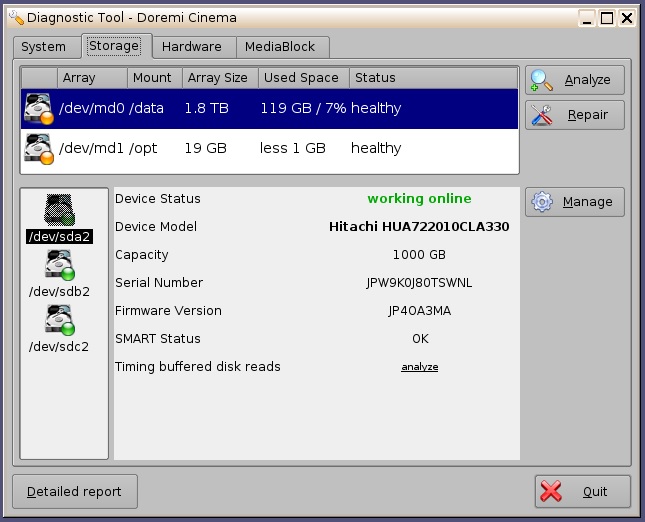
What is the reason of this?
And I have another problem. I can't ingest by USB. The USB drives, doesn't appears in the Ingest Manager, but I can ingest from a NAS in the network. This other problem is caused by the extrange status of the raid?
Thanks to all.
Posted by Dave Macaulay (Member # 813) on 11-25-2015, 09:01 AM:
The front USB port can be damaged over time. Did you try a rear USB port - less used, they're generally OK.
What software/firmware versions are you using?
You can take a diagnostic package and run it through the log analyzer at http://loganalyzer.dolbycustomer.com/ the report tells you quite a bit more than you see in diagnostic tools.
Posted by Carsten Kurz (Member # 5396) on 11-25-2015, 09:42 AM:
For how long after the RAID reinit command have the RAID partitions be shown in amber like this? Did you try a reboot? Could be just a stupid delayed GUI update issue.
- Carsten
Posted by Jose Angel Velasco (Member # 4706) on 11-25-2015, 09:58 AM:
Hi Dave. I'm using firmware 2.92 and software 2.6.4-0
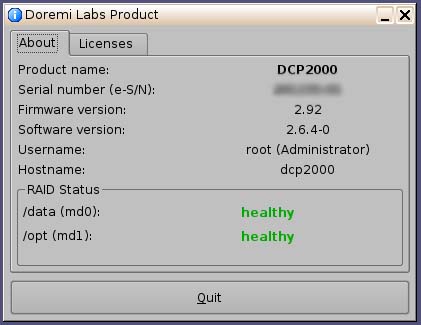
I'm tryed with all USB ports, and an USB keyboard or mouse works fine. When I make a shutdown, in the text screen previous to the shutdown, if I put an USB pendrive, I can see the USB device detection, and if I disconnect it, I can see the device disconnection message.
The Dolby Log Analyzer, says that 2 of the three disks are in Warning
quote:
sda:
State: Normal
Running State: running
Model: Hitachi HUA722010CLA330
SN: JPW9K0J80TSWNL
Capacity: no match
Age: 140 Hours
Temperature: 21 °C
Raw Read Error Value: 100
Spin Up Time Value: 117
Reallo Sect Ct Value: 100
Seek Error Rate Value: 100
Seek Time Perf Value: 140
Spin Retry Count Value: 100
UDMA CRC Value: 200
Speed: 104.13 MB/sec
sdb:
State: Warning
Running State: running
Model: Hitachi HUA722010CLA330
SN: JPW9K0J80TS5KL
Capacity: no match
Age: 189 Hours
Temperature: 21 °C
Raw Read Error Value: 100
Spin Up Time Value: 122
Reallo Sect Ct Value: 100
Seek Error Rate Value: 100
Seek Time Perf Value: 138
Spin Retry Count Value: 100
UDMA CRC Value: 200
Speed: 104.37 MB/sec
sdc:
State: Warning
Running State: running
Model: Hitachi HUA722010CLA330
SN: JPW9K0J80S3B0L
Capacity: no match
Age: 219 Hours
Temperature: 21 °C
Raw Read Error Value: 100
Spin Up Time Value: 119
Reallo Sect Ct Value: 100
Seek Error Rate Value: 100
Seek Time Perf Value: 144
Spin Retry Count Value: 100
UDMA CRC Value: 200
Speed: 104.19 MB/sec
But I don't know why. The numbers of all disks are more or less the same.
Posted by Adrian Avram (Member # 7931) on 11-25-2015, 10:44 AM:
Off-topic. I never heard of firmware 2.92 on a DCP2000 unit...
Also the SM info is not present on the 'About" window posted.
Posted by Jose Angel Velasco (Member # 4706) on 11-25-2015, 11:16 AM:
Hi Carsten.
I rebooted the server a lot of times. The server is not installed yet, I'm checking it before install.
And hi Adrian.
I think this server is an old model. The motherboard is an Intel, not a Supermicro, and what is the SM Info?
Posted by Adrian Avram (Member # 7931) on 11-25-2015, 11:31 AM:
Hi,
Oooh...so you have an older model, and a RevB Dolphin, with 4 BNC connectors.
SM stands for Security Manager, wich in the newer version is displayed as well.
Check if your SATA cables are well plugged on both ends/reinsert the drives (with the server disconnected from power)..
Posted by Jose Angel Velasco (Member # 4706) on 11-25-2015, 01:11 PM:
Hi Adrian.
The raid was reinitialized, with new SATA cables and new power cables, connected directly to the hard drives (with the hard drives out of the drive cage), and the result was the same.
Posted by Dave Macaulay (Member # 813) on 11-25-2015, 02:09 PM:
I haven't ever seen a Dolphin B card. I assume they still work OK? I thought Doremi replaced them all with Dolphin DCI 1.0 cards. Pretty sure there were also "required" upgrades for the older servers, one for the fans (fan vibration was killing the drives) and one for the boot flash drive.
Definitely replace the motherboard battery!
I've seen this - drives show "warning" with no apparent issues - before, Doremi said the drives look OK and to ignore it... you should send the package to Doremi for them to have a look.
Posted by Jose Angel Velasco (Member # 4706) on 11-26-2015, 12:16 PM:
Thanks to all the replies.
Finally, the server has a lot of problems (don't make the secure link to the projector) and now, don't boot.
We want to return it to the seller.
Posted by Marco Giustini (Member # 4544) on 11-26-2015, 02:48 PM:
Yes, I saw that too and I was told 'ignore it'. 2.6.4 is plenty of small bugs but Doremi/Dolby haven't developed for a while.
Posted by Jose Angel Velasco (Member # 4706) on 11-29-2015, 04:02 AM:
Finally, the USB problems was solved by Doremi technicians. It was a software problem.
Powered by Infopop Corporation
UBB.classicTM
6.3.1.2