This is topic How does object oriented audio work? in forum Digital Cinema Forum at Film-Tech Forum ARCHIVE.
To visit this topic, use this URL:
https://ft-forum.com/ft/cgi-bin/ubb/ultimatebb.cgi?ubb=get_topic;f=16;t=002508
Posted by Mitchell Dvoskin (Member # 751) on 12-02-2015, 12:28 PM:
While I can see that object oriented audio could make a sound mixer's life much easier, I'm not sure I understand, from the exhibition side, what (if anything) is any different from a 5.1/7.1 mix other than a lot more individual channels and speakers.
Could someone please clarify this for me?
Posted by David Buckley (Member # 2600) on 12-02-2015, 05:13 PM:
The audio "objects", which are essentially the sound elements, are held as an individual wave files all the way to exhibition; there is no audio "mix". Along with many audio elements, there is metadata that describes where each and every audio element should appear in three dimensional space.
The processor in the cinema is programmed to know the speaker layout in the auditorium. Thus it has a map of three dimension space in the auditorium. In real time, each audio element is steered to the right combination of speakers to make it appear in the right place.
Note the metadata can also specify dynamic changes of position, so stuff can move around in the three dimensional space.
So essentially, every presentation of a movie has a mix created in real time in the processor for that exact auditorium. It is unlikely two random auditoriums will ever have the same "mix", unless the auditoriums are identical with identical speaker layouts, but, and this is the whole point of the exercise, each auditorium should have the same sound element placement, within the capabilities of that auditorium speaker layout.
Posted by Carsten Kurz (Member # 5396) on 12-02-2015, 05:15 PM:
Well - more individual channels and speakers makes all the difference on the exhibition side ;-)
But theres a bit more than just more channels. Overhead speakers, higher angular/spacial resolution, timbre matching, rear LFE, 5 center systems, etc. Not all of these are used in every object based audio system, though, or, it depends on the implementation.
Here is Dolbys Whitepaper on Atmos.
http://www.dolby.com/us/en/professional/cinema/products/dolby-atmos-next-generation-audio-for-cinema-white-paper.pdf
- Carsten
Posted by Justin Hamaker (Member # 2165) on 12-02-2015, 05:15 PM:
As I understand it, speakers are given a unique identifier and then audio elements are targeted to specific theatres. In this way something like a shrapnel impact could be targeted to one speaker on the left wall, rather than the entire left channel. Also, that shrapnel sound is a completely different audio element than the music that might be playing at the same time, or the explosion that happened at the front of the left wall.
I don't know anything about the mixing process, but that's my understanding.
Posted by Bobby Henderson (Member # 840) on 12-02-2015, 05:47 PM:
I have some crude screen shot examples I threw together in Adobe Audition.
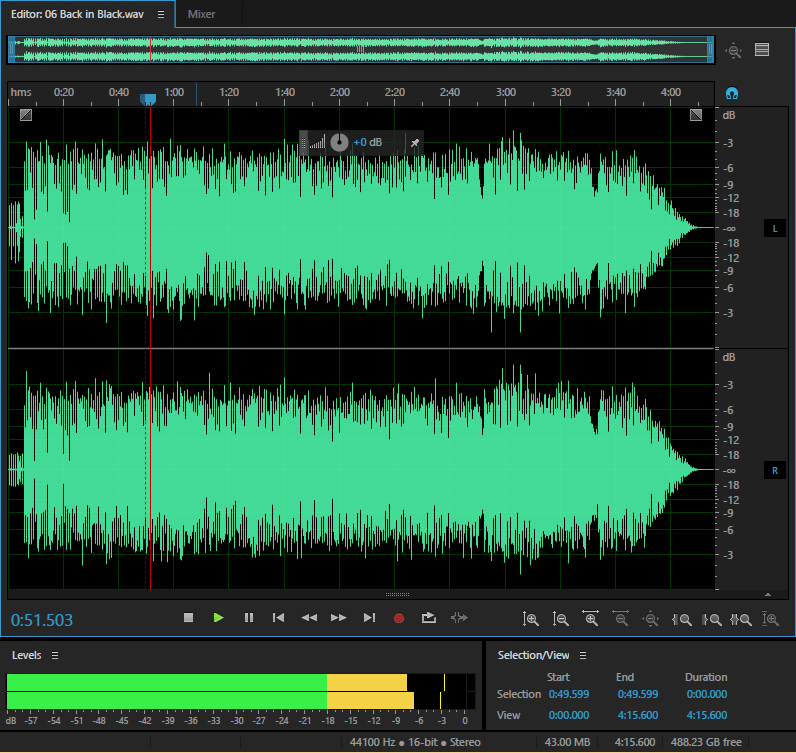
Conventional audio for playback is channel-based, with each channel playing as is and directed to a specific speaker or array of speakers.
Here's a screen shot of a 2-channel stereo LPCM .WAV file:
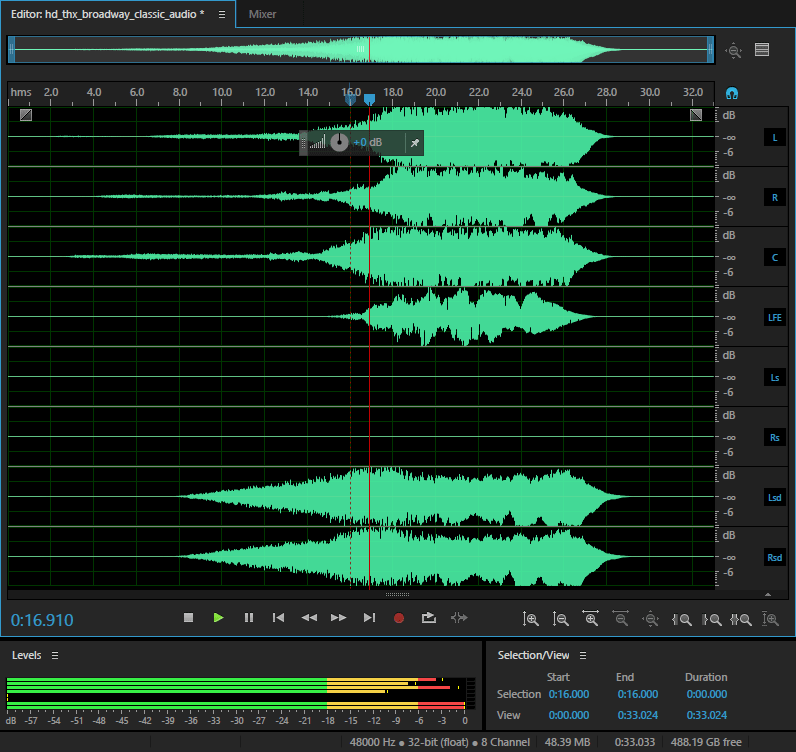
Here's an example of a 5.1 audio track from a Blu-ray style M2TS file. It looks like the stereo example, but with more channels of audio. For some reason it opened with an 8-channel layout.
Here is a simple example of object oriented audio, a multi-track layout in Audition.
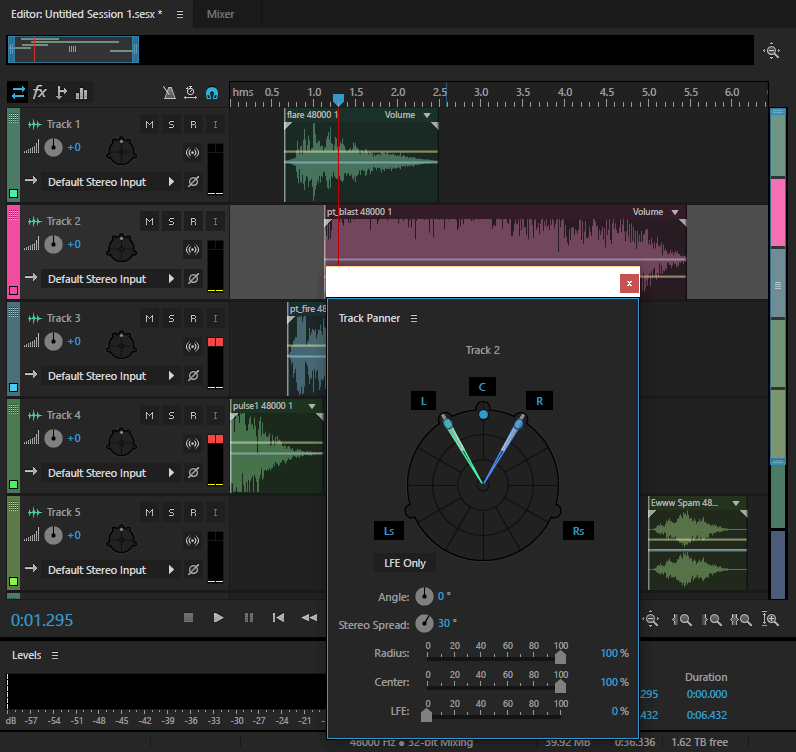
Each track can hold different pieces (or objects) of audio along the time line. Each track can have its own effects, volume controls, surround panning controls, etc. Those parameters can be changed along different points in the time line. This example is limited to a 5.1 audio layout. Audition doesn't have any simple options for creating surround mixes greater than 7.1.
Essentially object-based audio for theater playback (like in Atmos or DTS-X) goes from being like the first couple of examples to something more like the third example. The movie's playback mix can contain a bunch of different pieces of audio with each piece of audio containing its own data to control position, spread across one or more speakers, intensity level, etc. This allows the cinema processor, like a Dolby CP-850, to render the audio mix out to the theater's sound system according to however many speakers and amplifiers it may have. An entirely channel-based mix would not provide that flexibility, hence a lot of DCPs containing 5.1 and 7.1 mixes since 7.1 LPCM doesn't fold down to 5.1 in theaters.
Posted by Mike Renlund (Member # 4675) on 12-02-2015, 07:39 PM:
A good basic explanation is on Youtube:
https://www.youtube.com/watch?v=nT7KahOcxvA
(or search Youtube for "Dolby Atmos Explained")
Mike Renlund
Dolby Laboratories
Posted by Harold Hallikainen (Member # 5405) on 12-02-2015, 08:56 PM:
I did a presentation where I explained it like this.
1. In channel-based audio, the very talented mixer sends panning instructions to the mixing system that results in audio driving a 5.1 or 7.1 speaker system. There's a feedback path where the mixer makes adjustments such that it sounds as it should on the 5.1 or 7.1 speaker system. The resulting 6 or 8 channels of audio that are driving the amplifiers are recorded and distributed for playback in auditoriums with similar speaker configurations.
2. In object-based audio, the mixer does the same thing, adjusting panning controls to place individual audio fragments where desired on a larger group of speakers (typically up to 64). Instead of the resulting audio input to each amplifier being recorded, the mono audio fragment is recorded along with the panning instructions (generally the coordinates of the sound, its "extent," coherence, and other attributes. On playback, the rendering system interprets this metadata and executes the panning instructions for the individual auditorium, which will have different speakers in different positions. For example, the dub stage may have a speaker exactly half way down the left wall , but the auditorium does not. The auditorium rendering system will simulate this by driving speakers on each side of the desired position. Actual systems do a combination of channel and objects. The auxiliary data track has audio directed to specific speakers (perhaps 7.1) and then objects (mono audio fragments with associated metadata) that is added to the audio on these speakers plus others. There are lots of resources on panning for object-based audio. A fairly recent one is at https://patents.google.com/patent/US9197979B2/en .
Harold
Posted by Mitchell Dvoskin (Member # 751) on 12-04-2015, 10:41 AM:
Thank you everyone. It makes sense now.
Posted by Marco Giustini (Member # 4544) on 12-04-2015, 03:14 PM:
I don't know much about mixing but say the mixer uses some reverb, the mono track is then spread over several speakers to give the effect.
How is that handled by Atmos?
Posted by Kenneth Wuepper (Member # 1174) on 12-04-2015, 04:05 PM:
At last the "Perspecta-Sound" system of directing sound to a channel can be done well. The early system used "sub-audible" tones to direct the sound to different channels for projection into the room.
The tones were indeed audible as many can hear in the release prints of "White Christmas" encoded that way. When played without the proper filters, the bass is quite profound.
This new system seems to have great merit as the audible sound does not contain the encoding signals but rather is just controlled by them.
Posted by Harold Hallikainen (Member # 5405) on 12-04-2015, 10:38 PM:
In comparison with Perspecta, which, I think, steered a single audio channel (switched or panned?), object-based systems currently can have up to 128 simultaneous audio fragments, each individually panned based on instructions from the mixer and auditorium data (where the speakers are).
On reverberation, it appears that is largely handled through the "bed" channels. The bed channels consist of audio fragments that are directed to specific speakers or arrays of speakers instead of being "rendered" or panned based on XYZ position. In MDA, these are called "render exceptions."
Harold
Posted by Marco Giustini (Member # 4544) on 12-05-2015, 03:30 AM:
I see thanks.
So objects can only be panned. I guess maybe there is also a width control?
I'm just thinking of a sound panning around to then explode surrounding the audience. You're suggesting that this is currently done two tracks (pan and explosion) or maybe the object can be routed to the beds at a specific time?
Posted by Harold Hallikainen (Member # 5405) on 12-05-2015, 11:41 AM:
My understanding of all this is based on reading the SMPTE RDD on the Atmos bit stream and the MDA bit stream. The audio fragment can be sent to individual speakers or group of speakers through "bed channels" or "render exceptions." These are named speakers at specific locations. I've been (unsuccessfully) advocating use of the coordinate system to identify speakers for render exceptions. Instead, they are identified by name, and not all speakers are identified by name.
An object consists of a series of metadata elements that describe how a waveform that is pointed to by the metadata is to be played. The metadata contains such things as position, "extent" (how big), correlation, "snap" (should the object be rendered by the closest speaker instead of a group of speakers), and a bunch of other stuff. It appears to be extremely flexible.
My best description of this is that instead of distributing the audio for each speaker, we are distributing the audio fragments and panning instructions. On playback, these instructions are followed to pan the audio fragments as appropriate in the auditorium based on what speakers are where. If we had, say, 64 speakers that were all in the same location in every auditorium, we could distribute the audio pre-panned, just as we do for 5.1 and 7.1.
Since the speakers do not move between playouts in the same auditorium, it is possible to "render once, play many." This is what the USL CMS does. After ingest, the content is decrypted, rendered to multiple channels (currently up to 16) based on auditorium speaker positions, re-encrypted and saved for playback. At playback time, the customized channel-based audio is played that same as any other channel-based audio. "Prerendering" takes advantage of idle CPU time and allows for infinite complexity in the rendering since it need not be real time. The prerendering is actually considerably faster than real time since the processor is idle between shows.
Harold
Powered by Infopop Corporation
UBB.classicTM
6.3.1.2