This is topic Out of Virtual Memory in forum Digital Cinema Forum at Film-Tech Forum ARCHIVE.
To visit this topic, use this URL:
https://ft-forum.com/ft/cgi-bin/ubb/ultimatebb.cgi?ubb=get_topic;f=16;t=002516
Posted by Randy Stankey (Member # 64) on 12-07-2015, 11:58 AM:
We have a Christie CP2230 that's starting to give us trouble with virtual memory errors. We have had a Christie tech on site on site and he says he has never seen this type of error before.
Problem started about two weeks ago when we began getting warnings, "Virtual memory low."
Dismissing the warning (using the touch panel) and restarting the system (power cycling) usually cleared it.
This usually only happened in the mornings, at opening, but the warning occasionally showed up in the middle of the day.
Dismissing and restarting took care of the problem.
Last week, warnings started appearing more frequently and would pop up in the middle of the night when the projector was shut down. (from the touch panel)
The display would be locked up. No response from the touch panel. It required a cold start / power cycle to get it working.
This past weekend, we had a complete lockup in the middle of the day, requiring cold start to regain function.
The tech came in last week and upgraded software to v4.3.0(5)
He checked a couple of things but I didn't find out exactly what he did.
The other day, he instructed my boss to go into Windows, using a keyboard/mouse on the USB port to increase the amount of virtual memory available to the system but this has not helped.
It is my guess that we are having failures of physical RAM or physical storage.(HD or SSD). I suppose this is going to need some parts replaced.
Any ideas?
Posted by Pete Naples (Member # 761) on 12-07-2015, 01:25 PM:
Never seen that. Has your tech asked Christie?
What about deleting old software and log packages?
Posted by Steve Guttag (Member # 268) on 12-07-2015, 01:34 PM:
Haven't seen that one either...I would get clear of 4.3.0 (5). It was so bad that Christie pulled it within 2 weeks! 4.3.1 was subsequently issued and 4.4.0 (9) is available. I have only tried 4.3.1 (11). I generally give Christie a month of a version being in the field before loading it on...since they are one-way.
Posted by Randy Stankey (Member # 64) on 12-07-2015, 01:51 PM:
Seems like nobody has seen a problem like this.
Don't know if tech has called the mother ship yet.
It just locked up again at the start of the last show. Had to cold start to clear it.
Show ran normally afterward. It did not lock up at the end of the show but,min it locks up again, I will snap a picture of the TCP.
Posted by Ken Lackner (Member # 1002) on 12-07-2015, 01:55 PM:
I agree with Pete. The Christie TPC runs on Windows. Virtual Memory is hard drive space that is used to temporarily store working files if RAM is full. I would log in to the projector via FTP and see if there are bunches of software packages, backup files, and Interrogator log files in the root directory. All Interrogator files can be deleted if you don't need them and all but the latest software package and backup package can be deleted. I mean, technically you can delete all software packages, but if you ever need to reinstall the software for any reason, it's nice to already have it loaded so you don't have to go fetch it from somewhere.
Hope this helps. Please keep us updated!
Posted by Carsten Kurz (Member # 5396) on 12-07-2015, 04:41 PM:
Interesting. Randy - How old is this Christie?
As it is 'only' the TPC having that issue, I guess it's annoying, but not necessarily a show stopper. It could indeed be a defective component, or just a working memory being filled up. Christie should have means to find out the real reason.
- Carsten
Posted by Marco Giustini (Member # 4544) on 12-07-2015, 05:14 PM:
Is there a way to fully reinstall the TPC? Maybe replacing the CF card?
Posted by Dave Macaulay (Member # 813) on 12-07-2015, 07:56 PM:
You shouldn't dismiss it as "just" the TPC. The Christie TPC is an integral part of the projector, not an external control panel like a Barco DCTP. You can start a projector in an emergency using a TPC from a different one but that isn't totally simple.
Posted by Randy Stankey (Member # 64) on 12-07-2015, 10:14 PM:
The projector is three, going on four, years old.
Has just turned over to 8,000 hours on it.
On the last failure, I snapped a pic with my cell phone.
Not a great quality image but it's enough to document and time stamp the incident:
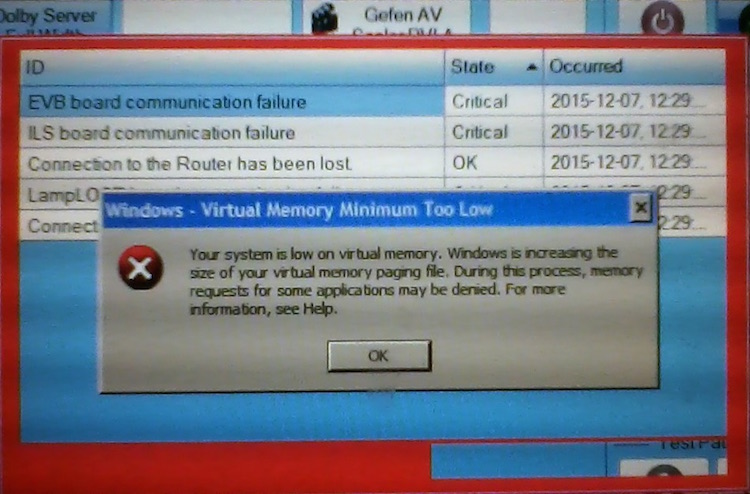
When it gets to this screen the TPC becomes unresponsive. The only way to fix it is to power the projector down and restart.
I have recommended replacing the CF card on the grounds that flash memory only has an average life span of 100,000 R/W cycles and that a few bucks spent on a new flash card is well worth the potential trouble it could save. It couldn't hurt? Could it?
I'm going to recommend to my boss that the software be updated to replace that depricated version and to have the system checked for old files and clean them out if necessary.
The boss comes in tomorrow morning so I'll be able to tell him then.
Posted by Marco Giustini (Member # 4544) on 12-08-2015, 04:56 AM:
Dave,
The TPC is a Windows computer. The error Randy posted is a Windows error, nothing to do with the projector. It may be a Christie application which is misbehaving but it won't have anything to to with the PIB, ICP, Enigma etc.
Randy,
You should be able to restart the TPC by unplugging and replugging it. That should keep your projector on while Windows reboots.
Any chance you got a virus or something on that TPC? I know you seldom plug a USB stick in it but sometimes you do for upgrades or logs and after all it's just a Windows PC.
This is why I'm wondering if Christie had an ISO file or similar which could be burnt on the CF to start afresh.
Posted by Dave Macaulay (Member # 813) on 12-08-2015, 07:34 AM:
Agree that it's a Windows computer.
But the projector will not start without one.
Connecting another S2 Christie's TPC allows you to switch on the projector, then you can unplug the TPC and return it to whence it came. Doing much else will cause confusion as the TPC is a bit more than a dumb terminal talking to the projector. It knows a lot about its projector and one can easily cause problems on both the "new" one and the original one if you go much past powering up the "new" projector.
Once turned on, a server can run shows because it communicates with the PIB and ICP, not the TPC.
Posted by Mitchell Dvoskin (Member # 751) on 12-08-2015, 09:24 AM:
Try googling "windows virtual memory minimum too low how to fix". This appears to be a somewhat common Windows issue unrelated to Cinema applications.
Posted by Randy Stankey (Member # 64) on 12-08-2015, 10:35 AM:
It was okay, this morning when I came in to work but, if it locks up again, I will try unplugging the TPC. I don't like doing a cold shutdown unless I have to. Sometimes it happens while the lamp is lit. This will save the wear and tear.
Good to know it's a 99% chance that the problem resides only in the TPC.
I feel a little bit quizzical to find out that such an expensive piece of equipment runs on Windoze XP.
I doubt the possibility of a virus. We never do anything to the projector except general cleaning and maintenance like changing filters and replacing the xenon lamp. The only time anything is plugged into any port on the projector is when technician does it or when he instructs us to. Nobody has done anything but daily operation and maintenance functions in about a year.
It interesting to imagine that problems like this might be solved by copying the projector's configuration files to a new CF card that contains a fresh, up-to-date operating system and swapping out the old CF card. If that's true, problems like ours might be solved in minutes. ![[Smile]](smile.gif)
Posted by Marco Giustini (Member # 4544) on 12-08-2015, 01:03 PM:
maybe it was not done intentionally. Maybe the technician USB stick had a virus on it, it can happen.
I'm sure Christie can provide either a new CF or an image to be burnt on the existing CF.
I'm confident it's a minor software issue on Windows.
Posted by Marcel Birgelen (Member # 6801) on 12-08-2015, 01:27 PM:
If you get this error message on any system running Windows and you're not clearly overusing the system, then this is an indication of some process is running rampage and eating all your memory. A software upgrade could be a solution, maybe it fixes a memory leak which causes this. It's most likely not being caused by a faulty CF card.
Posted by Randy Stankey (Member # 64) on 12-09-2015, 11:54 AM:
I took a pic of the system information page:
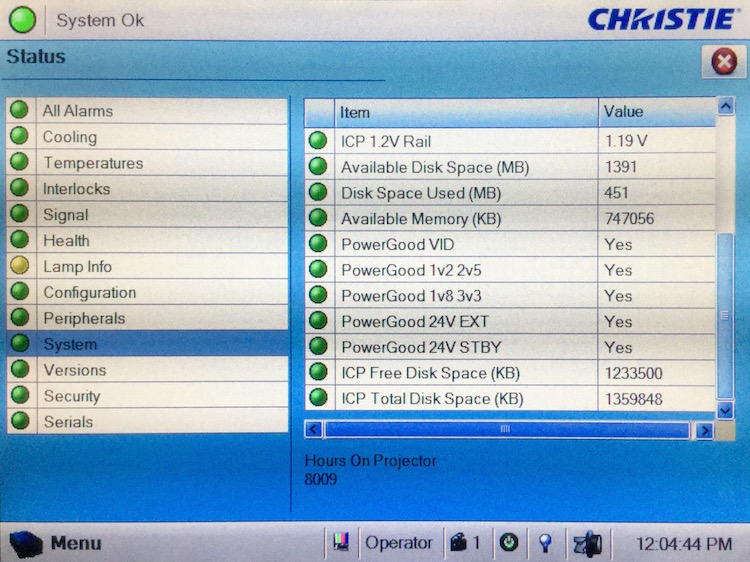
Which of the two readouts for disk space is the important one, here?
I wish I knew more about the details of this projector but working in a state facility means that my experience has been 90% "hands off."
This makes me think I should go back to "Projector School." ![[Wink]](wink.gif)
Posted by Steve Guttag (Member # 268) on 12-09-2015, 01:20 PM:
Nothing there looks wrong...just checked it against one of ours.
Posted by Randy Stankey (Member # 64) on 12-09-2015, 01:29 PM:
Then, I'm guessing that I need to wait until the next time the device locks up then try to get a look at this same screen again?
(Assuming that the lock-up doesn't prevent me from accessing this screen and that resetting it doesn't make the problem disappear again.)
Posted by Steve Guttag (Member # 268) on 12-09-2015, 03:43 PM:
I don't think that is it...I think it is with the Windows OS directly...not something within Christie.
Posted by Carsten Kurz (Member # 5396) on 12-09-2015, 04:40 PM:
That's what I meant further up. This is a display of the projector memory resources, not the TCP/windows itself, that it separate.
With the TPC being unresponsive through a memory shortage, it does not need to be a show stopper, as long as you're able to power up the projector and have all the necessary controls from the server then.
Send the screenshot to Christie, they should know what to do.
- Carsten
Posted by Randy Stankey (Member # 64) on 12-15-2015, 12:12 PM:
I just got word, today, that we'll be getting another touch panel from Christie.
We're hoping that this will solve the problem.
We've also noticed that automation cues aren't working properly, either.
Projector cues like lamp, input switch and dowser work okay but lights and sound cues don't work or, if they do, work erratically. We've been operating the lights and sound manually.
The lights and sound are operated through an AMX control system.
Since these things from the AMX aren't working, I wonder if the problem is coming from there.
Is is possible that a malfunctining AMX could be sending bad codes/commands back to the projector or automation that would cause problems like we are seeing?
I think I will get the boss's permission to give the AMX controller a cold reboot.
Posted by Tony Bandiera Jr (Member # 2365) on 12-15-2015, 12:35 PM:
quote: Randy Stankey
We've also noticed that automation cues aren't working properly, either.
Projector cues like lamp, input switch and dowser work okay but lights and sound cues don't work or, if they do, work erratically. We've been operating the lights and sound manually.
The lights and sound are operated through an AMX control system.
Since these things from the AMX aren't working, I wonder if the problem is coming from there.
Is is possible that a malfunctining AMX could be sending bad codes/commands back to the projector or automation that would cause problems like we are seeing?
Yes the problem is likely coming from the AMX system.
Depending on how the code for the AMX system was written, it could have become corrupted or buggy and is sending multiple commands to the system and causing the projector to keep acknowledging them which can eat up the TPC memory.
(A simple test would be to disconnect the AMX system and run totally manually from the server and projector to see if the problem goes away. Does the AMX communicate to the projector thru a serial RS232 connection? If so, simply unplug the RS232 cable at the projector. If the AMX is thru ethernet, you must disconnect or power down the AMX system to test.)
A cold reboot of the AMX would probably help...BUT make sure you have the AMX program code handy (and the software and know-how to reload it) because if you do a cold reboot and the master card/processor battery is dead (possible if it is more than 5 years old) you will end up with a brick. Luckily, unlike the TI board, you can simply reload the system program and recover.
If your AMX is the older Axcess platform I have extensive experience in programming them, so if you do have a copy of the program code you can email it to me and I can look it over for bugs. I can also review the newer Netlinx format, but have less experience with it.
One issue I had with a number of screening rooms I dealt with in the past with the Axcess systems was a previous programmer would have redundant or unused device code left in the mainline program which would cause random system crashes or erratic behavior. Deleting that code or changing it to a system call format cleared up the issues.
Posted by Randy Stankey (Member # 64) on 12-15-2015, 01:32 PM:
It's an AMX Netlinx NI-3000.
Is there a way to restart it without pulling the power cord?
(e.g. Using a pen point to press a hidden microswitch?)
Posted by Tony Bandiera Jr (Member # 2365) on 12-15-2015, 10:18 PM:
Ahh, the NI-3000 .....good unit.
Pulling the power cord and leaving it off for at least 20 seconds is the only way, unless you have a computer with the Netlinx Studio software (and know how to use it), the NS software has a system reboot option. (Technically that would be a warm reboot but that still often clears up some issues.)
Make sure that all of your connected systems are powered off during the reboot (masking motors, projectors, servers..dimmers would be ok to leave on) as AMX systems will often fire off random relays and commands during the final stages of the reboot process...(this is actually the master doing a self-test of all relays and ports) ....anything like masking motors (or film changeover dowsers) that should not ever see conflicting actions could be damaged..(usually such conflicts are only a second or two long, not really damaging but can scare the crap out of you.) Also note that any buttons or touchpanels that "light up" or otherwise provide feedback of what a device is set to will not reflect the ACTUAL status after a reboot. That corrects itself when said buttons/commands are executed.
A brief AMX tutorial: The older Axcess systems' program code runs in a "closed loop" style, where the program's "mainline" runs constantly from start to finish and repeats endlessly. As it runs, the mainline program is looking for inputs (commands) or "feedback" (usually levels or positional information) as it runs, and makes changes accordingly.
It is this constant looping action that can, with poorly written or redundant code, cause problems as actions are repeated or altered despite the system not being commanded to do so. A lot of that is avoided by using the "system calls" in the program... (I'll give an example of a call following.) basically a system call is a series of code written that does NOT run in mainline UNTIL the mainline command for that call is activated. (It can also be loosely, but not technically, be considered a "macro".)
An good example was the code I wrote for UC Irvine's screening room.. a call was written for an "Auto Show Start" which did all of the following in order: - Start Ipod for intro music
- After a time delay, set house lights down to "entr'e act"
- Start the projector motor
- open the screen curtain
- set masking to selected format
- start houselights to full dim
- open changeover dowser
- set cinema processor to format 10
If all of that code was in mainline, it could slow the response time of the system down, or create potential bugs or miscues if a valid command that was time-critical (think serial or other data strings to projector or server) was supposed to be executing while the program was reading that code. (Plus it makes making any changes to the system call code a lot easier and faster...I went thru several iterations of it to get the events timed to perfection.)
Netlinx was designed to eliminate some of the above mentioned issues, as it basically has a very streamlined "mainline" that it runs, all functions became very much like the system call protocol..it executes commands faster and more reliably.
It also eliminated the special 4-wire AXlink bus, replacing it with CAT 5. Easier and cheaper to run. (You will still see an Axlink 4-position Phoenix connector on virtually all Netlinx masters to allow some backwards compatibility.)
Posted by Randy Stankey (Member # 64) on 12-18-2015, 02:16 PM:
I'm starting to think that the problem lies in the AMX system, rather than the projector or TPC.
I pulled the power to the AMX and rebooted it but it seemed to cause more trouble than it solved. The fire alarm relay goes through AMX. When the thing rebooted, the fire alarm interlock tripped on the projector. It wouldn't run unless the fire alarm wires were disconnected and jumpered. The exhaust fan damper isn't working right, either. I'm guessing that the damper is also controlled by the AMX.
I gather, from what y'all are telling me, that the AMX has gone haywire. It is sending spurious messages back through the network, to the projector, and the projector's memory is filling up too fast because it has to respond to a million junk messages. Then, when we increased the amount of virtual memory for Windows on the TPC, it only masked the real problem. The AMX is still buggy and is still causing problems but they don't show up as often, except in the light, sound and environmental controls that are tied in though the AMX.
Sound reasonable?
Is there any way to go through the projector or the AMX log files to verify this?
Posted by Tony Bandiera Jr (Member # 2365) on 12-21-2015, 12:57 PM:
The projector might have log files in regards to network activity, but I haven't had the need to access them so Christie Digital would be the ones to ask.
The AMX system does not keep log files. There is, in the Netlinx Studio software (program for PC to write, edit and load code into AMX hardware) a so-called "debugger" that works about 10% of the time. (The code compiler does a better job of finding and pointing out code issues, but it only looks at syntax and logic, it can't find things like an error where your lights command actually flushes the toilet.)
Randy, try this to run your shows:
Disconnect the AMX system from the server AND projector ONLY. Use the server's TMS to run your shows. That will isolate the fault to either the AMX (most likely) or your projector/server.
You don't even have to run a full show if time is limited, just run various trailer packs or parts of shows to see if the projector and server are getting along.
As for the fire alarm trip and damper, as I said before during a reboot the AMX will test fire all relays and ports, and it will lose ALL track of system status and feedbacks. Basically ALL buttons have to be pressed and the devices that talk back to the AMX will have to send their status back to the AMX before the system will return to normal.
That said, you need an AMX certified programmer to come check the system, retrieve and reload the software to the AMX controller and fix any bugs. Without the Netlinx Studio software and experience it is not a do-it-yourself job.
Powered by Infopop Corporation
UBB.classicTM
6.3.1.2