This is topic Issues with Win10?? in forum Digital Cinema Forum at Film-Tech Forum ARCHIVE.
To visit this topic, use this URL:
https://ft-forum.com/ft/cgi-bin/ubb/ultimatebb.cgi?ubb=get_topic;f=16;t=002607
Posted by Dave Macaulay (Member # 813) on 03-04-2016, 03:21 PM:
Are there any serious problems using Win10 and the typical cinema tech applications - Dolby processor software, Barco Communicator/Commander, NEC DCC/DCCS, TI S1 and S2 software, QSC DCM control software, USB-serial dongles, etc... I have some clues for installing unsigned drivers and expect some grief there, but has anyone run into any insurmountable issues with Windows 10??
Posted by Leo Enticknap (Member # 534) on 03-04-2016, 03:29 PM:
Dolby Show Manager and NEC DCC (both S1 and S2) work for me under Windows 10 without any problems.
Posted by Leslie Hartmier (Member # 7053) on 03-04-2016, 03:47 PM:
We've had no trouble using any Dolby processor software, Barco Communicator, NEC DCC/DCCS, our VNC software, or any USB to Serial dongles with Windows 10.
I cannot speak for the TI S1 and S2 software, QSC DCM control software, or the multiplexer software, as I have not had cause to use them on Windows 10 as yet, although I did hear that the multiplexer driver is not supported in Windows 10.
Posted by Marco Giustini (Member # 4544) on 03-05-2016, 03:45 AM:
Everything seems to work, the only reason why I am not using W10 on my business computer right now is the forced upgrades.
The other day I turned on a laptop which had been turned off for a while and Windows performed the TH2 update. Result: computer unusable for 2 hours. This is unacceptable, MS should at least warn the customer. Had I been in a critical situation where my laptop was really needed I would have lost some money.
Until W10 does not allow the user to at least run the updates when they want, I will stay with Windows 7/8.
Posted by Lyle Romer (Member # 1266) on 03-05-2016, 10:17 AM:
quote: Marco Giustini
Until W10 does not allow the user to at least run the updates when they want, I will stay with Windows 7/8.
Doesn't the "professional" version let you manage the updates?
Posted by Mark Gulbrandsen (Member # 72) on 03-05-2016, 11:39 AM:
GDC reports that their current TMS program will run fine under Windows 10 but that they do not yet support it. Coming soon.
Mark
Posted by Marco Giustini (Member # 4544) on 03-05-2016, 12:34 PM:
Lyle,
Last time I checked you can "delay" the updates but apparently Windows will update regardless if you delay them too much.
Not sure if they changed this recently?
Posted by John Roddy (Member # 7348) on 03-05-2016, 01:30 PM:
From what I've seen, Win10 will download and install updates whenever it feels like it, and there's nothing you can really do about it. But it does all of that in the background, so it shouldn't affect anything you're doing. Installation of some heavy software may use up a significant amount of resources, but I can't imagine it being noticeable unless you're already pushing the limits of your hardware with several office programs open at once or anything like that. If it needs to restart the computer for any reason, it'll schedule that automatically for a time when it sees the computer isn't in use. You can manually override it if you head into the update settings screen and change it to the time you want. Of course, it won't actually give a notification when it's scheduled for that, so you'll also have to preemptively check on your own…
Yeah, updates suck. Then again, they were awful on 7 too. About equally as awful on 8 & 8.1, just for different reasons. It'd be nice if it were all linux-style. Just "apt-get update" and "apt-get upgrade" once a week or so, and you're done.
As for compatibility, I haven't noticed anything yet. Well, nothing that wasn't a problem with 7/8/8.1/not-XP, at least. Some USB-to-serial cables have been really mean to me, but what else is new?
Posted by Mark Gulbrandsen (Member # 72) on 03-05-2016, 01:44 PM:
I know the auto updates affected the connectability of a server I have here at home and it has also affected at least one commercial ticketing system. After the updates some of the local services do not automatically restart. Manually restarting them or setting them to delayed start (once you figure out which ones are being affected) fixes it.
Mark
Posted by Bobby Henderson (Member # 840) on 03-05-2016, 03:38 PM:
I don't know how many in this forum use Daktronics LED signs on marquees, box office windows, auditorium entries, etc. Their Venus 1500 control software will not work under Windows 10. It relies a bunch on 2008 versions of NET Framework and SQL Server.
The company is moving towards a cloud/web based application. Even there they have some catch-up work to do. Daktronics' web-based billboard software currently relies on Silverlight, which is a "deprecated" plug-in. Microsoft is not developing it any further, much less even supporting it.
Posted by Marco Giustini (Member # 4544) on 03-05-2016, 05:17 PM:
quote: John Roddy
But it does all of that in the background, so it shouldn't affect anything you're doing. Installation of some heavy software may use up a significant amount of resources, but I can't imagine it being noticeable
Two actual scenarios:
- Laptop was not behaving, I had to reboot it. Windows installed TH2 version, laptop offline for 90 minutes (new but slow laptop)
- Working in a hotel with slow broadband. Computer fans speeding up and internet even slower than it should be. In the meantime I try to work. 45 minutes later the fan slows down and the PC asks me if I want to reboot to install upgrades!
No, my computer installs upgrades when I tell it so! On Windows 7 you can be just notified - or you can disable them altogether. I do exactly what you suggest, I run Windows update every now and then, at the weekend, when I'm home, plenty of time and fast broadband.
Posted by Justin Hamaker (Member # 2165) on 03-05-2016, 05:28 PM:
One things you can do to delay auto updates is set your WiFi connection as a metered connection.
Although I have not used it extensively for service issues, I have not yet had any problems using VNC, DCC, Dolby CP750 Utility, or the TI program.
The most frustrating issue I've run into with Windows 10 is getting a WiFi network set to a trusted network. If it sets it as a public network, it can be difficult to get it to change to a work or home.
Posted by Marcel Birgelen (Member # 6801) on 03-06-2016, 02:00 AM:
There were some serious wireless problems with Windows 10. If you're on a network using Enterprise authentication using WPA2, it's still broken in many cases, because they stripped some ciphers from the authentication protocol.
The automatic updates in Windows 10 are the foremost reason I'm still not using it on most of my production machines. Getting stuck with a machine that decided to install some hours worth of updates (which sometimes also fail or even get stuck in a reboot loop) at will just isn't acceptable.
The most reliable way to disable automatic updates I've found until now is this one:
1. Start regedit (Windows key + R -> type "regedit" -> Run).
2. Go to: HKEY_LOCAL_MACHINE\SOFTWARE\Policies\Microsoft\Windows\WindowsUpdate\AU.
3. Create a new "32-bit DWORD" called "AuOptions" and put a value of 2 in "Value Data" and then click "OK".
3. Start the Settings app (Windows key + I).
4. Go to Update and Security -> Windows Updates. Enable the "Check for updates" option.
Disclaimer: Editing registry settings is considered "advanced stuff". No warranties and I'm not sure if this sticks forever, but until now it has worked. You can now just manually check for updates and plan for downtime instead of letting Microsoft decide for you. If your computer is part of a domain, the preferred way of doing this is via a GPO setting.
Posted by Mark Gulbrandsen (Member # 72) on 03-06-2016, 10:14 AM:
Instead of messing with editing the regestry which very few seem capable of, why not go into component services and just stop the service?
Mark
Posted by Steve Guttag (Member # 268) on 03-06-2016, 10:35 AM:
Because services can start up on the next boot cycle. Changing the registry kills the problem for good or until that registry is altered to undo what was done. It is possible to create a txt file with the registry modifications but save it with a ".reg" extension and merely double-clicking that file will do the registry modification. I did that for the stupid Win10 nagger (that is, how I modded all of mine...I didn't actually write the script since I'm not that into Windows registries). On all such computers that have had the Win10 nagger (GWX)...none have reported ever seeing it again.
Posted by Dave Macaulay (Member # 813) on 03-06-2016, 11:07 AM:
Well:
I made a backup clone of my win7 system and then did win10. I didn't get to actually trying any applications or device driver stuff... it screwed up Outlook so badly I reverted to the win7 backup.
- no contact lists (this is the real killer, I need them!)
- zombie RSS feeds: not working but can't be deleted - delete them and they pop back in a few seconds?
- I tried "repairing office" but it decided it wasn't activated... trying to fix that screwed up login so I have to use a hotmail account password to log in to windows (???).
Still hope to figure out what went wrong and reinstall 10...
Posted by Mark Gulbrandsen (Member # 72) on 03-06-2016, 11:14 AM:
Yes, it can be "disabled" in Component services. See the attached image.
Don't mess with the reg!
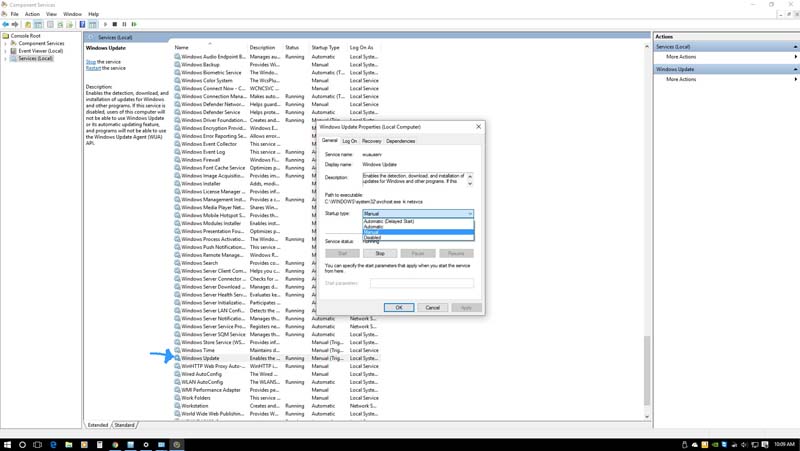
If you are going to leave update as-is I would suggest you go into the new Windows Update advanced settings and set them as shown in the image below.

Mark
Posted by Rick Raskin (Member # 1561) on 03-06-2016, 12:22 PM:
I disable Windows Update Service when upgrading to Windows 10. Elsewise it can hang in the checking for updates mode.
Posted by Marcel Birgelen (Member # 6801) on 03-06-2016, 04:01 PM:
Disabling the Windows Update Service is a bad idea:
- This service is still needed to update your computer. It's still wise to regularly scan for and deploy new updates, or otherwise you might find your system getting hosed due to some exploit while just browsing around on the Internet.
- Like Steve already pointed out, services might come back to life after a while and the Windows Update Service happens to be one of those undead things that can come crawling back out of the grave and hunt you when you least expect it.
Personally, I hate the current state of things, where everything seems to be needing updates all the time. I want to decide when and where an update gets deployed. It wouldn't be the first time someone, including Microsoft, rolls out an update that backfires.
Then again, if you look at the amount of systems out there being used by absolute computer illiterates and therefore massively being abused by trojans, botnets and whatnot, this "we own your computer" attitude of Microsoft, is probably better for "the Internet" at large...
Posted by Marco Giustini (Member # 4544) on 03-07-2016, 04:20 PM:
quote: Marcel Birgelen
Personally, I hate the current state of things, where everything seems to be needing updates all the time. I want to decide when and where an update gets deployed
I second that. Yes W10 can be tweaked to stop updates etc. but I want an official feature for that. I don't want to wake up one day and all the PC in the company have started upgrading because MS managed to re-enable the feature.
I want to be able to schedule my own upgrades - and to decide whether to do them or not.
That said I also second the other part of Marcel's post: I can understand why MS have decided to force the upgrades.
I hope that once W10 have reached a level of maturity maybe they'll add the feature to manage the upgrades. Hopefully they just want to make sure that all W10 machines on the globe reach that state before allowing more freedom.
Posted by Mark Gulbrandsen (Member # 72) on 03-08-2016, 06:04 AM:
The worst system for needing updates is Ubuntu. Combine Windows, Apple and android updates all in one, they never seem to ever end.
Mark
Powered by Infopop Corporation
UBB.classicTM
6.3.1.2