This is topic GDC Error Msg Question in forum Digital Cinema Forum at Film-Tech Forum ARCHIVE.
To visit this topic, use this URL:
https://ft-forum.com/ft/cgi-bin/ubb/ultimatebb.cgi?ubb=get_topic;f=16;t=002611
Posted by Jim Cassedy (Member # 4115) on 03-08-2016, 11:58 AM:
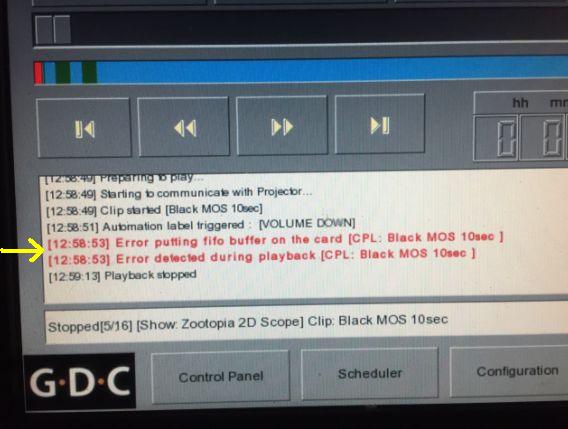
Can anybody give me an idea of what's going on here?
It happens occasionally on one of the GDC's I have to
deal with. I know what 'fifo' is, I'm just curious if
anyone has any idea why this sometimes happens.
(and what "card" does the message refer to?)
The same playlist/files works fine on other GDC's in
the same complex. All have identical software versions, etc.
Posted by John Roddy (Member # 7348) on 03-08-2016, 12:14 PM:
I have seen this error a lot, and it almost always means the media block is either completely FUBAR'd, or it has one foot in the grave and the other on a banana peel.
It's worth cracking open the server to check on the cooler fan for the card. GDC was using PCI slot fans in the past, and they had a nasty habit of locking up and breaking. Note that I'm assuming you have an SMB in that server. If it's an IMB in the projector, then it's a different story.
Posted by Mark Gulbrandsen (Member # 72) on 03-08-2016, 04:19 PM:
I agree with what John said. Doesn't matter if it's an internal media block or IMB, you get a similar error. IMHO, it's not worth fixing it either. I lost two older GDV servers with internal media blocks last summer and I replaced them both with SX-3000's instead. At least the SX-3000 has a serviceable media block and much more flexibility on data inputs. For 2 grand more than the replacement media block you get a whole new server with three year warranty. It uses so little power that over about seven years the power savings will offset the 2 grand cost in many areas. I have over 60 SX-3000's and they have had zero issues.
I turned one of the old GDC servers into a hardware raided TMS!
To be sure it's the media block send the logs to GDC tech support....
Mark
Posted by Mike Blakesley (Member # 26) on 03-08-2016, 05:39 PM:
Speaking of that TMS, when are you heading this way? ![[Smile]](smile.gif)
Posted by Mark Gulbrandsen (Member # 72) on 03-09-2016, 03:38 PM:
As soon as the snow departs.
Posted by Marcel Birgelen (Member # 6801) on 03-09-2016, 04:26 PM:
quote: Jim Cassedy
The same playlist/files works fine on other GDC's in
the same complex. All have identical software versions, etc.
Did it get stuck on the same file again after a reboot? If so, you might want to try to re-ingest the content, if it keeps happening at random, your mediablock is most likely dying.
Posted by Mark Gulbrandsen (Member # 72) on 03-12-2016, 12:55 PM:
The first clue (we now know) when Mike's media block died is that he completely lost Dolby 3-D capability. We assumed it was a DFC-100 issue because everything else worked normally for about 6 months until he got the same error as shown in this thread.
Mark
Posted by Marcel Birgelen (Member # 6801) on 03-12-2016, 04:27 PM:
Well, 3D has quite a higher bandwidth requirement on the output side of things than 2D, so maybe that's why it starts to show up during 3D shows first?
Posted by Mark Gulbrandsen (Member # 72) on 03-12-2016, 09:27 PM:
I agree Marcel!
Posted by Pur Wanto (Member # 8760) on 05-06-2016, 02:56 AM:
Dear Mr. Jim Cassedy,
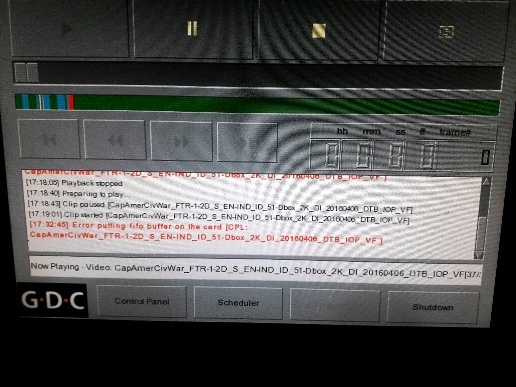
I am also problem like you, ERROR PUTTING FIFO BUFFER ON THE CARD. for the trouble shoot i am changed PCI card on the server with new one. for result have 2 show movie running well.
thanks,
Pur
Posted by Brad Miller (Member # 2) on 05-06-2016, 03:01 AM:
quote: Mark Gulbrandsen
It uses so little power that over about seven years the power savings will offset the 2 grand cost in many areas.
Let's hear your detailed math on this because I'm calling bullshit on that.
Posted by Steve Guttag (Member # 268) on 05-06-2016, 07:56 AM:
And then there is the presumption that the SX3000 will have no failures over 7 years, more than 2x its warranty...or you can buy warranty for the same price as the SX2001 after the same 3-years so the cost of upkeep would have still been cheaper to keep the SX2001 over buying a new SX3000 that ads no new features to the 2K venue other than HFR 3D...which given that Mike has Dolby 3D is a consideration.
Posted by Mark Gulbrandsen (Member # 72) on 05-07-2016, 07:18 PM:
If it does have any failures at least it's media block is repairable...
Brad,
Take this Ten Plex...
Add up 300 watts times 10... That equals Dolby, GDC, Doremi full size Servers.
Add up 50 watts times 10... this equals SX-3000 servers.
Now multiply those by ten years worth of power bills which will be a typical lifespan off all this gear. Which one is cheaper?
Mark
Posted by Monte L Fullmer (Member # 2797) on 05-10-2016, 04:54 PM:
Last month, had an SX-3000 die.
I was doing weekly reboots with powering down the SX-3000 unit, then powering down the projector to finalize a cold reboot.
That SX-3000 unit failed to wake up on the restart.
It was three years old.
Got a new one on the exchange/repair thing the next day from GDC, did the config and we were on the screen again.
Now, just waiting for the others to follow suit.
$8500 bucks for this unit .. definitely spendy if that had to come out of one's pocket...
-Monte
Posted by Mark Gulbrandsen (Member # 72) on 05-10-2016, 07:14 PM:
I have yet to have one go bad out of over 40 units out there. Not that they won't but the media block in them is repairable. I'd be interested in knowing if it was the computer board or the media block that failed.
Monet... 7200 dollars net. Not 8600.00! If you go to the right source they can be had for less then that.
Mark
Posted by Monte L Fullmer (Member # 2797) on 05-10-2016, 08:46 PM:
Price was on the emailed invoice from GDC.
Posted by Brad Miller (Member # 2) on 05-10-2016, 10:18 PM:
Mark,
ASSUMING the SX-3000 lasts 10 years, which is hardly proven, the numbers you quoted (which I am assuming are valid) it would take 10 years just to break even. What you forget is that if for example you have a SX-3000 in a Barco...now you are forced to leave that Barco powered on 24/7, so it becomes noticeably more expensive to run over that 10 year timespan. Also if you need to use some type of external raid box to get more storage on the unit, now you are pulling even more electricity and hard drives to keep changing.
Besides, when people are looking for a good return on their investment, the concept of spending more money now to "potentially break even in 10 years assuming the unit is still functioning at that time" is ridiculous.
Time for you to find a new selling point.
Posted by Pur Wanto (Member # 8760) on 05-12-2016, 07:47 AM:
Hi ALL,
Today we have problem again with other GDC Server SX2000, when the movie running at 1 hour 15 minute we found server error (picture & sound stuck).
for troubleshooting:
1. Reboot server and movie running again.
Anyone has any idea why this sometimes happens.
thanks,
Pur
quote: Pur Wanto
Dear Mr. Jim Cassedy,
I am also problem like you, ERROR PUTTING FIFO BUFFER ON THE CARD. for the trouble shoot i am changed PCI card on the server with new one. for result have 2 show movie running well.
thanks,
Pur
Posted by Mark Gulbrandsen (Member # 72) on 05-12-2016, 01:46 PM:
What version of firmware are you running? Also, check the SMART data on your hard drives through the admin panel. You may have a bad drive, especially if you have Seagates in there.
Mark
Monte,
Thats the list price! No one sells at that.
Brad,
You need to go back to math class! 300 watts for a full size server be it GDC, Doremi or Dolby vs. 50 watts. 50 watts is way more environmentally friendly.
Mark
Posted by Leslie Hartmier (Member # 7053) on 05-12-2016, 03:05 PM:
Pur Wanto,
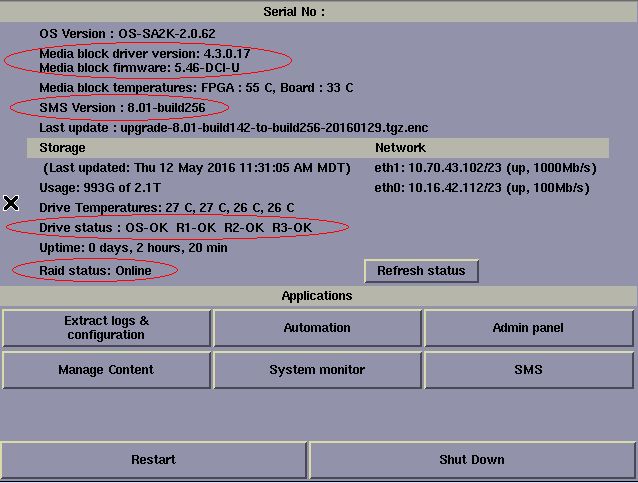
As Mark mentioned, the first step is to find out what firmware version you are running, and to look in the Control Panel to see if all of your hard drives are coming up as 'OK.'
I have included an image of the Control Panel for an GDC non-AR with the things you'll want to check. That is from a server that is up to date on the released firmware, so all the version numbers are the latest.
Posted by Pur Wanto (Member # 8760) on 05-13-2016, 07:42 AM:
Dear Mr. Mark & Mr Leslie,
This is my server ![[Frown]](frown.gif)
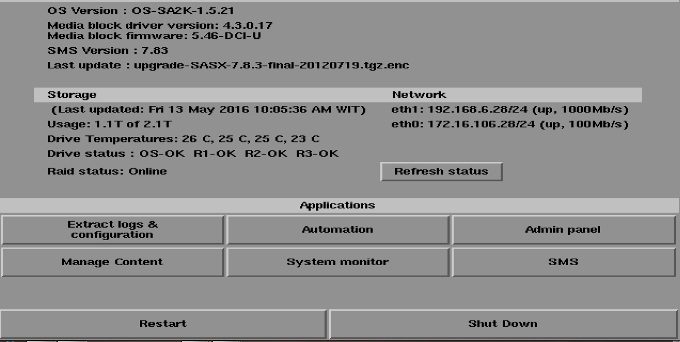
yes, for HDD storage i am using Seagate.
thanks,
Pur
Posted by Steve Guttag (Member # 268) on 05-13-2016, 11:13 AM:
I would definitely change out the HDD to Hitachi. I'd also suggest getting to a more modern OS. 8.01 build186 at a minimum. One thing else you get on the Control Panel display is the current temp on the Mediablock. If that gets into the 70C range, you will have playback issues and eventual mediablock failures.
Posted by Mark Gulbrandsen (Member # 72) on 05-13-2016, 11:27 AM:
What Steve said... You are still running non DCI firmware and pretty darn soon it will cease to play back. 7.83 is not compatible with the SMPTE format DCP's thata re now beginning to show up. I also have one stubborn customer that has a six plex that refuses to update. Pretty soon he'll have to close, buy warranty upgrades for all six servers then have me upgrade them and then reopen his location. Some people...
EDIT: Since you are in Indonesia I am not sure you are on the same playback standards we are. You may want to check with your nearest GDC dealer or distributor to see what they recommend but for sure replace those Seagates before you do anything else.
Mark
Posted by Leslie Hartmier (Member # 7053) on 05-13-2016, 03:49 PM:
Pur,
One thing I might caution you about is that though you really SHOULD update to 8.01, some of the IMBs for the SA-2001s/SX-2000s/SX-2001s had faulty ADSP chips, which will mean that if you have one of them, you will end up with no sound.
In case you might think it is an isolated incident, out of fourteen GDC content servers, I replaced five IMBs.
Yes, I know enough that Mark will mention how none of the machines in his domain have ever had such a terrible problem, but I assure you, GDC is who brought this up to me in 2014, not the other way around, and it's possible that any content servers with 7.83 might still have IMBs with the faulty ADSPs.
In our case, we were lucky that the hardware was under warranty, but I'm going to say that even if you do not maintain a hardware warranty, leaving it on 7.83 might mean you cannot run all content due to the shift to using SMPTE, and upgrading your servers to 8.01 might mean having to replace the IMB so you have sound.
Also, GDC states that the HFR servers and the IMSes do NOT have the faulty ADSP, and that has been our experience, as well.
I know, this is not part of the main thread, and I hope I have not hijacked it, but when I see systems with 7.83, I think it worthwhile to bring up the possible complication of upgrading.
Have a great day,
Leslie Hartmier
Posted by Mark Gulbrandsen (Member # 72) on 05-13-2016, 07:48 PM:
Good point Leslie! I have only lost two internal Media blocks that were in service. Both were replaced with SX-3000. All the IMB's chug on, but they also all got regular updates and still do. I also found one defective internal Media Block that would not update to 8.01... but that was replaced under warranty and was not ADSP related. The loopback jack on it was dead. The only sound issues any sites ever experienced was the bleed over from the narration track. Rebooting fixes that and it was a known bug in a certain FW version.
Mark
Posted by Pur Wanto (Member # 8760) on 05-14-2016, 08:13 AM:
Dear Mr. Steve, Mr. Mark and Mr. Leslie,
Thanks for suggestions and advice to me.
I should to be patient due to the extended warranty is still in progress with my boss and awaiting approval from our management.
Thanks,
Pur
Posted by Mark Gulbrandsen (Member # 72) on 05-14-2016, 05:30 PM:
Please be aware that extended warranty does not cover hard drives! You have to buy those your self.
Mark
Posted by Pur Wanto (Member # 8760) on 06-12-2016, 12:52 AM:
Dear All,
i find error Degraded Array.
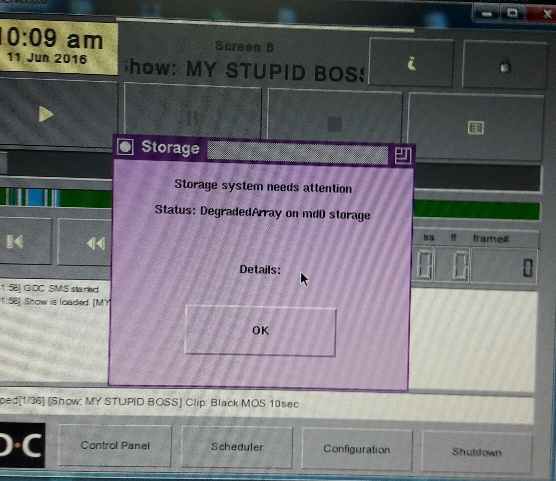
anyone has any idea why this sometimes happens.
thanks,
Pur
Posted by Frank Cox (Member # 6258) on 06-12-2016, 01:06 AM:
One of your hard drives has quit. If another one quits, you're out of business until you get it replaced. So you want to replace them as soon as possible.
I've replaced all the hard drives in my GDC server twice, so it's not an uncommon problem.
Posted by Pur Wanto (Member # 8760) on 06-12-2016, 01:26 AM:
Dear Mr. Frank,
for replace all the Hard drives, can i buy byself? or i should buy to GDC dealer or distributor? because my GDC server out of warranty.
Thanks,
Pur
Posted by Frank Cox (Member # 6258) on 06-12-2016, 01:33 AM:
I don't really know. When I replaced mine I just ordered a new set from the company that I use to handle my equipment maintenance. They sent me a new set of hard drives that was pre-formatted and ready to go. I removed the old ones and put the new ones in, then booted the server up and loaded all of my content back in. And there was literally nothing more involved than that. Didn't even need a screwdriver and didn't enter any passwords either. The actual changing of the hard drives took five minutes, including the time that it took to open the box that they came in.
I don't know if you can use off-the-shelf hard drives in that server but if you can then you'll have to format them yourself. Maybe the server can do that too; I have no idea since I've never had to do it.
Posted by Pur Wanto (Member # 8760) on 06-12-2016, 01:45 AM:
Dear Mr. Frank,
owh oke Mr. frank, thanks for your reply.
thanks,
pur
Posted by Jim Cassedy (Member # 4115) on 06-12-2016, 12:57 PM:
Pur-
I got the same error message on a server about a month ago.
GDC had me do some disk diagnostics, and they determined
that for some reason, the drive had been 'kicked out' of the
system. They said there could have been several reasons for
this, ranging from just a momentary glitch to some sort of
actual disk problem.
In my case, they talked me into how to do all the disk
diagnostics on the 'failed' hard drive, and when the results
came back with no errors, they had me add the 'bad' drive
back into the RAID array system.
(You need to do this overnight, because it takes 4 or 5 hours)
I added the 'bad' disk back in, and over the next several days
I did diagnostics on it every morning when the system got
powered up until I was sure the drive was 'stable'
GDC said I should only worry about getting a new hard drive
if it starts acting up again. That was over a month ago, and
I've had no more error messages or problems since then.
To do all the disk & RAID diagnostics you need to get into
the ADMIN menu.
The rest of the procedure is too detailed to go into here.
Most GDC servers here in the US, come pre-loaded with a set
of GDC training videos. I would suggest that before you go out
and start buying new hard drives, you check your server to see
if you have them and then watch these three videos:
#13 "Admin Panel Overview"
#14 "Identifiying A Failing RAID Drive"
#15 "Removing & Adding RAID Drives"
They will tell you everything you need to know.
(They might be available on You Tube. Try searching for them)
If you don't have them, give GDC tech support a call. They were
very helpful to me.
Posted by Pur Wanto (Member # 8760) on 06-18-2016, 06:59 AM:
Dear Mr. Jim .C
Thanks very much for your help, now i already getting a new hard drive (3 pcs). how long time for cread new raid array? 4 - 5 hour or more?
thanks,
Pur
Posted by Mark Gulbrandsen (Member # 72) on 06-18-2016, 12:40 PM:
If they are 1TB drives it does take about to 5 hours. Longer for larger drives. But you can load content while raid is creating.
Mark
Posted by Pur Wanto (Member # 8760) on 06-19-2016, 05:08 AM:
Dear Mr. Mark,
My hdd drives is 2 TB. and my question:
1. SX2000 can upgrade using 6 TB(2TB+2TB+2TB) or no?
2. Do you have gdc training videos or manual book for guide create new raid array?
Thanks,
Pur
Posted by Mark Gulbrandsen (Member # 72) on 06-19-2016, 04:22 PM:
Yes, the GDC can accept 2 tb drives in all three positions. You will end up with about 4tb of storage space. I will post the procedure here tomorrow morning complete with pages form the manual, I would do it today but I am not at home. I will also talk to GDC and see if they would allow Brad to post some of those videos on line here, there are two of them on YouTube but not the one on creating a new raid.
Mark
Posted by Leslie Hartmier (Member # 7053) on 06-19-2016, 05:13 PM:
All 25 videos can be found on GDC's FTP server, in english, portuguese and spanish, if you have the FTP credentials.
It would be a reasonable request to see if they can be hosted elsewhere as well. We have them sitting on our company FTP server for our managers, after getting approval from GDC.
If I end up chatting with them today or tomorrow, I'll ask as well.
Leslie
Posted by Pur Wanto (Member # 8760) on 06-19-2016, 09:59 PM:
Dear Mr. Mark & Leslie,
Thanks for your help and reply. My new HDD Drives now already created new raid array.
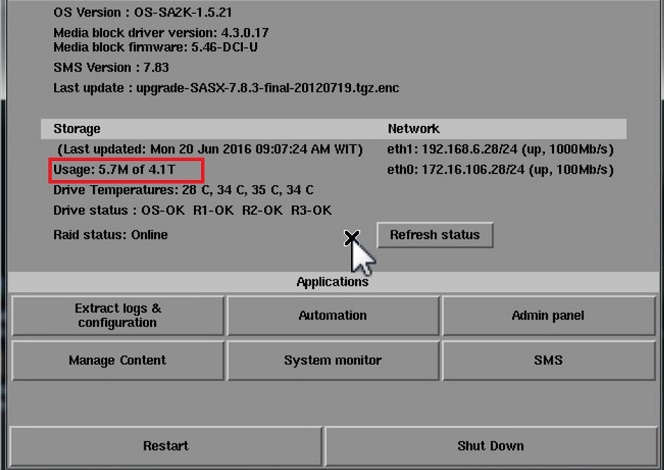
after created new raid array, now hdd drives have detect 4.1 T and raid status already online too. to do that i need 10 hour .
thanks,
Pur
Posted by Mark Gulbrandsen (Member # 72) on 06-20-2016, 12:30 PM:
Our,
You can still ingest content while raid is creating. Raid creation still goes on in background while content is ingesting.... You can also move sets of drives, inserting them n any order between the GDC servers and then reboot and have that raid and no building is necessary. Easy way to move content from one screen to next screen...
Mark
Posted by Steve Guttag (Member # 268) on 06-20-2016, 12:44 PM:
So can you play content while it is initializing? On Dolby's you can do most anything while it is initializing the RAID...play, ingest, transfer. I've never done it on a GDC and the ones I've updated to 4TB capacity, I let complete overnight.
Posted by Leslie Hartmier (Member # 7053) on 06-20-2016, 02:39 PM:
You can ingest while the RAID is initializing, but simply speaking from a computer nerd point of view, it is a terrible idea. Ingests take an unholy amount of time to accomplish on a GDC server while rebuilding (like, a twenty minute ingest can and will take HOURS). Also, the RAID initialization will take much longer, as the blocks that are being copied to then require that they be gone over again, which means that the logic will not be focusing only on locking in the drive to drive parity.
Additionally, faffing around with ingesting increases the chance that the content gets corrupted (normally not an issue, as the logic gives higher priority to rebuilding the blocks that are being written to, but...)
So, simply put, why ingest when you may just have to ingest again? Why slow down the RAID rebuild when it's less efficient to do so? Dolbys are FAR better at it, as they use beautiful hardware RAID cards, but they are not immune to all the issues above.
As for running content? Since our priority is picture perfect presentations for increased profit, why would we not just cancel a show that we may have to refund tickets for anyway, and not gain a reputation for not always giving our best?
Again, and just for reference, I don't actually prefer Dolby - yeah, yeah, there might be something wrong with me - but they have far less problems with ingesting while running content. We still don't allow our locations to do so.
Additionally, even if the RAID is trucking along, due to Doremi and GDC using software RAID, the CPU does a lot more work, increasing the stutter of the playing content.
Me? I would rebuild the RAID after the location closes, or if the shows are cancelled, I'd rebuild the RAID then. We do not ingest or run shows while rebuilding. We're not interested in the cost in reputation.
Leslie
Posted by Mark Gulbrandsen (Member # 72) on 06-20-2016, 04:19 PM:
Yes, you can Steve.... The way it works is it throttles back any other RAID processes in service at the time. Playback has priority over all other functions on a GDC. They are just using on board INTEL software raid. There DID at one time exist a build issue that if you were playing back 4K and rebuilding a RAID the picture would skip, but was a pre-build 7.83 non DCI version and was when 4K was first introduced.
If you use drives that meet GDC specs then all should be well. I have yet to encounter a RAID that doesn't allow one to do work while the raid is building. They all do it in the background. Just don't shut down the server or the rebuild process may start all over again, but even later Dell raids can remember where they stopped building and when powered back up the building continues right along as though nothing ever happened. Perc 5 and 6 Raid Cards can do this as well as most LSI raid cards AS LONG as they have correct memory installed and battery back up. None of the commercially available cinema servers have ever included battery back up on raid. Don't need it just for playback and the data is considered non critical.
Mark
Posted by Steve Guttag (Member # 268) on 06-20-2016, 04:50 PM:
Leslie,
You'd be horrified to see a couple of our sites then! With Dolby DSS...while show was running, ingest AND transfer on the same server! Dolby's servers are far from perfect but on the RAID department, they got the goods.
Posted by Leslie Hartmier (Member # 7053) on 06-20-2016, 05:23 PM:
Steve, you MONSTER.
Leslie
Posted by Brad Miller (Member # 2) on 06-20-2016, 05:29 PM:
We do that all the time. All non-Dolby servers darn near choke at the mere thought, but Dolby's DSS200 doesn't slow down even in the slightest bit (and definitely no playback stuttering).
Posted by Leslie Hartmier (Member # 7053) on 06-21-2016, 01:36 PM:
That is reasonable, but since we have GDC, Dolby and Doremi, for the sake of consistency, we have all locations do everything the exact same way.
You never know when you might have to kidnap a manager and press them into indentured servitude at a different location with different hardware, eh?
Leslie
Posted by Steve Guttag (Member # 268) on 06-22-2016, 06:07 AM:
Ah, the least common denominator approach. Guarantees that you get the least of all features of the systems. Though I completely understand looking for consistency.
Posted by Pawel Latkowski (Member # 9645) on 09-06-2016, 11:51 AM:
Hi,
Can you help with this problem: HOST AND SM CERTIFICATES DO NOT MATCH
Powered by Infopop Corporation
UBB.classicTM
6.3.1.2