This is topic SONY SRX-R515 blue image on screen in forum Digital Cinema Forum at Film-Tech Forum ARCHIVE.
To visit this topic, use this URL:
https://ft-forum.com/ft/cgi-bin/ubb/ultimatebb.cgi?ubb=get_topic;f=16;t=002633
Posted by Mike Moreno (Member # 4887) on 03-28-2016, 09:23 PM:
Hi guys.
Im having some issues in one SONY projector.
It start to project blue image and i dont know what can be the problem.
i check some parameters comparing with another sony projector but they look the same.
you can si the diference in the same scene from the bad projector and anotherone
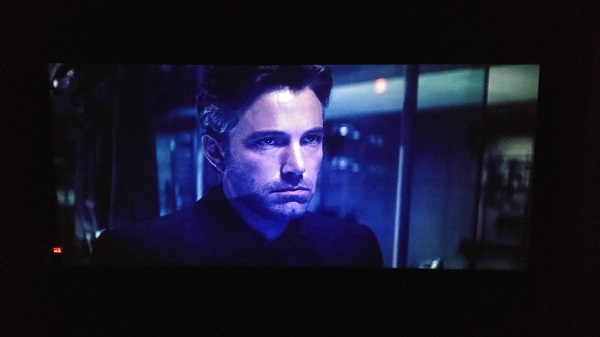
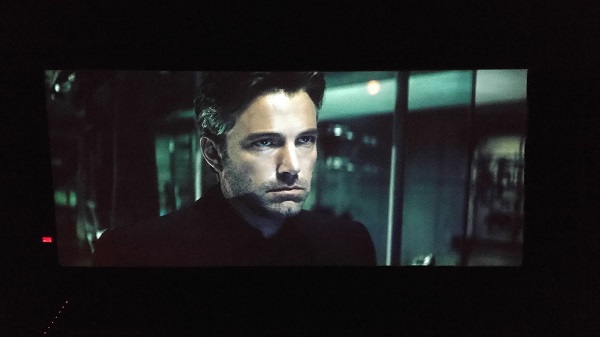
can you help me please
thanks guys
mike morneo
Posted by Marco Giustini (Member # 4544) on 03-29-2016, 04:01 AM:
it seems your blue halo is mainly at the centre of the screen. Play some test patterns, red, green, blue and white. Your light engine - or T-block - will probably need to be replaced.
Posted by Carsten Kurz (Member # 5396) on 03-29-2016, 04:48 AM:
What type of projector is it, how many hours on it's counter?
- Carsten
Posted by Carsten Kurz (Member # 5396) on 03-29-2016, 06:20 AM:
Oops, sorry, it's in the thread title.
First, order a service technician to do a good cleaning of the unit.
I have never seen blue center-blotching as a result of dirt in a 515, but you should still give it a try. The 515 has suboptimal air inlet filtering and needs regular cleaning in 'normal' environments.
Also, play a grey pattern to see a discoloration pattern over only part of the screen or the full screen.
Again, how old is this unit/how many operating hours?
- Carsten
Posted by Marco Giustini (Member # 4544) on 03-29-2016, 05:32 PM:
also, check TEST1 pattern and compare with grey-10 full. TEST1 does not take into account the colour calibration and uniformity.
Posted by Mike Moreno (Member # 4887) on 03-30-2016, 08:23 PM:
This projector has 12043 operation hours
Posted by Carsten Kurz (Member # 5396) on 03-31-2016, 06:17 AM:
That's enough to cause issues. Do you know wether it is running with all 6 lamps on, multiple shows a day? The maintenance manual has cleaning instructions. I would first open the side panel, remove the fan panel, then check with a torch the RGB filters (Sony calls them Lens 2 R/G/B) for dust and grease buildup.
If this unit never had a regular maintenance cleaning, better get an experienced Sony tech to do a full cleaning.
From my experience however, it does look more like a permanent damage than just dirt, but you may be lucky.
The Lens 2 R/G/B panels can be extracted rather easy (single screw) and reinserted without any realignment necessary, and be cleaned with standard tools like high-grade isopropanol or ethanol and optical wipers. Try this, and see if there is improvement. I suggest to get the maintenance manual first.
- Carsten
Posted by Mike Moreno (Member # 4887) on 04-19-2016, 03:18 PM:
the R/G/B panels are clean.
i think it has somethig bad ![[uhoh]](graemlins/uhoh.gif) the support tech will come next week in order to check. but they said is a bad T-CORE.
the support tech will come next week in order to check. but they said is a bad T-CORE.
![[Confused]](confused.gif)
Posted by Ariel Vocal (Member # 6912) on 04-30-2016, 06:32 PM:
Hi Mike, a friend of another cinema had the same problem, but in the image existed yellow spots, apparently is the SRXRD805 component, but SONY say they do not replace just that part if not the whole unit T-CORE, and they it is extremely expensive ... above $us 18K!! ![[Eek!]](eek.gif)
You managed to solve the problem? or at least know what the problem was?
Regards!
Posted by Marco Giustini (Member # 4544) on 05-01-2016, 04:10 AM:
The T-core is all glued together that's why it cannot be repaired.
Powered by Infopop Corporation
UBB.classicTM
6.3.1.2