This is topic Post Production Projectors in forum Digital Cinema Forum at Film-Tech Forum ARCHIVE.
To visit this topic, use this URL:
https://ft-forum.com/ft/cgi-bin/ubb/ultimatebb.cgi?ubb=get_topic;f=16;t=002650
Posted by Alan Gordon (Member # 9434) on 04-19-2016, 07:24 PM:
I've been investigating upgrading my color grading suite to have DCI projection.
So far I have found the DP2k-P and DP4k-P projectors from Barco. Does Christie have anything similar that would be suitable for color critical viewing? NEC? Sony?
On the lower end, would the DP2K-8S might also be usable considering the screen size will surely be on the smaller size?
Thanks for any input!
Posted by Steve Guttag (Member # 268) on 04-19-2016, 07:56 PM:
For Christie, I'm unaware of equivalent projectors BUT they DO have high-contrast lenses and there is nothing to say that the Barco and Christie have the same contrast to begin with. Christie does have an aperture set available to potentially increase contrast. NEC has a single aperture they included in their non-S2K projectors (or lasers).
I would NOT consider the S2K projectors for critical viewing (anybody's). They have all of the negatives of the 4K chip (low contrast) without any of the benefits.
Posted by Marcel Birgelen (Member # 6801) on 04-20-2016, 12:18 AM:
Christie doesn't offer a specific set of "Post Production" projectors. I'm also not so sure what the Barco "-P" series brings to the table, besides a "high contrast lens", that's also available for their normal DCI projectors. It includes an ACS-2048 alternative content switcher, which is, as far as I'm informed, end of sale and if you're a post production house, you probably have lots of other means to route alternative content to your projector already...
In any case, I would always go for a 3DLP setup for DCI color grading, so that eliminates Sony. Although some chains are squarely in bed with Sony, TI 3DLP 2K setups have the biggest install base.
Posted by Marlon Martins (Member # 8823) on 04-20-2016, 01:32 AM:
The DP2K-P specs says 1,2” chips (2.500:1 contrast) and 1,38" on the DP4K-P (2.300:1)
isn't that the main "extra" compared to 0,69" ones (1.850:1 - 10S, 8s)?
Posted by Steve Guttag (Member # 268) on 04-20-2016, 05:55 AM:
It is my understanding that the entire light path is improved, where possible to improve contrast...not just the higher contrast lenses, in the name of getting more contrast out of the projector. I've never sold/installed one so I can't say for sure however, I'm positive that it isn't just the higher contrast lenses. Which, if you have the light are advisable anyway.
Posted by Dave Macaulay (Member # 813) on 04-20-2016, 06:45 AM:
The price for "P" projectors suggests there's more going on than just using a high contrast lens. We have not installed one yet. We have put several Barco "cinema" projectors in CGI and animation shop screening rooms though. Final grading in Toronto is often done at Technicolor, they probably have a "P" projector - although I haven't seen their room. Not sure what Deluxe has here now. If you want to do critical grading and such the P projector may be worth the price?
Barco offers a "post-production" version of the Communicator control software for optimizing image color and gamma etc on any of their cinema projectors.
I would not recommend a .69" chip projector for critical viewing (not that we haven't sold a few to production shops). If you want/need 4K, the 4K DMD chip loses some contrast much like the .69" 4K because the DMD mirror size and density is the same - the .69" 2K chip is basically 1/4 of a 1.38" 4K chip.
For Barco's cinema series projectors: the "s" series do not have DVI inputs. You can use an SDI input/decryptor board for SDI only or an integrated media block/server. These have HDMI, SDI, and/or DisplayPort inputs (different ones have different options).
Other Barco models do have the dual DVI inputs (but the Barco ICMP integrated server disables them and adds its DisplayPort inputs).
Using a Sony SXRD projector - not sure. They do have some issues with the imager deteriorating - with color shift - in cinema use.
Other cinema xenon projectors with TI DMD technology are pretty much the same inside, and perform pretty much the same. Lenses will be different... but you may get the same lens in a different mount from different brands.
I have had no major issues with support from any manufacturer for cinema projectors.
Phosphor laser - a different light source for a standard 3-chip DMD light engine as far as I've seen.
3P laser - color gamut may/should be extended; with modified optics (ie IMAX laser) you can get impressive contrast/low dark level but most use the standard DMD prism with typical contrast/dark level.
You can talk to Dolby about their projector, it's built by Christie with "different stuff" inside (last time I asked, Dolby was not discussing just what is in there). Supposed to have extended color gamut and extremely high contrast. The black level is certainly very impressively dark. Not sure if they are selling them to anyone except in a "Dolby Cinema".
Posted by Steve Kraus (Member # 476) on 04-20-2016, 10:09 AM:
Wouldn't it make good sense to judge picture quality on equipment comparable to the best but still ordinary cinema gear?
Posted by Dave Macaulay (Member # 813) on 04-20-2016, 10:20 AM:
Somehow that logic doesn't play in studios. They use sound systems no sane owner would pay for and their projector colors are calibrated with equipment few sane techs would pay for.
However - many apparently sane people pay ludicrous sums for "super premium" cables claiming magical ability to perform better than the standard cables used in every recording, mixing, and grading suite I've been into. How do they recover the magic lost in those studio cables?
Posted by Marcel Birgelen (Member # 6801) on 04-20-2016, 01:39 PM:
quote: Marlon Martins
isn't that the main "extra" compared to 0,69" ones (1.850:1 - 10S, 8s)?
It's essentially a DP2K-B / DP4K-B series projector, they also come with 1.2" DMDs. I somehow doubt that they built a custom light engine for a device with such a small target market.
From what I've been told, (and yes, that info might be incorrect or incomplete, so feel free to enlighten us), it's essentially a normal DP2K/DP4K projector fitted with a "high contrast" lens right out of the box, a customized version of the communicator software, an End-of-Sale input switcher as a "free" giveaway and it has been tested to meet higher specifications. So, essentially the best of the batch are destined to become a "P-series", while the rest is good enough to become an ordinary DCI projector.
So if this is just it, I'm not sure if this is really worth the premium.
quote: Steve Kraus
Wouldn't it make good sense to judge picture quality on equipment comparable to the best but still ordinary cinema gear?
I guess it would, but there's so little money in good sense, so just let's not talk about it, ok? ![[Smile]](smile.gif)
Posted by Alan Gordon (Member # 9434) on 04-20-2016, 04:20 PM:
Thanks for all the info guys! Huge help.
Yeah the logic is always do the technical work on the closest to reference as possible, whether it's audio mixing or color grading. That way when cinemas are a little off spec you've got the middle ground and it should still be very watchable.
That said, I also think that if a projector can hit DCI color primaries (Which it seems pretty much all of the cinema projectors do) it should still be able to accurately represent the image seen in theaters.
I've also heard to stay away from Sony's from grading since they're not DLP. Why is that if they can still hit the right colors?
Posted by Ian Freer (Member # 1940) on 04-20-2016, 04:54 PM:
quote: Alan Gordon
I've also heard to stay away from Sony's from grading since they're not DLP. Why is that if they can still hit the right colors?
I'm only guessing but;
quote: Dave Macaulay
Using a Sony SXRD projector - not sure. They do have some issues with the imager deteriorating - with color shift - in cinema use.
This suggests a Sony would probably be fine for a while, but eventually they are prone to the colours drifting unacceptably for grading (and even too much for cinema use)...
Posted by Marco Giustini (Member # 4544) on 04-20-2016, 05:44 PM:
The 4K-P machine, which as said is a 23B, outputs about 6000 lumen versus 23000 of a 23B. This is to improve contrast and colour gamut and uniformity. The machine sells for about twice as much the regular one, it's not just a HC lens.
Whether that is worth the double price is another story. But post productions are required to achieve 2500:1 contrast, higher gamut and higher uniformity. If you must have it I believe a Barco P is the only choice.
If you're happy with 2000-ish contrast and regular cinema tolerance, then any machine (besides 0.69) will do.
Another thing is that if you install a normal Barco and then your uniformity is 0.012 between left and right, Barco will likely say it's within tolerance and won't do anything. If you install a P machine and you end up with 0.012 delta, Barco will replace the light engine or whatever is needed to achieve the tighter tolerance.
Posted by Steve Guttag (Member # 268) on 04-21-2016, 06:51 AM:
Hitting the primaries is just but one step in the color grading process. How is it when the level varies (look at the colors on a step chart, look at the greys on a step chart...etc.
A popular misconception for some with NEC NC900C is that one can remove the notch filter, reshoot colors and you are good-to-go...NO! Primaries are primaries...then end points but do not depict how the system will do between. Without the notch filter, it will no longer be as uniform.
This is the same, wrong, line of thinking that has people putting high-gain screens and setting the center to 14fL and thinking they have made a bright picture with less light. The spec is not JUST 14fL in the center but there is also a uniformity component to the spec too and if your screen gain is above 1.3 and flat, it will never achieve it and your image will be DARKER than spec.
Again, it is my understanding that the entire light path is improved on the "P" series to achieve its higher contrast. I suppose one could look on the parts lists to see if there are unique parts on the P projector versus the standard "B" projectors.
The Software (Post Production) works on ANY Barco based DCinema projector, not just the "P"...in fact, Post Production goes all of the way back to the DP30, 40 and 50 days. It's chief addition is a more detailed PCF section where one can make their own TCGD files, PCF files to hit desired color corrections for particular projects. It also blows out the potential presets up to 99 and their is an extra column of test pattern presets. Also, it was first to have a "dark display" color scheme so your laptop wasn't as bright in the theatre.
Posted by Alan Gordon (Member # 9434) on 04-21-2016, 03:58 PM:
Hrm all very interesting. They do charge an arm an a leg for all that extra calibration. I guess I'll have to decide if it's worth it.
In either case, I'm thinking of going with the Alchemy board to have an onboard server for checking and screening DCPs. Would I be able to use its Display Port input for the actual color grading if I converted from my Blackmagic's HDMI out? Or would I be stuck until Barco decides to finally enable the HDMI inputs?
Posted by Steve Guttag (Member # 268) on 04-21-2016, 04:25 PM:
HDMI input is active already and has been for some time...I believe it is fully functional now too (supports everything they promised it would on 2D and 3D.
That should be a viable way of handing a server in the unit plus it has SDI inputs if you have an such sources.
Note, I just checked, the Light Processor (light engine) part numbers are different between the B and P of the same version projector.
Posted by Carsten Kurz (Member # 5396) on 04-21-2016, 04:30 PM:
I was about to write that you don't need a real DCI projector for a post production application. You need a machine that supports P3 colors and proper calibration. However, if you are going for DCI content wrapping, it is advisable to have a DCI compliant server, and the Alchemy certainly is not a bad option (beefy yet low cost).
All ports are usable now, though I guess for a post production application, the HD-SDI ports will be first choice.
The Barco DP2K-6E with the Alchemy/ICMP is a very low cost option as well. It is also very silent, if that plays a role.
I think there are two different aspects that you may follow with such a purchase - you may want to get the best in 4k, contrast and color stability for grading in a grading/mastering suite.
Or you may buy the 'lowest denominator' in order to be sure what you grade to is actually displayed at a typical cinema. Some people suggest basic JBL speakers for the same reason for the final audio mastering, as that is what most cinemas have installed.
I know some mastering studios have both high-end monitors for production, and one or two typical consumer systems for verification.
- Carsten
Posted by Alan Gordon (Member # 9434) on 04-21-2016, 05:27 PM:
What variety are the SDI ports on the Alchemy board? I had assumed 3G SDI, which wouldn't get you 4k input (which is why the P projector comes with the quad 3G SDI...)
My Blackmagic output card has both 12G SDI (which can easily be converted to quad 3G SDI) As well as HDMI 2.0
Interesting note about the P and B having different light engines. I've been talking with a dealer about modifications that can be done to the 19B to bring the contrast a bit closer to that of the P. And I'm thinking that might be the best middle ground here as much as the gear nut in me would like to splurge on the P.
Posted by Dave Macaulay (Member # 813) on 04-22-2016, 06:39 AM:
The Alchemy ICMP dual SDI inputs are 3G, 2.970 Gb/s. Each will carry a 2k 4:4:4 image stream. It also supports the legacy 2D single or 3D dual SDI 4:2:2 and dual span 4:4:4 signals.
Ask your Barco dealer for document "Barco_InstallationManual_R5905722_06__ICMP-InstallationUpgrade-instructions-for-DC-projectors"
This has decent detail on what the inputs are expected to do. The different connections (SDI, DP, HDMI) each has it's own list of capabilities.
The ICMP is still somewhat new... firmware has been evolving. For example I don't think the SDI outputs do anything yet, and I haven't managed to use audio over DisplayPort.
The B and C projectors have the same backplane connectors for the same circuit boards: without seeing one "in the flesh" the P machine looks to be the same. If so you can install a TI ICP and any input card (quad SDI, Enigma dual SDI, IMB, IMS) or install an Alchemy where the ICP and input card would go.
All cinema projectors and cinema servers are designed for - and almost exclusively used for - cinema projection. Their feature sheets might suggest they will do exactly what you want, yet non-cinema features can be buggy or missing. Engineering teams have to prioritize issues that impact cinema customers... there is no shortage of such issues.
With any expensive equipment where you want to step outside of the primary intended use... talk to people who are using one for something similar to what you hope to do.
Don't jump in with the alligators because a salesman says the water's safe.
Posted by Daniel Morez (Member # 5787) on 05-26-2016, 07:48 PM:
Below are a couple examples of what Ive found differentiates a Barco Post Production projector vs standard cinema projectors. As mentioned its much more than just improved contrast. Hand selected and matched optical components etc, etc. Its always vary obvious to me what this results in when working on a P unit.
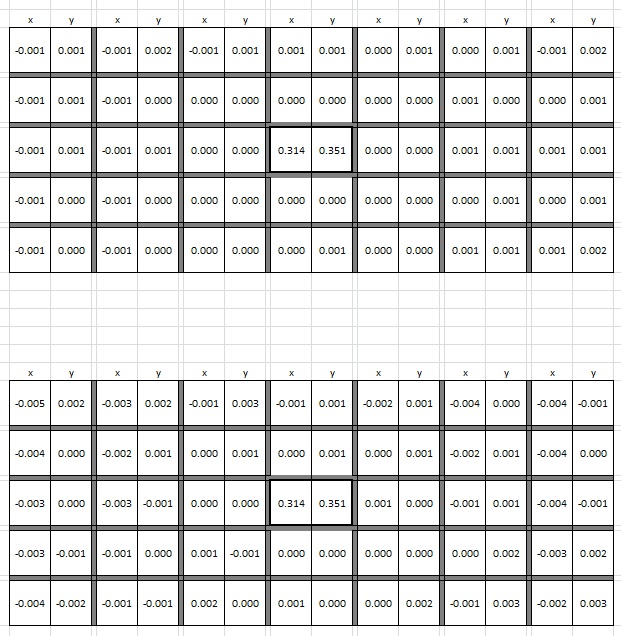
CIE xy color uniformity relative to center screen shown below. The upper measure grid is from a Barco P. The lower is a similar series non P model tuned up as best as possible.
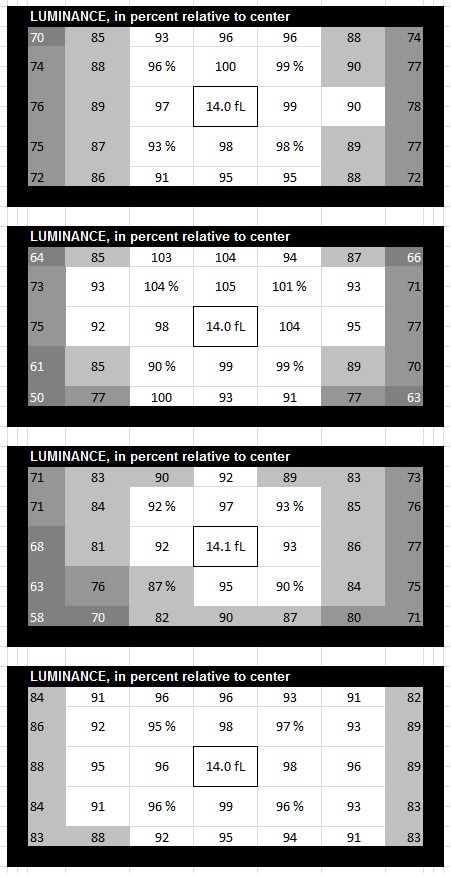
Below are multiple Luminance uniformity examples of non P cinema projectors vs a P unit.
Another less often discussed factor is the Extended Gamut capability that comes with the P models. While Cinema projectors are supposed to all be able to reproduce the entire DCI-P3 color gamut, the reality is the good majority of standard gamut projectors will miss small portions of the gamut towards maximum saturations. With an available Gamut that goes beyond P3 the theory is you then just need to limit the gamut down to exactly cover P3. Just like we commonly do with Rec709 which is a smaller gamut that resides within the larger P3 gamut. This is actually the primary reason why the P Lumens rating is so much lower than a standard 23B. Light path contrast enhancements have a part but are not as significant compared to the spectral modifications needed to extend the gamut.
The above uniformity comparisons follow a custom 35 point (5x7) measurement of the entire 2K image area (DCI-P3 white field, includes perimeter edges of active area). Each point measured with spectroradiometer placed in the "hero" point of the room to factor reflection incidence. Done in the same DI suite successively, ie when measured the projectors were placed in the same position and alignment relative to the screen. Room equipped with a non-perf SnoMatte 100 unity gain white screen.
Just to state, as far as uniformity goes, I'm not saying only a P can achieve these or similar levels of uniformity. A lot can be done with methodical tuning and swapping/upgrading optical components. The thing with the P is that its just waaaaay better out of the box compared to any other projector I have had the chance to evaluate.
Posted by Marco Giustini (Member # 4544) on 05-27-2016, 03:18 AM:
Thanks, that's quite interesting.
Another point is that if your P machine exceeds the Post Production tolerances and cannot be adjusted on site, Barco will take responsibility and replace the required parts to bring it back to what it should be. So if you measure +0.003x on a corner, you can claim a warranty repair.
It all depends whether you need that accuracy or not but the P machine is indeed very accurate.
Posted by Steve Guttag (Member # 268) on 05-27-2016, 11:31 AM:
Bravo! Very good post! ![[beer]](graemlins/beer.gif)
Posted by Alan Gouger (Member # 543) on 11-23-2016, 11:26 PM:
Regarding the expanded color space of the Barco 4k-P it exceeds P3 closer to rec2020. It uses a special Notch filter supplied by Kodak. The light path with filter does take a hit on light output.
Barco P gamut:
native red: x = 0.7; y = 0.3
native green: x = 0.2; y = 0.76
native blue: x = 0.145; y = 0.04
Rec2020
(R) 0.708, 0.292
(G) 0.170, 0.797
(B) 0.131, 0.046
Posted by Marco Giustini (Member # 4544) on 11-24-2016, 08:52 AM:
very interesting, I thought the reduced light output was all used up to increase the contrast ratio.
Very interesting post indeed. Thanks!
Posted by Mark Gulbrandsen (Member # 72) on 11-24-2016, 09:13 AM:
Has anyone tried the Schneider series of D-Cinema lenses instead of the chinese built zooms? I am just curious if there is anything very positive to them...
Mark
Posted by Alan Gouger (Member # 543) on 11-24-2016, 09:47 AM:
quote: Mark Gulbrandsen
Has anyone tried the Schneider series of D-Cinema lenses instead of the chinese built zooms? I am just curious if there is anything very positive to them...
No experience but they are monstrous in size. I think they are all fixed, no zoom.
In-Vision 4K can be superior to the Minolta's if you get a good one ( the mechanics ). Ive had them work in one projector and not another.
Posted by Marco Giustini (Member # 4544) on 11-24-2016, 11:10 AM:
interesting. I only found short-throw lenses though. Makes sense, why someone should install one of those lenses in a commercial cinema? You only require them on special occasions.
Posted by Mark Gulbrandsen (Member # 72) on 11-24-2016, 11:18 AM:
Yes, same issue here with the In-Vision stuff. I had one that went on an NC-3240 that looked absolutely awesome but the zoom motor was not set up properly on the lens. NC-3200 & 3240 have no lens learn function. But after several different tries at locating the null zoom point I got it to work and it's been fine for some times now. At another Drive In with an NC-3200 the first In-Vision lens would not work at all but the second one worked just fine and has been for a long time now. ALL of the .89" In-Vision DLP lenses drifted and all were returned for Minolta lenses. Yes, the Schneiders are big and you have to change lenses to change formats however, I suspect they beat the pants off any zoom.
Mark
Posted by Steve Guttag (Member # 268) on 11-25-2016, 10:29 AM:
Schneider, realizing they could not compete with the asian made lenses for DCinema and also realizing that for each style of projector (1.2/1.38, .98, .69) would require new designs of lenses, and also realizing that "zoom" lenses would never live up to their standards, opted to not jump into the DCinema lens business like they had with film projection.
So the lenses they DO make are short EFs for use in large screen applications. This is an area where their strengths would shine and lesser lenses would be shown to be not as good. Also, given that there would be a smaller percentage of lenses made in the short EFs, it is an area where high-volume doesn't help competitors.
Now me, personally, I wished that they had jumped in with variable focal length lenses (technically, a "zoom" should hold focus over its range). The quality I've experienced with DCinema lenses is all over the map. I'd say, on average, Minolta lenses are one's best bet but there is no guarantee. Yes, one can find examples of really good Invision and Fujinon lenses but if you had a pile of 10 Minoltas, 10 InVision and 10 Fujinon lens that all were the same range for the same projector, the odds you got a "good" lens would be FAR higher on the Minolta pile.
I believe InVision is the only lens company that is making 4K specific lenses, at the moment (of the variable EF, at least). The others just let their 2K lenses work on 4K projectors and noted the EF changes. There was no mention of if they over-designed the MTF of the lenses to work with 4K as well as 2K. The other thing a 4K lens should bring is a better shift range due to a larger inlet pupil.
Posted by Mark Gulbrandsen (Member # 72) on 11-25-2016, 10:38 AM:
Exactly... I remember when I did the Zion Canyon conversion we tried to get them to build us a WA lens since we had customers with pretty deep pockets on the project. But Schneider had literally just hired the optics guy away from T.I. at the time and he was just getting started. I actually had conversations with him several times about it. They quoted us something like 30K and a year turn around time which wouldn't have worked out. Dwight said the big issue with D-Cinema lenses was grinding the flourite elements involved. Apparently every now and then one of those will shatter and then the whole batch is ruined. Had we done that job a year later they would have a Schneider there. But the 15/70 system was getting pretty decrepit.
Mark
Powered by Infopop Corporation
UBB.classicTM
6.3.1.2