This is topic Barco DP2K-32B lamp house stuck? in forum Digital Cinema Forum at Film-Tech Forum ARCHIVE.
To visit this topic, use this URL:
https://ft-forum.com/ft/cgi-bin/ubb/ultimatebb.cgi?ubb=get_topic;f=16;t=002670
Posted by Andrew Thomas (Member # 7000) on 05-02-2016, 02:46 AM:
My projectionist called me this evening and said that while attempting to change the lamp, something he has done many many times, the lamp house seemed to be stuck. It would slide out about an inch or so before hanging up. I checked it myself and it seems to be catching on something in the top left corner of the lamphouse. Barco tech support people seemed to think this was a known issue where the house fuses to some board in the projector and ultimately the board and house need to be replaced.
I've got an email out to a Barco certified company, but any other thoughts or suggestions?
Posted by Andrew Thomas (Member # 7000) on 05-02-2016, 04:19 AM:
Video link
Took the exhaust fan off to get a look inside. That's what I found. Any tips on what to do?
Posted by Marco Giustini (Member # 4544) on 05-02-2016, 04:51 AM:
I've seen that before. The anode wick had not been tightened properly and it welded the whole thing together.
Good luck. No easy fix for that. Hammer on it from the chimney and hope not to damage too many things.
Then, buy a torque spanner!
Posted by Andrew Thomas (Member # 7000) on 05-02-2016, 05:17 AM:
That's the thing, I have no idea how to get any closer to it as the top of the lamphouse itself doesn't seem to come off. the video was recorded through the mesh on the top panel.
Posted by Dave Macaulay (Member # 813) on 05-02-2016, 06:04 AM:
The SPG pulls out to the left so you will have the same basic problem if you go at it from that side, it won't because the connector is welded together.
You need new connector assemblies minimum. The SPG may be damaged.
I would try to get at the connector from the top, back, and left sides of the projector, hoping to get a hacksaw blade in to cut it apart.
Maybe Barco has some trick to deal with this, you could try asking them...
Posted by Andrew Thomas (Member # 7000) on 05-02-2016, 06:10 AM:
Barco tech said brute force is about all you can do, but try not to be ridiculous as you don't want the bulb to explode on you. They also said nearly 100% guarantee the SPG needs to be replaced. Is the SPG the part with the two posts that the lamp house slides on to? If so, seems like best bet is to get out the Dremel tool and cut it from the other side of the projector close to where is goes into the lamp house through the plastic port?
Posted by Marco Giustini (Member # 4544) on 05-02-2016, 06:25 AM:
quote: Andrew Thomas
Barco tech said brute force is about all you can do
I agree with Barco unfortunately.
Yes, the SPG is that one.
Posted by Andrew Thomas (Member # 7000) on 05-02-2016, 07:15 AM:
Anybody see any issue with cutting the fused post with a dremel tool? I've yanked this thing around from both the lamp house and SPG sides for a few hours. Doesn't seem to be be budging.
Posted by Marco Giustini (Member # 4544) on 05-02-2016, 07:57 AM:
don't think so, besides that you will need a new SPG!
Posted by Carsten Kurz (Member # 5396) on 05-02-2016, 08:56 AM:
Any way to cut it without spilling loads of metal particles inside as with a Dremel?
- Carsten
Posted by Gordon McLeod (Member # 33) on 05-02-2016, 09:52 AM:
locate the hose of a shop vac close to the cutter to capture as much as possible
Posted by Jason Raftery (Member # 6291) on 05-02-2016, 12:36 PM:
I've dealt with a handful of these before and haven't had to cut one out yet. Try bolting the lamphouse back in place, then go around to the other side of the projector, loosen the three captive flat head screws that secure the SPG in place, and yank the SPG out of the machine. Sometimes it takes a fair bit of rocking it back and forth to get it to break free, but it will usually come out if you work at it enough.
You will definitely need a new anode electrical connector / teflon insulator on the lamphouse, but the SPG itself might have survived.
This type of welding occurs because either the anode connector was not properly tightened when the lamp was installed or the anode eyelet/nuts/washers were positioned with too much or too little play in the anode electrical connector to allow the connector to seat correctly on the SPG.
Posted by Dave Macaulay (Member # 813) on 05-02-2016, 02:09 PM:
The nuts can go anywhere you like, the connector seats with the lamphouse side pushed all the way in. Any slack just lets you pull the lamphouse out a bit before the connector starts getting pulled apart - not a bad idea if one is sticky ... you use the whole lamphouse as a slide hammer.
The older connectors had a hollow "bolt" that would collapse if the nuts were over-torqued, that's been changed to solid/stronger.
From the image my guess is that the nuts were left finger tight. Easy to do if distracted during a lamp change.
Posted by Jason Raftery (Member # 6291) on 05-02-2016, 11:13 PM:
quote: Dave Macaulay
The nuts can go anywhere you like, the connector seats with the lamphouse side pushed all the way in. Any slack just lets you pull the lamphouse out a bit before the connector starts getting pulled apart
While I agree this burned up connection looks to be the result of not sufficiently tightening the anode nuts, the positioning of the nuts does matter--particularly if the posts on the SPG were not lubricated by the factory. I found out the hard way when I had the anode connector burn up on a new 32B from arcing between the SPG and the lamphouse anode connector on a lamp that was installed with a torque wrench in accordance with Barco's installation procedures. If the nuts are positioned snug against the Teflon insulator, the lamphouse connector will have trouble seating on the SPG post. That is also true if the nuts are left positioned all the way at the other end of the bolt away from the SPG.
I've never seen this written in an official Barco manual but the advice I received from Barco USA was to position the nuts on both the anode and cathode connectors such that when each connector is pushed in from the outside of the lamphouse, the gap between the back of the Teflon block and the nut closest to it should be between the thickness of 1-2 US quarters.
Additionally, if the lamphouse has difficulty seating on or letting go of the SPG posts and the play in the anode and cathode connectors is correct, the SPG posts may not have been adequately greased by the factory. The circuit I work for had a number of new 32B and 23B projectors where the lamphouses would get stuck on the SPG, in some cases requiring us to remove the SPGs to get them out. Barco recommended applying a small amount of a specific grease to the SPG to prevent lamphouse fitment issues. Here's what one looked like once greased:
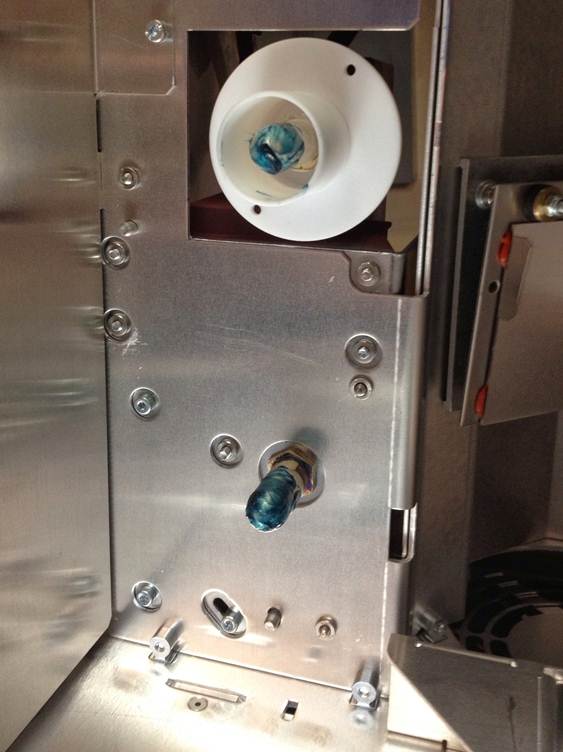
Once we applied the grease to the problem projectors and began positioning the nuts on the anode and cathode connectors in the manner in which Barco suggested, our problems with burned up connectors and sticking lamphouses disappeared.
Posted by Phil Ranucci (Member # 3820) on 05-02-2016, 11:50 PM:
On the smaller Barco lamphouses the anode/cathode aren't threaded all the way to the SPG side. They have an unthreaded area and with the nuts on them there is some movement possible on them, this I believe helps them line up with the SPG. Kind of like the blue plastic connectors on the lamphouse.
What grease do you use?
Posted by Marco Giustini (Member # 4544) on 05-03-2016, 05:21 AM:
I believe the gap between nuts and connector is specified in the Barco user manual. As long as there is some gap to allow the connector to move, that's fine.
Posted by Dave Macaulay (Member # 813) on 05-03-2016, 07:42 AM:
Tight is no good, agreed. The newer solid posts should have an unthreaded section. If set with them tight to the insulator, you need a thin "bicycle" wrench to get on the inner nut so few people would do that... you need enough room to get a standard wrench on it.
The SPG connector sometimes doesn't line up well... I think Barco should have allowed some movement in the SPG so you could align it then screw it down tight... the locating pins don't allow that.
With the nuts further out on the threads, the slidehammer action will jerk the connector free (usually).
You should inspect the connector sockets and pins when the lamphouse is out. There are at least two socket types, both can show some arc damage and still be OK.
Some dielectric grease on the pins will help keep them unstuck and not interfere with connection. I would hesitate to use normal grease - overheat it and it turns to gluey tar (plus it can burn).
Posted by Jack Ondracek (Member # 1466) on 05-03-2016, 09:31 AM:
I had that happen last year. Brute force, at least as much as I was willing to put on a new projector, didn't help at all. I'm working from memory here, but I recall something like 3 or 4 screws that hold the "ignitor" in place. Taking those off and loosening up the assembly did the trick for me.
Grease? Huh. Have to look into that. Seems like a curious fix.
Posted by Monte L Fullmer (Member # 2797) on 05-04-2016, 02:15 PM:
Lot of techs recommending adding a light film of dielectric grease to these connections so the fittings don't seize, esp with these big, "B" series modules.
Maybe, one workaround would be to cut the anode braided cable close to the burnt end with bolt cutters, pull the module out enough to undo the four quarter turn captive screws so the front heat filter piece can be released from the module frame.
As pulling out the module, one hold up the cut anode cable to keep bulb level as possible while the module is being pulled.
When module is fully out of the unit, then one can remove bulb.
Posted by Andrew Thomas (Member # 7000) on 05-05-2016, 03:29 PM:
Brad Miller was great and had one of his guys who was finishing a big install elsewhere in Houston come out and get it taken care of. Ended up replacing the SPG and anode connector, and switched to Ushio lamps from the cheap no-name stuff the previous owners used.
Posted by Buck Wilson (Member # 5885) on 05-05-2016, 03:47 PM:
How cool is that!! ![[beer]](graemlins/beer.gif)
Posted by Monte L Fullmer (Member # 2797) on 05-05-2016, 04:35 PM:
Congrats on the accomplishment ![[thumbsup]](graemlins/thumbsup.gif)
Wonder what cheap bulbs were used ...
Posted by Andrew Thomas (Member # 7000) on 05-06-2016, 07:26 PM:
PlusRite bulbs. Even going from 6.5kw to 6kw, the Ushio is putting more light on screen than the PlusRites, and the random flicker that we would get from time to time (even early in the life of the bulb!) is gone. Way more stable!
Posted by Jason Raftery (Member # 6291) on 05-06-2016, 08:10 PM:
quote: Phil Ranucci
What grease do you use?
Metalon Hi-Tech EP 1.5
Posted by Brad Miller (Member # 2) on 05-06-2016, 09:22 PM:
quote:
Even going from 6.5kw to 6kw, the Ushio is putting more light on screen than the PlusRites, and the random flicker that we would get from time to time (even early in the life of the bulb!) is gone. Way more stable!
That's why price is not as important as cost per hour when looking at bulbs. At the end of the day the Ushio is cheaper to operate than another brand of bulb. Just do the math on the cost of that PlusRite you were using divided by their 550 warranty hours vs. the cost of the Ushio we recommended divided by their 800 warranty hours and it becomes a no-brainer. On top of it all, the Ushio is using less electricity and is a better quality of light too.
Remember kids, it's not the price that matters, it's what it costs you. ![[Wink]](wink.gif)
Posted by Martin Murray (Member # 162) on 05-07-2016, 01:45 AM:
Your results may vary. I run 6.5k Plusrights 14-1600 hours with no problems. The damage seen in the pictures above came from an improperly tightened connection, not a bad bulb. Don't blame the manufacturer when the installer is at fault. The flicker you describe probably came from the loose connection. As far as the lower light level, my guess would be improper lamp alignment, assuming the same person that failed to tighten the lead is the one that aligned it.
Posted by Marco Giustini (Member # 4544) on 05-07-2016, 04:17 AM:
Many, many MANY people won't align the lamp at all when replacing it... ![[Frown]](frown.gif)
Posted by Buck Wilson (Member # 5885) on 05-07-2016, 05:54 AM:
Martin, no one said the cheap bulb caused the burn up of the terminal.
Posted by Brad Miller (Member # 2) on 05-07-2016, 12:11 PM:
Martin, on what machine do you run them?
Posted by Martin Murray (Member # 162) on 05-08-2016, 01:04 AM:
Christie cp2000, 2230
Barco 19b, 20c, 23b, 32b, dp1500, dp2000, dp3000
NEC 1600c, 2000c, 2500c, 3200s
I have them running in all of these and have been through 100's of them now with great results.
Posted by Andrew Thomas (Member # 7000) on 05-08-2016, 05:47 PM:
quote: Buck Wilson
Martin, no one said the cheap bulb caused the burn up of the terminal
Exactly. We just took the opportunity of needing to put new bulbs in to switch back to better quality bulbs. And I don't run bulbs past warranty hours at any of my theaters. At this site, our projectors run about 1100 hours annually, so bulbs just aren't a major line item and trying to wring a few more hours out just isn't worth the risk of even a single lost shows from a wrecked lamp house due to catastrophic bulb failure.
Posted by Monte L Fullmer (Member # 2797) on 05-10-2016, 04:39 PM:
Prob why Martin can get the hours out of those PlusRite bulbs is due to strong exhaust, so to get as much heat out that unit.
Example on my end over here:
Got two drive-ins in my area that I take care of. Both locations have the 32B unit and both using 65BA2 Bulbs.
Location A: Lamp had 480Hrs on the changeout.
Envelope was dark with light flicker.
Location was using the existing carbon arc exhaust setup. One side capped off for use with CFS2000 console burning a 4K vertical and Simplex-XL.
Location B: Lamp had 560hrs on the changeout.
Envelope was still clear with no flicker.
Kept bulb as spare.
Setup is using existing xenon setup that was using a Xenex with a 3K lamp, but an 800cfm booster fan was installed on top of the unit.
Plenty of air flow for this projector.
Looks like exhaust flow can be the main factor in this situation.
True, do any lamp installers really know how to focus the bulb in using whatever software program assigned to that make of projector?
-Monte
Posted by Andrew Thomas (Member # 7000) on 05-30-2016, 02:20 AM:
whoops.
Posted by Justin Hamaker (Member # 2165) on 05-30-2016, 02:41 AM:
Just experienced this same issue a few nights ago. Somewhat of a relief to know it's a 'common' problem.
Powered by Infopop Corporation
UBB.classicTM
6.3.1.2