This is topic Doremi DP2K4 playback log in forum Digital Cinema Forum at Film-Tech Forum ARCHIVE.
To visit this topic, use this URL:
https://ft-forum.com/ft/cgi-bin/ubb/ultimatebb.cgi?ubb=get_topic;f=16;t=002684
Posted by Michal Matys (Member # 8614) on 05-16-2016, 07:08 AM:
Hi guys,
I was wondering, is there any way to download or see log file from Doremi DP2K4 of what has been played there for past few days?
I need to check exact dcps that has been played in exact time, and struggle to find it.
Thanks for your answer.
Michal
Posted by Carsten Kurz (Member # 5396) on 05-16-2016, 07:26 AM:
See e.g. this document from page 5:
DiagnosticTool Manual
Then go to:
http://loganalyzer.dolbycustomer.com/
read http://loganalyzer.dolbycustomer.com/index.php/manual
If you have created the detailed report, you could as well unpack it and browse the odeticsd.log or drmplaylistd.log with an editor.
A bit of trouble with reading these logs (from all DCI servers) is that internally, DCPs are played in reels, referenced by UUIDs, not by their human readable names. So you may find out that your server played a file named 6f98c3a2-e5dd-4957-b917-8a31bb2e0707.mxf but what does that mean? Without special tools, you need to search for that UUID in the other logs to find that reference to a DCP. It's usually easier for playlists.
Therefore, the Dolby/Doremi log analyzer is a very useful tool to prepare all the logs in a user interface.
There is a training document from Dolby dealing with logs, the log analyzer, etc.:
http://support.doremitechno.org/images/Portal/Cinema_Players/Other_Documents/Training_Material/Doremi_Product_Overview__Technical_Training_23Apr_2015_inc_IMS2000.pdf
- Carsten
Posted by Dave Macaulay (Member # 813) on 05-16-2016, 09:28 AM:
As Carsten suggested, the playback logs are in the diagnostic report. It isn't easy to turn the logs into useful information though.
You have to do multiple levels of opening the gzip archives. It will end up as about 50mB of stuff, 99.9% meaningless for your needs.
The log files are in the <report>/drmreport/doremi/log folder. They're named "odetics.log.x" with the highest x number most recent I think. Open it in a text editor like notepad++, although Windows won't know what a ".3" file is, it shows the time (in UTC of course) and the CPL UUID played... of course you have to reference back to the CPLs in editor and inspect them to see the UUID.
The online log analyzer does not help for finding what's been played.
Someone must have a tool for automating this, theoretically a distributor can demand the logs to see if someone is cheating - playing a movie without paying.
Posted by Michal Matys (Member # 8614) on 05-16-2016, 10:25 AM:
Thank you guys, found it and found what I needed. I have to say it would be really good idea to make some easier way to check this, not talking about if you would like someone who doesnt know what CPL is to see something in there.
Thanks again.
Posted by Carsten Kurz (Member # 5396) on 05-16-2016, 11:17 AM:
As the Dolby/Doremi Log Analyzer already does everything else, it would probably be not too complicated to write a script that simply lists all played assets with their timestamps and internal references, to something like
2016-5-12;20:35:15 <UUID.mxf> - referenced by CPL: xxxx
Or one that simply scans the playback logs and replaces all UUIDs by their anotation/CPL references and writes them to a new log.
I only have to deal with this rarely, so I'm fine with some lookup and search in these files.
- Carsten
Posted by Marco Giustini (Member # 4544) on 05-16-2016, 12:13 PM:
Thanks Carsten for the interesting doc.
Posted by Carsten Kurz (Member # 5396) on 05-16-2016, 12:34 PM:
Yup - there's quite a bit of interesting information contained in those documents. I'm always happy to dig them up.
After years of only supplying manual-addenda, Doremi/Dolby recently created some nice complete references like the ShowVault Manual 1.7 and this training document outlining all the current products, Dolby-Doremi lineup, etc.
They also have a nice set of multi-langual training videos over at vimeo. Maybe not too exciting for techs, but certainly for some advanced users.
- Carsten
Posted by Steve Guttag (Member # 268) on 05-16-2016, 07:00 PM:
See now on the DSS line...all one would need do is export the audit logs to get the information.:
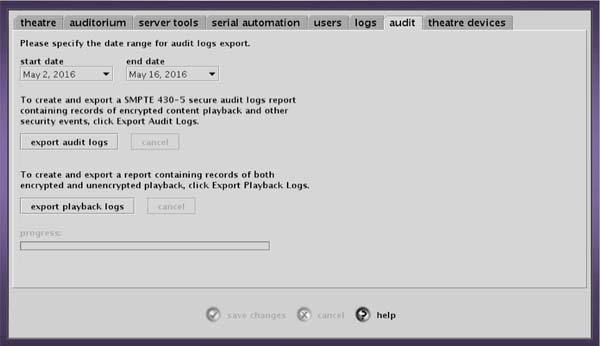
It is also much easier to read in the Dolby DSS logs to see what played an when.
The thing is, the audit logs are available from every server to TMSes for VPF reasons. Now I've never personally seen what is actually in THOSE logs to know just how human readable they are. I'm amazed at just how difficult some manufactures make looking at the logs are. GDC flipping encrypts them!
Posted by Carsten Kurz (Member # 5396) on 05-17-2016, 06:43 AM:
They all only reference UUIDs, that's the only thing that makes sense for the distributors to identify their content. But it's really not very difficult to do a find on them and then get the CPL annotation. I mean, really, who in exhibition is doing this on a regular basis?
The Doremi/Dolby log analyzer is much more useful in finding issues with hard- and software.
- Carsten
Posted by Steve Guttag (Member # 268) on 05-17-2016, 06:56 AM:
I wonder why. That is, I wonder why the human readable name isn't also in there. Why just the UUID.
Posted by Frank Cox (Member # 6258) on 05-17-2016, 12:11 PM:
The issue here is that we have one log file that contains UUID's, and a different file that tells you what title that UUID is associated with?
If that's all there is to it, it wouldn't be too difficult to write a program to read all of the titles from the second file and then go through the log file with the UUID's and re-write a new file that contains both the UUID and the title.
Is that what's needed here? If so, someone email me a sample of both of those files and I'll see if I can whip something up to do that.
Posted by Carsten Kurz (Member # 5396) on 05-17-2016, 02:21 PM:
As there is no filter in the logfile creation process, every entity requesting log files will receive logs where most of the listed playout events concerns assets that are not their business. That is, their competitors.
Those entities only know their own UUIDs, so it is easy to restrict log recipients to analyze only THEIR content playout, not other distributors. Makes sense I guess.
- Carsten
Powered by Infopop Corporation
UBB.classicTM
6.3.1.2