This is topic Playlist ejected itself in forum Digital Cinema Forum at Film-Tech Forum ARCHIVE.
To visit this topic, use this URL:
https://ft-forum.com/ft/cgi-bin/ubb/ultimatebb.cgi?ubb=get_topic;f=16;t=002724
Posted by Adriano Caporro (Member # 9481) on 06-17-2016, 10:23 AM:
Hi All, i have experienced while looking at the screen of the server, that the playlist ejected it self.
Looking onto the logs i have found this:
Process 4890 terminated with status ff00
[Fri Jun 17 15:10:48 2016]: === START OF LOG ===
[Fri Jun 17 15:10:48 2016]: Software version 2.6.4-0
[Fri Jun 17 15:11:38 2016]: [127.0.0.1]: Received `LoadSPL("bead18d8-6953-480c-b467-61512f6f9cc2")' command.
[Fri Jun 17 15:11:38 2016]: [127.0.0.1]: Received `LoadSPL' command.
[Fri Jun 17 15:11:38 2016]: [PLAYER]: VALIDATE SHOW "bead18d8-6953-480c-b467-61512f6f9cc2" - ""
[Fri Jun 17 15:11:51 2016]: [PLAYER]: Validate KDM 'd8374ea2-3603-4ff7-b9ad-678bba850478': Success.
[Fri Jun 17 15:11:52 2016]: [PLAYER]: START OF SHOW "bead18d8-6953-480c-b467-61512f6f9cc2" - ""
[Fri Jun 17 15:11:53 2016]: [127.0.0.1]: Received `PauseSPL' command.
[Fri Jun 17 15:12:04 2016]: [127.0.0.1]: Received `JumpToTimeCode("00:25:00.00")' command.
[Fri Jun 17 15:12:12 2016]: [127.0.0.1]: Received `PlaySPL' command.
Does anyone know what is going on?
Many Thanks in advance.
Adriano
Posted by Mark Gulbrandsen (Member # 72) on 06-17-2016, 12:18 PM:
Assuming this is Dolbly thats a pretty old firmware version you are running.... Not sure that would have anythng to do with this issue but it might if you hit a new SMPTE clip or some other non compatible clip.
Mark
Posted by Steve Moore (Member # 4753) on 06-17-2016, 12:38 PM:
Out of interest at what point in the show did this happen? Was it during a feature and if so what was it; just in case other come across this?
We had a doremi which kept either pausing or ejecting during a show days before the dolphin card failed.When I looked at the diagnostic tool, under hardware the uncorrected errors number rocketed in the ECC box as each time before the show stopped.
Posted by Marco Giustini (Member # 4544) on 06-17-2016, 02:20 PM:
quote: Adriano Caporro
Software version 2.6.4-0
Mark, that's a Doremi server.
The log you quoted seems to suggest that someone jumped 25 minutes into the playlist, did you do that? Anyway it doesn't show anything wrong: load, skip, play. You need to dig further. Try and upload the log report to the log analyser!
Posted by Carsten Kurz (Member # 5396) on 06-18-2016, 03:11 PM:
The Doremis have a 'Play and eject' option within the Cinelister player window.
But what do you mean with 'ejected itself'? Did it play until the end and eject there, or did it stop playing somewhere in between?
The log you post doesn't seem to be complete, so, I'm not sure wether we can really see your issue.
- Carsten
Posted by German Marin (Member # 918) on 06-20-2016, 02:46 AM:
Ciao Adriano,
When searching for the intermission, the projectionist used to jump forward and backward through the SPL, if done several times in a short period of time, the Cinelister will crash (experience on 2.6.4-0 / 21.03y / 2.0.20-0)
Posted by Monte L Fullmer (Member # 2797) on 06-20-2016, 02:54 AM:
That is one thing about GDC that I like is the "slider" to advance or reverse content while in pause, along with the hour counter to go to a specific point in the content then take operation out of pause to resume play.
Dolby has theirs that is close to the GDC.
Now the ICMP Barco is also close, but the play has to be in the stopped position and scheduler disabled, but does have the 'slider' method of search.
The Doremi just have the "Rewind," "Forward," and "Next" options while in Pause.
Posted by Steve Moore (Member # 4753) on 06-20-2016, 03:42 AM:
Monte,
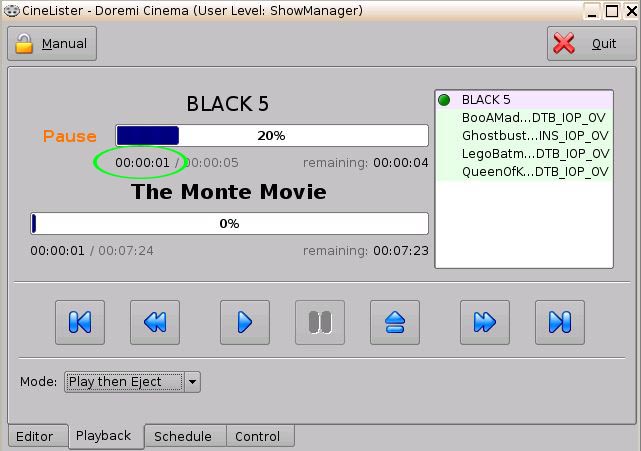
On the Doremi, whilst in pause, you can double click on the current time position and then a dialogue box comes up into which you can type a time you want to be or use up and down arrows to find a position. Them press on play to resume from that point. I use this all the time to find "correct" cast offset or in older films an intermission point, though I agree this may not appear as obvious as on other brands.
Posted by Brad Miller (Member # 2) on 06-20-2016, 12:05 PM:
Monte, all of the servers can jump to any point in the playlist.
On the Doremi you put the server into manual mode, pause it and then click the time display itself and a popup appears.
On a Dolby you click the little "go to" arrow and a popup appears to enter the desired time. (You can even do this while still playing.)
On a Sony you pause the server and then a new button appears to enter the desired offset.
On a GDC you use the actual playlist slider bar and drag forward and backwards. Only problem is you have to have a pretty steady hand because it's like working on a PC with a over-ambitious mouse setting and you can ultimately only get near where you want instead of exactly where you want like with Dolby/Doremi/Sony.
All get the job done in the end though.
See the green circle below?
Posted by Steve Guttag (Member # 268) on 06-20-2016, 12:43 PM:
What I like about Dolby's, aside from going exactly where you want to go, is that it keeps you in the same mode you were in before the "jump" So if you were playing before you are playing after the jump...if paused before you are paused now and if stopped, you are still stopped.
Posted by Richard May (Member # 2627) on 06-20-2016, 01:42 PM:
Current version of software is 2.6.6-0. One of the fixes had something to do with playlist ejecting. I will try and find the sheet.
Posted by Marco Giustini (Member # 4544) on 06-21-2016, 12:46 AM:
2.6.6 is for the IMS not the 2K4 or similar.
Posted by Monte L Fullmer (Member # 2797) on 06-21-2016, 12:58 AM:
Gee, thx Brad. Never knew this since no one showed me how to fully operate Doremi when I began with them with REG on the initial installs - had to learn it by myself from scratch.
No tech instructions, no instruction manuals left on site to follow.
Then, we got SONY and learned quite a bit from these servers, and on my own - how odd and definitely proprietory (almost reminded me of APPLE products) these servers were than GDC and Doremi Servers. The SONY TMS was an interesting animal to learn also - took a couple of weeks to understand how they worked, then it was quite easy to work with - and they recognized our Doremi installs.
I'm sure there were tons of more tricks with the SONY TMS that one could pick up on, but was removed from the booth operations when I had to work on floor, and left REG shortly afterwards.
Now I know now.
-Monte
Posted by Jim Cassedy (Member # 4115) on 06-21-2016, 10:02 AM:
quote: Brad Miller
On the Doremi you put the server into manual mode, pause
it and then click the time display itself and a popup appears.
WoW! Thanks, Brad! ![[thumbsup]](graemlins/thumbsup.gif)
I never knew this. I never got any 'formal' training on the Doremi,
having had to figure out most of it myself from actual use & going
through the manual, and I don't recall seeing this 'trick' in there.
Heck- - I even had to finish the install and configuration of the
thing myself last year after delivery delays & scheduling conflicts
made it impossible for the original tech to finish the job on time.
By the time I got it up & running, I actually knew a lot more about
installing it than operating it. One of my tech-friends joked that
Doremi should send me an "honorary installers certificate" - -
- I earned it! lol
Posted by Mike Blakesley (Member # 26) on 06-21-2016, 03:02 PM:
quote: Brad Miller
On a GDC you use the actual playlist slider bar and drag forward and backwards. Only problem is you have to have a pretty steady hand because it's like working on a PC with a over-ambitious mouse setting and you can ultimately only get near where you want instead of exactly where you want like with Dolby/Doremi/Sony.
You can use the left/right arrow keys on the keyboard to move the slider slowly on the GDC. Drag it to the approximate point you want, then use the arrows for precise placement.
Powered by Infopop Corporation
UBB.classicTM
6.3.1.2