This is topic Cinelister for Doremi Server in forum Digital Cinema Forum at Film-Tech Forum ARCHIVE.


To visit this topic, use this URL:
https://ft-forum.com/ft/cgi-bin/ubb/ultimatebb.cgi?ubb=get_topic;f=16;t=002773

Posted by Ananda Ayu (Member # 9436) on 08-04-2016, 05:31 AM:
 
Hi Anyone,I would ask to all of u.
I want to make an apk cinelister for my tablet. Can I link Doremi Server's Cinrlister to my tablet??How about the connection?

Thank you [Smile] [Smile]
 
Posted by Pietro Clarici (Member # 4937) on 08-04-2016, 07:38 AM:
 
If you have a WLAN access point, you can install a generic VNC app on your tablet (I suggest Screens if you are on iOS) and connect via Wi-Fi. It's password protected, but you can find the default one by googling it.

If your Doremi's software version is up-to-date, there is also a web interface that you can access via a standard mobile browser - still need a Wi-Fi connection, obviously. I personally cannot stand it and it's even less usable on a touch screen, but you could try it.
 
Posted by Dave Macaulay (Member # 813) on 08-05-2016, 05:55 AM:
 
I haven't seen the web interface included in the base software package (is it now?), and the optional package for v1.1.17 has been pulled from distribution. That version is now obsolete and has a few annoying bugs. I don't know if they will ever release updated versions, the webGUI is for the IMS servers and may not be easy to port to chassis servers?
 
Posted by Steve Guttag (Member # 268) on 08-05-2016, 06:42 AM:
 
Dave, the Web UI is still available from the US download site...it is carefully stored in the /IMS/Software/2.6.x (intuitive, isn't it? But that is sort of like the whole UI...if you can't master this the UI will likely defeat the average user anyway).

But yes, the WebGUI for the DCP/Showvault line is only "mostly functional" For instance, I created a new library file for the eCNA automation to add in functions that don't exist on the factory provided file (Macro, RDI and SENDFx triggers). They show up fine on the normal UI and they work fine on IMS WebUI...but the DCP WebUI...bzzzt...it sees the file but can't display it.

I have a site with four Doremi servers that were put in at different times so there is a DCP2K4, IMS1000s and an IMS2000. Having the WebUI on the DCP2K4, at least, provides a uniform user experience. It also would make interfacing on the phone as usable as the VNC...which is VERY weak on Doremi. Control panel icons, for instance, don't show up properly until one manually refreshes the screen. I've tried Ultra, Tight and Real VNCs all with the same shoddy VNC experience.
 
Posted by Carsten Kurz (Member # 5396) on 08-05-2016, 07:40 AM:
 
I am very disappointed with what Dolby is doing for the Doremi software. Really wondering what their strategy is...

- Carsten
 
Posted by Steve Guttag (Member # 268) on 08-05-2016, 12:00 PM:
 
I really have no inside information on this one. I'm hoping that they are working on the UI and trying to port it over to a more Dolby like UI yet retain the configuration aspects of the Doremi product.

I know that there are those that really like the Doremi UI but honestly, I don't see why. It feels like a collection of disparate items forced to live under one roof. There is not a unified user experience, like with the Dolby DSS line. The Web UI, as ghastly as it is, at least has a bit of a unified experience.
 
Posted by Marco Giustini (Member # 4544) on 08-06-2016, 06:32 AM:
 
What Carsten said.

I do not really understand. They've been developing the DSS series (according to Steve with even new functions which are not going to be used as ALL the systems have already been installed) and forsaking the DCP series completely.

I mean, the two servers (Doremi and DSS) still cannot talk to each other!!! I thought that would be priority ONE for Dolby - since an exhibitor cannot replace a DSS with a DSS - but apparently they have different priorities.
 
Posted by Pietro Clarici (Member # 4937) on 08-06-2016, 08:41 AM:
 
Honestly? I don't think they bought Doremi technology, for the simple reason that there wasn't anything that interesting to get. They actually bought *us*, Doremi's customer base.

In a couple of years they will EOL all legacy Doremi products - and parts, especially parts - and force us to "upgrade" to a new all-in-one overpriced IMS/audio processor with Atmos if we want to keep working.

I cannot imagine a different endgame, and I'm frankly wondering what they're waiting for.
 
Posted by Brad Miller (Member # 2) on 08-06-2016, 11:11 AM:
 
Interesting theory, but their most foolish move was not including an analog 6 channel input on the CP850. I think that has hurt them more than they will ever admit, as I know of a number of theaters that were going to start doing Atmos until that little restriction popped up, then the plan went into the trash! Dolby simply is discounting the importance of alternative content.

Besides, in terms of a conventional sound processor, now you can get a QSC Core 110f audio processor for the same price as a CP750 that blows it out of the water, and not by a small margin either! The Core processors are fantastically phenomenal. Plus if you want to talk support, QSC has really got this down. No other company of that size can touch their attention to customer's needs that I've come across. They are quickly becoming a one-stop-shop for audio. Their Core processors have the best sound processing, I don't think any other speaker manufacturer outperforms the QSC line and we all know how solid their amplifiers are.

You've also got Barco's Alchemy server gaining momentum (what will kill this is not making it compatible with only Barco projectors though), USL is working hard on their server and even GDC has made changes in their design realizing the importance of things like hardware raid and not putting the drives inside the projector. Dolby will quickly find themselves dying in the cinema market if they don't start making some changes based on tech input from the field. Nothing is worse for a product than corporate personnel or programmers that are not out in the field working daily with these products in different types of scenarios making decisions on how something should operate or being able to turn "features" on and off. Case in point the silly Doremi maintenance program. Really? Why can I not turn this stupid thing off? Why is there not a place for me to tick a checkbox in the control panel to disable the stupid screensaver? (Things like this force me to root into the unit at command line level just to turn off the screensaver.)

Speaking of changes, to get back to the earlier discussion, they promised us at Cinemacon a couple of years ago that the Doremi server would have a Dolby GUI. I am with Steve here, I know some people are used to the Doremi GUI (I am one of those who am comfortable with it but prefer Dolby's GUI), but I am not a fan of a simple VNC and want a jupiter client to leave the local server in a "locked" state. Seemingly little things like the always-frustrating "must put a pause command at the start of every playlist" coupled with "must make sure the server starts playing so it can self-pause before time for the automation to initiate the show" is maddening. Dolby owns both companies now. Make an option in the control panel to activate the Dolby version of the GUI or simply create a jupiter client that if used provides that interface. The Dolby GUI already has a checkbox "check to start shows at the scheduled time". Why has this sort of thing not been implemented into the Doremi yet???

*Important disclaimer. I have no interest in servers with a stupid web GUI. When I say Dolby GUI, I mean the classic interface seen locally on a Dolby server or through the jupiter client. Web GUIs suck. Want a really good example? Go play with a Sony 515 and let's see how quickly frustrated you get when you realize only certain versions of certain browsers will connect. God forbid someone in a building does an "upgrade" to the computer's browser, or it "upgrades" itself automatically. And nevermind the lack of a proper certificate for the secure login. [Roll Eyes]
 
Posted by Steve Guttag (Member # 268) on 08-06-2016, 12:30 PM:
 
I think Pietro hit the nail on the head. Dolby bought the customer base. There is nothing Doremi was doing that Dolby couldn't do without infringing.

I agree with Brad on the CP850 that the lack of an analog multichannel input (8 channel minimum) was a big blunder. One that they could relatively easily fix. Come up with a DB25 analog to HDMI adapter. Being Dolby it cripples them that they cannot offer DTS decoding when DTS represents the vast majority of Blu-ray releases. That isn't the customer's fault.

It is my impression (and it is just that), that Dolby is putting its coding effort into their TMS to be the "unifying" item between legacy Dolby and Doremi. Of course, it comes with an annual fee. It also presumes one liked the Doremi TMS before. If ftheir servers are any indication of how they design a GUI, then I don't have high hopes. We are primarily Dolby DSS so how this support plays out for the DSS line is of great interest. I'd say most of our customers are also are of the "mini-plex" variety.

As to QSC...they have a lot of positives, for sure. Their support is mixed. The DCP product line, which is quite popular and probably should be replaced with something that is more Q-Sys based rather than Cobranet, they have been incredibly slow on software updates (read years). But yes, the personalities are great, the speakers are very good, amps are tops and I don't have any problem with their more recent DCP (Basis and beyond). Most of our rooms (just about 100%) require proper booth monitoring and a suitable UI so a CP750 with something like a CM-8E or a DCP based processor has advantages since if a Qsys was used, the monitor functions would need to be factored into the design.
 
Posted by Leo Enticknap (Member # 534) on 08-06-2016, 03:11 PM:
 
quote: Steve Guttag
It also would make interfacing on the phone as usable as the VNC...which is VERY weak on Doremi. Control panel icons, for instance, don't show up properly until one manually refreshes the screen.
Yup, that was my experience with the Doremi VNC server as well. It was always excruciatingly slow to respond, too. If I had an AP20 VNC window open and the Doremi one next to it on the same PC, button pushes on the AP20 window would respond in half a second or so, but on the Doremi window it could take 2-3 seconds. Same network, same router, same switches, etc., so the culprit had to be the Doremi. Along with the hideousness that is Cinelister/Ingest Manager/Content Manager, that was yet another reason why I was relieved to retire our DCP2000 for another DSS200.

quote: Brad Miller
When I say Dolby GUI, I mean the classic interface seen locally on a Dolby server or through the jupiter client.
Amen to that. The ability to run Dolby Show Manager as the front end on Doremi servers really would give them a new lease of life.
 
Posted by Pietro Clarici (Member # 4937) on 08-06-2016, 03:47 PM:
 
I have to say I seem to have been lucky with VNC, it's not fast as local but it's close enough. Maybe it's because I only have 3RU Doremi machines with internal LCD screens, and as such I'm limited to that abysmal 640x480 resolution?

What I hate about Cinelister are small things: for example, moving playlists from one server to another ignores missing content, so you have to manually move all relevant CPLs as well. Providing an option to let the SPL move all its content would be incredibly easy. It's almost like they've never been in a booth, or just don't care.
 
Posted by Steve Guttag (Member # 268) on 08-06-2016, 03:49 PM:
 
Leo, the VNC thing with the Doremi server is update based. If you click on your button and immediately move your cursor, you'll see it respond with like speed.
 
Posted by Brad Miller (Member # 2) on 08-06-2016, 04:49 PM:
 
quote: Steve Guttag
Most of our rooms (just about 100%) require proper booth monitoring and a suitable UI so a CP750 with something like a CM-8E or a DCP based processor has advantages since if a Qsys was used, the monitor functions would need to be factored into the design.
But that's the thing about their Q-SYS systems, you can literally DESIGN YOUR OWN monitoring GUI from scratch. You can put any bit of data you want on it, as advanced as you want or as simplified with green/red status. Here are a couple of basic examples, but in the end it's almost limitless.

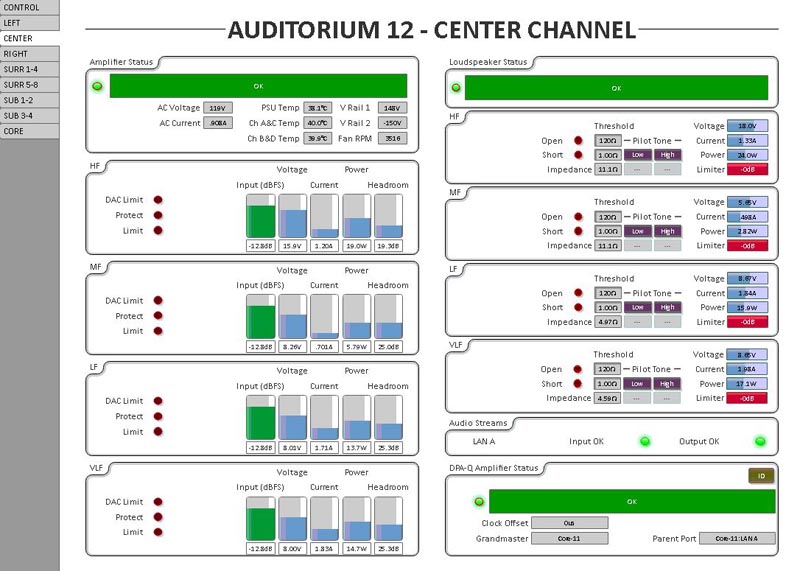
 -

 -
 
Posted by Steve Guttag (Member # 268) on 08-06-2016, 08:26 PM:
 
I was referring to actual user monitoring (audio). Yes, with most drag and drop DSPs, one can monitor singles at most any point on the chain.

Clearly, you've set up a bit of a GUI with that one. So do you provide touchscreens or perhaps a web gui for the end user to access the UI above or is that just for your NOC to monitor the system in case of difficulties?
 
Posted by Lonny Jennings (Member # 365) on 08-06-2016, 10:14 PM:
 
I've done a couple of projects with the QSC Core 110F now and Brad is correct: it's a fantastic piece! I do mostly specialized designs and it really is amazing how much you can do with this one very reasonable priced unit. The 110F has a large number of analog inputs and outputs; none are Dataport so you'll need to go back to the old days and actually cut and strip wires for your connections to the amps. As Brad mentioned you can create your own GUI's that can control various audio processing functions within your design or utilize the GPIO's (16 each I's and O's) to effect changes or control external events. There's a free app for smartphones that gives you control of the unit via the custom GUI's you can create. I've created a GUI page that let's me call up pink noise on any or all channels from my phone via WiFi. There's even a RS-232C port to talk to external devices and, of course, you can communicate with external devices via IP. I'll be doing a regular multiplex soon and it's utilizing Core 110F's in the Atmos houses replacing Core 500's that were used in the last build. There's plenty of processing power in the 110f for this application.

Brad: I had an idea on this subject that I'd like to suggest. How about a place on the Film-Tech website for people to post Q-Sys designs? That way people who aren't interested in getting completely up to speed could just download a design. It would probably require some understanding of the basics of the Q-Sys designer but, it might save some people a lot of time and effort. Kind of like open source software. What do you think?
 
Posted by Carsten Kurz (Member # 5396) on 08-07-2016, 08:03 AM:
 
How do you solve the most basic application of a digital cinema installation with the 110F - 8 AES channels from a media block into the Core 110F?

I am fascinated by the features of this device, but it comes with many features hardly any cinema installation needs (POTS/VOIP), but lacks important I/O like AES. Sure it can be added by using an external networked converter, but where is the real benefit for typical cinema auditoriums? You would need to beef the system up with Crestrons, external HDMI switches, audio converters, AES/SP-DIF bridges, decoders etc. I would always prefer an AP20 for typical cinema installations.

- Carsten
 
Posted by System Notices (Member # 2357) on 10-23-2017, 05:57 PM:
 

It has been 442 days since the last post.


Posted by Carsten Kurz (Member # 5396) on 10-23-2017, 05:57 PM:
 
QSC now launched a QSYS I/O interface dedicated to cinema applications, the DCIO/DYcIO-H. It offers AES, analog line, mic, and even HDMI with Dolby and DTS HD decoding, plus HI/VI, monitoring, some automation, through a QLAN interface to the QSYS core:

https://www.qsc.com/cinema/products/processing/qsc-processors/q-sys/network-io-peripherals/dciodcio-h/

- Carsten
 
Posted by Steve Guttag (Member # 268) on 10-23-2017, 07:09 PM:
 
That could be a game changer. I wish that they had a version of the 110f with these features though. Some systems need not be 2-box solutions.
 
Posted by Magnus Eriksson (Member # 6085) on 10-24-2017, 01:34 AM:
 
Can it do Prologic on the line input?
I know, an option from the stone age, but still useful.
/M.E.
 
Posted by Steve Guttag (Member # 268) on 10-24-2017, 06:02 AM:
 
The current QSYS has a 2:4 decoder module (only shows up in the RHP if running in cinema mode). So, yes.
 
Posted by Marco Giustini (Member # 4544) on 10-24-2017, 11:55 AM:
 
I don't understand the purpose of the HI, VI and monitor lines. Can't the I/O of a 110f be configured to do exactly the same? Wouldn't have been easier to manufacture a 111f with the AES inputs?
 
Posted by Carsten Kurz (Member # 5396) on 10-24-2017, 02:09 PM:
 
I guess they aim at having central Q-SYS cores and only remote/booth interfacing. For booth local CPs, they have their traditional cinema QSC and USL processors.

- Carsten
 
Posted by Marcel Birgelen (Member # 6801) on 10-24-2017, 04:01 PM:
 
Yeah, the concept is total centralization of your Q-Sys cores.

The major problem I have with this though, is the possible impact during an outage of such a core. They're supposed to be able to operate in redundant failover mode, but this would also require your network to be redundant to make sense. Also, I've got some bad experiences with redundant systems in the past, primarily if one of the systems ends up in a failure mode that isn't recognized as being a failure by the other one.

What I really would like to see is support for DTS:X. An affordable DTS:X "input" breakout, could really be a game changer for MDA in the cinema. It could also force Dolby to step up their game in regards to Dolby Atmos.
 
Posted by Marco Giustini (Member # 4544) on 10-24-2017, 04:55 PM:
 
I see, so this is the cinema version of an I/O frame. Interesting but I still don't like the idea of multiple auditoria running on a single core.
 
Posted by Carsten Kurz (Member # 5396) on 10-24-2017, 05:31 PM:
 
Well, most cinemas run on a single power supply line ;-)

The Q-SYS cores are used a lot in huge installations far beyond entertainment. I guess they don't expect them to fail easy. Then you can design-in redundancy..

I guess the benefit is not only in replacing x local CPs, but also many other functions. And it certainly is not for every cinema.

- Carsten
 
Posted by Marco Giustini (Member # 4544) on 10-25-2017, 04:33 AM:
 
If you lose your mains, then you lose the whole cinema. Following your logic, then there is no point in having redundant power supplies as 'you only have one mains line!"

But that is not my primary concern.
My concerns are:
1. You'll need someone familiar with QSYS to work on the sound
2. If someone is working on sound in an auditorium, you are still connecting and tweaking a system which is driving the rest of the multiplex (see point 1).
3. If you need to amend your design, you can only do that when the WHOLE cinema is not showing movies
4. (This is a little silly, ok). If you lose the Core and somehow you lose the backup, then you'll need to re-do the sound in ALL screens!
5. Some newer sound processors feature advanced auto-EQ which may achieve better/faster results than a classic EQ.
6. You can only reboot the system when all auditorium are off screen
7. To have a redundant system you need twice as many switches and network wires.
8. Indeed you can create a cool UI for it. That means you'll need some display device to connect to it. Maybe a cheap android tablet - another thing that can fail or can lose its configuration etc.

My point is: it's an interesting idea and I'd love to see that in action but how much money are we saving here and what are the advantages?
 
Posted by Carsten Kurz (Member # 5396) on 10-25-2017, 05:30 AM:
 
I am not really defending the idea of a central audio processor, your points are all valid.
I understand people find Q-SYS tempting for it's modularity and setup flexibility.

The AP20 has most of the needed flexibility, but in an easier to use package.

- Carsten
 
Posted by Steve Guttag (Member # 268) on 10-25-2017, 08:53 AM:
 
I think a cost analysis needs to be done on the centralized processor versus islands. I think there can also be some logic into doing some centralizing. Let the big auditoria run as islands and the "move-over" houses be more centralized. Or, perhaps, break a 12-plex into two groups of 6, that sort of thing.

As for updating a design affecting all cinemas...well, how often have you found you need to update a design, RIGHT NOW in a DSP system? Mind you, we are not talking about tuning, that is done on a live system anyway. We are talking about actual reconfiguring (the equivalent of rewiring a traditional system). Odds are, if there is a design flaw or update needed for a particular feature, then you'd want to do it to all of them anyway and I tend to do updates like that without anything on screen anyway.

I see the DCIO box is something that mounts right where the projector is and that is it. You have short premade CAT cables to it for audio. If Blu-ray or other HDMI source is coming in, plug it into that and a short jumper to the projector and your sound is just about done.

Put the DPA-Q amps where the speakers are so again, short wiring with the exception of a couple of CAT cables (and the DPA-Q amps are up to 8-channel now so you can knock out quite a bit with few boxes).

As for GUI (or UCI, as they call it), you have options there. For traditional booths, touchpanel, for others create a UCI that any workstation on network can access and even have one for iOS devices so you have access there too. Remember, with Q-SYS you also get a bit of an automation system too so you could really develop these UCIs to be a low-cost user interface into the booth stuff.

For small time basic 5.1/7.1, I think "canned" solutions using traditional DCinema sound processors (JSD-xx, CP750, DPM, DCP) with normal amplifiers/crossovers are going to be a cheaper collection of boxes though perhaps not necessarily the cheapest to install.

I still think QSC needs to come out with a cinema specific core to avoid the 2-part system. The two pieces put Q-SYS significantly above canned solutions. Get rid of one box and you are likely in the middle of the pack but with significantly more possibilities.
 
Posted by Marcel Birgelen (Member # 6801) on 10-25-2017, 03:17 PM:
 
I think that if the combination of a Core 110F, DCIO and a panel for their "UCI" can be had at roughly the price of an AP20, I'd prefer this solution, even in an "island per screen" setup. The only reason for an AP20 would be a screen with lots of alternate content coming in via HDMI, although you could solve that one with a remotely switchable HDMI switch (although the AP20's HDMI switch is one of the better ones out there).

Maybe another final reason for an AP20 would be the Dirac Live auto-EQ, which can save a lot of time in the initial EQ. But I guess QSC will be able to come up with some auto-EQ tool targeted at cinemas.

You can still put your DPA-Q's close to the speakers, e.g. behind or close to the screen and you can still network the Cores together for some centralized stuff like house music or emergency PAs.
 
Posted by Steve Guttag (Member # 268) on 10-26-2017, 06:38 AM:
 
I think if there is much more QSYS discussion, it really should be moved to its own thread.

I think the DCIO-H puts an end to the AP20 advantage entirely. First, which company/product do you have more confidence in being there 5-years from now? The HDMI ports on the AP20 may be good but they are also stuck in HDMI 1.4, DCIO-H is at 2.0.

QSYS will have QSC's intrinsic correction for their speakers so if your room is decently made, just how much EQing are doing?

Though more costly, you could still use a Trinnov Ovaition into a 110f if you are into that sort of processor though then you wouldn't have addressed HDMI without yet another product.

The auto-EQ thing just doesn't seem to be a factor to me on a typical 5.1/7.1 system. On Atmos (and similar) I see the advantage beyond the stage speakers so I suppose an auto-EQ is a good starting point. At the end, I always judge the stage speakers based on the human voice (male and female) and I often use non-American accent English as the final judge. If an American can understand the accent of say an Australian, it is a good sign that the sound has good dialog clarity. I've learned this from our art houses will show various European movies and it is the "English" accents that will be the most touchy. If they are in French/German, etc. it isn't an issue because there are subtitles but when it is your own language but a different accent, then the listener can be frustrated because they don't understand. Mad Max was released in the US dubbed though it was an Aussie film because they feared the accents would be too thick for the average American to easily understand.
 
Posted by Carsten Kurz (Member # 5396) on 10-26-2017, 07:02 AM:
 
The AP20 can be ordered with HDMI 2.0 switcher as well. As the RS20 shares the same hardware and HDMI 2.0 is a must in the high-end home cinema market now. The 2.0 board can be retrofitted to existing AP20 as well.

About the future of the AP20, yes, that may be a bit cloudy - although that friend of mine who ordered one back in July finally received his fully featured AP20 just yesterday.

Honestly I don't understand why QSC launched their DPM-100/H instead of making a nice Q-SYS package with some prebuilt functionality targeted towards cinema. But who knows wether the DPM-100 is actually a Q-SYS in disguise? ;-)

- Carsten
 
Posted by Steve Guttag (Member # 268) on 10-26-2017, 07:33 AM:
 
I think the DPM-100 was a means of breaking away from the DCP line, which is more akin to Basis (Cobranet based) than QSYS.

Having a canned solution that allows a fast installation like a DPM-100 makes for the most cost effective installation in a typical 5.1/7.1 cinema. You have everything you need in one box that connects with Dataport cables.

I wonder how long the DCP100 will remain. What does it have over the DPM100?

I think there would be a significant market for the DCP200/300 if they were ported over to a more Q-SYS based system. Most people don't want to "figure out" their system. They just want it to go in fast.

I'm surprised that QSC hasn't come up with templates for DCinema systems for QSYS where one can just run a "canned" template. If you want to change it, fine but if you just want to put in a DCinema based QSYS, load the template and you are off and running.
 
Posted by Carsten Kurz (Member # 5396) on 10-26-2017, 07:44 AM:
 
That's what I mean. Sell a Q-SYS with a standard 5.1/7.1 setup preconfigured for quick deployment. Add specials later based on a tested framework. Techs would see more or less the same familiar setup in most installations, but would still have the flexibility to add extras. The digital rollout is over, and it's hard to justify the development effort for a dedicated cinema processor hardware with all the flexibility we expect now. Standard hardware, custom software seems to be the better solution now. An external I/O box is not such a bad idea, as it can solve some wiring issues, and when mounted above or below a core in the rack, what's the difference to an all-in-one solution, besides some minor cost disadvantage?
It will also be much easier to cover the future object based audio systems based on a Q-SYS.

- Carsten
 
Posted by Steve Guttag (Member # 268) on 10-26-2017, 10:37 AM:
 
I don't really think that object based audio is going to go too far beyond premium houses. I've heard it and it costs a lot to get very little perceived "improvement." Furthermore, everyone ports it to the home for relatively low cost so like 4K, you don't get marquee value with it.
 
Posted by Carsten Kurz (Member # 5396) on 10-26-2017, 01:25 PM:
 
I'm not talking of marquee value, especially not when the SMPTE standard is finalized. But a Q-SYS is then the natural central building block for object based audio systems, no matter what brand/system it is.

- Carsten
 
Posted by Steve Guttag (Member # 268) on 10-26-2017, 01:50 PM:
 
Well they already have CP850 and MDA blocks in the cinema mode so I suppose you are right there. It is naturally an expandable platform.
 
Posted by Harold Hallikainen (Member # 5405) on 10-26-2017, 01:54 PM:
 
Because of the need of being an outboard media block for external rendering (required security and associated costs), I really expect most object based systems to go with internal rendering. The object based audio would be decrypted, rendered, forensically marked (all speaker feeds), in the IMB then dropped onto Ethernet based audio output like Qlan. Qsys would then handle eq, delays, other inputs, etc.

Harold
 
Posted by Marco Giustini (Member # 4544) on 10-27-2017, 04:35 AM:
 
quote: Steve Guttag
As for updating a design affecting all cinemas...well, how often have you found you need to update a design, RIGHT NOW in a DSP system? Mind you, we are not talking about tuning, that is done on a live system anyway. We are talking about actual reconfiguring (the equivalent of rewiring a traditional system). Odds are, if there is a design flaw or update needed for a particular feature, then you'd want to do it to all of them anyway and I tend to do updates like that without anything on screen anyway.
Suppose you are called for a premiere or some service and you are doing an EQ and realise that some parameters are wrong or you want a high pass filter or some delay or whatever.
You cannot do that as the Core is currently live with all the other auditoriums.
 
Posted by Steve Guttag (Member # 268) on 10-27-2017, 07:39 AM:
 
So you are saying that I'm doing a premier where my first look at the system is just before show time? Are you serious? For those shows, there are tech set ups EARLY in the day (sometimes days before the event) to flesh out all sorts of issues.

Is your position that the person putting in a QSYS was overly stingy on the processing blocks and ignored all advice such that no filters are to be found or can be reconfigured prior to my big screening?

It all depends on the type of show that is going to happen, what the client is wanting out of it and the time available as to just what sort of effort will or can go into the event.

Odds are, if it is a big premier type house that it would be put in as an island anyway and if it is just an area pre-release screening, there isn't the budget for altering someone's equipment (which they may not approve of anyway).
 
Posted by Jay Wyatt (Member # 8768) on 10-27-2017, 12:05 PM:
 
quote: Marco Giustini
Suppose you are called for a premiere or some service and you are doing an EQ and realise that some parameters are wrong or you want a high pass filter or some delay or whatever.
You cannot do that as the Core is currently live with all the other auditoriums.

Technically, if the processing blocks are already in place a user can freely modify the parameters while being live. I suppose if you needed to insert a new module or change routing then you would indeed have to push a new design.
 
Posted by Marco Giustini (Member # 4544) on 10-27-2017, 06:52 PM:
 
The premiere was an example, you know what I mean.

And yes, I mean that the module is not there or any other issue that would require to disconnect the design and push it again to the core.

It is an unnecessary complicate thing in my opinion.

In fact, I found myself in a similar situation where I wanted to reboot the Core to rule out a software glitch causing some audio issues but I could not because the core was being used by some other system in the complex. (it was done after I left and indeed the issue was gone BTW).

I am not saying it shouldn't be done. I am saying that it comes with those caveats and 'limitations' and the question that follows is: is it worth going that way?
 
Posted by Carsten Kurz (Member # 5396) on 10-29-2017, 09:08 PM:
 
Admitted, I have no experience in creating setups for QSYS, but Marco is right, think of the typical multiplex showing 5 shows a day on all screens. When would a tech actually be able to do the kind of work on the system that involves inits or reboots? Again, a backup/redundant system would probably allow this to a certain extent.

- Carsten
 
Posted by Marco Giustini (Member # 4544) on 10-30-2017, 06:20 AM:
 
Not really, in the end both cores would need to be on the same page. And would you feel confident in messing with the units (disconnecting wires etc) known that 2000 customers are watching movies in the other auditoriums? [Smile]
I appreciate that in an ideal world you shouldn't need to amend the design once it's done but this seldom happens.

Another example: there is a screening and the customer asks for a special setup for the microphones, say to mix the mikes with the soundtrack on the surrounds as the director wants to comment during the show.

On a stand-alone system it takes 10 minutes. On a "multiplex" system you'll have to go back overnight to perform the change!
 
Posted by Anders Nordentoft-Madsen (Member # 3334) on 10-30-2017, 08:17 AM:
 
Speaking for someone that now has 5 diffent new sites running qsys on multiple screen, I can confidently say that its been just a stable as any AP20 setup. The need to change something in the design "live" is not something we have ever had the need to do, mind you most of the screens are "just" 6 screen "mall" multiplexes. We also have Atmos screens running Qsys (with a Cp850) and they have there own core, partly because of number of channel and partly because of the atmos recievers in the qsys design; for atmos the cp850 need to be synced to the core so mulitple atmos designs on one core (or 7.1/5.1) is not possble. Last two sites have been using the core110f, so 6 screens on one core is possible due to the increassed number o f channels on 110f vs i500. Running this in redundand mode with at extra core and network redundancy also has proven to very stable, I fact I have one had one screen swaping to redundand core over the last 2 years and that was due to a local screen swicth crashing. Last piece of the puzzle is the new cinema i/o frame, giving us HDMI, AES, and HI (something we needed a extra box for) all in one box.
 
Posted by Marco Giustini (Member # 4544) on 10-31-2017, 01:42 PM:
 
It's great to know the QSYS solution is stable.
What is the financial advantage of the whole system? Considering you have to install DPA-Q amps, switches, network runs compared to - say - an AP20 or equivalent?
 
Posted by Steve Guttag (Member # 268) on 10-31-2017, 01:49 PM:
 
Cost wise, at the projector you are cutting the price in half (or more) using the new (soon to be released, in Feb 2018) box versus an AP20. BUT you have to add in the cost of the core. The Core plus IO box is in the same ballpark of an AP20. However since a core can handle multiple screens, you are ahead of the game on the second screen. Likewise, if you are using dual redundant cores, then you are ahead by the 3rd screen (just using rough numbers).
 
Posted by Anders Nordentoft-Madsen (Member # 3334) on 11-01-2017, 05:51 AM:
 
I believe a Core 110f is about 1/3 cheaper than an AP20....
 
Posted by Marco Giustini (Member # 4544) on 11-02-2017, 04:54 PM:
 
So for a 10plex you're saving like 8000 - 800 per screen?
 
Posted by Steve Guttag (Member # 268) on 11-02-2017, 05:02 PM:
 
Probably considerably more than that once you factor in running short runs of speaker cable to the stage because the amp(s) can reside near the speakers. The flexibility also goes way up. Some things come along for the ride too like if you have Non-Sync music, distribution is built in. If you use QSC speakers, you get intrinsic correction built in so tuning should go faster (saving money).

But even on the hardware, compared to an AP20 set up, the more screens you put in the system, closer you get to about $2,000 cheaper/screen on processors alone. There are other variables that will vary by complex (how one handles the user interface, for example)


Powered by Infopop Corporation
UBB.classicTM 6.3.1.2