This is topic NEC Fan Error Code "220"?? in forum Digital Cinema Forum at Film-Tech Forum ARCHIVE.
To visit this topic, use this URL:
https://ft-forum.com/ft/cgi-bin/ubb/ultimatebb.cgi?ubb=get_topic;f=16;t=002781
Posted by Jim Cassedy (Member # 4115) on 08-09-2016, 02:31 PM:
I got a call from a theater I sometimes look after that they
had 'red lights' on their NEC 3200S. I couldn't get much more
much info due to a language barrier.
So- - logging into their NECdigitalprojectorthingy, I see
the following error code:

Since I don't have a list of NEC error codes, I'm assuming it's
telling me that it's time to replace one (or more) of the cooling fans.
But which one(s)? All of them, or does this code refer to a specific fan?
The projector was installed about 3 or maybe 4 years ago.
Don't know if this helps, but here's the fan log:
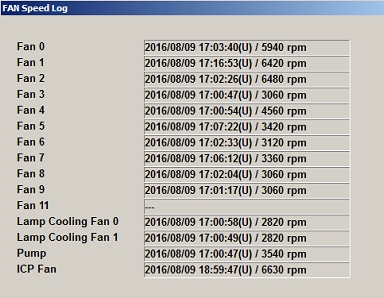
I also scrolled back through the temperature logs and didn't see
anything unusual. How "urgent" is action required on this? How
long can they continue to safely operate before they get into
big trouble? (I know they're going to ask me this!)
 (hint)
 ![[Wink]](wink.gif)
Posted by Steve Guttag (Member # 268) on 08-09-2016, 03:23 PM:
AC ON is "Fan 6". It runs ANYTIME that there is power to the projector...including in standby. So it will burn up the time but if you look at the RPMs you'll likely see that you are fine. NEC conservatively puts the error out at 20,000 hours. The MTBF on that fan is 80,000 hours. So you are likely fine for another 20,000-40,000 hours.
Fan 6, by the way is the lower of the two fans that reside behind the front filters. It is blowing on the card cage (something has to keep those cards, enigma, IMBs cool in standby).
As for error codes, they are in the manuals.
To reset the fan, go to the "LAMP" section of the DCC and you'll see the buttons in the lower right for clearing such things.
Posted by Mark Gulbrandsen (Member # 72) on 08-10-2016, 07:57 AM:
I have been starting to replace these fans once the projector hits the 5 year old mark. Some are approaching 60k hours of on time and these two fans and the ICP are what I consider critical fans to the life of the machine since they cool the card cage, I also replace the ICP battery at 5 years since it is pulled out to get to the ICP fan located in the CPU module above it.
Mark
Posted by Kerry Fleming (Member # 1657) on 07-19-2017, 07:13 PM:
I am dealing with this error code on a NEC900C-A. DCC log shows that Fan #6 is running at 92%. Temp log appears normal in all areas. This is apparently a run time oriented response. Can anyone advise me if Fan #6 is operating at all times this model NEC projector is "On" or in "Standby as in other NEC model projectors mentioned in previous posts? My guess is that it is! NEC Tech Support recommends replacing ALL of the fans once this error message appears. Too costly!
Posted by Leo Enticknap (Member # 534) on 07-19-2017, 09:52 PM:
I've only been a service tech for a month and a half, but have already encountered this twice! Scares the hell out of the owners of the projectors, because it also gives you a red tail light. Ironically, one of them is at my former workplace as a projectionist...
Error codes are in the service manual, and NEC also have a site that allows you to search for them, as so:
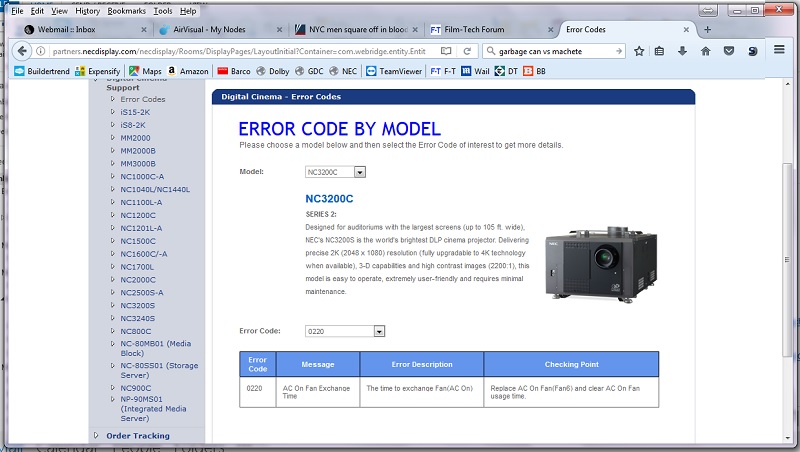
But I'm afraid you have to be an employee of an authorized service partner to register on and have access to it.
I've also been told by co-workers who have been taking these machines apart for many years that the actual life expectancy of the fans in NEC projectors is way longer than NEC officially advises and recommends replacement at. You could decide to take the risk and simply reset the fan hours without as much as taking a panel off. But if you do that, the logs will show that you did it, and if you later need to make a warranty claim for a seriously expensive part that goes bad, I guess you could be asked to prove that the fan(s) were actually bought and installed in order for that claim to be honored.
I'm guessing that one part of the equation is how regularly the air filters have been replaced. If they've been swapped out with every bulb, the airflow through the projector should have stayed pretty good and excessive strain on the fans avoided. But if the filters have been allowed to become plugged up, gross and disgusting, the fans will have been straining against a partial vacuum, with all the stress on bearings and motors that implies.
Posted by Steve Guttag (Member # 268) on 07-20-2017, 05:51 AM:
Leo,
The logs will also show that the fan speeds are in their proper range and the temps were in their proper range.
Posted by Kerry Fleming (Member # 1657) on 07-20-2017, 08:30 AM:
I am told the NEC projector warranty is for (2) years. After that you can obtain a "Parts Only Warranty" for $1272 per projector per year. Ours are 2 years/3months old. We take very good care of our equipment. The air filters have been changed regularly. Air flow is normal. Fan logs give a percentage of efficiency which is obviously derived from fan rpms. The operating temps are within normal ranges as well. This error code is obviously timer generated. Not failure oriented. I have reset the Fan log. Depending on the state the projector is operating in. Not all fans will be running. That is why I am trying to identify which fans get the most use.
Posted by Mark Gulbrandsen (Member # 72) on 07-20-2017, 03:10 PM:
I have never found the parts warranty from NEC to be at all advantageous. Out of 334 NEC's I installed I have replaced about a dozen power switches, two NC-900 lamp ballasts, one NC-1200 lamp ballast, and the focus motor on one Minolta lens. Now that's a dam good track record for going on a little over 6 years. Now the NC-900 does not have quite the track record the larger machines have, but considering how rushed it was and that there are so many of them out there, the overall picture is not all that bad. All of my customers have however taken advantage of the GDC extended warranty that covers the media block. No hard drive coverage as they are cheap expendables anyway. I have lost two GDC media blocks because of certificate batteries dying before I could get to them and GDC will replace them for you. No extended warranty and you are S.O.L.! GDC sells the extended warranty directly.
Mark
Posted by Leo Enticknap (Member # 534) on 07-20-2017, 11:01 PM:
An extended warranty (on any big ticket consumer or professional appliance, not just a projector) is fundamentally an insurance product just like any other. You are buying peace of mind that you won't face an unplanned expenditure over the term of the warranty. The vendor of the warranty wants to make a profit on them, obviously, and so they will do the same math as an insurance actuary to set the price of them. Therefore, the probability is that you will end up spending more over your ownership of the product if you buy the warranty rather than "self insure" for unplanned repair costs, but the down side is that you (the end user) have to be able to write that check if you lose the gamble.
Posted by Mark Gulbrandsen (Member # 72) on 07-22-2017, 11:03 AM:
Well, there are extended warranties that are a reasonable deal and there are ones that aren't. The NEC warranty is not a good deal considering how reliable NEC's have been around here. If one is doing booming business and needs a write off then go for it.
The GDC warranty if bought direct on the other hand IS a good deal that won't break any theater's check book. And they offer multi-year discounts. That same GDC warranty from Strong is about 2K dollars from Wrong which is an absolute rip off.
I have had two SX-3000's lose the certs and the GDC warranty provided replacement servers the next day. I just swapped one out in Idaho yesterday. Both these SX-3000's were 3 years and a few months old when they lost the cert. So changing the batteries out on these is very important. Its easy to do.
Mark
Posted by Leo Enticknap (Member # 534) on 07-22-2017, 02:06 PM:
Maybe the expensive NEC warranties are because, as you say, these projectors have such a good reputation for reliability that a relatively small proportion of the overall risk pool buys them, and those that do, buy warranties for older projectors and are thus more likely to make a claim? Without wanting to stray too much into politics, it's the same underlying problem as with Obamacare: healthy people aren't buying the policies (despite the tax penalty), so the overall risk pool is smaller and higher.
I once heard the argument (could have been on the Clark Howard show, but can't remember), that for extended warranties on autos, the price/reliability relationship is the opposite to the one you'd instinctively expect: as a general rule, cars that are more reliable cost more for extended warranties. So very few people buy one for a Honda Civic, and those that do are doing so for a specific reason that puts them at higher risk of a claim: they know that they haven't maintained it very well, they use it in a way that puts a lot of strain on it (e.g. lots of short journeys starting from cold), etc. etc. But at the other end of the scale, BMWs and Subarus have such high breakdown rates as a proportion of the total number of units in service that a much higher proportion of owners want to cover themselves with an extended warranty, and so a lower proportion of the total warranties sold ever have a claim made against them.
Agreed on the importance of regular replacement for media block batteries, and it's not just GDC. I had a weird issue last week: Barco DP2K-15C / DSS220 / cat745. Theatre called: server wouldn't connect to IMB. To cut a very long and convoluted story short, it turned out that both the projector's signal backplane and the cat745 IMB had gone bad. The guy at Barco I spoke to thought that the problem could have started with an IMB battery beginning to die and causing weird things to happen between the IMB and the backplane. It kinda makes sense: the server could communicate through the cat5e link wire (so pinging 130.1.1.1 locally from the DSS220 did get a response) but not through the backplane of the projector. After the backplane was replaced, the projector showed an IMB physical tamper error after the service door tamper had been cleared, and so the cat745 had to be replaced as well to get that screen up and running.
There was no low battery warning in Show Manager or the server logs, though. That having been said, that IMB had been in service for five years, and I didn't look to me like the battery had ever been replaced.
Posted by Stephan Shelley (Member # 8587) on 07-22-2017, 02:14 PM:
Cat 745s do not have field replaceable batteries. They are rechargeable and do so while in service. Just like link decrypter batteries.
Posted by Steve Guttag (Member # 268) on 07-22-2017, 05:22 PM:
You are mistaken Stephen! The CAT745 DOES have a changeable battery. There is a cover over the battery and a temporary battery holder right next to it. You put in the coin battery while changing the main one. Once the main one is finished, remove the coin battery and move on to the next one.
Perhaps you are thinking of the CAT862.
I don't think the NEC extended warranty is excessive for what it is as compared to other manufacturers. In general, if you are single or twin, then a projector warranty makes quite a bit of sense (long term). Odds are, before that projector gets to be 10-years old, you are going to lose something on the light engine/prism (stuck pixel, even) and the cost of replacing that/down time while being repaired) will be offset by the yearly warranty price. If you have an NC900, it isn't a matter of if, but when something in that unit craps out.
Once you hit 3 screens, the cost benefits of extended warranties start to diminish and for 4 and up, you are better off owning your own parts source or even a spare projector to be put on line in an emergency (perhaps the NC1000). The annual cost of a lot of extended warranties far exceed the cost in parts.
Posted by Stephan Shelley (Member # 8587) on 07-22-2017, 06:58 PM:
Your right Steve I was thinking of the 862.
BTW just had a cat 745 die much like Leo did but in this case the backplane was fine. This one was 3.5 years old.
Posted by Leo Enticknap (Member # 534) on 07-22-2017, 07:12 PM:
The replacement 745 I swapped in had a supercapacitor soldered to the board in place of the dual battery arrangement (CR2477N in there permanently, and a holder for a CR2032 that you insert temporarily while you replace the main one). So it looks like a design change happened part way through the production run.
Posted by Martin Murray (Member # 162) on 07-23-2017, 03:24 AM:
I have an error code on fan 0 on a 3200s which fan is this and where is it located? thanks
Posted by Steve Guttag (Member # 268) on 07-23-2017, 09:50 AM:
I'd have to look it up on a 3200S series but on the NC1200/2000 it is the fan that blows on the prism (has to be swung out of the way when working/removing the prism).
[edited] Confirmed, on the NC3200S, FAN0 is the Top Prism fan.
Posted by Kerry Fleming (Member # 1657) on 07-23-2017, 11:12 AM:
You all make some very valid points about Extended Warranties!
I have an 8 year old NEC 1600C-A Series 1 still in operation.
It has taken only one control board & lamps in all those years!
Likewise the Dolby equipment has been equally as reliable; one HDD & a 3D Filter Wheel Motor assembly.
The 900's have run flawlessly these past two years & three months. And purchasing an extended warranty on each is NOT cost effective!
On the other hand the GDC 3000's have been a continual headache. PSD's, HDDs, Cables, Servers go bad at the "Drop of a Hat." Haven't hit the point of battery replacements yet. But, I can't imagine NOT having extended warranty service from GDC.
Posted by Mark Gulbrandsen (Member # 72) on 07-23-2017, 01:47 PM:
Thats interesting, because except for a few HD failures on the PSD-3000's I have had no SX-3000 failures that were not caused by dying Certificate batteries. A few firmware bugs in the beginning, yes. But nothing that kept anyone off the screen. Overall they have blown the Doremi IMB Server out of the water as far as reliability goes. The few of those I have installed have all been replaced multiple times and I finally refused to ever touch one again.
On the GDC warranty. Do not call Wrong for it. Call GDC directly for the best deal. I advise all my customers to get it because it covers the media block. And it's the media block that is supposedly the most unreliable and most expensive part in all servers. I have had the GDC extended warranty replace two different SX-2000A servers that were skippping, one motherboard on an SX-2000A server that was skipping. Also one media block failure where the servers were updated from 7.8 to Build 254 straight away. The older media blocks don't seem to like that huge update being done, where systems that received incremental updates over the life of the firmware have had zero issues.
Mark
Powered by Infopop Corporation
UBB.classicTM
6.3.1.2