This is topic Audio Description not working - help! in forum Digital Cinema Forum at Film-Tech Forum ARCHIVE.
To visit this topic, use this URL:
https://ft-forum.com/ft/cgi-bin/ubb/ultimatebb.cgi?ubb=get_topic;f=16;t=002792
Posted by Steve R Pike (Member # 6238) on 08-28-2016, 12:51 PM:
Hi All
Hope someone can help me! We have no audio description coming through our system. I have checked that the correct version of the film is being played with the AD track.
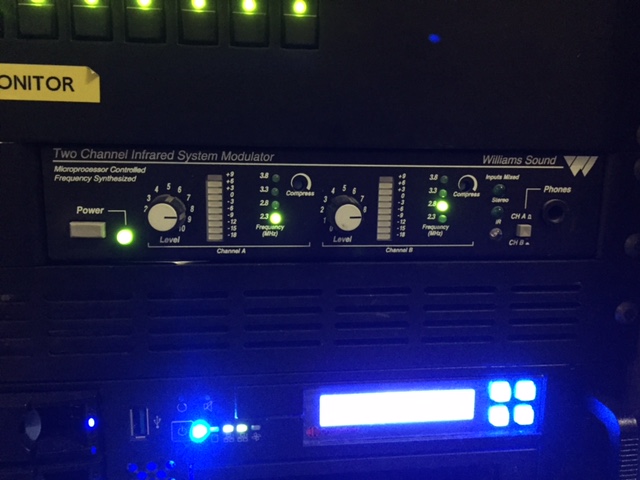
We are using a Williams Sound system as below:
The back of the unit is connected as below:
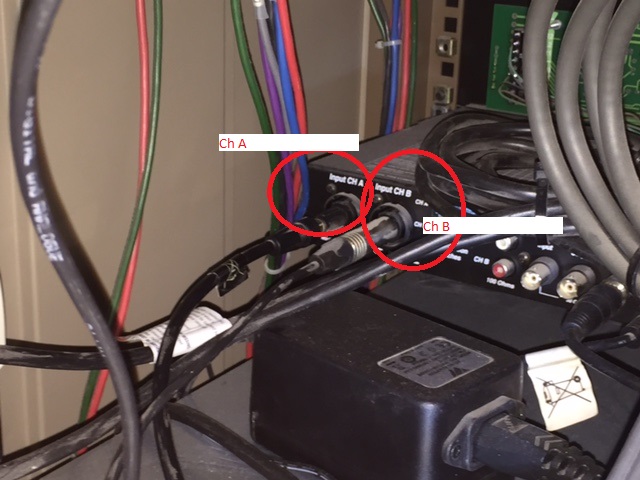
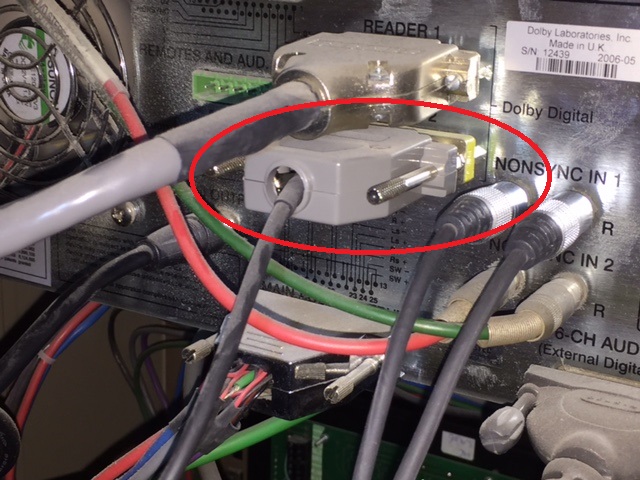
The film soundtrack is coming out of the dolby digital processor from the circled location and going into channel B on the AD box:
We also have a connection coiming out of the H/I Output of Dolby unit into channel A on the AD box (presumably for the AD track)?:
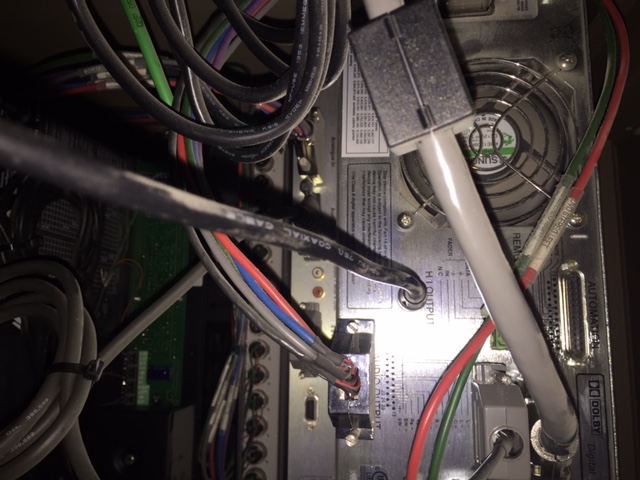
However it is only channel B (film soundtrack) that is showing as having any output on the front of the Williams Sound panel, and when wearing the headsets in the auditorium, only channel B is coming through - channel A is just quiet.
The connections haven't changed since we had it installed (and it did work once!) - could this be a setting on the projector (we are using a Doremi DCP2000 with Christie CP-2000S - for example audio system mapping?
To add pressure to this situation we are screening a film this week for blind customers and management have asked if the AD system is working (and sods law it isn't!)
Thanks in advance!
Posted by Harold Hallikainen (Member # 5405) on 08-28-2016, 01:08 PM:
Has anything changed in the system since it last worked? For example, some server updates have brought in audio routing instead of just sending audio out in the same order as the tracks in the DCP. Interop content has HI audio on track 7 and Audio Description (VI) on track 8. Not all content has either. Looking at the photos of the sound processor, it looks like HI is being taken from the HI output of the processor which is an LCR mix. This has the advantage over using track 7 in that it always works including for trailers with no HI track and for preshow material. VI, again is on track 8. This will typically come out AES channel 8 on the server unless there is some routing enabled. To help isolate the problem, I'd connect a pair of headphones across the line driving the VI input of the IR transmitter. If the audio is there, the problem is in the IR transmitter or the wiring to it. If the audio is not there, the problem is in whatever is driving the IR panel. It appears to be the sound processor from the photos, but that is not super clear. It appears to be an older Dolby processor (before CP750). Is it an 8 channel processor (does it convert 4 AES pairs to analog)? Is the auditorium 5.1 or 7.1?
Good luck!
Harold
Posted by Brad Miller (Member # 2) on 08-28-2016, 01:26 PM:
"Reader 2" is an INPUT used exclusively for connection to an SRD "on film" digital sound reader.
I know you say nothing changed, but trust me, something HAS been changed if you are absolutely sure this DID work at one point, as you cannot simply expect an input to output audio.
Is that even a CP650, or is it a CP650D? You need to check the sticker on the back of the unit to find out.
I see you have something connected to the 6-channel input, so there is good odds unless you have an old dts player in the rack that you are using an external D to A converter and you have a CP650D which is not even decoding the server's audio.
Posted by Steve R Pike (Member # 6238) on 08-28-2016, 01:53 PM:
Hi Both
Thanks for your quick replies, I'll have to check this out when the current screening has finished.
I'm at a loss why someone has connected an input to another input!! Looks like someone (who has since left the business and prone to fiddling around) may have had a play around at the back!
This is a Dolby CP650 not a CP650D (printed name on back of unit confirms this)
The 6-channel input is connected to our Denon AV receiver used for our satellite broadcasts.
Posted by Leo Enticknap (Member # 534) on 08-28-2016, 02:07 PM:
Do the simple checks first.
This reminds me of when I had kittens a few weeks ago when I test played a reel of a 70mm print of The Wild Bunch and heard a silent movie. While I was getting frantic, sticking multimeter probes into various places in the back of the CP200 and MPU1, etc., a co-worker stopped by to talk about something different. After explaining the problem, she said, "You are sure that there is actually something recorded on those tracks, right?". So we threaded a pink noise loop through the mag heads, pulled it through, and pink noise blared through the booth monitors. The simplest and most obvious thing to check was the one thing I skipped checking.
Therefore, do you have a DCP on your server that you know has an audio description track (as in, you've heard it before), that you can try playing? If you have, you do and it does, then you know that either you're dealing with an Interop/SMPTE channel assignment problem (unless you've played both Interop and SMPTE audio described DCPs before and successfully), or you're dealing with an equipment problem.
If it is an equipment problem, maybe try connecting the HI RCA output jack of your CP650 to something else, e.g. an active PC speaker, and seeing if you hear anything? If no, the problem would appear to be in the CP650; if yes, the problem would appear to be downstream from the CP650.
Posted by Jesse Crooks (Member # 9389) on 09-14-2016, 07:41 PM:
Continuing Leo's advice to check the simple things first, does the DCP name indicate that there is in fact a VI narration track?
I don't know what your accessibility hardware is, but one of our theaters has Doremi radio transmitters for the HI and VI tracks. We used to leave them on 24/7, and they were consistently failing. Rebooting the transmitters would solve the problem. We ultimately plugged the power supplies into outlets that get power cycled daily, and haven't had any issues since. Depending on which system you use, perhaps a simple reboot would be in order?
Posted by Monte L Fullmer (Member # 2797) on 09-14-2016, 07:58 PM:
VI is Visual Impaired
HI is Hearing Impaired
Some prints already have DA (Descriptive Audio) encoding in the files and we use the USL headsets that has the dual hearing and descriptive audio choices via switch position and the visual readers that sits in the cup holders.
Do the words, "HI_VI" appear in the naming string of the feature content?
If not, the assistive devices will not work.
-Monte
Posted by Dave Macaulay (Member # 813) on 09-15-2016, 05:45 AM:
You're convinced this worked previously? I don't see any way it could have.
As noted the READER 2 jack is an input, not likely any VI audio came from there.
The HI output jack gives a signal derived inside the CP650, a mix of output channels with Centre (the dialog channel) dominant. This is not the DCP HI track which is a different mix done by the studio, with either just dialog or adding some music/effects.
A VI track is "Descriptive Audio", someone saying what the action is... this is obviously impossible to derive from the movie's sound track.
The HI/VI audio on the DCP is on a single AES digital stereo signal. Just about every D-A for cinema handles the 4 main AES signals with 5.1 audio on 1,2, 3 and the HI/VI signal on 4. For 7.1 all channels are used for program sound.
The most difficult situation is a 7.1 room regardless of the D-A used.
With a 5.1 room you could set up your CP650 for 7.1 (might require an expensive option card and one or two inexpensive paid software upgrades), get the normal cinema button to be 7.1, and connect your transmitter to the BSL and BSR outputs. With the default AES channel mapping you will have HI and VI on BSL/BSR. If you play an EX 35mm film the "real" BSL/BSR audio will be on the headphones, though... you could switch to the CP650 HI output for that. This will have the HI/VI signals controlled by the CP650 fader.
To avoid those headaches, I would use the Odyssey adapter card that pulls out the HI/VI AES signal, add a D-A converter, and feed the transmitter from that. You can switch to the CP650 HI output for film shows if you need HI then.
If you run 5.1 and use an external 8 channel (4xAES) D-A, you can pull the HI/VI analog channels out and connect them to your transmitter. I don't know of an adapter that does that, Odyssey could make it for you if you don't want to get into soldering to DB25 connectors.
These last two setups will give fixed level HI/VI signals (not controlled by the CP650 fader).
Powered by Infopop Corporation
UBB.classicTM
6.3.1.2