This is topic DCP-o-Matic and "part time" subtitles in forum Digital Cinema Forum at Film-Tech Forum ARCHIVE.
To visit this topic, use this URL:
https://ft-forum.com/ft/cgi-bin/ubb/ultimatebb.cgi?ubb=get_topic;f=16;t=002793
Posted by Mike Blakesley (Member # 26) on 08-28-2016, 01:11 PM:
I'm trying to convert a movie from Blu-Ray that has subtitles in only a few scenes where the characters don't speak English - but the subtitles don't show up on the resulting DCP. If I click the "Use subtitles" box in DCP-o-Matic, of course I get subtitles all the time.
I assume this is because the part-time subtitles are on the blu-ray in various languages...how can I get those part-time English subtitles to show up in the DCP?
Posted by Brad Miller (Member # 2) on 08-28-2016, 01:25 PM:
You would have to select the correct caption track. Assuming you are ripping with MakeMKV, there are options to only select "forced English" subtitles. You may end up with a few different subtitle tracks, but you would just have to preview it within DOM before making the DCP and see which track gave you what you wanted.
Posted by Leo Enticknap (Member # 534) on 08-28-2016, 02:32 PM:
As Brad says, there is probably a different English hard-of-hearing subtitle track and a "translate the foreign dialogue only" subtitle track: the trick is to rip the BD such that you only take the subtitle track you want into the file that you then import into DCP-o-Matic.
I have the full version of DVDFab, which makes doing this very easy and straightforward, but couldn't advise on any free options - sorry.
Posted by Carsten Kurz (Member # 5396) on 08-28-2016, 04:55 PM:
MakeMKV allows to choose between subs and forced subs - try the forced subs, or select a different subtile track.
- carsten
Posted by Mike Blakesley (Member # 26) on 08-28-2016, 09:20 PM:
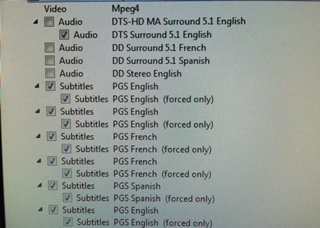
Here is the list that comes up in MakeMKV -- I have not changed any of the settings from when I created the first DCP (which rendered without the subtitles). It looks like all the "forced" options are checked...so apparently I need to uncheck something? Or is there something else I'm missing? A setting on DOM maybe?
Posted by Brad Miller (Member # 2) on 08-28-2016, 09:41 PM:
DOM has a drop down menu to select which subtitle stream you need. Start it playing during a dialogue scene and keep going down the list one by one until you find one that DOESN'T have regular dialogue subtitles displaying on the preview window.
Then you have to find out if it is just a subtitle stream of occasional dumb "director/cast/crew commentary" subtitles or actual subtitles that would've been burned into a film print, so be prepared to skip around the movie for quite a bit in the preview window.
Posted by Michael Putlack (Member # 6523) on 08-28-2016, 11:56 PM:
Mike, I think the subtitle box you should check is the PGS English (Forced Only) and uncheck the other english ones.
Posted by Mike Blakesley (Member # 26) on 08-30-2016, 02:29 PM:
Thanks guys, I got it figured out.
Powered by Infopop Corporation
UBB.classicTM
6.3.1.2