This is topic Interlock Failure Christie 2210 in forum Digital Cinema Forum at Film-Tech Forum ARCHIVE.
To visit this topic, use this URL:
https://ft-forum.com/ft/cgi-bin/ubb/ultimatebb.cgi?ubb=get_topic;f=16;t=002815
Posted by Bradley J Sime (Member # 9423) on 09-20-2016, 11:53 PM:
For the past few weeks, I've experienced this problem with my Christie 2210 projector wherein I get an Lamp Status Off Due To Interlock Thermal/Door Failure message. Initially, I thought it was because I'd left the keys in the door of the projector, so I removed them, and for about a week the projector was fine. Then the lamp turned off again during a show, and we had to cancel the show, so I bent back the little interlock switch on the projector door, and again, for a week, things were fine.
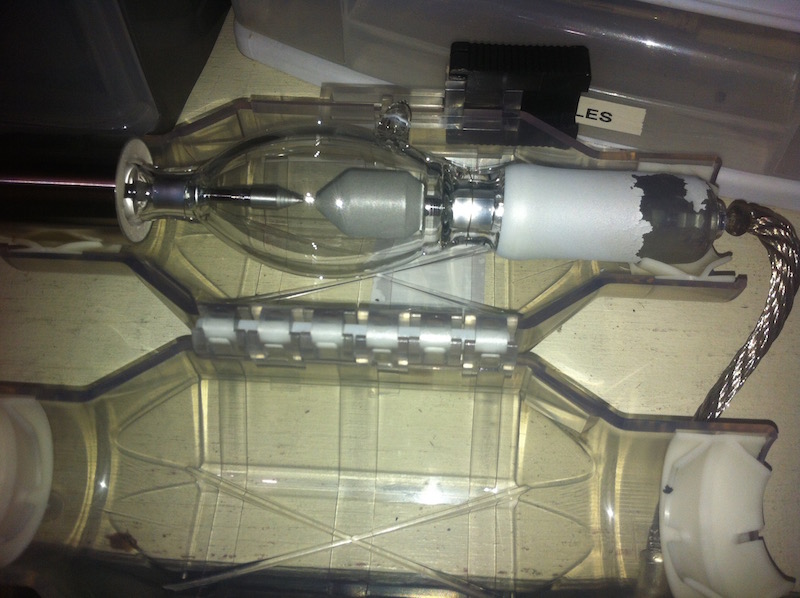
Then tonight, I received the failure message again and Superman (1978) was lost. Anyway, I checked my lamp, a CDXL 18SD and it looked like this (see below). My guess is that all that shit flaked off and was heating up my ballast cable and tripping the thermal interlock? Does this sound right or possible? Anyone else ever seen a lamp looking like this after 504 hours?
Posted by Steve Guttag (Member # 268) on 09-21-2016, 07:08 AM:
Christie has a problem with their switches. They are using traditional electromechanical switches that have really gone down in the post RoHS era. There is so little current going through the switch that any degradation will get you a sudden lamp off. Now Christie could resolve this a bit by putting a "debounce" their code such that the projectors are not so trigger happy (e.g. only declare a trip if it remains off for 5 seconds or more). Or, ideally, stop using electromechanical switches altogether.
The bottom line, change the switch and your problems will likely vanish with it.
I've changed many door interlock and now a few air flow switches due to them just flaking out. Also note, for the 20 and 30 series, there is now a UV kit that re-routes the cables out of the UV light and also shrouds air flow and door switches (as well as the exhaust sensor) out of the UV light.
As to your lamp. The CP2210/2215 has a problem with its cooling. Any wattage above 1600-watts is going to cook. They just don't have sufficient air flow for the 1800 and larger lamps. I've looked at them with some rather impressive exhaust (with the optional exhaust flange) and still they cook.
If you are worried about it really overtemping, look at what the thermal sensors are reading.
Another thing you can do is install the latest software (4.6) and untick the "overdrive" option that will prevent the projector from going above 100%. Note, if you drive your lamp over 100%, Christie won't honor the lamp warranty even though their own program would do it.
Posted by Dave Macaulay (Member # 813) on 09-21-2016, 07:11 AM:
An enhanced interrogator report should have temperature data that can tell if it was a switch or a thermal alarm.
Agreed that mechanical switches are crap now for microcurrent use.
You should disable the lamp overdrive function.
The CP2210 as barely able to cool this lamp when at its best.
I've not seen this flaking of the paint on these lamps, they are unusual in not having the metal cover on the anode end.
It looks like overheating, which would also explain an overtemp shutdown.
The CP200M/CP2210 lamp fans are very prone to getting clogged with greasy dust if there's any popcorn smoke getting to the booth - ie if you can smell popcorn in there when the concession is running. They must be removed, the assembly dismantled, and then be pried open to get their squirrel cages and housings cleaned. I have seen a 2210 shutting down because clogged fans were moving very little air. You can see inside the outer one from the lamphouse with a flashlight, the other one will be about the same condition: the vanes should be clean and open. Removal of the fan assembly is a bit tricky, and take pics or mark how the blowers mount to the plate for help reassembling them. The blower clamshells come apart via little clips molded into the housing that can be unlocked with a small screwdriver or knife.
If the fans are OK... Do you use an external exhaust duct and fan? Could it be broken or working poorly?
Posted by Bradley J Sime (Member # 9423) on 09-21-2016, 11:53 AM:
I had a tech come in and look at this morning, and he seemed to confirm that it was an issue with the bulb itself, that was leading to the interlock failure. The bulb pictured had 504 hrs on it (guaranteed for 1750). The connection from the anode cable to the bulb, to me, looks like crap, and I can't think of anything within the projector itself that would cause the bulb to look like that on the section of the bulb where looks like that. Basically, only the bulb itself could make the bulb look like that, and that could cause the thermal interlock switch to open. I should mention as well that all my interrogator reports are normal, and I haven't received any other error messages or warnings for a looooong time.
Anyway, I changed the bulb last night after Superman was cancelled, and the next show ran smoothly (a two and half hour picture). I don't know. What keeps me up, and will no doubt continue to keep me up, is that the problem was recurring (after each troubleshooting session) in a 7 day frequency. It'd be fine, then a week later, I'd lose a show. I'm guessing that these could be environmental factors as well. Our booth is very cool (theater was built in the 40's) and the temperature outside has been fluctuating like crazy lately, which means some nights I've had a little heater on in here, some nights I haven't. Some days have been much warmer than others. Typical Alberta weather. I know I'm grasping at possible causes for the sporadic nature of the interlock event, but it's all I can think of.
Posted by Frank Cox (Member # 6258) on 09-21-2016, 12:51 PM:
What about the paper filter on the front of the projector? I had an error message show up on my 2210 a little while back that said something about "Filtered airflow". I took the front cover off off and pulled the filter out. It looked perfectly white and clean and just exactly the same as a brand new one, but I put a new one in anyway and haven't seen that error message since. "Invisible dirt" of some kind in the filter, I guess, even though it still looked brand new.
Posted by Bradley J Sime (Member # 9423) on 09-22-2016, 07:04 PM:
Installed a new lamp, made it through two shows last night, and then same shit tonight. Lamp goes off because of interlock open. I've ordered new interlock switches. I'm guessing there's no way to just disable those switches? They have to be replaced?
Posted by Stephan Shelley (Member # 8587) on 09-22-2016, 08:56 PM:
You connect the two wires together.
Posted by Bradley J Sime (Member # 9423) on 09-22-2016, 08:59 PM:
what two wires? my service guy says he won't do it because it's a fire hazard, and I might not do it, either. But just for shits, which two wires? Has anyone done that? I should mention that I'm not getting ANY other warnings, and all my other sensors seem to be functioning. I'm at the point where we're looking at renting a projector as a huge film fest begins here tomorrow night (of course).
Posted by Stephan Shelley (Member # 8587) on 09-22-2016, 10:03 PM:
The two wires that go the the micro switch. Everyone did it for years with the consoles for film projectors. The micro switch closes the circuit. So connecting them together is the same thing. Just until a new switch can be installed. Also it will tell you if that is the problem.
Posted by Bradley J Sime (Member # 9423) on 09-23-2016, 12:27 PM:
Here's some more information. The shows I've lost have all been BluRays or DVD's, being played off of one of our decks (an Oppo and a Panasonic). I haven't lost a DCP this entire time, despite playing tons for the duration of these troubles. Could the problem possibly be the DVI port on the projector itself? A bad connection in the board somewhere tripping the thermal interlock? I'm in the booth now, running a BluRay, waiting for it to fail again, and then will switch my feed to SDI.
Posted by Sean McKinnon (Member # 612) on 09-23-2016, 02:27 PM:
Even though it was common (but unadvised because I can't tell you how many lamp houses and consoles I ran into that someone bypassed and never replaced the switch making a dangerous situation for anyone working inside that lamp house/console I used to carry microswitches with me just for this reason and re-install them as I ran across them) I don't know if I would risk bypassing any interlock switches especially thermal or sail fan stack switches in a DLP Projector there is just too much to risk with a damaged light engine or other expensive parts.
Posted by Bradley J Sime (Member # 9423) on 09-23-2016, 02:35 PM:
Thanks, Sean. Yeah, I'm not gonna mess with them. It's my ass, ultimately. I'm just hoping that the interlock switches is the root of these troubles because I'm smack dab in the middle of the literal projectionist's nightmare.
Posted by Steve Guttag (Member # 268) on 09-23-2016, 03:09 PM:
Sean,
You can't "bypass" a thermal switch...it isn't a switch but a sensor...it knows the difference between open/shorted/connected.
As for the sail switch...I've already had to do that in one location until the switch arrived...dumping 1000s of people in the name of a switch that shouldn't have even been there is just silly. That switch has since been replaced and the projector (CP4230) upgraded with the UV kit and both the interlock and sail switches changed (as well as the thermal sensor on the exhaust).
Posted by Bradley J Sime (Member # 9423) on 09-23-2016, 03:13 PM:
Steve, is a malfunctioning thermal sensor what you'd bank on here? I haven't had any temperature warnings, or any warning of any kind, and all my temperatures are right where they should be.
Posted by Steve Guttag (Member # 268) on 09-23-2016, 05:34 PM:
No, I'd bank on the mechanical switch. A thermal sensor failing will yell and complain...and unless it goes above a set value, wont do anything else. I've had NUMEROUS door interlock and vane switches give sudden lamp-offs...never had a thermal switch cause it.
Posted by Bradley J Sime (Member # 9423) on 09-24-2016, 11:39 AM:
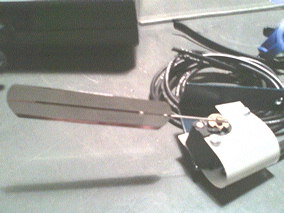
Sorry, what is the vane switch?
Posted by Stephan Shelley (Member # 8587) on 09-24-2016, 01:33 PM:
There are no vane switches in a 2210. The larger Christies use them as airflow switches. An example of one is below.
Posted by Sean McKinnon (Member # 612) on 09-24-2016, 02:53 PM:
Thank you for the information on the thermal switches, Steve ![[Smile]](smile.gif)
Posted by Jim Cassedy (Member # 4115) on 09-24-2016, 07:28 PM:
I'm with Sean what said a few posts ago in that safety interlocks
are there for a good reason, and in general, I don't advise bypassing
them except in an emergency to save a show.
I ran into a situation earlier this year during a screening.
(film) Full house. No automation, I run everything manually.
But when I went to strike the xenon, - - nothing happened.
Indicator lights showed I had AC to the lamphouse and igniter.
I knew my igniter was in good shape, so I felt sudden failure
was unlikely, although not impossible.
But I also knew that the igniter primary ran through a relay that
wouldn't close unless all the safety interlocks were operating.
. . & I didn't hear that relay clicking, so I suspected the interlocks.
Opened the lamphouse door, and sure enough, it was that pesky
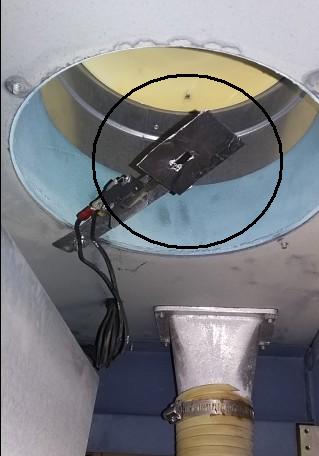
exhaust stack "vane switch". In fact, the 'vane' had disappeared
entirely! I suspect it somehow got loose and sucked up through the
exhaust system. Not wanting to keep "the house" waiting, I shorted
out the interlock terminals and started the show.
But I didn't want to leave the switch contacts shorted, so before the
next show I managed to make a replacement 'vane' out of some heavy
duty black-wrap foil I had in the booth, & un-shorted the interlock switch.
Worked like a charm!
>Actual Photo !<
Posted by Sean McKinnon (Member # 612) on 09-25-2016, 11:22 AM:
That was my only intent that one should be careful to make sure it is a faulty switch and not another condition and to make sure it gets replaced or if it is felt to be redundant and unnecessary that the bypass be done in such a way that it won't become an open circuit on you and lead to a failure and possible passed house. Obviously it would be silly to dump a 1,000 seat house over an interlock if you can verify a bad switch but I'm sure we have all ran across those lamp houses or consoles where booth staff just twisted all the bare wires together and left it that way for years until a new tech or service company comes in and hopefully does a thorough inspection instead of getting caught in an unsafe situation. That's all. Hopefully Steve's (as usual) good advice helped you get back on screen.
Posted by Bradley J Sime (Member # 9423) on 09-26-2016, 05:17 PM:
Good to know guys. It looks like it was the door switch or the harness or something. I got it all replaced (wasn't too dear) and the proj has been running sound for a couple nights. We'll see....
Thanks for listening.
Posted by Carsten Kurz (Member # 5396) on 09-29-2016, 05:39 PM:
Why is the 'Interlock-Switch' called 'Interlock-Switch', even on a digital projector? Is that a generic term? I guess in this case the meaning is different from film-interlock?
Wondering wether we have a suitable german word for it...
- Carsten
Posted by Sam D. Chavez (Member # 1841) on 09-29-2016, 08:32 PM:
Interlock is used more as in safety or electrical interlock than film interlock as in running more than one projector in series.
Powered by Infopop Corporation
UBB.classicTM
6.3.1.2