This is topic Rear projection with DCP in forum Digital Cinema Forum at Film-Tech Forum ARCHIVE.
To visit this topic, use this URL:
https://ft-forum.com/ft/cgi-bin/ubb/ultimatebb.cgi?ubb=get_topic;f=16;t=002824
Posted by Andres Kauts (Member # 7009) on 09-28-2016, 06:00 AM:
In relation to a special event we have been asked if it is possible to use rear projection for DCP film.
I didn't find this option with our projector (Barco DP2K-20C with Alchemy) nor did I find any info on the google.
Am I correct to assume that this option is not available in dcp projectors?
Posted by Richard Fowler (Member # 893) on 09-28-2016, 06:43 AM:
I did a screening for a festival with a Barco with n0 problems
Posted by Steve Guttag (Member # 268) on 09-28-2016, 08:14 AM:
Since you say it is an Alchemy, I cannot say for certain. For normal Barcos (or any DLP based projector with an ICP module), it is certainly doable. On the Barco, in Communicator, go to the Advanced>Misc Settings and you will have the option for reverse screen projection. And via the ICP/Enigma program you can even specify Ceiling mounted.
Posted by Bajsic Bojan (Member # 4928) on 09-28-2016, 02:26 PM:
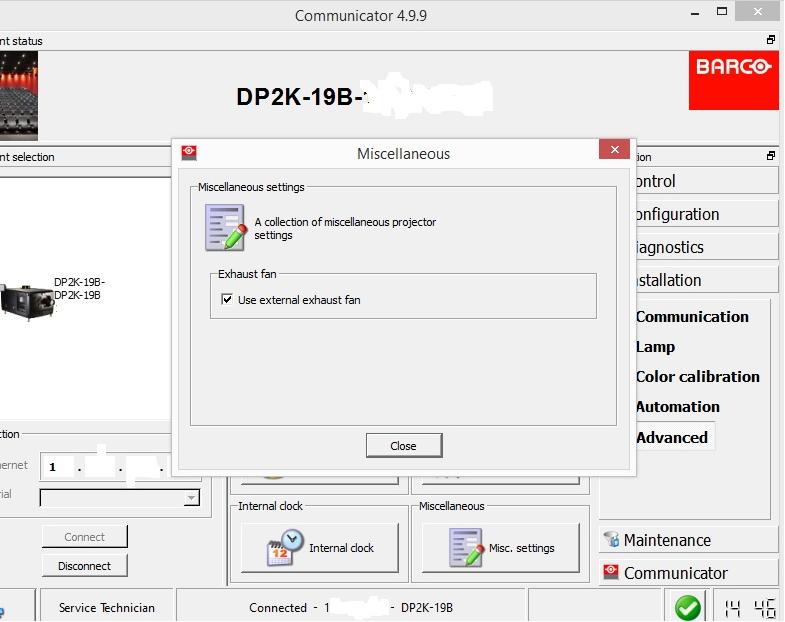
not all communicator software revisions have the above-mentioned misc. setting, at least not for default / service tech modes.
should be doable from the ICP software tho.
post which communicator ver. you are running.
Posted by Steve Guttag (Member # 268) on 09-28-2016, 03:44 PM:
Can you name one that doesn't?
Posted by Andres Kauts (Member # 7009) on 09-29-2016, 08:04 AM:
Thank you. Steve instructions worked perfectly. Exactly what I needed.
Posted by Bajsic Bojan (Member # 4928) on 10-01-2016, 08:11 AM:
probably every version before 5.x.x ?
we have a 4.9.9 and 4.4.11 running without those features. so 2014 and before versions.
Posted by Ioannis Syrogiannis (Member # 3235) on 10-01-2016, 09:27 AM:
My guess would be that 4.9.9 would have this feature.
I 've just read in a January 2014 revision of the communicator manual (R59770483/09) about the feature, giving both rear and upside-down projection capabilities, and I remember them also.
January of 2014 wouldn't be after a 4.8.13 version of communicator for PC.
I've seen one DP2000 that was originally installed upside-down, but I don't know if the settings were via the communicator or the ICP and Enigma Program.
A tough one to change the cooling liquid, that one...
It goes without saying that the ICP software gives that setting too.
Alchemy gives only the rear projection alternative via the communicator 5.3.0. An ICP software might give more options.
Posted by Bajsic Bojan (Member # 4928) on 10-02-2016, 09:18 AM:
as said
Posted by Steve Kraus (Member # 476) on 10-02-2016, 10:42 AM:
What does the ceiling mount setting do?
Posted by Sam D. Chavez (Member # 1841) on 10-02-2016, 10:48 AM:
Ceiling mounts allow the unit to run upside down.
Posted by Dave Macaulay (Member # 813) on 10-02-2016, 11:02 AM:
You can't run a liquid cooled Barco series 2 upside down, so with their ceiling mounts - projector upright but the top un-openable - makes convergence adjustment "challenging". Less challenging than on a DP2000 though... regardless of access ease.
Changing DP2000 coolant is no problem with it upside down, if you can find a place to sit two bottles.
Posted by Ioannis Syrogiannis (Member # 3235) on 10-02-2016, 01:02 PM:
quote: Dave Macaulay
Changing DP2000 coolant is no problem with it upside down, if you can find a place to sit two bottles.
Well, maybe it was me, but I had to put there an extra effort, not to leave any air bubbles there.
Powered by Infopop Corporation
UBB.classicTM
6.3.1.2