This is topic Playing UHD Blu-Ray on DCI Equipment? in forum Digital Cinema Forum at Film-Tech Forum ARCHIVE.
To visit this topic, use this URL:
https://ft-forum.com/ft/cgi-bin/ubb/ultimatebb.cgi?ubb=get_topic;f=16;t=002868
Posted by Arnold Chase (Member # 7988) on 11-21-2016, 03:07 PM:
As UHD(4k) Blu-Ray content is now growing, any thoughts as to how to interface the players to a Christie CP4230 with an IMB-S2?
Posted by Steve Guttag (Member # 268) on 11-21-2016, 04:26 PM:
yeah...sorry no. The IMB-S2 has no HDMI inputs. The Christie DVI ports are not 4K. Your only choice for 4K that isn't DCP is to buy the 3G PIB and the daughter board to turn it into a quad-link 3G input and then go from HDMI to quad-link SDI...unfortunately, that violates HDCP and even if you overcome that, it is capped at 30fps.
4K/60 poses a bandwidth problem for typical DCinema S2 projectors. Barco got around it with the Alchemy because they also replaced the ICP. I believe the Alchemy is the only potential 4K/60 HDMI compliant means into a DCinema projector and even then I don't think they are on the current UHD standards but I'm pretty sure that they can and it is on the roadmap but you'd have to ask Barco.
I believe the Dolby IMS2000 can or will be able to handle 4K HDMI at some level but it too would hit a bandwidth roadblock at the ICP so some trickery would need to be done.
Most technology is going to be a snapshot of the technology of the day it came out so it isn't reaosnable for systems designed to come out in 2010 to be ready to accept things that are cutting edge in 2016. 4K is a small fraction of the market and playing non-DCP 4K is going be an even smaller fraction so there is very little sales potential until it can come along for the ride, like with the Alchemy.
Posted by Arnold Chase (Member # 7988) on 11-22-2016, 01:30 AM:
How was it possible for the theaters to use Christie Mirage projectors for "Billy Lynn" since they're not DCI compliant?
I ask because those projectors appear to be able to handle UHD content easily.
Posted by Carsten Kurz (Member # 5396) on 11-22-2016, 04:02 AM:
They didn't need to be DCI compliant, as the signal they played - 4k/3D/120 is not DCI/SMPTE as well. They used a non-DCI format with non-DCI playout machines on non-DCI projectors.
This happens from time to time for non-regular showings. It is not a DCP what they play. The studio is free to issue special versions for these events.
BTW - most movie content on UHD is still UHD/24p. That can be used over HDMI 1.4. If you solve potential HDCP HDCP 2.2 issue - which can be done using cheap converters.
You still need to have a HDMI input that is UHD capable.
For know, I wouldn't care that much about playing consumer content in 4k on DCI machines. Most of these discs are mainstream blockbuster features which received no 4k mastering/DI, so, most of it is upscaled to UHD. Even those few titles with a real 4k DI need to go through some sort of rescaling to come out in UHD resolution, as UHD is no DCI 4k.
Play them in 1080p, I'd say.
- Carsten
Posted by Alan Gouger (Member # 543) on 11-22-2016, 12:01 PM:
HDFury has a devise called the Linker. This gets placed between a UHD 4k HDR player and any HDMI 1.4 device. It does many things but in this case it will allow you to downscale UHD to 1080p 24/60 yet maintain HDR 10bit deep color. Because the projector does not have the proper ST 2084 EOTF you will want to choose a gamma of 3.5 or higher. This device will also pass 4k into a HDMI 1.4 display but at 8bit.
In case of no HDMI they also have a solution called the "Integral" which has a split mode that will allow you to feed both DVI inputs (set DVI to 4k mode ) however they have yet to add the needed cinema resolution's 2048 x 1080 and 4096 x 2060 but will do so in next update.
Posted by Stephen Furley (Member # 1277) on 11-27-2016, 06:22 AM:
How much content is there available on UHD Blu-Ray? A few months ago HMV had six titles. The last time I looked, a few weeks ago, that was up to about twenty. I'm yet to see a player, though I did see a notice in a shop window that they had one on demonstration.
Wow do the players connect? Can the normal HDMI connector handle it? I don't think the dual link 'B' connector was ever used.
What codecs are used on the discs and are they physically just normal Blu-Ray discs, or the special three or four layer ones?
Posted by Scott Jentsch (Member # 1681) on 11-28-2016, 02:01 PM:
According to an article in CEPro at the beginning of November, there are approximately 90 titles on Ultra HD Blu-ray, with 100 expected by the end of the year:
http://www.cepro.com/article/bda_sees_4k_blu_ray_gains_continuing_plans_new_promotion_efforts
The players connect via HDMI. Ultra HD Blu-ray discs use HEVC (H.265/MPEG-H Part 2) coding, and the discs are not directly compatible with Blu-ray players / drives.
Posted by Mitchell Dvoskin (Member # 751) on 11-28-2016, 02:21 PM:
UHD Bluray players require HDMI 2.0 (18Gbyte) Cables connected to a UHD display. Further, the display must support HDCP 2.2. If any of this is not met, the player will downgrade the signal to 1080p.
Posted by Anders Nordentoft-Madsen (Member # 3334) on 12-06-2016, 03:50 AM:
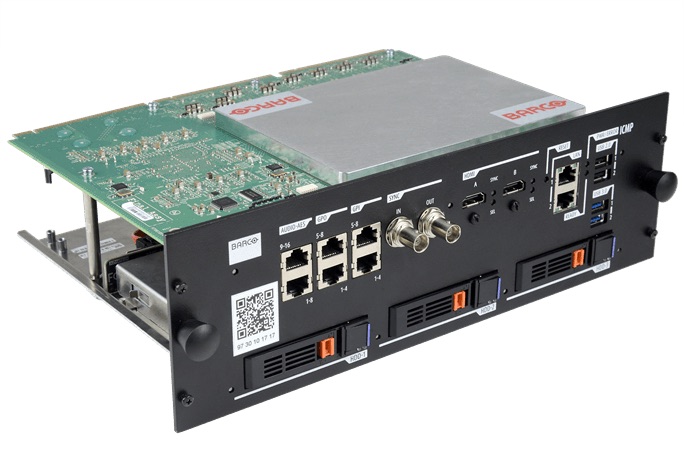
New version of Barco ICMP should have HDMI 2.0 port, so UHD Bluray should be possible.
Posted by Alan Gouger (Member # 543) on 12-06-2016, 06:15 AM:
A DCP still offers the best consistent picture quality. The UHD disc is another typical watered down consumer product with no quality control. The specs offer some improvement over HD Blu-ray but the quality of the disc's vary from studio to studio. PQ is all over the map and none compare to the same title in DCP if doing a side by side.
They look great on a 55" flat panel TV, what doesn't.
Posted by Scott Jentsch (Member # 1681) on 12-07-2016, 12:02 PM:
I think it would be interesting to see a split-screen comparison of a DCP, Ultra HD Blu-ray, and regular HD Blu-ray, using the same title.
Has anyone ever done this?
Posted by Steve Guttag (Member # 268) on 12-07-2016, 05:07 PM:
I can tell you that a regular Blu-ray is really sucky compared to a DCP...you can REALLY see it in the black levels, or lack there of on Blu-ray...it is like a little show going on with all of the garbage in the blacks. There are motion artifacts in Blu-ray as well. I and other have noted that if one converts a Blu-ray to DCP, it has a better look to it. my guess is that the conversion forces a separate frame rather than the player having to do it all on the fly.
Posted by Dave Macaulay (Member # 813) on 12-07-2016, 05:39 PM:
"a split-screen comparison of a DCP, Ultra HD Blu-ray, and regular HD Blu-ray"
The results would vary depending on who runs the comparo - what are they selling?
The DCP JPEG2000 codec is non-progressive: each image is complete, but the images can be as good or bad as the producer wants. Higher quality means higher bitrate - and there is a set limit, plus the distribution files need to fit on the drives in both distribution and exhibition. They like to keep distribution drive data under 1TB.
DVD and Blu-Ray use progressive codecs: a complete frame is sent then subsequent frames are saved as the changes from that complete frame or the previous frame. The conversion system is set to ignore a set level of change... if that "ignore" setting is high the video looks super bad.
The ratio of complete iframes to delta frames is adjustable, fewer iframes reduces data bandwidth. More iframes means more data, fewer and the image starts to look ratty as the ignored minor changes add up (plus discs get damaged and a lost/corrupt delta frame gives a totally ruined image until the next iframe - that causes the weird pixellation commonly seen with scratched discs or fringe digital TV reception).
Someone trying to prove that 4K BD video is as good as 4K D-Cinema can make or pick a disc with codec conversion optimized for image quality (and high bandwidth), and it will be hard to see a difference unless a glitch causes the pixellation crap waiting for an iframe.
Someone trying to prove 4K BD is poor can make or pick a disc with the codec converter settings optimized for a low data rate. That will look like crap... if you watch many DVD or BD movies you know exactly what I mean.
Posted by Carsten Kurz (Member # 5396) on 12-14-2016, 06:35 AM:
Yes, Barco is advertising the ICMP/Alchemy now with twin HDMI 2.0 ports (in addition to one pre-existing HDMI 1.4a port).
https://www.barco.com/en/Specsheets/c4753110-87c0-41f3-b609-f2c3f354a784/Barco-Alchemy-ICMP.pdf
Now, basically, with 10 and 12 Bit support, these inputs are 'HDR capable', depending on how you define HDR.
When we talk about Consumer HDR/UHD Blu-Ray, however, it is not about 10/12 Bit, but support for HDR 10 and/or Dolby Vision metadata - which is a very different issue, and there is no DCI gear yet that supports it. I wouldn't even know how consumer HDR/HDR 10/Dolby Vision (consumer) would be mapped into current 12Bit DCI gears operational parameters.
- Carsten
Posted by Scott Jentsch (Member # 1681) on 12-14-2016, 03:57 PM:
quote: Dave Macaulay
The results would vary depending on who runs the comparo - what are they selling?
I guess I was not thinking the same way you are. I'm not looking for an agenda or motive, but rather a decent sampling of DCI's that might be on someone's server because they are running a movie after the home video release (a limited case scenario, I know).
Ideally, the Blu-ray and UHD Blu-ray would be well-regarded in terms of the mastering job, but not out of the ordinary.
I would certainly hope that the ~1TB DCI would smoke the 50GB Blu-ray, and it should do pretty well against the 66-100GB UHD Blu-ray, but my intent was to somehow quantify the significance of the difference.
Posted by Steve Guttag (Member # 268) on 12-15-2016, 04:25 AM:
So I guess it is "so long" to display port on the Alchemy. I don't know how popular Display Port is but, at least, it was a locking connector and compatible with other TMDS type signals.
Posted by Carsten Kurz (Member # 5396) on 12-15-2016, 06:29 AM:
True, but HDMI2.0 ist much more versatile. With the existing 1.4a, they could have opted to have one DP and one HDMI2.0, though.
- Carsten
Posted by Carsten Kurz (Member # 5396) on 03-15-2017, 09:50 PM:
quote: Carsten Kurz
Yes, Barco is advertising the ICMP/Alchemy now with twin HDMI 2.0 ports (in addition to one pre-existing HDMI 1.4a port).
And now with the most recent ICMP software, some HDR options actually turned up in Communicator.
- Carsten
Posted by Antti Nayha (Member # 4980) on 03-18-2017, 05:22 AM:
quote: Carsten Kurz
Yes, Barco is advertising the ICMP/Alchemy now with twin HDMI 2.0 ports (in addition to one pre-existing HDMI 1.4a port).
https://www.barco.com/en/Specsheets/c4753110-87c0-41f3-b609-f2c3f354a784/Barco-Alchemy-ICMP.pdf
Where exactly are the twin HDMI 2.0 ports mentioned? ![[Confused]](confused.gif) Both the picture and the spec sheet show the same old "dual DP's + single HDMI 1.4a" thing. Same goes for their spec sheets for Alchemy-equipped Barco projectors.
Both the picture and the spec sheet show the same old "dual DP's + single HDMI 1.4a" thing. Same goes for their spec sheets for Alchemy-equipped Barco projectors.
Also, shouldn't it be possible to retain the locking DP ports since the DisplayPort standards supports the HDMI 2.0 signal anyway?
Edit: OK, found it. Indeed, gone are the DisplayPort ports:
quote:
Next-generation Barco Alchemy adds HDMI2.0
Now, Barco is taking the next step in this evolution, by adding support for HDMI2.0 on the Barco Alchemy projectors with ICMP. HDMI2.0 is the latest standard for bringing alternative content to cinema. It support HDR, HFR and has enhanced content protection (so-called HDCP2.2). Thanks to the next-generation ICMP, exhibitors can leverage the full benefits of alternative content by directly hooking up their 4K HDR - sometimes called 'UHD Premium' - sources to the projector. We added two HDMI2.0 interfaces to the ICMP, while keeping our legacy HDMI1.4 (and SDI) inputs; giving you the option to hook up 4 different sources. Thanks to the abilities of HDMI2.0, the 4K HFR and 4K3D capabilities that the projector and server already had; are now linked to a much wider portfolio of new alternative content sources.
https://www.barco.com/en/News/Post/2016/12/7/Enjoy-the-full-benefits-of-alternative-content-with-Barco-Alchemy-HDMI20
Posted by Arnold Chase (Member # 7988) on 02-18-2018, 09:51 PM:
Hello all - I guess it's time to wake this topic up again. I have given up waiting for Christie to come up with a solution to feeding an Oppo UHD-203 to their CP-4230 via their IMB. At this point I am considering throwing out the Christie S2 IMB and replacing it with a Dolby or other IMB that has a HDMI input.
Has anyone seen a successful pairing of a UHD Oppo to a Christie yet?
Posted by Steve Guttag (Member # 268) on 02-18-2018, 11:14 PM:
Note, the HDMI 2.0 version of the ICMP is currently shipping. I've installed two already and am putting in a 3rd this week.
Be VERY careful of the HDMI ports on this unit. The connectors are flimsy and easily damaged. Use a "Port Saver" (typically about 8 inches long and flexible, Monoprice has them) in conjunction with whatever cable you are using. Be sure to use a product that will allow you to strap the HDMI plug onto the ICMP via the supplied screw (Extron make such devices but there are many others).
So, on your Christie, what is it you are concerned about? You can use the two DVI inputs to take your Oppo's inputs though just at 1080p/60, not UHD 4K. You can spend a lot of money on Christie's Quad-link solution but it isn't HDCP compliant and tops out at 30fps.
As for other IMBs (IMS2000/3000, Showvault/IMB, SX2000AR, SX3000), ALL top out at the SAME resolution of 1080p/60. I still have a request in to Dolby to implement the full HDMI 1.4 spec on the CAT745 and allow 8-bit 4K on it but given that it is discontinued, I'm not holding my breath but I get that question every year from a growing number of people.
The problem is, with the ICP, you aren't going to get 4K/60 on ANY DLP projector. The Barco ICMP can do it because it replaces the ICP and breaks the bandwidth barrier. That is why they can have HDMI2.0/HDCP2.2 ports. So, unless you are going to pitch your projector too, you are stuck at 1080p/60 on that projector until such time as Christie comes out with a solution. They do have an IMB S3 that is being paired with the new CP4325-RGB BUT that one will debut with an HDMI 1.4a port, not an HDMI 2.0. However, my birdies tell me that before the end of the year, it should have an HDMI2.0 option but it will be a hardware one on the new PIB. So, in order to bring HDMI 2.0 to a CP4230, they would need to come out with a retrofit S3 server (because nobody is going to design an S3 ICP for Christie but Christie so I suppose there may be S3 ICPs...we'll see but they would also need to come out with a new PIB to work with the S3 architecture.
The bottom line, it is VERY difficult to support 4K alternative content from anyone but Barco in the DLP world and I believe the newest of the new Sony's also has an HDMI 2.0 port.
Posted by Arnold Chase (Member # 7988) on 02-19-2018, 01:13 AM:
Steve, I very much appreciate your information. I am sick of waiting and waiting for Christie to allow UHD alternative content to be displayed at 10 bit/4k resolution, so I have no choice but to now ditch my 4230 for a Barco.
Posted by Alan Gouger (Member # 543) on 02-19-2018, 11:58 AM:
Arnold, this box will allow you to connect any 4k UHD HDR player to the Christie with success. In your case, it will downconvert 4k to 1080p but more important it will maintain and pass 10 or 12-bit deep color and all HDR metadata.
https://www.hdfury.com/product/vertex-4k60-444-600mhz/
The latest Dolby IMS ( 3000 ) will update via software to HDMI 2.0 later this year. Hardware is in place.
Posted by Steve Guttag (Member # 268) on 02-19-2018, 12:44 PM:
So how are they getting the bandwidth on the ICP?
Posted by Alan Gouger (Member # 543) on 02-19-2018, 03:51 PM:
Only concerned with 24p
Posted by Steve Guttag (Member # 268) on 02-19-2018, 05:51 PM:
See, I get hit with people wanting to do high-res stuff off of their computers and thus they want 60fps things.
Powered by Infopop Corporation
UBB.classicTM
6.3.1.2