This is topic Christie Solaria 1 Green DMD Overheating in forum Digital Cinema Forum at Film-Tech Forum ARCHIVE.
To visit this topic, use this URL:
https://ft-forum.com/ft/cgi-bin/ubb/ultimatebb.cgi?ubb=get_topic;f=16;t=002873
Posted by Mark Gulbrandsen (Member # 72) on 11-25-2016, 12:59 PM:
A customer has a couple Solaria's and one started throwing a Green DMD overheating error last week. They swapped in another spare Solaria and are up and running but he wants the bad one repaired. All else seems normal and the red and blue dmd's temperature are fine, the fans are fine... no other errors. Have any of you ever seen a Solaria do this? Possible bad sensor or other board issue? The boards that can be have been re-seated. One tech I talked to thinks it might be the sensor on the green DMD and this would necessitate sending the light engine back to Christie for repair...
Thanks!
Mark
Posted by Leslie Hartmier (Member # 7053) on 11-28-2016, 07:34 PM:
Based on the location of the green DMD, it is unlikely that it, rather than the red DMD (the red DMD is "wisely" crammed on the 'bottom' of the light engine, so it's not as open to the air flow) would suffer as much from a heat issue, so I would think it either a fan issue or a sensor issue.
If the exhaust was being retarded (dirty exhaust panel filters?), it might be that the heat build up in the area triggered the sensor.
If you had the log file, someone could use the Interrogator software to examine it (including Christie themselves, of course.) The logs are sometimes kinda vague (like, when you don't know why you're getting an ICP Startup Failure, and it can be tracked to LVPS, ICP, internal ethernet switch or the PIB), but sometimes, they are very precise, and will let you exclude everything else.
Posted by Mark Gulbrandsen (Member # 72) on 11-29-2016, 02:18 PM:
Thanks for the suggestions Leslie. I won't be seeing this unit till tomorrow. But I do know it's not a fan or dirty filters.
Mark
Posted by Pete Naples (Member # 761) on 11-29-2016, 04:14 PM:
We've had a faulty sensor on one before now.
Not sure on a Christie if you could swap it with another channel to test it. I don't really see a lot of Solaria One.
Posted by Ioannis Syrogiannis (Member # 3235) on 12-10-2016, 03:20 AM:
quote: Leslie Hartmier
If you had the log file, someone could use the Interrogator software to examine it (including Christie themselves, of course.)
I kind of lost it there.
Is there some kind of Interrogator files examiner software available outside Christie, similar to the diagnostics package reader of Barco?
I am asking because if it is, I 've been waisting too many hours using notepad++ and the similar.
Any guidance would be appreciated.
Posted by Dave Macaulay (Member # 813) on 12-10-2016, 09:31 AM:
Yes there is Christie log reader software. Unfortunately I dont know how to make it work. I can download it or get it from a tech who uses it, but on startup it just says " unauthorized" and shuts down.
Posted by Marco Giustini (Member # 4544) on 12-10-2016, 12:15 PM:
mine works and does not require any authorisation. If I recall correctly you need the latest version under Windows 10.
Posted by Stephan Shelley (Member # 8587) on 12-10-2016, 12:40 PM:
Version 3.0 which is the latest on the Christie website runs under XP. You do need netframe 2.0 installed. It is easy to use drag the interrogator file to it or use the open function in the file menu. You can filter by error and/or warnings and such so you can not have to look through all the normal stuff to find the problem.
Posted by Dave Macaulay (Member # 813) on 12-10-2016, 02:42 PM:
Nope.
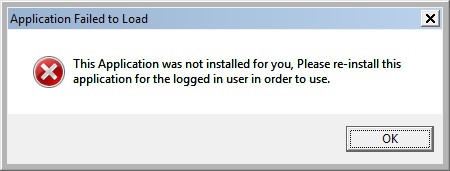
This is what I get when I try to open the Christie Interrogator Viewer (v3, but the older one is the same):
Posted by Stephan Shelley (Member # 8587) on 12-10-2016, 03:04 PM:
Is there multiple logins on that computer? It looks like it was installed by another users and the right to it are only for that user and not all users. If your user name is an administrator you can change those right or install a second time with you login.
Posted by Marco Giustini (Member # 4544) on 12-10-2016, 03:44 PM:
you are right, same here. I run the troubleshooter and it fixed for me - setting it to Windows 8 compatibility mode.
Posted by Leslie Hartmier (Member # 7053) on 12-10-2016, 05:10 PM:
The Interrogator software is a massive pain in the patootie to run.
It must ALWAYS be installed and run using 'Run As Administrator', whether you are in an administrator account or not.
Otherwise, it gives the 'unauthorized' error and the 'This Application...' dialog boxes.
Posted by Marco Giustini (Member # 4544) on 12-10-2016, 05:23 PM:
You're right! Just select "run as administrator" in the compatibility tab!
Posted by Ioannis Syrogiannis (Member # 3235) on 01-26-2017, 12:46 PM:
Well, thank you Dave for your answer. Actually, every post here was useful.
I did contact Christie about the Interrogator Viewer but, after a while, I 've been kindly refused a link to it. :-/
That means a lot more time spent over notepad++, but that goes with the territory.
On the bright side, I don't need to have the projector's output decrypted...
Powered by Infopop Corporation
UBB.classicTM
6.3.1.2