This is topic Planar PT-1545 Touch Screen monitor in forum Digital Cinema Forum at Film-Tech Forum ARCHIVE.
To visit this topic, use this URL:
https://ft-forum.com/ft/cgi-bin/ubb/ultimatebb.cgi?ubb=get_topic;f=16;t=002897
Posted by Mark Gulbrandsen (Member # 72) on 12-22-2016, 01:45 PM:
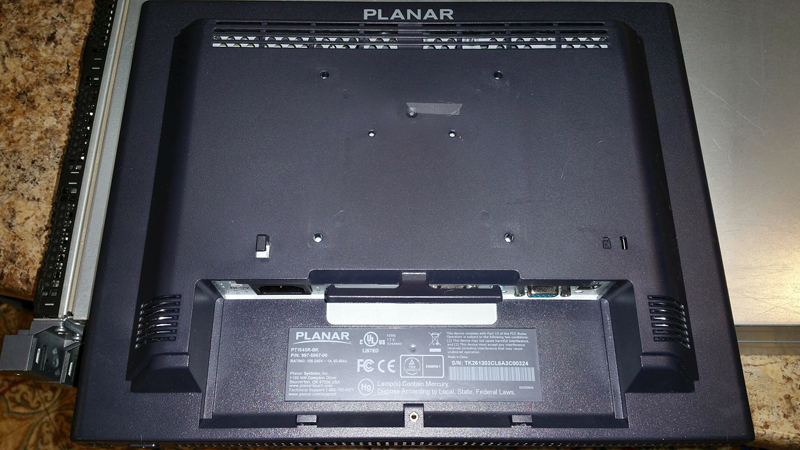
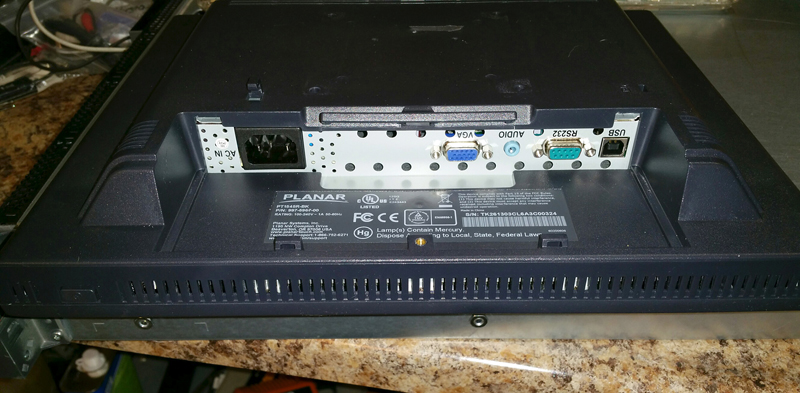
Here is yet another expensive ticket item that the manufacturer does not support or repair. This is one of th most commonly used touch screen monitors on cinema servers. I have one here from a customer that I know just has bad power supply caps. It comes on and goes right back off again, I've seen this a dozen times before on other brand monitors.
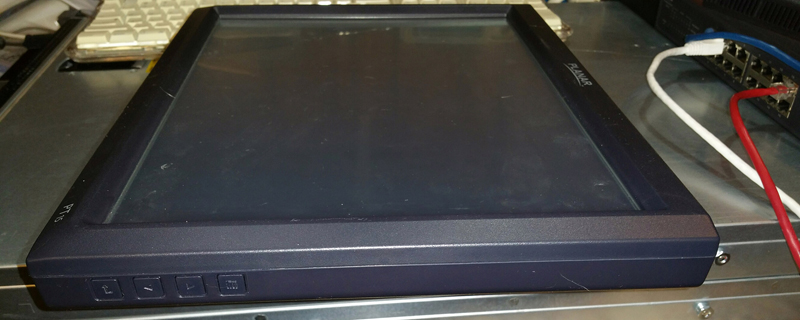
I can not figure out how this thing opens up... There are no hidden screws, nothing under the label except a mold mark. Planar DOES NOT REPAIR THEM! Have any of you tried to open one of these up? This is the first time I have ever run into what is apparently a sealed shut monitor of any type. I may have to try prying it apart or going around the edge with a very narrow saw blade or Dremel cutting wheel.
Anyone here run into this on Planar Monitors before?
Posted by John Roddy (Member # 7348) on 12-22-2016, 03:02 PM:
I've got maybe five or six of these in a nearby cabinet with that exact problem. And boy oh boy was I hoping that the stupid electrolytic caps would be the entire problem…
Yes, they can be opened. They're not sealed, only clipped. The plastic is just above and beyond standard quality, so it takes some effort to properly flex it. If you don't have a spudger or similar opening tool, you'll really want to get one. iFixIt has a really good one for like $10. It's just a flat piece of flexible-yet-sturdy metal that can get behind those clips and lift them up. You'll need that and an assorted list of bad words to get the cover off.
And once you're inside, it's pretty straightforward. The inverter circuit is integrated into the power board, and the LCD/touch driver is on a separate board from there. It's pretty obvious which is which. Just remove the screws, unplug the cables, and prepare for disappointment.
I can almost guarantee every single capacitor on there will look perfectly fine. And everything but the backlight itself is going to run OK, so it's limited exclusively to the inverter circuit (You can verify that by shining a bright light onto the screen to see if an image still persists even after it appears to die out). Now you're down to extremely advanced component level repair. Which part is acting up? The controller IC? The mosfets before the transformers? The transformers themselves? I don't know! It's something in that specific circuit, but I haven't been able to narrow it down. Even a few basic diagnostics with my Rigol oscilloscope got me nowhere. Now what?
On a more positive note, I did actually find that exact power board available from some random Chinese supplier. In less positive news, the link I saved for that no longer works, and I haven't found anything since.
Posted by Mark Gulbrandsen (Member # 72) on 12-22-2016, 07:46 PM:
John...
I wonder if a putty knife would work to open these up...? And what does "The plastic is just above and beyond standard quality" mean exactly? Are you referring to the frame around the screen itself, or the back of the monitor? I had a feeling there were either snap clips or it was glued shut like an Eye Pad. If you happen to have one of yours sitting open a picture would be appreciated. I don't want to break this one trying.
Anyways, if it's the CCFL driver board then I know where to get universal CCFL driver boards for most monitors. This is something I'm going to look into and offer a repair service for if it's doable. These are too expensive to just toss out.
Mark
Posted by John Roddy (Member # 7348) on 12-22-2016, 09:41 PM:
I just mean that the plastic is much higher quality than you might think. You have to put a lot more effort into opening it up, but the plastic itself is also much less likely to break while you're working on it.
A putty knife is actually not a bad idea. The tool I was referring to is the iFixit Jimmy opening tool. The drawback with a putty knife is the sharp corners, which a standard opening tool doesn't have. But as long as you can get under the lip of the plastic, it should still work.
I'd recommend taking a close look at the way the plastic from the front & back of the bezel meets up near the buttons first. That will give you a starting point. From there, you can figure out the best way to prize the pieces apart. Just accept up-front that you will scratch it up a lot. Nothing on the exterior is screwed or glued to anything, so good ol' force is all you need. You just need a lot of it.
Posted by Steve Guttag (Member # 268) on 12-23-2016, 05:03 AM:
We have three bad ones, ourselves, and counting. So I'm with Mark. I'd like to find a way to bring these back to life.
Posted by John Roddy (Member # 7348) on 12-23-2016, 07:59 AM:
Sounds like this is a wider-spread issue than I originally thought. Well if that's the case, I guess it might be worth another shot on my part as well. I'll crack open one of my dead screens tonight and see if I can at least get some pictures or something to help narrow down the problem area. If memory serves, the the driver IC and transformers were parts I suspected the most. I'll see if I can isolate them and give it a more thorough test.
Posted by Gordon McLeod (Member # 33) on 12-23-2016, 08:34 AM:
ours that failed were always the actual touchportion of the panel with it sending out false triggers
Also it is the only touch panel that GDC supports
Posted by John Roddy (Member # 7348) on 12-23-2016, 10:02 AM:
All of the ones we ever lost were exclusively at one site. Pretty much our entire company (8 or 9 locations, I think? I forget) uses exclusively GDC servers with the external Planar screens, and all of them have been A-OK. Even with leaving them on at max brightness 24/7. We long-since switched to powering them off overnight, of course, and I run them at 25% brightness on both of my locations. But it doesn't seem to be the deciding factor. Something at that one location murders these screens, but only the backlight circuit. I've confirmed on all of them that the image and touch functionality are both fine. And a quick-and-dirty test with a laptop inverter board proved that the backlights themselves are still fine. It's just one part of the inverter circuit. And aside from a couple of components that have clearly seen some abuse, nothing looks wrong. Even the abuse part isn't too unusual since that circuit runs at an extremely high voltage with a very fast frequency. Both of those are nasty workloads for any component to deal with.
What would be nice is if I could get a known working board, fire up my SMD rework station, and start swapping components between it and a failed board until something starts not sucking anymore. But given the price of these monitors and the company's bizarre reluctance to let me tear everything apart for no really important reason (can't really fault anyone on that, to be honest), that's not happening. Unless anyone else wants to donate a functioning power board to the cause. I just can't guarantee it'll still be functioning after my grubby little paws have gotten a hold of it.
Posted by Mark Gulbrandsen (Member # 72) on 12-23-2016, 12:16 PM:
quote: Gordon McLeod
ours that failed were always the actual touchportion of the panel with it sending out false triggers
Also it is the only touch panel that GDC supports
That can be caused by a metal particle in contact with the touch screen itself or just excessive dirt, possibly behind the escutcheon edge by the screen. I have not lost a touch screen as of yet. But they do behave erratically when they get full of smudges.
I have a few ILO monitors out there that also work just fine with GDC. The ILO driver is more or less the same as Planars being universal.
Thanks in advance John for info!! I ordered a kit of four different spludges.
There is also the option to convert these to LED backlight with some work with a universal kit from China.
http://www.ebay.com/itm/222277756593?_trksid=p2055119.m1438.l2649&ssPageName=STRK%3AMEBIDX%3AIT
http://www.ebay.com/itm/272344244336?_trksid=p2055119.m1438.l2649&ssPageName=STRK%3AMEBIDX%3AIT
Mark
Posted by John Roddy (Member # 7348) on 12-23-2016, 12:41 PM:
quote: Mark Gulbrandsen
Thanks in advance John for info!! I ordered a kit of four different spludges.
These opening tools are some of the single most useful tools you never knew you really needed. I can't tell you how many times I've fallen back on them for getting into stuff. They're very useful.
quote: Mark Gulbrandsen
There is also the option to convert these to LED backlight with some work with a universal kit from China.
That is very interesting. I might actually try looking into that as well. It just sounds like a fun project, if nothing else. And any chance to give the finger to CCFL lights is quite welcomed.
Posted by Leslie Hartmier (Member # 7053) on 12-23-2016, 03:35 PM:
Funny you should mention that, Gordon. As of yesterday, I have one that behaves precisely like this thread is complaining about. I have it in my office, having come from Fort.
Mark, I also have an ELO Touchscreen in my office that does NOT work with GDC's servers, and having talked to GDC themselves, they pointedly stated that they do not guarantee that anything but Planar works on it, as it is the only touchscreen monitor driver that they have in the OS. They went so far as to state, "No other monitors should be able to work on the servers."
So, specifically, please list what monitors you have installed/been using that work with the non-AR, AR and IMS servers. I am interested in that list, as keyboard/mouse is a poor, if functional, substitute, and Planar is pretty obscenely expensive for what you get (not to mention the zero support/repair).
I look forward to the list.
Thanks.
Leslie
Posted by Jason Raftery (Member # 6291) on 12-23-2016, 04:07 PM:
Leslie, what GDC software version are you on? There are a handful of different touchscreen drivers available to choose from in the current software:
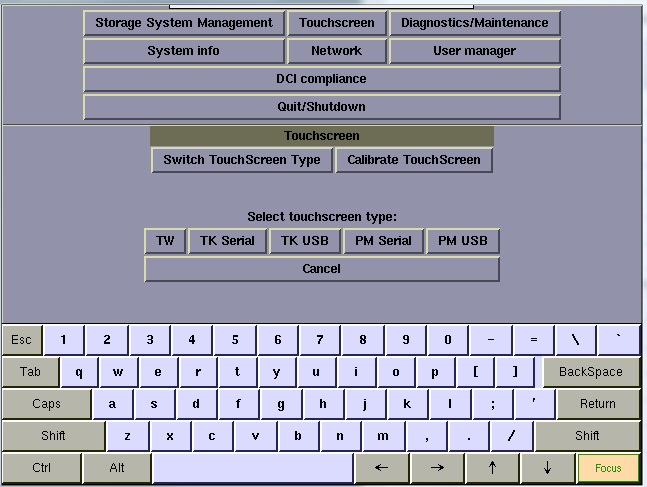
Also, add me to the list of those that have had a Planar experience an inverter or backlight failure that would like to be able to repair them.
Posted by Leslie Hartmier (Member # 7053) on 12-23-2016, 04:26 PM:
Interesting. Clearly since I was asking, more have been added.
I had the problem with 7.83, 8.01 Build 244, and 9.00 build 369.
Mind you, at this point, all the servers are on 8.01 build 256 and 9.00 build 397. I just never revisited it in 2016.
Still, a list of monitors that can be confirmed to work would be valuable. With Planar, the approximate cost approaches $900 per 15" monitor for us, with customs, taxes, US to canadian conversion, and frankly, I'm not into that.
Thanks for the heads up on the additional drivers though. That is magic.
Leslie
Posted by Steve Guttag (Member # 268) on 12-23-2016, 04:37 PM:
WOW...that seems way over the top. They are under $400US Amazon has one for $320. Even with the Canadian exchange it doesn't get anywhere near $900CAD
Posted by Leslie Hartmier (Member # 7053) on 12-23-2016, 05:10 PM:
I know, right?
Mind you, when we bought them, we did so from Strong, and my figures were from the invoice, and the actual cost from accounts payable, so I'm confident of my numbers (modified by the value of the current exchange rate).
That said, we can get the ELO Touchscreen screens without importing them, so if we had confirmation, it would open up options.
Leslie
Posted by John Roddy (Member # 7348) on 12-23-2016, 07:31 PM:
In the past, we've gotten away with just using any VGA monitor and a mouse. You could hook up an old CRT display at it if you want.
Posted by Mark Gulbrandsen (Member # 72) on 12-23-2016, 08:46 PM:
Next time I'm at a theater that has an ELO I will get the model number. But my theaters rarely ever break down, so it might be a while... You could also email GDC Tech Support, I am sure they can recommend something other than Planar. I know I am going to stop pushing them. The majority of the ones I have in the field also came from Strong as part of equipment packages... Oh, ILO Monitors also seem to be way more serviceable. There is plethora of Youtube Vids on this but I'd also want to actually talk to ILO Tech Support to see how far they carry through on out of warranty items and in supplying parts.
Mark
Posted by Leslie Hartmier (Member # 7053) on 12-24-2016, 06:38 PM:
Thanks John, we have used regular VGA monitors, but the touchscreens are far more convenient if you're doing mods to SPLs etc at the content server. Great if you don't, or want them to follow a policy of doing everything on the TMS though.
Mark, GDC is compiling a list of suitable monitors for me. I'll let you know what their list contains. As I said, the last time I visited the topic with GDC, Planar was the only one they supported.
Leslie
Posted by Mark Gulbrandsen (Member # 72) on 12-24-2016, 07:09 PM:
Leslie,
I can't believe that others haven't also become dismayed with Planar and no manufacturer is ever going to rely on another single manufacturer to keep supplying a certain model touch screen for ever. So I will be interested in seeing that list for sure.
Thanks and Merry Christmas!
Mark
Posted by Dave Macaulay (Member # 813) on 12-26-2016, 01:32 PM:
I think it's about cost/benefit like most business decisions.
When Regal, AMC, Carmike or the other big chains tell Dolby "we want the derver to work with Planar touchscreens - not the expensive multitouch ones, just the cheapest one-touch model" Dolby jumps at it. When Bob's Movies with it's 4 screens asks for their ELO screens to be supported, Dolby either deletes that email or replies with a simple "no".
The Doremi servers have talked to most APC UPS units for a long time. I got nowhere asking for Tripplite to be supported. They just added a brand I had never heard of before and can't remember now. I assume some mega chain with a huge order in the works asked for it.
It's not worth the cost of creating and testing a new software module to talk to a new device unless a large volume sale hinges on it.
Posted by Frank Cox (Member # 6258) on 12-26-2016, 03:43 PM:
Since most of these things run on Linux, the drivers likely already exist so it's not something that they would have to write from scratch. Just add it to their disk image would be all that's required in many cases, I suspect.
Posted by Mark Gulbrandsen (Member # 72) on 12-29-2016, 01:44 PM:
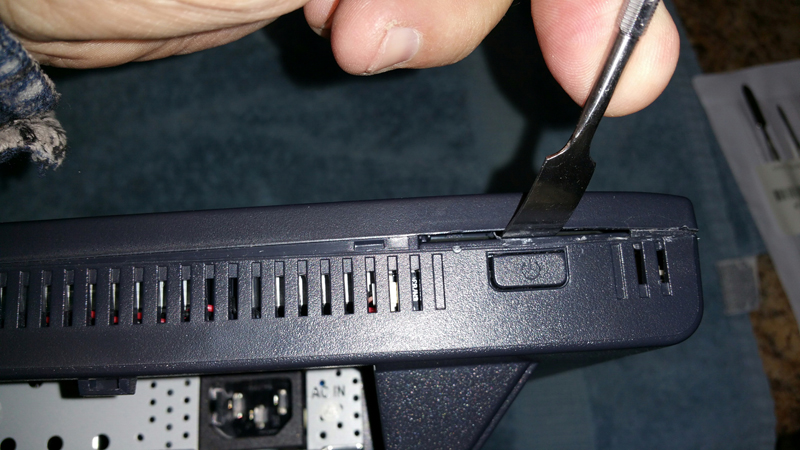
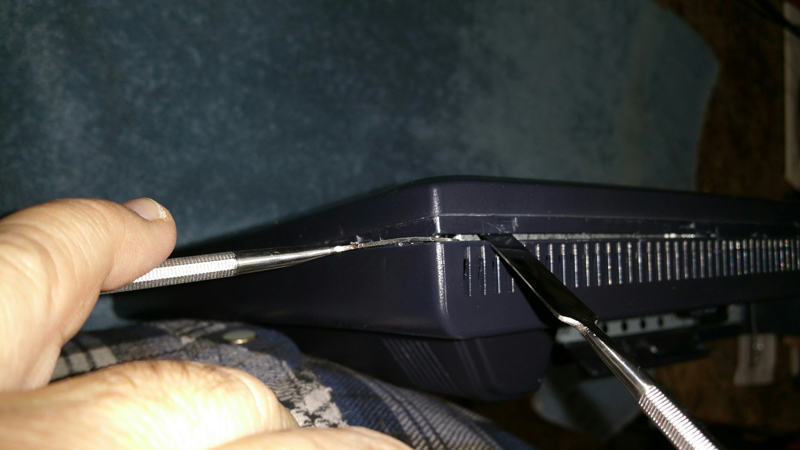
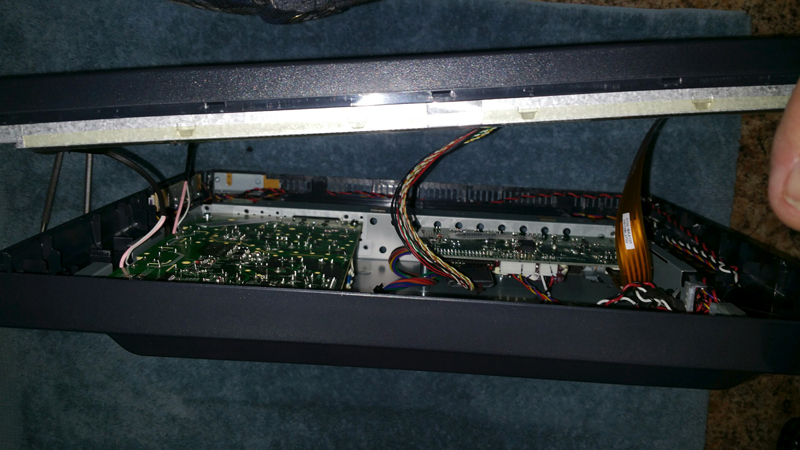
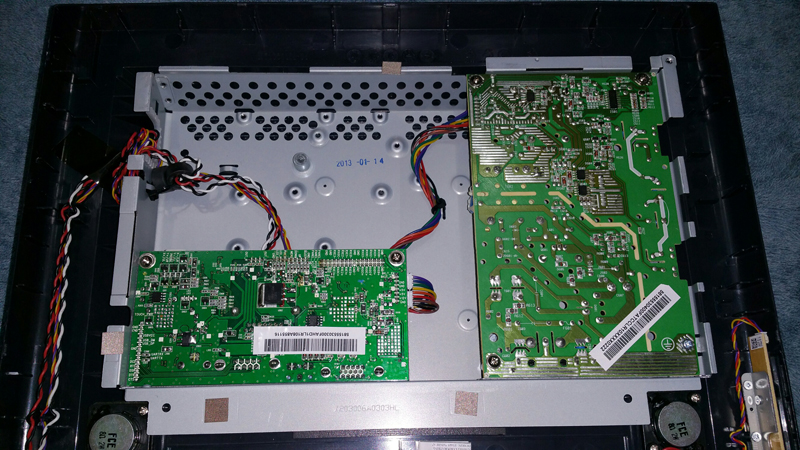
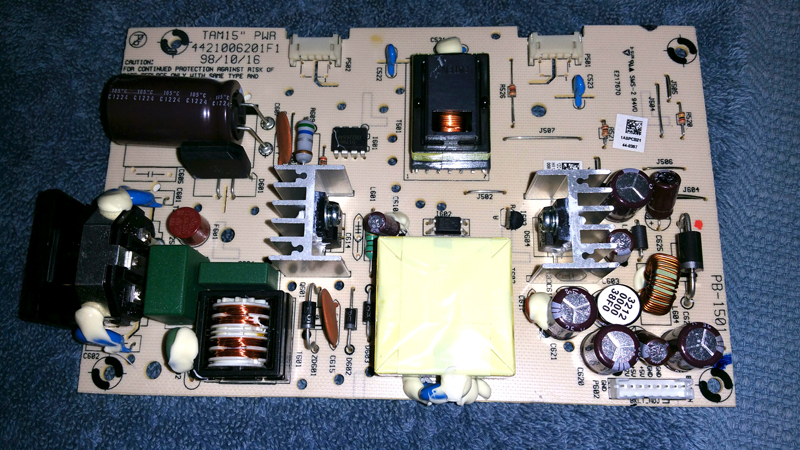
My spudger tool kit arrived and I finally cracked this thing open. Don't even try doing it without a spudger kit. Two spudgers is better as you do the first sides! Start at the power button. It appears to be the easiest area to flex the spudger under. Then work across away from the power button and up the next side using two spudgers at the corner. Then do the opposite side so that you leave just the top snapped together. Next take a look inside and see how the wires are running from the rear panel pcb's to the screen itself. You don't want to break these or rip them out of their sockets or the monitor is a sudden doorstop. Lastly, carefully separate the top edge and reach in and unplug the ribbon cable first. It's the more fragile one and easiest to tear apart, it is in a black malke connector that plugs into the pcb. Then unplug the larger bunch of wires and you can lay the two halves of the monitor on the bench and unplug the two smaller cables. Note that the larger bunch of wires and the ribbon feed the screen itself. The ribbon is likely the power for the CCFL inverter which unfortunately APPEARS to be integrated into the screen itself. Going to lay the boards on the bench connect it all back up to the screen and check voltages. If the voltages appear normal then I'm going to take a peak inside the screen assembly at the CCFL inverter itself. The capacitors in this unit appear normal, but that doesn't mean they are not bad.
Pictures follow....
Posted by Mark Gulbrandsen (Member # 72) on 12-29-2016, 03:36 PM:
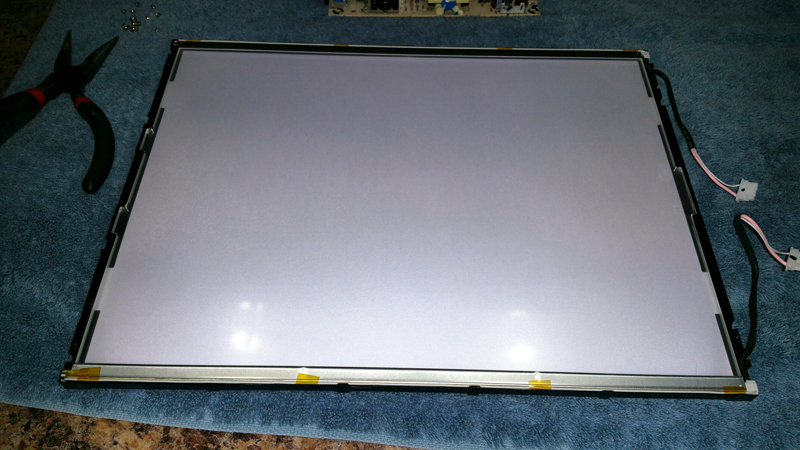
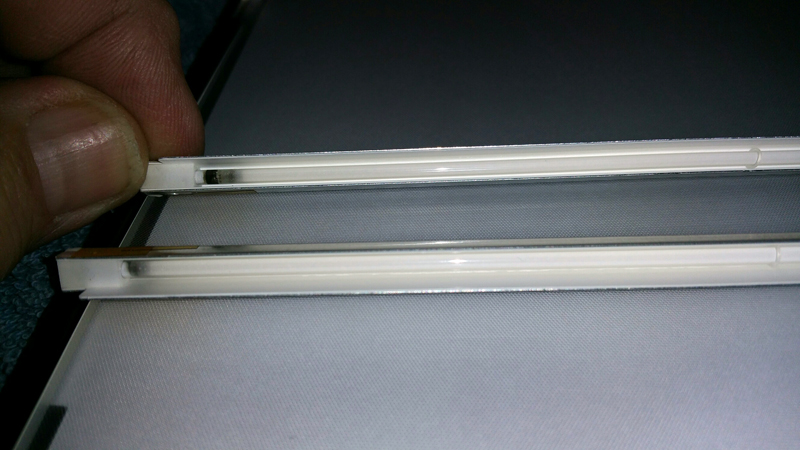
It would appear that everything is ok and all that's wrong is a bad CCFL tube. The one tube in the pictures is OBVIOUSLY bad. This IS the most common failure mode for monitors.
Yes, the lamps are available from a US Source at about 30 bucks each. Still worth doing it though. If a person gets good at this its about a 90 minute job to re-lamp one. Some spare Kapton tape might also be handy during re-assembly.
Also... Am going to build a CCFL tester out of an old laptop CCFL inverter. That way you can test these tubes in place and not have to rip the LCD panel apart to see if they are ok or not. It' not a difficult job to tear the panel apart, just a delicate one... It's held in by four screws, two on each side of the front, and there are four tiny ones in the back cover that need to come off. Then the back of the panel snaps off. It is also a common issue for the wires to burn off the ends of the tubes and or for a hole to burn through the glass section of the tube.
Lastly, Converting these to LED would not be an easy task. The tubes are in U-shaped reflectors and need to be put back in them. They are too narrow for the usual LED strip that is being used to convert monitors. The tubes aside fomr being in a U-shaped reflector also mount into a plastic frame. Oh, the touch screen stays attached to the front panel and the connection for that is actually the flat ribbon cable. The CCFL tubes are the two small pink/white wires with a connector. Running 600 VAC up that tiny wire seems odd.
Lastly, my recommendation is... Shut these things off when not in use or if you don't absolutely need them turned on. If you run on a scheduler on your server then they really don't need to be on. Or run your projector remotely from the box office like many seem to do these days...
Posted by Kristo Nalo (Member # 9748) on 12-30-2016, 06:30 AM:
I also have a lot of things that we can call it vintage and if this things bring you life again you would see the different of the Hi-Tech than the vintage and you will truly amazed. I also have 7 monitors from studios companies because they want it to paste out all the older model and I brought them for only $400 and all of them works great.
Posted by Mark Gulbrandsen (Member # 72) on 12-30-2016, 01:30 PM:
Well, if you repair these be sure to order the lamps and have them on hand BEFORE you rip it all apart. The lamps are quite easy to get Now I have this thing all over my bench and really don't want to move any of it around unnecessarily because the stuff is so fragile when it's apart. So I guess I move my today's project on to my desk for now.
Mak
Posted by Mark Gulbrandsen (Member # 72) on 01-20-2017, 04:06 PM:
I just got a second dead PT-1545 going again. The lamps in this one were fine, the CCFL power supply was at issue. The power supply is a nightmare to trace, although the actual inverter itself on the ps board is pretty simple and more or less exactly the same as what is on a dual lamp replacement inverter board, tracing how it is control ed by the video input card is next to impossible. So the solution here was to hang another small inverter board on the monitor just to power the lamps. There is room in the internal chassis for a small board, however I didn't like the idea of extending the leads fomr the CCFL lamps over or near the low voltage DC supply. So I decided to outboard the supply and mount it to the rear of the monitor in a small plastic box which is on order. This process is about a two hour job, and not sure from a cost standpoint that I would do it again or not. It would be nice and easy to be able to mount the new board to the rear of the LCD display itself and just sandwich this back together. However there is only about 2mm spacing between the boards and the rear of the LCD panel. I may consider extending the lamp leads to the rear chassis area on the next one, but the ignition voltage of these lamps is about 3kv and the run voltage is a few hundred, so its gonna have to be well insulated, and the two leads should be kept separated. Here are a few pictures. The board plugs in to both power source and the lamps.
The flying yellow lead is brightness. High brightness it gets tied to +5 volts. Low brightness to ground. Just going to leave this on medium brightness.
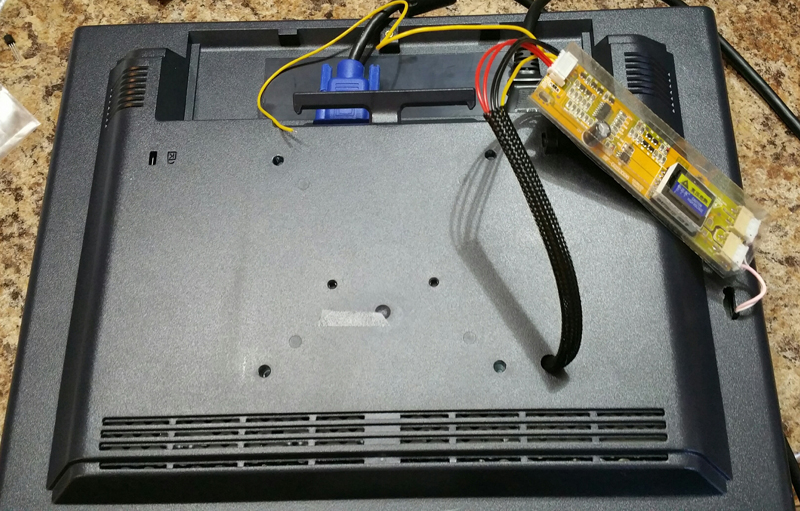
A fairly long wiring harness what has wire with crappy insulation on it is included with each board. You have to tack it to these locations. Ground, +12 volts for the board supply and + 5 volts to turn the board on.
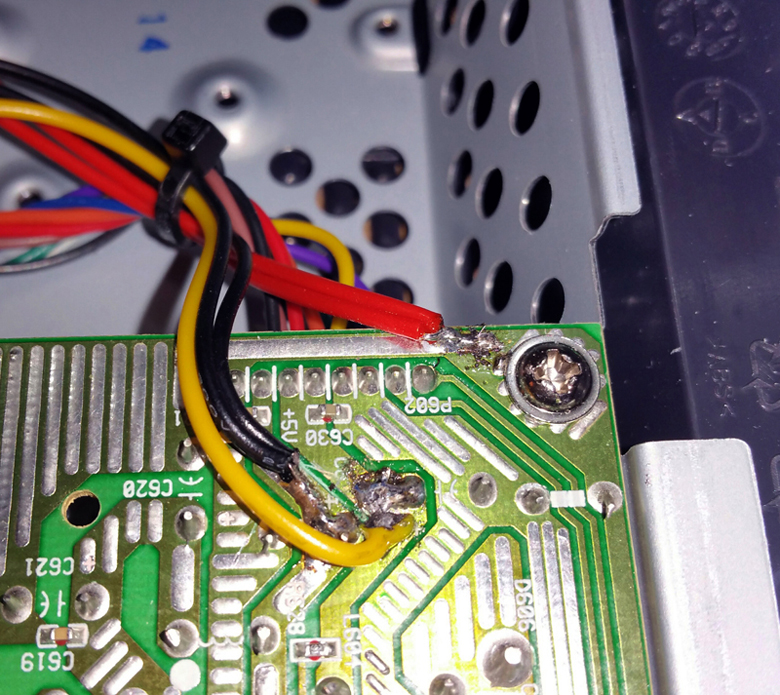
The board will mount along the right rear of the monitor in a vertical position. one toggel switch to turn the lmaps on or off. A 3 volt relay could also be used if you want to, as there is a switched 3 volt supply on the video card. The main power supply is an always live type. I am just going to put a small toggle switch on the plastic box to turn the lamps on and off.
The key to these boards is getting one with 8mm pitch CCFl lead sockets.
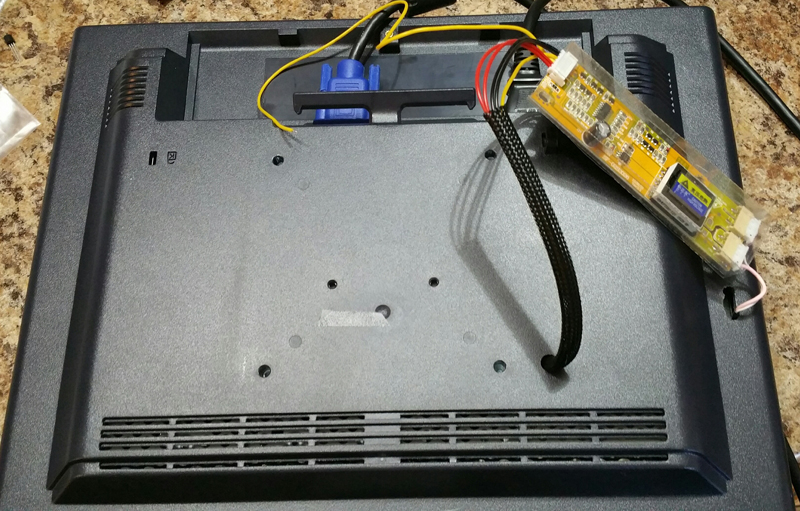
Posted by Monte L Fullmer (Member # 2797) on 01-20-2017, 06:56 PM:
Side question, yet follows this topic of LED displays, but adding home Flat screen TV's in this:
I have a 32" Visio, where once in a while, screen will blank out for about 5 seconds, then comes back on.
It does this about once every other day.
Flaky PS, esp the caps?
thx - Monte
Posted by Mark Gulbrandsen (Member # 72) on 01-20-2017, 07:33 PM:
Could be. Some times caps are obviously leaky or look bulged at the top... Always recap it first and see how it goes. If it uses one central CCFL supply I would suspect that next. You may be able to get the exact supply from them, or a general purpose one that also works ok. There are a number of different size ccfl sockets on the generic supplies, so be sure to get the correct one.
Mark
Powered by Infopop Corporation
UBB.classicTM
6.3.1.2