This is topic Barco 10s / Doremi IMB-SV / HDMI Problem in forum Digital Cinema Forum at Film-Tech Forum ARCHIVE.
To visit this topic, use this URL:
https://ft-forum.com/ft/cgi-bin/ubb/ultimatebb.cgi?ubb=get_topic;f=16;t=002911
Posted by Marcial Feliciano Ramos (Member # 1989) on 01-07-2017, 12:24 PM:
Hi all,
I've tried every solution/advice that I had read here on the forum, also the installation manual and I cant managed to get an image or sound through the HDMI input port of the IMB.
Any recent solution or steps for this to work?
Posted by Marco Giustini (Member # 4544) on 01-07-2017, 12:43 PM:
I am not familiar with the "SV" suffix but assuming this is a standard IMB, you only need to create a macro where you enable the HDMI input and leave the projector on the same macro you use to watch DCI features.
Try different sources, HDMI is a naughty beast, it may be that it does not like the source you are testing.
Can you play DCI content with no issues?
Posted by Marcial Feliciano Ramos (Member # 1989) on 01-07-2017, 02:23 PM:
Hi Marco,
SV = Show Vault. I installed it and I can use everything on the server except the HDMI input. I tried the macro, the live source and I cant get an image. The blu-ray is on 1080p and even changed the HDMI cable.
Posted by Marco Giustini (Member # 4544) on 01-07-2017, 02:41 PM:
of course, sorry! ![[Smile]](smile.gif)
Well, definitely try a different blu ray player. Also, try resetting the blu ray player video output. It will default to 576p which should work. THEN you can try setting it to 1080p.
And make sure you use a short cable for the test.
Unfortunately I do not think there is a facility in the ShowVault to check the status of the signal coming through HDMI.
Can you maybe post a screenshot of the macro you are using?
Welcome to the HDMI world!
Posted by Dave Macaulay (Member # 813) on 01-07-2017, 04:21 PM:
You can select the HDMI input and adjust degamma through "Device Controller" in Control Panel. You connect to "Certainty" (the IMB) and go from there.
Or make up macros using the library cues.
I have seen an issue preventing HDMI presentation with some (most) HDMI cables. The IMB panel is quite thick so the HDMI socket is recessed, the connector doesn't go in deep enough. Comparing to many other panel mounted sockets, the IMB is deeper. Doremi tells me there is no problem.
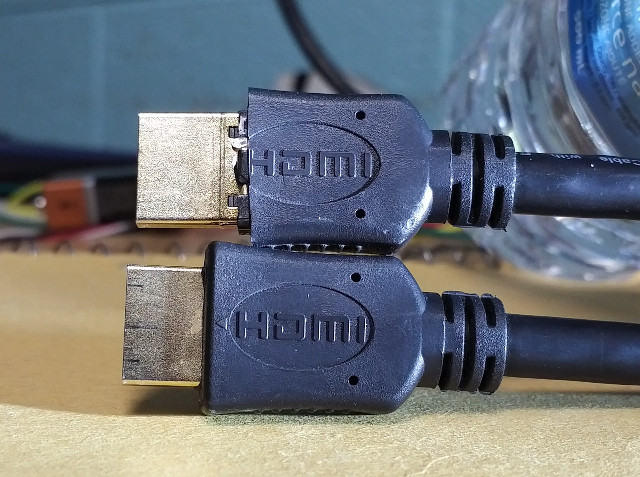
The box knife modified connector works perfectly in the IMB, the unmodified one does not connect.
Posted by Leslie Hartmier (Member # 7053) on 01-08-2017, 07:29 PM:
Marcial,
I admit that it has been just under a year since I had to sort this out, but I'll give it a go.
Open Control Panel.
Open Device Controller.
Double-click 'IMB Device' (this might just be to single-click 'IMB Device' then select the cog icon to the left.)
Select HDMI button for 'Input'
(At this point, you should have any data being sent via HDMI showing on-screen if your lamp is on)
Select the appropriate setting for 'Scaling' as necessary.
The wrench/hammer is network configuration/default configuration, which I expect you not to need.
The screwdriver/wrench tab is the Color Space Settings tab, where you set the colorspace you intend to use for the HDMI (or HDSDI) - again, you should be able to leave that as the existing settings.
A lot of words to say, open the control panel, open the Device Controller, select IMB Device, change it to HDMI from Internal, lock the door, drink some coffee and read a periodical, unlock the door once you have enjoyed your coffee, dab your brow for some unseen sweat, and tell the others that THAT was the hardest half hour of your life.
I must confess, I do not recall if it was necessary to run some kind of 'HDMI' SPL, as you must with the GDC AR servers, and the remaining ShowVaults in our company are too far away for me to check on (also, we did not set those up to play HDMI, as they are currently on a VPF).
This didn't help? Let us know, but that is how we swapped inputs on the ShowVault IMB that we no longer own.
Leslie
Posted by Leslie Hartmier (Member # 7053) on 01-08-2017, 09:35 PM:
<edit: The ex-manager of the location confirmed that once the IMB Device is changed from 'Internal' to 'HDMI', the content server is no longer used until you switch it back to 'Internal.'>
In fact, my HOWTO on what to do was:
Menu->Control Panel->Device Controller
Double-click IMB Device
Select HDMI Input
[Quit] (or leave it open to switch back once done)
Leslie
Posted by Marco Giustini (Member # 4544) on 01-09-2017, 04:27 AM:
I forgot the HDMI selection is also available on that page, thanks Leslie!
Posted by Dave Macaulay (Member # 813) on 01-09-2017, 04:07 PM:
When you switch the Doremi IMB from server input to HDMI, any playlist being shown is ejected immediately. When it's showing HDMI, playing a server playlist switches it out of HDMI input and back to server.
So you only really need to select HDMI and play your DVD or whatever, it will automatically go back to normal the next time a playlist is shown.
Posted by Marcial Feliciano Ramos (Member # 1989) on 01-09-2017, 08:43 PM:
hi all,
I will do the testing on Wednesday and let you all know. Thanks!
Powered by Infopop Corporation
UBB.classicTM
6.3.1.2