This is topic Loading package failed pkl cannot be parsed in forum Digital Cinema Forum at Film-Tech Forum ARCHIVE.
To visit this topic, use this URL:
https://ft-forum.com/ft/cgi-bin/ubb/ultimatebb.cgi?ubb=get_topic;f=16;t=002930
Posted by Mislav Scukanec (Member # 9844) on 01-27-2017, 04:00 AM:
Hey guys,
new to this forum, but found it very helpful many times in the past.
this time, i couldnt find help for this one, so I am posting.
i get the error as stated in the subject and as seen on the screenshot uploaded.
any idea what it is?
and helpful info?
this is a dcp that came on a hard disk drive, all i wanted to do was to open and check it, and cant even open it.
tnx a lot in advance... 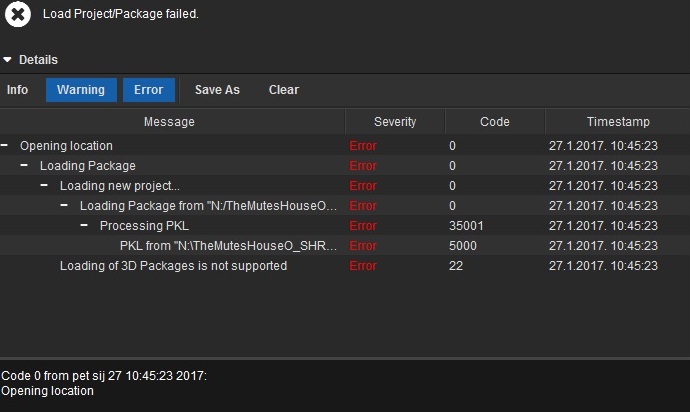
Posted by Carsten Kurz (Member # 5396) on 01-27-2017, 11:10 AM:
I can only assume you are trying this with some of the software DCP players.
The final line 'Loading of 3D packages is not supported' should tell you the reason.
Try to load it onto a DCI server.
- Carsten
Posted by Ioannis Syrogiannis (Member # 3235) on 01-27-2017, 03:09 PM:
I have no idea what the errors could mean.
Probably, an issue with 3D content.
Yet, since even opening the folder comes back with an error, I would first check issues with connectivity/access of the files/HDD.
The source of the content would give me a hint whether this is a properly formated and structured storage or not.
Posted by Monte L Fullmer (Member # 2797) on 01-27-2017, 05:37 PM:
I call it that the content is in Linux and can't be read, why the errors.
Posted by Leslie Hartmier (Member # 7053) on 01-27-2017, 05:41 PM:
The first thing I would do is find out what those codes stand for.
What is the program you are using to check the DCP with?
Leslie
Posted by Leo Enticknap (Member # 534) on 01-28-2017, 07:38 PM:
quote: Monte L. Fullmer
I call it that the content is in Linux and can't be read, why the errors.
Whatever this program is, it's clearly running in Windows ("Loading package from N:/..."), but reading the DCP files is not a problem, because Windows can see the files it's trying to process: it just can't process them. So either these DCP files came on a drive with a volume/partition format that Windows can read natively, or there is some add-on software installed to enable it to mount an ext2 or ext3 volume with a regular Windows drive letter.
From what I see on this screenshot, therefore, the problem is not that the drive can't be read, it's that the computer doesn't like what it sees in the files.
quote: Carsetn Kurz
I can only assume you are trying this with some of the software DCP players.
I was wondering that, too: it doesn't look like the front end of any DCP server I've ever encountered.
The error says "Loading of 3-D packages is not supported," and so, like Carsten, my guess would be that this is a PC DCP playback package that can only deal with 2-D DCPs, and the OP has tried to open a 3-D one.
Posted by Ioannis Syrogiannis (Member # 3235) on 01-29-2017, 03:27 PM:
Since the original poster left us speculating, I would say that, based on the screenshot we all observe, the short movie might probably be this The Mute's House and it is not a 3D.
I don't want to argue about what could be the actual error here, since, given the little info we have, it can be anything.
Yet, I want to say that, especially with small productions, drives go around the globe, or a specific region, that may be faulty, badly formated (working or reading on one server and not to another) or badly powered (USB 3.0 drives of 2.5" that have only one power/data cable and you have to connect to USB 2.0 to ingest or test).
Given the fact that this is a windows PC (it definitely isn't a Solo G3 server, which also runs Windows... :-/), the program has to implement a non-native way to access such an external HDD and that it isn't even able to open the file location that it previously read, you just pick a major/elementary disaster that comes first in mind and go with it.
In any case, no feedback, no resolution.
Mislav, please give us a hint and be helpful, the same way you found the forum to be, as you wrote.
Posted by Mislav Scukanec (Member # 9844) on 01-30-2017, 04:04 AM:
Hi guys,
tnx for all your replies, much appreciated.
Sry for not responding, a busy weekend.
The software I was using to try to open this is EasyDCP Creator. I tried looking for what these errors mean before posting here of course, couldnt find anything.
And yes, as Ioannis Syrogiannis indicated, this is a short 2D movie, so the 3D error baffles me, no reason for something like that.
The DCP came on an external 2.5" HDD, it connects and opens fine on my windows 10 computer. It is NTFS formatted, so no, it is not a Linux format problem. Besides, I have a third party plugin to opet ext2, ext3 and ext4 formats, tried it with other HDD formatted like that, and no problems.
Unfortunately, the cinema where this is supposed to play soon is being remodeled, so I the serves or not working at the moment, so I cant test it there.
Tnx guys for your responses, if you need any more info, I will send it as soon as I see your reply.
Tnx
Posted by Adam Martin (Member # 641) on 01-30-2017, 05:46 PM:
If the content is encrypted, you are likely not going to be able to open it as a "project" in a DCP editor.
Posted by Mislav Scukanec (Member # 9844) on 02-01-2017, 05:11 AM:
I am aware that I would not be able to open the file if it is encyrpted. I have other DCPs that are encrypted, and of course I cannot open them, but none of them even remotely gives me such an error. Also, I checked with the distributor, the DCP is not encrypted...
Any other ideas and help would be much appreciated...
Posted by Carsten Kurz (Member # 5396) on 02-01-2017, 09:03 AM:
I doubt it will change anything, but you can try a different DCP player software, like the Doremi/Dolby DCP Player, or Neo DCP Player.
If you're a bit Linux-savy, you should probably try Wolfgang Woehls 'DCP Inspect'.
Did you try to open this DCP directly from the distribution drive, using an EXT disc reader tool?
- Carsten
Posted by Mislav Scukanec (Member # 9844) on 02-02-2017, 05:41 AM:
Hi Carsten,
yes, I tried opening this DCP directly from the distribution drive. I can go into the folder no problem using an EXT disc reader tool, but the error in easydcp still remains.
I did not try any other player, because I do not have access to any, but I will try it on a player in the cinema as soon as I am able...
Posted by Carsten Kurz (Member # 5396) on 02-02-2017, 09:42 AM:
NeoDCP is available as demo for Windows. You may also try to copy that DCP to a local NTFS drive before testing it with a DCP player or verification tool. Which ext2/3 tool do you use? Does EasyDCP open other DCPs on exactly the same machine configuration? How do you connect the distribution drive to that machine?
- Carsten
Posted by Mislav Scukanec (Member # 9844) on 02-03-2017, 03:42 AM:
i will try neodcp as soon as I can.
i have tried moving it to a ntfs drive, with the same results.
for ext formated disks, i use ext2 volume manager.
and as i said before, none of the other disks formated on any ext format show any problems.
i connect the dcps via usb cables, usb 2.0 or 3.0 port, tried them both
Posted by Leslie Hartmier (Member # 7053) on 02-03-2017, 05:22 PM:
One thing I might also recommend is that, since the DCP is unencrypted, you download a different DCP viewer to test the content.
NeoDCP was mentioned, I use 3dtv's Stereoscopic Player (the free version will permit the DCP to run for five minutes, which will allow you to test the file. (Switch the setting to monoscopic, or it will look weird.))
Leslie
Posted by Carsten Kurz (Member # 5396) on 02-03-2017, 08:14 PM:
Stereoscopic player only opens the MXF files and disregards all the metadata. While this may give you an idea about the content, it will not indicate any issues with the formal structure of the DCP or confirm proper metadata.
- Carsten
Posted by Mislav Scukanec (Member # 9844) on 02-06-2017, 01:31 AM:
Hi Leslie,
Tnx for the suggestion, will definetly try it in another player, just to be sure.
Posted by Leslie Hartmier (Member # 7053) on 02-07-2017, 06:19 PM:
Carsten, that is true that it ignores the metadata, but it is a free way to determine if the video/audio works. In this case, a less-functional program can help narrow down the problem, though not solve it.
Leslie
Powered by Infopop Corporation
UBB.classicTM
6.3.1.2