This is topic QSC NAC-100 in forum Digital Cinema Forum at Film-Tech Forum ARCHIVE.
To visit this topic, use this URL:
https://ft-forum.com/ft/cgi-bin/ubb/ultimatebb.cgi?ubb=get_topic;f=16;t=002953
Posted by Leonardo Miceli (Member # 4417) on 02-25-2017, 08:10 PM:
Hello everyone.
Does anybody know if I can use the QSC NAC-100 to control the QSC DCP100, DCP200 or DCP3000.
My company bought that equipment for an openning, but no one knows how to install it or configure it (The NAC-100). I just figure it out how to change the IPs, but thats all.
Thanks for your help
Posted by Marco Giustini (Member # 4544) on 02-26-2017, 03:33 AM:
Hi,
I am not familiar with the NAC-100 but it seems to work with QSControl and AFAIK the DCP series is compatible with that. I guess you have to create a 'venue' into QSControl and add your controls in there. Hopefully someone can be more specific about that.
Posted by Steve Guttag (Member # 268) on 02-26-2017, 08:16 AM:
I believe Marco is right. You can definitely add a DCP processor to a Basis system so I would think you could make a suitable layout with the DCP300 on it. Note, you don't get everything from Venue Manager on the DCP series. It seems more of an accommodation module than like they did for the Basis equipment were that was the primary means of control. It gives you much of with "DCP NET" does, in terms of functionality.
Posted by Adrian Avram (Member # 7931) on 02-27-2017, 02:56 AM:
Hi,
First of all you need a POE adapter for it, then the QSC Control.net software on a PC/laptop. After you install everything, the entire setup is made with the Venue Manager software (all freely downloadable from QSC website), from your PC/laptop, configured with the same IP scheme (wich the DCP series processors and the NAC-100 have).
Now it gets tricky, because every single control item (volume, format, etc) for every singe hall needs to be created manually, so a lot of "clicking"action.
I've installed several of them so far.
Adrian,
Posted by Leonardo Miceli (Member # 4417) on 02-27-2017, 11:44 AM:
Thanks.
So, I already have the POE adapters and the QSControl.net, I created a venue with 9 DCP and 3 NAC (for now) all of them in the same IP scheme.
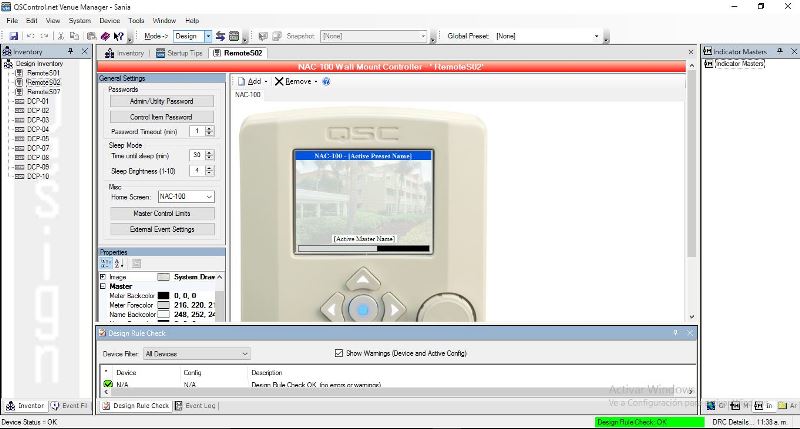
Now, how can I configure the NAC for each DCP? Do you have a preset or config file for the NAC that I can use?.
Posted by Adrian Avram (Member # 7931) on 02-27-2017, 12:41 PM:
Hi,
Send me a PM with an email address and I will send you one venue file that I use, as an example for you. Be sure to save yours, before uploading this one. You should only config everything in Design mode, and once all is set go to Live, to synchronize the halls with the NAC.
I hope it will help you configure them ![[Smile]](smile.gif)
Powered by Infopop Corporation
UBB.classicTM
6.3.1.2