This is topic DSS200 RAID issue in forum Digital Cinema Forum at Film-Tech Forum ARCHIVE.
To visit this topic, use this URL:
https://ft-forum.com/ft/cgi-bin/ubb/ultimatebb.cgi?ubb=get_topic;f=16;t=002979
Posted by Ma Yun (Member # 9523) on 03-18-2017, 10:17 AM:
Hi All,
I found out 1 of hard drive indicate red led status so I decide replace with new hard drive. Somehow there no progress for RAID rebuilt. I try power off server again and reseat new hard drive but this time LED status not shown on slot and RAID state at server tool show failed. Please help any solution for this issue.
Can I insert new hard drive to spare slot if that slot faulty? Possible this action cause data loss?
Posted by Leo Enticknap (Member # 534) on 03-18-2017, 11:54 AM:
You have to tell it to rebuild the RAID - after a drive replacement, it won't start that process automatically. So I suppose you could say that the DSS200 is a "lukewarm swap" setup as far as drives are concerned: you can replace one without shutting down and rebooting the whole thing, but you then have to tell it to rebuild the RAID, integrating the new drive into it.
In Show Manager, and logged on as either "manager" or "installer" ("operator" or "projectionist" will not give you acccess to the system tab), go to system > server tools, then press the "Rebuild RAID" button, as so.
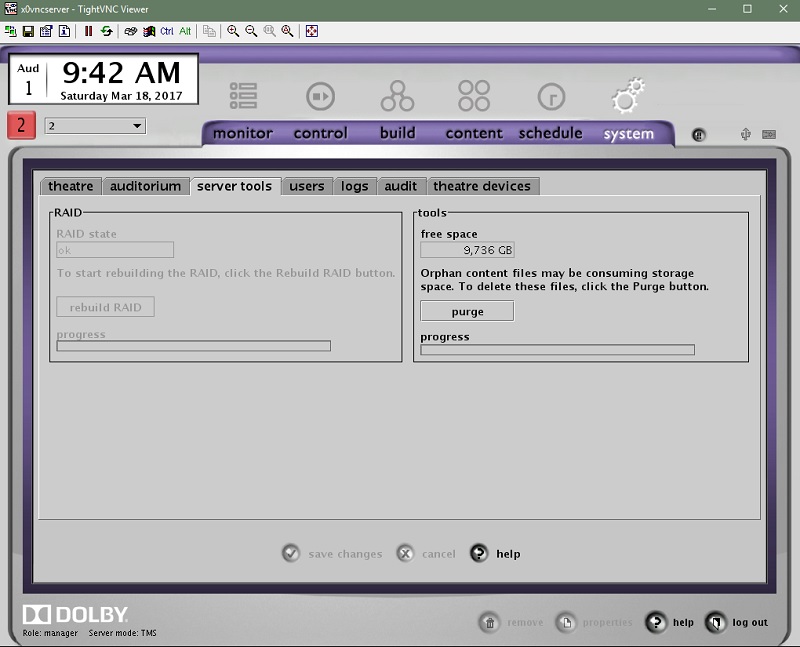
It's grayed out in this screenshot because on this server, the RAID is not degraded and thus does not need rebuilding. If your RAID has three drives from a previously operating RAID plus one virgin drive in it, that button should be live. Of course, the new drive cannot have a lower capacity than the others.
If you go to the "theatre devices" sub-tab, you can also see information about the status of the individual drives in your RAID, as so:
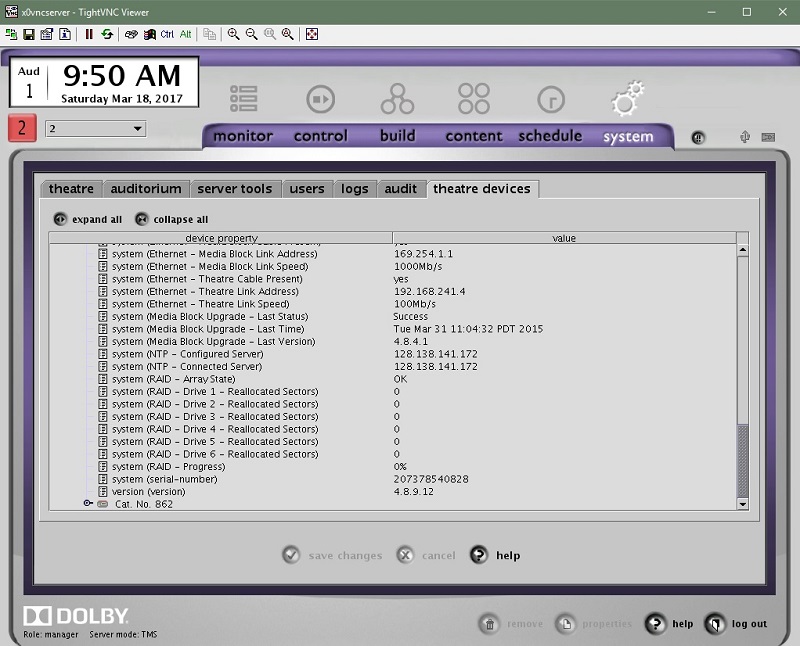
This will give you an early warning of drive trouble before a red light appears on the front of the unit, if any of those reallocated sector figures are higher than zero.
Sometimes, reallocated sectors happen for reasons other than a physical drive error. The rebuild button becomes live when this screen shows array state = degraded (rather than OK, as in this screenshot). If you have a few hours to play with (as in, you don't have shows taking place immediately), it could be worth trying a rebuild without replacing the drive(s) with reallocated sectors. Sometimes that fixes the RAID and all is then good. I once did this after a long enough power outage to drain the UPS battery (breaker tripped in the middle of the night), and all was OK thereafter.
Posted by Marco Giustini (Member # 4544) on 03-18-2017, 03:30 PM:
I like swapping drives while the server is on. Give the server time to recognise that the drive is not there anymore and when you plug the new in it should start the rebuild process automatically.
I have seen servers getting confused on which one is the drive to use when the disk is swapped when the server off.
Posted by Steve Guttag (Member # 268) on 03-18-2017, 07:43 PM:
Just to be contrary...I always swap drives with the server off. The first thing a Dolby DSS200 does when it boots up (well the RAID controller), is it identifies the drives. I knows immediately that something has changed and will start the RAID rebuild process as soon as it finishes booting up.
Powered by Infopop Corporation
UBB.classicTM
6.3.1.2