This is topic an ingest is currently running, do you really want to shutdown? in forum Digital Cinema Forum at Film-Tech Forum ARCHIVE.
To visit this topic, use this URL:
https://ft-forum.com/ft/cgi-bin/ubb/ultimatebb.cgi?ubb=get_topic;f=16;t=003011
Posted by Bob Ezra (Member # 841) on 04-24-2017, 03:15 PM:
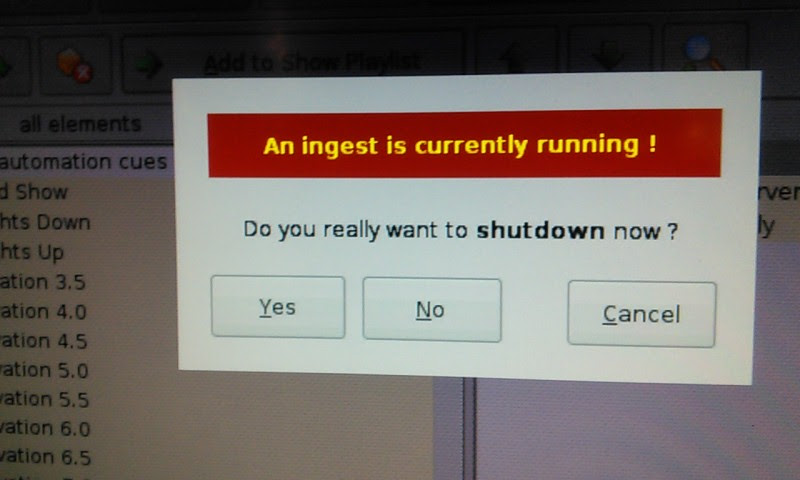
After ingesting a bunch of shorts from around the world for a shortsfest and having some ingest fails and a couple of aborts, I have been getting the message in the attached image on shutdown of the server. I ran disk cleanup and contacted Doremi/Dolby with a detailed report. They found nothing on the logs and were unable to come up with a solution other than upgrading the software from 2.4.4 to 2.6.4.
Any ideas?
Thanks
Posted by Marco Giustini (Member # 4544) on 04-24-2017, 04:15 PM:
Really no reason for NOT upgrading to 2.6.4 + hotfixes to be honest. It's usually safe to do. Dolby/Doremi will provide support on the latest version.
Posted by Dave Macaulay (Member # 813) on 04-24-2017, 04:33 PM:
There is a bug in the hotfixes, some systems will mute tracks 9-16. No problem - unless you use the upper channels, like a 7.1 house with the Odyssey channel swap card or Fidelio if it's using the alternate HI/VI tracks.
This shows up in the log analyzer report, I don't know why it happens to some and not all servers. If it does happen just reingest the software package but not the accumulated hotfixes.
Posted by Marco Giustini (Member # 4544) on 04-25-2017, 04:41 PM:
Dave,
do you know which hotfix is causing the issue? The accumulated one is just installing all the hotfixes one after the other but it may still possible to find the single files and only install the ones which are not causing the bug you mentioned?
Posted by Carsten Kurz (Member # 5396) on 04-26-2017, 07:01 AM:
Bob - is this a one-time event, or do you get this now every time you are trying to shut down? If it keeps you from shutting down, just do it, and after restart, perform a clean-up (orphan files). Then go ahead ingesting in your normal routine. And yes, you should upgrade to 2.64.
- Carsten
Posted by Dave Macaulay (Member # 813) on 04-26-2017, 09:20 AM:
The accumulated update package is signed and can't be broken down into individual updates from what I've been told, I haven't tried though.
It affects Interop DCP payback when the advanced audio setting is NOT "Disabled".
Also, apparently there's no way back on an IMS according to the message on the analysis report, the bug is in the main sw package.
To quote:
"This could be related to the bug that mutes channels 9-16.
This bug is happening for Interop content if any global audio configuration other than "Disabled" is used.
This bug is present in 2.8.X and 2.6.4 accumulated hotfix.
We recommend to reinstall software 2.6.4 (no hotfix) which will over-write the effects of accumulated hotfix.
FYI, there is no workaround for IMS2000’s running software 2.8.2."
Posted by Bob Ezra (Member # 841) on 04-26-2017, 09:58 AM:
Carsten
It happens every time on shutdown.
I have no problem ingesting.
I already ran disk cleanup in Diagnostic Tool
Posted by Marco Giustini (Member # 4544) on 04-26-2017, 10:34 AM:
Thanks Dave
You are correct, you cannot split the accumulated one but it contains all the hotfixes which have been released over time - plus one I believe? So if you still have the single files - and we knew which fix is unfixing the sound, maybe one could install all the hotfixes but that one.
Posted by Carsten Kurz (Member # 5396) on 04-27-2017, 06:15 AM:
Bob, I never heard of that before. Something must be stuck. You should probably call Doremi/Dolby support for help. The problem is, they will usually want you to be on current software. Which is really no problem. Are you able to update yourself? Coming from 2.4x, its a three stage process. I you can't update the software yourself, and if it is just annoying during shutdown, then wait for a tech to do it, and maybe the update process will solve this issue as well.
- Carsten
Posted by Dave Macaulay (Member # 813) on 04-27-2017, 10:33 AM:
Three stages? You can go from 2.4x to 2.6x with no intermediate stages. Just ingest it and reboot.
Then ingest the accumulated hotfix if desired (a good plan if the 9-16 audio muting thing doesn't affect you) and, if you have 2GB drives, the "harddiskfailingnow" hotfix. Both can be ingested prior to the required reboot.
Posted by Carsten Kurz (Member # 5396) on 04-27-2017, 02:24 PM:
No Dave, I mean
1 - main software
2 - security manager
3 - MB firmware
- Carsten
Posted by Bob Ezra (Member # 841) on 04-27-2017, 03:10 PM:
Doremi support remotely checked things out and determined there was a corrupt file in the SSD that they couldn't clear and determined that replacing the SSD was the fix.
Posted by Marco Giustini (Member # 4544) on 04-27-2017, 05:05 PM:
Carsten,
You can still upgrade to 2.6.4 and leave SM and FW where they are.
Glad that the SSD has fixed the issue - I still would like to see an easy way to re-flash the whole SSD when such weird issues happen.
Posted by Mark Gulbrandsen (Member # 72) on 04-27-2017, 05:26 PM:
Is it actually a real SSD or just a Memory Card like Doremi has used in the past? There is a big difference. I have had the memory cards fail in older Doremi servers that I maintain.
Mark
Posted by Marco Giustini (Member # 4544) on 04-27-2017, 05:43 PM:
I believe it's a USB-based SSD - you can probably call it memory card. Earlier Intel SSD's were prone to fail, never been a big issue since they change the brand.
Posted by Bob Ezra (Member # 841) on 04-27-2017, 08:08 PM:
since I have not yet replaced the ssd, the issue is not yet fixed
Posted by Carsten Kurz (Member # 5396) on 04-28-2017, 03:24 AM:
quote: Marco Giustini
You can still upgrade to 2.6.4 and leave SM and FW where they are.
I know Marco, goes with the suggested sequence of updating, but it's not a good idea to continue running such an outdated SM and firmware.
Bob - are you waiting to receive a new SSD from Dolby? It will probably come with 2.64 preinstalled anyway?
- Carsten
Posted by Dave Macaulay (Member # 813) on 04-28-2017, 09:41 AM:
It is a USB 2gB memory card, never seen them used anywhere else: not a familiar form factor with a multipin header connection, not a normal USB port.
There was a way to use a USB stick as the root drive in emergencies, I don't know if that's still supported. I used it once quite a while ago, the BIOS boot drive list has to be modified as I recall.
Posted by Marco Giustini (Member # 4544) on 04-28-2017, 12:25 PM:
Carsten,
What SM and FW? Bob didn't mention what version is currently running! ![[Smile]](smile.gif)
Posted by Carsten Kurz (Member # 5396) on 04-28-2017, 02:27 PM:
Well I am sure he isn't running his 2.4.4 with the most current SM and firmware. ;-)
Not even mentioning potentially relevant hotfixes. 2.4.4 is mid 2013...
- Carsten
Posted by Mark Gulbrandsen (Member # 72) on 04-28-2017, 02:38 PM:
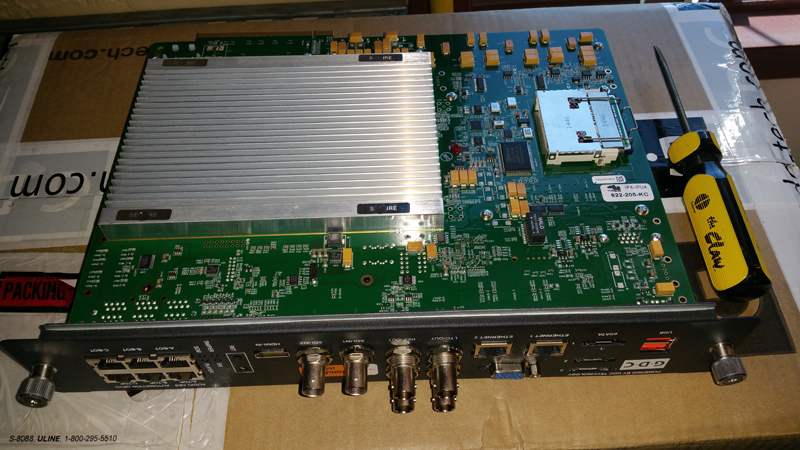
GDC uses CF type memory card on the SX-3000, but I never paid much attention to it's size and never had to replace one. It only contains the OS on that server. Seen just to the left of the screwdriver in it's socket.
Mark
Posted by Tim Sherman (Member # 569) on 04-29-2017, 03:50 PM:
Dave,
Yes the operating system backup to USB on a Doremi still works. I just made a new USB stick about two weeks ago.
Powered by Infopop Corporation
UBB.classicTM
6.3.1.2