This is topic LMT-200 in forum Digital Cinema Forum at Film-Tech Forum ARCHIVE.
To visit this topic, use this URL:
https://ft-forum.com/ft/cgi-bin/ubb/ultimatebb.cgi?ubb=get_topic;f=16;t=003091
Posted by Sigurd Wik (Member # 6131) on 08-10-2017, 10:57 AM:
Hi all,
So I have a Sony SRX-R210 that I'm trying to keep alive a little longer. Got a Media Block battery error and hence a Media Block alarm. Anybody know if I have to change the Media Block or if it is possible to change battery only on these units? And of course if the Media Block is gone if it is without grid power or battery power for some time? Any experiences is appreciated on this.
Thanks.
Sigurd
Posted by Leslie Hartmier (Member # 7053) on 08-10-2017, 01:20 PM:
Disclosure: I have no dealings with the Sony D-cinema hardware - I'm basing my information on the hardware I do - Doremi and GDC.
It is important to make sure that the media block batteries never run out of power. If they do, the media block needs to be returned to the manufacturer to have the media block returned to a usable state, at the very least.
Both GDC and Doremi are very vocal that you must never let the life die out of the IMB batteries, or the machines are worthless as the certificates stored on the IMBs are lost. Which they can resurrect at a nominal cost, of course.
In the case of Doremi, you have a very short period of time after having the IMB powered up using the projector to swap the one battery that maintains the certificates.
With GDC, they have two batteries on their IMBs and/or IMSes, you replace one at a time, and in some cases, they have pins that you connect a housing for two AAA batteries on the non-AR board (I assume it's insurance if the batteries are too weak to support maintaining the certs if one is removed). That coolness is offset by the fact that they have a foolish number of different batteries (Xenos XL-055F 3.6V 1.65Ah 2/3 AA for non-ARs, and depending on WHICH version of the AR/HFR IMB you use, you have to change it with Panasonic CR2354 (R8) or Tadiran TL-2450 (R9), and if it is early versions of the R9, you have to hack up the battery holders, then find some way (buy a rubber bumper from GDC would be one way) to keep the batteries in place).
All that said, if the Media Block battery error is a warning to change your battery, you should get that done immediately according to their instructions (whether by you or by a trained technician), and if it is NOT a warning, you likely have a major problem on your hands.
I will now defer to people who actually use or maintain the SRX-R210, but I thought my experiences might shed some light on the situation.
Leslie
Posted by Marco Giustini (Member # 4544) on 08-10-2017, 06:36 PM:
on the 300 the batteries are where the fans are and can be hot-replaced with no issues (one module at the time). If the batteries failed I believe you lose the RAID but not the certificates - not 100% sure.
Why not asking a Sony engineer to service the machine? They could replace the batteries, update the software and calibrate the projector for you.
Posted by Carsten Kurz (Member # 5396) on 08-10-2017, 09:01 PM:
These batteries are the server batteries, yes, they also buffer the RAID configuration RAM. The mediablock has it's own battery (the SMS has separate indicators). The LMT200 and LMT300 have the media block board within the server, so, the media block certificate and RTC battery is also within the server. For the 515/510(DS), the media block sits within the projector.
I have never seen a maintenance manual for the LMT200, but from the LMT300 maintenance manual, it should be more or less identical to find and swap the battery. From what Sigurd writes, I am not sure wether what he has is a battery warning (swap battery) or a battery alarm (battery depleted, certificate lost).
- Carsten
Posted by Sigurd Wik (Member # 6131) on 08-11-2017, 05:37 AM:
Thanks for replies. I asked our local technician about this issue, and he didn't know if the whole MB had to be replaced or not, but would check. So I figured I'd ask here.
Some background info on the server: I bought it dirt cheap a year ago when it had been sitting without power for a month. I knew about the MB battery issue, so I hooked it up, had no error messages, did firmware upgrade and calibrated. Now a year later it has been dormant but connected to power all the time. I fired it up and battery message appeared.
Carsten: Think it is an alarm. Touch screen just says "MB: BATTERY", and on the front of the Media Block the red alarm LED is lit. Then again, all content on the RAID shows up, and it even plays out DCPs, so who knows.
Sigurd
Posted by Sigurd Wik (Member # 6131) on 08-11-2017, 07:39 AM:
Maybe I'm lucky. Looked through the service manual for the LMT-200, and it does indeed seem to be the case that the battery is running low and not dead, because low is when the front panel LED should be lit. I'll replace batteries and see if it helps.
Posted by Carsten Kurz (Member # 5396) on 08-11-2017, 08:07 AM:
So, then, be very careful with the swapping. I can send you the LMT300 instructions how to do it, so you know at least some caveats. There should be two batteries, and you swap them one after the other, and quickly. Use a plastik tool/spudger if necessary to pry the battery out, not a metal screwdriver. And if possible, wear gloves, or only touch the new batteries through tissues.
- Carsten
Posted by Sigurd Wik (Member # 6131) on 08-11-2017, 09:32 AM:
Thanks Carsten, much appreciated! I found this page in the LMT-200 service manual, but please send me the LMT-300 instructions. Will be nice to compare them, I'll pm you my address.
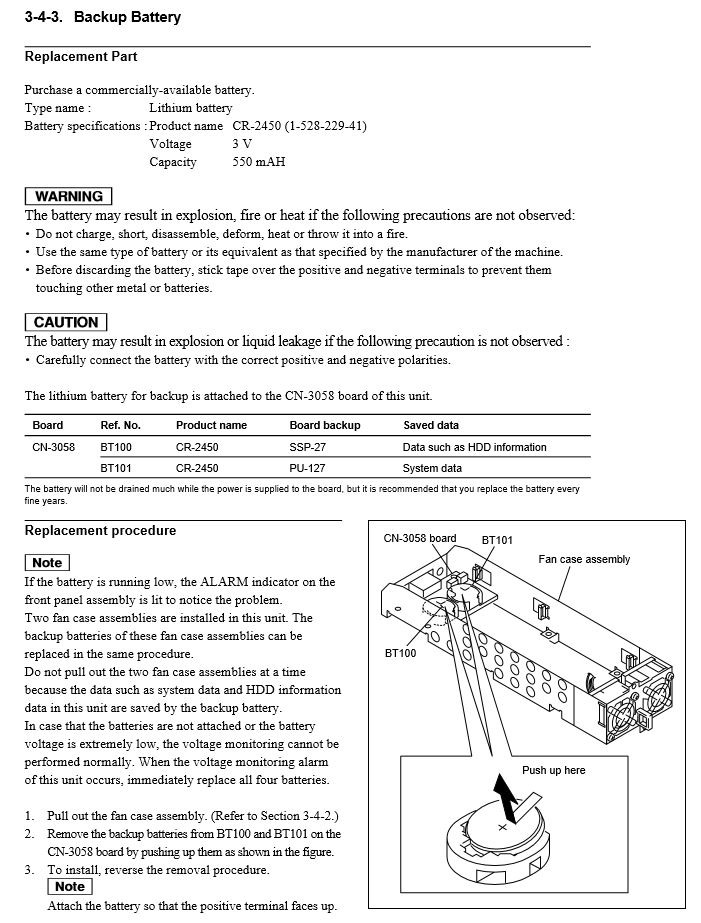
Posted by Carsten Kurz (Member # 5396) on 08-11-2017, 10:17 AM:
Hi Sigurd, yes, seems I'm wrong, it's more or less the same on the LMT300/200, as Marco mentions,, and different on the 515. Looks pretty easy to replace the batteries for all systems. Just get four 2450 from a reputable source, and then exchange them one by one. The media block should never be pulled from the LMT200/300, as then it looses contact to the batteries. Only pull out one fan assembly, swap batteries, reinsert, then take out the other.
- Carsten
Posted by Sigurd Wik (Member # 6131) on 08-11-2017, 10:22 AM:
Nice to know, thanks again!
Powered by Infopop Corporation
UBB.classicTM
6.3.1.2