This is topic Encrypted CCAP and HI-VI DCP 'Failed Verify' on IMS/IMB TMSs in forum Digital Cinema Forum at Film-Tech Forum ARCHIVE.
To visit this topic, use this URL:
https://ft-forum.com/ft/cgi-bin/ubb/ultimatebb.cgi?ubb=get_topic;f=16;t=003094
Posted by Alexandre Salvador (Member # 9437) on 08-14-2017, 07:52 AM:
Hi all,
I have an Encrypted with CCAP and HI-VI content. It was sent to several cinemas. Many of them reported problems when ingesting in IMS/IMB based TMS. The most common error message was 'Status: failed verify' and 'CPL not validated'. When ingesting directly in the projectors, it worked fine. There were no reports of DSS systems problems. We did a non-encrypted version with same contents, and it worked fine. Also, we did an encrypted version with no CCAP and no HI-VI. It also worked fine. Do you know something that could clarify what is going wrong with this DCP encryption so we can explain to the cinemas and avoid it on future deliveries ?
Thank you!
Posted by Leo Enticknap (Member # 534) on 08-14-2017, 08:11 AM:
The Interop DCP standard does not allow you to encrypt subtitles and auxiliary data tracks (subtitles, HI, VI, wobbly seat control data, etc.); SMPTE does. I would therefore guess that you're dealing with SMPTE DCPs for which you need to use the auxiliary data, and that the software versions in your TMS are too old to cope with this being encrypted. More info here.
As a first step I'd start by making sure that all the software involved in the problematic TMS system(s) is the current release version. Fixes that enable SMPTE DCP compatibility have been coming out in the last year or two. As a "for example," the release notes for version 4.8.8 for the Dolby DSS200/220 include fix DC-13130, which "fixed an issue preventing ingest of content containing SMPTE 429-14 auxiliary data track files." I'm sure that the other manufacturers were issuing similar fixes at around the same time.
Posted by Alexandre Salvador (Member # 9437) on 08-14-2017, 01:50 PM:
Hi Leo. Thanks for your reply. It is actually an Interop DCP. We used to master SMPTE DCPs but we had an issue in Brazil with Sony projectors not allowing SMPTE encrypted ingests. This was due to non updated systems, but since then the DCPs are being mastered as Interop with Closed Caption. The HI-VI are just inserted as channels 7 and 8 in audio PCM_MXF file. Do you think this may be the problem? Thanks
Posted by Carsten Kurz (Member # 5396) on 08-14-2017, 04:02 PM:
The HI/VI-N are not special, if you encrypt the audio, they will be encrypted as well and cause no issues. The CCAP must not be encrypted in Interop. Only image and audio is allowed to be encrypted in Interop features.
Which dcp authoring system do you use? It should not allow to encrypt CCAP in interop projects.
- Carsten
Posted by Alexandre Salvador (Member # 9437) on 08-14-2017, 04:34 PM:
I use QubeMaster Pro 3.0
Indeed the Closed Captions are not encrypted, as it is a XML separated file in the package. Video and Audio are encrypted.
Audio channels are like this:
01- Left
02- Right
03- Center
04- LFE
05- Left Surround
06- Right Surround
07- HI/VI (in BR both are used as the same audio)
08- HI/VI
09- Mute Audio file
10- Mute Audio file
11- Back Surround 1
12- Back Surround 2
13- D-BOX
14- D-BOX
In systems which played the DCP normal, all contents were ok (from HI-VI to D-BOX). In several cases the same Hard Drive had failure when ingesting in TMS but worked fine ingesting directly on projector. We mastered other DCPs with HI-VI and CCAP contents and this is the first time we had issues. And it is a big issue, cause this title went to about 300 cinema complexes and around half complained about the same problem. We need to know exactly the cause in order to avoid further issues on new cases, but we still have not much info or tests and are working and researching on it. Thanks for your help!
Posted by Leo Enticknap (Member # 534) on 08-14-2017, 05:37 PM:
OK, so it's not an Interop/SMPTE issue.
How about asking 10 of the sites that complained to tell you the hardware model numbers and serial numbers of all the TMSes and servers involved, and 10 of the sites that didn't, and seeing if there is a consistent pattern (e.g. all the sites that did not have a problem had software version XXX.YYY or later, or all the ones that did were using a specific make and model of server)? That would tell you if the bug is specific to a given model and/or software version, or combination of the two.
Posted by Alexandre Salvador (Member # 9437) on 08-14-2017, 05:53 PM:
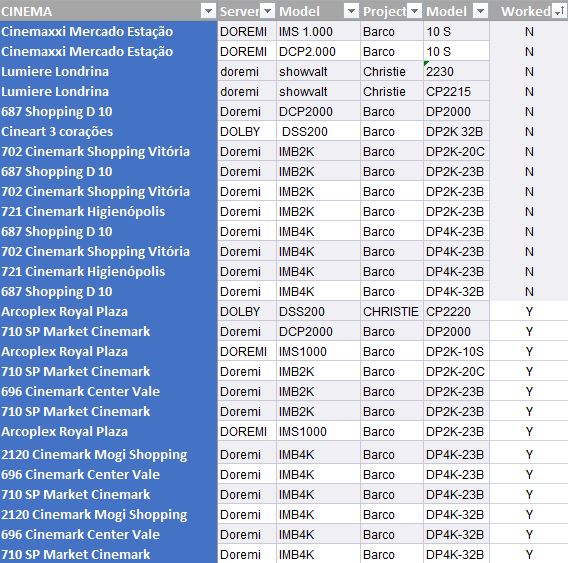
Yes, we just did, I was going to post here the results. Unfortunately, there is no pattern in systems with or without errors, which has just made me a lot more confused:
Posted by Brad Miller (Member # 2) on 08-15-2017, 09:34 AM:
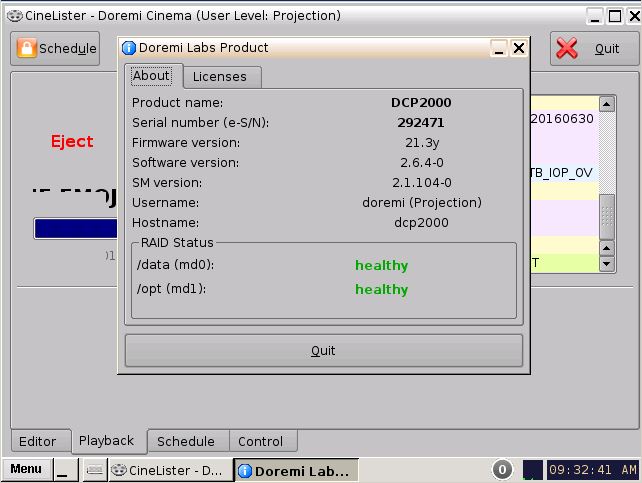
For anyone to be able to help, we need the versions running on the machines added to your table below.
For example on a Doremi:
Firmware version?
Software version?
Security Manager version?
All 3 are accessed by clicking MENU and then ABOUT like seen below.
Posted by Steve Guttag (Member # 268) on 08-15-2017, 09:57 AM:
I can tell you, encrypted captions are unreliable on a Dolby DSS system prior to 4.8.10.4. Unencrypted are fine.
Posted by Leo Enticknap (Member # 534) on 08-15-2017, 11:05 AM:
There is one failed and one OK site in Alexandre's list that uses a DSS200, so it would be interesting to know if they are pre- and post-4.8.8.4 respectively.
Although the vast majority of the problem sites are Doremi/Barco Series 2 installations, not all of them are, which leads me to speculate that the problem is not specific to that combo, and therefore is either or both of:
1 - QubeMaster Pro is creating glitchy DCPs
2 - The software in the servers / IMBs is out of date.
I'd be inclined to investigate 1 first, because that doesn't require the co-operation of several sites in updating software. I don't know if the local managers would be competent to do that, if it can be done remotely, or if a tech would need to get there, but in any case, there is an element of risk involved in updating server and projector software (the updating process itself could fail, or the new version may introduce new problems), so my instinct would be to explore that second rather than first.
Try making an encrypted DCP using DCP-o-Matic (it's free) with the same auxiliary track configuration that you were using with QubeMaster, and KDMs for the problem sites. It can be short (say, 30 seconds), so that the sites can download it and you don't need to ship media. All you need to know is if it ingests OK and plays OK. Ask the problem sites on your list to ingest it, and tell you if it works or not.
If it works in all the problematic sites, that's pretty convincing evidence that the bug is in QubeMaster. If it fixes the problem at some sites but not others, there could be a QubeMaster problem, a DCP server software update needed, or both. If it fixes none of them, then gather software version information from all the sites on your list, and compare the problem sites with the OK sites. If you see a pattern, update the software at the problem sites. If you don't see a pattern, and/or the problem sites are already running the current server and media block software/firmware, I'm not sure where to go from there.
Posted by Harold Hallikainen (Member # 5405) on 08-15-2017, 11:17 AM:
From the original post, it LOOKS like the issue was ingest into the TMS as opposed to auditorium servers. Did I read this correctly? Is, perhaps, this just a TMS issue?
Harold
Posted by Alexandre Salvador (Member # 9437) on 08-15-2017, 01:16 PM:
In time: We did a new encrypted DCP using the same software (Qube) with the exactly same movie but with no DBOX and no CC-HI-VI contents. It worked for all the cinemas which reported issues. This is how we managed to resolve the problem for the nearest sessions at these cinemas. Now we are digging on the cause of the problem. Hope this info help a bit.
Posted by Leo Enticknap (Member # 534) on 08-15-2017, 10:15 PM:
Sorry - forgot the details in the opening post. Yes, it states that the problem is in the TMS, and that bypassing it and ingesting directly into the servers functions as a workaround.
So it's the TMSes that it might be an idea to compare the software versions in the complaining vs. the non-complaining ones.
Posted by Alexandre Salvador (Member # 9437) on 11-17-2017, 06:55 AM:
Hi all,
Just to finish this case. We sent the same DCP along with a few versions (with no encryption, with no acessibility resources and a SMPTE version with all the same content) to a few cinema theatres. All versions worked fine which makes us think the issue was in the copies. We use a Flash Duplicator machine so maybe there were some problem at the master that replicated through the other HDs. Now, for these tests, new copies have been made so the copy issue may have been resolved. Thanks for all your support!
Posted by Carsten Kurz (Member # 5396) on 11-17-2017, 10:35 AM:
How would corrupt DCPs fail in the TMS ingest, but successfully ingest locally at the servers?
- Carsten
Posted by Alexandre Salvador (Member # 9437) on 12-04-2017, 08:44 AM:
That's a good question that bothered us all at the beginning of the whole situation. We concluded later that TMSs may have several check routines beyond local projectors that provided a warning and blocked the content reproduction. As it happens sometimes with DCPs that play fine in Qube or NeoDCP Player but get an error messagem on EasyDCP player. Perhaps that's the point.
Posted by Carsten Kurz (Member # 5396) on 12-04-2017, 11:09 AM:
Well, standards and validation are one thing, but corrupt storage media does not fall into this category. They should fail hash verification, no matter wether on the TMS or local server.
- Carsten
Powered by Infopop Corporation
UBB.classicTM
6.3.1.2