This is topic Dead DSS100 in forum Digital Cinema Forum at Film-Tech Forum ARCHIVE.
To visit this topic, use this URL:
https://ft-forum.com/ft/cgi-bin/ubb/ultimatebb.cgi?ubb=get_topic;f=16;t=003112
Posted by Steve Kraus (Member # 476) on 09-06-2017, 10:46 AM:
I must state up front that this is not an emergency as I do not use this equipment.
I have a Dolby DSP100 / DSS100 that I keep around as a potential backup for my DSS200 server. I have in the past set it all up and hooked it up to my projector and successfully run open content on it and even made a little encrypted test DCP, generated a key, and played it. So it was all in working order.
Yesterday I was going to run a test and found the DSS100 totally dead. Neither power supply seems to be working. No fans, no PS LEDs. They do seem to warm up after a time and I do see an LED inside the DSS lit but no fans or drives. I've tried reseating the PS's. I've also tried powering one of them while outside the DSS (not sure if that is a good idea) and it's just as dead. FWIW I'm feeding power directly not through the pass-through.
Seems unlikely both would just die during non use at the same time although that's theoretically possible. I did just move this server to a new cart so there's the possibility of something being jostled around. I don't see anything amiss inside the DSS, not that I would necessarily know.
Anything I should look for? As I am not very familiar with this equipment I keep imagining there is a PS switch someplace that I've simply forgotten but probably not.
My PS's are Cat.991's which apparently are generally available as GIN-6350P. Nothing in the manual about fuses like there is on the DSP power supplies which are different.
Posted by Mark Gulbrandsen (Member # 72) on 09-06-2017, 11:28 AM:
It's unusual that both would be dead at the same time, but believable because power supply failure is a Dolby tradition. Some times it's an easy fix as the most common failure mode is the main input capacitor on these power supplies tends to fail. After that the caps on the output side also fail. A quick visual of the power supplies will tell you if any caps are leaking, I had dozens of CP-650's with leaky caps and actually carried a kit of caps around until all of them were rebuilt. Use 105C rated caps! Some bench checks would be in order to confirm if the input cap is has failed. Most of the DSS-100's around here are now booth door stops (Quite literally in one location). There is only one still functioning that I know of... I have a USL booth monitor sitting here waiting for an AC input capacitor. Some times it turns on and some times not.
Mark
Posted by Leo Enticknap (Member # 534) on 09-06-2017, 12:11 PM:
One 11-plex that I service has two DSS100/DSP100 combos still in use, and still going strong (with a Barco DP1500 and DP3000). All the others are Series 2 screens, on a DSS220/DSL200 network. I've made the manager there aware that the software can't be updated beyond 4.7.8.7 unless she's prepared to do ingestion and scheduling manually in the Series 1 screens (i.e. not through the DSL200), but they haven't come across any DCPs that won't play with that version, and so for the moment they're happy to keep the 100s in use until they croak, and stick with that software version until they have to take the 220s to 4.9.
We've got several used DSS100/DSP100s in storage at the shop anyways, and so could replace one pretty quickly on an emergency basis if one of theirs dies. As this is a mainstream house that still plays 99.9% Interop DCPs, I can't see them getting rid of the 100s until either they encounter an SMPTE DCP that won't play on them, or upgrade those screens to a Series 2 installation. But so far at any rate, there is no reason or need for them to do so.
I do agree that both of Steve's units being dead is weird, though. Could it be that the DSP won't even begin to boot until it senses that it's connected to an "alive" DSS, and that only the DSS is actually dead? Does the DSP take its power fromor through the DSS, and therefore a dead power supply (or -ies) in the DSS would TARFU both? Just speculating - I've never observed the startup sequence, or looked at the connections in the back of them, in enough detail to see.
Posted by Steve Kraus (Member # 476) on 09-06-2017, 01:01 PM:
Two power supplies on each box (but of different types). I would ordinarily plug all 4 into an outlet strip and plug it in so it all goes live at once. The DSP comes up and the screen says it's searching for the DSS. There are some used PSs on eBay for not too much so I guess I could spring for that and see if that solves it. I did open one PS and did not see anything noteworthy.
Posted by Mark Gulbrandsen (Member # 72) on 09-06-2017, 02:40 PM:
Yea, since these are the slide in type I would get one and see. Server Supply has them too. It's a pretty common supply used in Supermicro servers and it's certainly worth the 20 bucks to find out. If that fixes it then replacing all of them would be a good idea since it's a backup and has to function. Plus, they already have a gazillion on-hours on them.
I have a rack of Dell R620 servers here at home for various stuff and I have already lost a couple of the slide in supplies in them. But they were also used when I bought them, probably also with a gazillion hours on them. They have redundant 700watt supplies so they never actually go off line. I just get a email notification a supply failed and the server display screen turns orange as an alert.
Mark
Posted by Marcel Birgelen (Member # 6801) on 09-06-2017, 06:05 PM:
Afaik, the DSS100 is not a Supermicro machine, and it doesn't use the Supermicro PSUs. The GIN-6350P should be the correct OEM part. The subsequent DSS models were based on Supermicro OEM hardware.
Not wanting to rain on your parade, but two PSUs dying at the same time while not being connected to anything is kind of implausible, I'm afraid the problem is most likely located on either the backplane or the mainboard. Both communicate with the PSUs.
Obviously, if you can Ebay a replacement for ~$20, it's worth a try.
Posted by Stephan Shelley (Member # 8587) on 09-06-2017, 06:23 PM:
No light at all on PSU? Did you try bypassing the power conditioner and go directly to the PSU? While no power switch you can momentarily short the start pins on the motherboard. Or connect a momentary switch to it. The connection for a start switch is on the motherboard just nothing connected to it. I have had to do this in the past.
Posted by Frank Cox (Member # 6258) on 09-06-2017, 06:30 PM:
Is it possible that one power supply died a long time ago and you just didn't notice?
I've always wondered that about the GDC cinema server that I have here. "Dual power supplies" -- would it tell me if one of them quit?
Posted by Stephan Shelley (Member # 8587) on 09-06-2017, 06:56 PM:
On the Dolby stuff there is an audible alarm and I think with the GDC as well.
Posted by Mark Gulbrandsen (Member # 72) on 09-06-2017, 07:27 PM:
quote: Marcel Birgelen
Afaik, the DSS100 is not a Supermicro machine, and it doesn't use the Supermicro PSUs. The GIN-6350P should be the correct OEM part. The subsequent DSS models were based on Supermicro OEM hardware.
Same one from that era Supermicro server that I have TMS running on at several locations.I did not use more than a few of them because they are noisy bastards! The H-P and Dell's run whisper quiet.
There is absolutely an alarm on GDC and a red button on the power supply cage to defeat the alarm.
Mark
Posted by Steve Kraus (Member # 476) on 09-06-2017, 07:59 PM:
Yes, Frank, I came to that conclusion earlier today since I cannot swear that both were working and I'm not sure they alarm like they do on the DSS200.
I don't know if Zippy just made the PS's or the entire server but I did see that name in there.
Posted by Stephan Shelley (Member # 8587) on 09-06-2017, 08:02 PM:
DSS 100 do have an audible alarm and like the GDCs have a cancel button. DSS200s and DSLs do not have the cancel button.
Posted by Marcel Birgelen (Member # 6801) on 09-07-2017, 01:44 AM:
The cancel button for the Supermicro/Ablecom based PSUs is yanking the PSU out of the chassis. ![[Wink]](wink.gif)
quote: Mark Gulbrandsen
Same one from that era Supermicro server that I have TMS running on at several locations.I did not use more than a few of them because they are noisy bastards! The H-P and Dell's run whisper quiet.
I agree, the SuperMicro machines are almost always noisy, although their large machines do have larger fans and therefore a less penetrating noise. HP(E) and Dell seem to have better power regulation for their fans, so in normal conditions in good ventilated rooms they run pretty quiet on average.
For the DSS100, Dolby seemingly sourced most of their components from EMACS/Zippy Technology, resulting in a far more customized box, more in line with Dolby's other custom designed hardware. This box is also noticeably quieter than the other servers. For all future designs they seemingly didn't want to go down that ally again and just sourced an off-the-shelf OEM server platform rather than building one their own.
Regarding Steve's problem, he does see an active LED in the machine itself, most likely on the mainboard. So at least one of the 5V circuits on one of the two PSUs must still be working.
Posted by Mark Gulbrandsen (Member # 72) on 09-09-2017, 10:07 AM:
Yea, all the TMS servers I use are 2 RU high. The ones I switched to were Dell 2950's and they are whisper quiet, and now I use Dell 720's and you can't even hear them run. I could also use a 1 RU Dell 620, but most of the theaters are already dealing with having spare 3.5" drives around so I tend to leave things there as the 720's I use take 3.5's. The 620 uses 2.5" drives.
Mark
Posted by Greg Routenburg (Member # 1742) on 09-18-2017, 02:06 PM:
The power supplies were available OEM from Zippy in California. You might have a failed power supply enclosure. I've seen that a couple of times. The Zippy model and part numbers are:
R2G-6350P (Enclosure)
GIN-6350P (Individual Supplies) - (P/N:B000780001)
The default p/n for the R2G-6350P is B000790004. For a small fee, three years ago it was $20USD, they will rewire the harness to p/n B000790067 which was specifically done for the dolby servers. If I remember correctly, the R2G-6350P comes with two supplies installed.
This information is about three years old now though so I'm not sure if they're still in production. It doesn't hurt to contact Zippy and ask.
You can test the power supply itself by shorting the Power_On pin on the ATX connector to any of the ground pins. If you look at the pin count of the ATX connector in the server, you can google it to get a pinout. The Power_On wire is typically green and the ground wires are typically black. If you manually short those pins, the supply should power on and you should be able to test the output voltage with a standard multimeter on the various pins. If it tests OK then you've got a Motherboard problem.
Before swapping the motherboard though, you can verify that the auto_on jumper is properly set on the motherboard. If that jumper is not set, the motherboard will be looking for an intermittent contact on the power button header to turn the unit on. The manuals for the motherboards that were used are available online or from SuperMicro.
I hope that helps.
Posted by Steve Kraus (Member # 476) on 10-27-2017, 12:09 PM:
Thinking maybe both PSUs are dead, I picked up a couple on eBay but that made no difference. It still did not power up.
So I opened it and forced it to start by grounding the green wire on the motherboard power connector. That did get it to power. Initially, removing the wire caused it to lose power but after it had been on a bit, removing the wire left the power on though it did cause a reboot.
But it still would not really boot and be seen by the DSP. I would see the SuperMicro splash screen and then something about the RAID and then nothing.
I then pulled the coin battery on the MB and sure enough, dead. So I replaced it. Initially that still didn't make it start by applying power but after more experiments with forced starting it does now start by plugging in the power cords.
But it still does not fully boot. The last thing I see is "boot from raid" then a blank screen. No stream of Linux gibberish.
I tried an experiment with multiple reboots each time with one of the four drives pulled. It recognized the "degraded RAID" but that didn't change anything. Curiously, with all four back in, it now marks drive 0 as "not in use" as though it is defective but if I reboot with 0, 1, 2 in and 3 pulled, it makes no complaint about 0.
BTW, is there a drive inside the DSP100? Otherwise where does it boot from? Mine continues to start normally though of course it sits on "Searching for Show Store."
Anyway, that's where things are at present.
Posted by Steve Guttag (Member # 268) on 10-27-2017, 12:47 PM:
Run an Install disc on the DSS100 of the same version that your DSP100 is expecting and see if it will rebuild the RAID (which is where it sound like things are dying).
Posted by Steve Kraus (Member # 476) on 10-27-2017, 02:38 PM:
The DSP has 4.0.8.10. I have handy 4.3.5(9) and 4.3.5.13. Are those of any use and if so, how does the DSP get updated?
Posted by Steve Guttag (Member # 268) on 10-27-2017, 03:03 PM:
You can use either 4.3.5.9 or 4.3.5.13. You wouldn't need to update the DSP100.
To answer the question though, updating the DSP100 can take three forms:
When updating the DSS100, stick a thumb drive in with the KDM for the DSP100 in the root of the thumb drive (the drive goes in the DSS100, not the DSP100). When the install/upgrade is done with the DSS100, it will then proceed to update the DSP100.
Use a "Remote Update" (using a normal SSH session) file and place the KDM for the DSP100 in the normal FTP directory and execute the update command for the remote update file and at the conclusion of the DSS100 update, it will update the DSP100.
Or if you JUST are updating the DSP100, it is done with the Dolby Software Update Utility and a USB cable plugged into the front of the DSP100. For that you'd need the DSP100 update file and the KDM on your computer.
It is essentially the same as for a DSS200/CAT862 system.
Posted by Leo Enticknap (Member # 534) on 10-27-2017, 04:20 PM:
The DSP100 is essentially a cat862 in a standalone box, and with a little screen and buttons.
As Steve points out, you need an update KDM from Dolby to install a newer version of the software on the DSP than the one you have already. So if you currently have 4.0 and you want to install 4.3, you'll need to buy a KDM from Dolby for that, if the unit went out of warranty before 4.3 was published. If you enter the serial number of your DSP into Dolby's upgrade key site, it should give you a KDM to download for the final software version published before the last warranty expired on your DSP.
If you going to pay for a one-time software upgrade, then unless your projector is not DCI-compliant (i.e. if it will only support Cinelink II DH link encryption, and will not support either Cinelink I or Cinelink II TLS), in which case 4.3.5.13 is the final version you can use, you might as well install the final version that was published for this machine, which is 4.7.8.7.
Also, upgrading from a non-DCI compliant software version (4.3.5.13 or below) to a DCI-compliant one is a one-way ticket: you cannot downgrade it afterwards.
Posted by Dave Macaulay (Member # 813) on 10-27-2017, 06:14 PM:
I think it might upgrade the DSS without a KDM - that's needed for the DSP upgrade?
Posted by Leo Enticknap (Member # 534) on 10-27-2017, 06:33 PM:
Yes, you only need a KDM to update the DSP. But presumably the two would not talk to each other if the DSS is on a higher version generation than the DSP.
Posted by Stephan Shelley (Member # 8587) on 10-27-2017, 09:18 PM:
Steve K the DSS 100 has a IDE flash drive in it that it starts the boot process from. In the case of software that old the operating system is on that flash drive.
As your CMOS battery went dead it is possible you lost the correct boot device order. You set them in the supermicro BIOS. It should be the CD/DVD ROM first and the IDE flash drive second. Also set the after power failure to always on.
Posted by Marco Giustini (Member # 4544) on 10-28-2017, 04:05 AM:
you probably lost the "power on after AC loss" setting in the BIOS.
Now that it stays on, just run an install disk. You don't need the DSP connected while you do your tests, I would disconnect it. When you finally reach the ShowManager and you are confident all is well, you can reconnect the DSP - you may need to update it manually though and that would require a KDM. Unless the current software is on a version which is compatible with the ShowStore you are installing.
Posted by Steve Kraus (Member # 476) on 10-28-2017, 08:59 AM:
I was unable to get it to load the update but I've probably forgotten something. I've tried putting in the disk while running as well as having it in place and rebooting. I do have the BIOS set to check the optical drive first and I see it read a bit but it continues to boot as before.
I also was looking into the less drastic step of having it rebuild the array. I can get into the RAID stuff on boot. If I get into it early it doesn't show the RAID at all but can where you cursor around via the keyboard and the options are at the bottom. If I get into it after the RAID stuff the RAID is shown and I can see the drives listed and so forth but for some reason I cannot get to the options. Again, there is probably something I'm missing.
Posted by Steve Guttag (Member # 268) on 10-28-2017, 10:44 AM:
The DSS100/DSP100 can freely upgrade/downgrade beween 4.4 and 4.3. It doesn't have the same restrictions as the CAT862.
How long ago did you burn the disc? Also, did you convert it from an ISO file to an actual disc?
Posted by Marco Giustini (Member # 4544) on 10-28-2017, 02:10 PM:
Basically you need to boot from the CD. The BIOS should be set up to boot from CD first, then RAID. You could manually boot from the CDROM and see what happens.
What Steve said, also consider the possibility that the CDROM is faulty, it can happen after a long time. May be worth cleaning the lens. You could try a Linux boot disk to confirm whether the unit still works or not.
Finally, you are trying an INSTALL disk, right? An Update should boot anyway and try to update the software though.
Posted by Stephan Shelley (Member # 8587) on 10-28-2017, 02:57 PM:
On the DSS100 you need to boot from the IDE flash drive second not the RAID. That is also true with the DSS200 with the X7 board. X8 you boot directly from the RAID.
Posted by Steve Guttag (Member # 268) on 10-28-2017, 02:58 PM:
If the RAID is crashed, the upgrade disc won't do anything because there is no RAID to load onto.
Posted by Stephan Shelley (Member # 8587) on 10-28-2017, 03:43 PM:
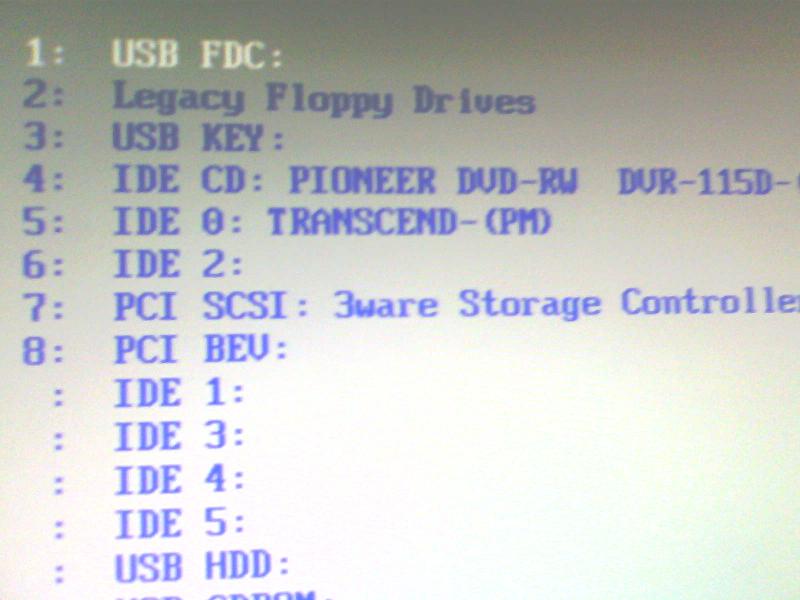
Below is a screen capture of the boot device sequence on a working DSS100. Items 4 & 5 are the important ones. The IDE Transcend is the flash drive.
Posted by Marco Giustini (Member # 4544) on 10-29-2017, 04:42 AM:
Steve and Stephan are right. However if you are confident the RAID is still there and you want to try and keep the content, you may want to try an upgrade first. Failing that, you'll have to use an INSTALL disk.
Posted by Mark Gulbrandsen (Member # 72) on 10-29-2017, 11:30 AM:
This is VERY similar to a problem I had with a DSS-100 minus the won't boot up part. Because mine would boot Dolbly diagnosed the issue from the logs as a bad RAID Card... which of course they had none of even though this DSS-100 was a mere two yeas old and the DSS-200 had just been released aound this time. This really pissed the customer off and we replaced that server with a new GDC because we had to get the screen back up, pronto. This lack of parts on Dolbly's behest caused the customer to abandon all his Dolby's at all his sites when we did his full digital conversions, most weren't even five years old. I was always going to try to find the equivalent off the shelf RAID card which it for sure was... probably made by LSI I believe... or a company that was bought out by them, but what for and why bother? They all became door stops almost overnight.
Mark
Posted by Leo Enticknap (Member # 534) on 10-29-2017, 12:29 PM:
Doesn't the DSS100 use a generic 3Ware card, available OTS (or at least, used on Ebay if that model is no longer in production)? The 200 certainly does, because I once replaced the one in a 200 with an 8-drive variant of the same model, a few years ago when I needed around 10TB of usable RAID space for a bunch of festivals in succession, and drives bigger than 2TB were eye-wateringly expensive. The installer reflashed the firmware in the new card after it went in, but after that everything worked perfectly, and, as far as I'm aware, still does.
Just one other thought on Steve's DSS100 install woes, adding more detail to Marco's point above: if you're trying to install the software on a system with more than one RAID drive problematic, are you sure that you're using a "clean install" version of the ISO, and not an updater? I'm not sure that an updater would work in that scenario. The updater ISOs are available for download from dolbycustomer.com, but you have to open a support ticket and ask them for a clean install ISO. I suspect that Dolby does this because the clean install doesn't give you any last chance "Are you sure you want to nuke your entire RAID, and your config script settings, and make your server as if it's new from the factory?" question. As soon as it starts to boot from the stick or disc, it's unstoppable. So Dolby probably want to check that anyone who receives a clean install ISO is made fully aware of what will happen if they use it.
Posted by Steve Guttag (Member # 268) on 10-29-2017, 05:32 PM:
I suspect at least partial BS on Mark's part (he does it a lot). Dolby has ALWAYS supported their products, at least, 3-years past discontinuation. Since he identifies the DSS100 as under that time, Dolby would have had what it took to get him going again.
The reason I say partial BS is that there WAS a brief period where RX was reserved for just products under warranty. They then extended it to other "mission critical" products (like a server) but it would be a 2-step in that they would supply an advance replacement that works. You send yours in for a repair/return, you then send the loaner back. While certainly a cumbersome process, the end result would be a working server.
Posted by Leo Enticknap (Member # 534) on 10-29-2017, 10:08 PM:
Dolby is, sometimes at least, willing to be flexible on that. I had a cat745 go bad a couple of months ago. They shipped a loaner and we returned the deceased one: I asked if they'd be willing to keep that one after they fixed it and put it back into their loaner stock, to avoid the theater having to register new certificates with distributors a second time and re-KDM all their shows, and, kudos to Dolby, they agreed.
Incidentally, the one they sent us did not have the same battery arrangement as the one that went bad. Instead of the dual CR2477N/CR2032 battery holders, there was a single supercap on the same place on the board. Presumably they're modifying them as such whenever one goes back for repair.
Posted by Steve Kraus (Member # 476) on 10-30-2017, 12:02 AM:
I will verify the readability of the two CDs on a PC. Both have been used successfully in the past. .9 when I installed larger drives on the 200 and .13 after a Cat.862 replacement had newer software that would not work with .9.
Posted by Mark Gulbrandsen (Member # 72) on 10-30-2017, 02:12 PM:
quote: Steve Guttag
Since he identifies the DSS100 as under that time, Dolby would have had what it took to get him going again.
Nope, unfortunately they did not have the board. Nor were they very interested in trying to find a substitute.
Mark
Posted by Steve Guttag (Member # 268) on 10-30-2017, 03:37 PM:
Again, Dolby supports their products for at least 3-years after discontinuation. What you say conflicts with that.
Posted by Mark Gulbrandsen (Member # 72) on 10-30-2017, 04:12 PM:
Thats nice n all Steve, but sadly... this time they could not. I would not be one to set aside an expensive piece of my customers gear for no legitimate reason.
Here Steve is Norm's first reply to that issue.... Yes, I save many interesting emails.
"Hi Mark,
There are no logs attached to this email.
But what you describe appears to be a lack of through put of traffic via the raid controller card.
I would suspect this card also from not seeing the logs yet, though we don’t replace the Raid card in the DSS100. And you would mostly likely have to get the DSS100 RXO’d.
Send the logs and we will try to look at them sometime today.
Thanks,
Norm"
The logs were sent in the second email and they confirmed it was indeed the card. Now we could have send the unit in and they could have replaced it... That's just stupid. RAID cards are very easy to install. No one sends servers back for repair, it is done no site or replaced... which we did. How long would the theater have been off screen waiting on them? My customer chose not to wait as his site could not afford to be down a screen for a week to ten days.
Mark
Posted by Steve Guttag (Member # 268) on 10-30-2017, 04:24 PM:
That's YOUR claim.
Posted by Mark Gulbrandsen (Member # 72) on 10-30-2017, 07:21 PM:
Not my claim. Norm's statement.
Posted by Sam D. Chavez (Member # 1841) on 10-30-2017, 07:29 PM:
I usually don't find myself agreeing with Mark and not with you but I had a similar issue at the same time frame with Dolby offering no solution but to send a loaner DSS200 all the way to Hobbs, NM, repair the original unit and return it. I got some higher up involved and they allowed the theatre to keep the loaner, but there was a time where the service was not as good as it once was and has significantly improved since that "dark" time.
Posted by James Falloon (Member # 1933) on 10-31-2017, 06:17 AM:
Boys, to get back to the topic, I had a similar problem on a Qube server (also a supermicro) - after it lost its CMOS settings it defaulted the SATA ports to IDE mode - instead of AHCI (needed for hot swapping of cru drive etc). after changing the settings in the BIOS back to AHCI we were back booting again.
Posted by Steve Guttag (Member # 268) on 10-31-2017, 06:48 AM:
Hold on a second; Mark essentially backed up what I had said and showed that he twisted his response.
quote: Mark Gulbrandsen
bad RAID Card... which of course they had none of even though this DSS-100 was a mere two yeas old
It isn't that Dolby couldn't repair the server or that they had no parts to repair the server, as implied, but that they had no parts for sale. Dolby has taken the policy what after EOL discontinuation to pull the parts and reserve them for repairs to ensure they can support the product for 3-years after discontinuation.
My response:
quote: Steve Guttag
I suspect at least partial BS on Mark's part (he does it a lot). Dolby has ALWAYS supported their products, at least, 3-years past discontinuation. Since he identifies the DSS100 as under that time, Dolby would have had what it took to get him going again.
The reason I say partial BS is that there WAS a brief period where RX was reserved for just products under warranty. They then extended it to other "mission critical" products (like a server) but it would be a 2-step in that they would supply an advance replacement that works. You send yours in for a repair/return, you then send the loaner back. While certainly a cumbersome process, the end result would be a working server.
Mark asserts:
quote: Mark Gulbrandsen
Nope, unfortunately they did not have the board. Nor were they very interested in trying to find a substitute.
.
I reassert that Dolby supports discontinued products for 3-years but Mark counters that they could not.
I'll admit that I did not see (either it was added later or it didn't load on my browser the first time the cut/paste of Norm's contribution) but again, he backs my case and debunks Mark's.
quote: Mark Gulbrandsen
The logs were sent in the second email and they confirmed it was indeed the card. Now we could have send the unit in and they could have replaced it.
Thereby admitting that the server could be sent back and repaired with the not-in-Dolby's-possession card.
I won't dispute the absurdity of sending back an entire server to replace one card and even noted the dark period where that was indeed the Dolby position and I'm one of (I presume many) that lobbied for "mission critical" devices to have advance replacements available. The fact remains, the server was repairable 2-years after it was discontinued. And since you are so fond of touting the value of Extended Warranties on servers, had he had an extended warranty on the DSS100, at the time (you could purchase warranty to extend it up to 5-years), the RXO program would have been in full force too.
Note too, Dolby techs will tell you which off-the-shelf parts are in the servers. I had a RAID card in a DSS200 become "questionable" in its performance. I sourced it through normal computer supply means. Rarely is a cinema manufacturer going to be the cheap source for standard parts. Furthermore, the RAID card I sourced was the older 3WARE to match what was in there (worked like a charm, by the way).
There is a big difference in the claim that Dolby didn't have the part or couldn't fix a 2-year old server and that they were not selling discrete parts for a discontinued product in order to ensure they had parts to fulfill their obligation for repairing units. There are people that keep spare systems, including servers and would prefer just shipping the whole thing back and getting it factory serviced. Our sites that had DSS100/DSP100s now use them as the emergency spare and are no longer using them 24/7.
Posted by Stephan Shelley (Member # 8587) on 11-01-2017, 04:44 PM:
The RAID card are standard and available online.3ware 9550SXU-4LP card.Install or upgrade disk will install new firmware on it if needed.
BTW do not confuse the USB CD at the very bottom of the list with the IDE CD/DVD ROM Boot item 4.
Posted by Mark Gulbrandsen (Member # 72) on 11-02-2017, 12:20 PM:
Stephen,
That was my intention except 3-Ware had been sold at the time I believe to LSI. And that card was out of production and the short time I spent searching for a used one turned up nothing. I had to get that screen back in operation again as it had already been down for two days. It was also not a very popular card even at the time according to the people I spoke to at LSI. Now it appears that Broadcom owns LSI/3-Ware... Sheesh, these are all some really unstable companies. I wonder who is in line to purchase Broadcom now? I have LSI 8888ELP raid cards in all my computers here at home ![[Eek!]](eek.gif)
Mark
Posted by Steve Guttag (Member # 268) on 11-02-2017, 03:13 PM:
So let me get this straight. A "...not a very popular card even at the time according to the people I spoke to at LSI" that I can get now, years later (from multiple sources), YOU couldn't find anywhere?
Face it, you didn't/don't like Dolby (or however you spell it in a post) and were predisposed to sell your customer on a GDC and it didn't take much for you to forgo a couple hundred dollar solution in the name of a several thousand dollar solution. Not because it isn't or wasn't supportable but because YOU didn't want to support it.
And honestly, that is fine too. You can (as anyone else) can like or dislike whatever or whomever you want. There is just no need to lie about it. I've told customers that I prefer certain products over others and why and have taken the opportunity of a failure to have them switch but I've never resorted to fabricating a story to accomplish it.
I can, quite truthfully, tell you a story of two IMB failures where, heading into a holiday weekend, the IMB manufacturer could not supply replacements (FIPS error) such that this twin theatre would have been 100% down, if I didn't do anything about it and was able to have DSS200 servers sent in to get them going (and they've been going ever since). The replacement IMBs (they were still in warranty) didn't show for another 3 weeks or so! It happens.
I'm up to two DSP100 failures (both repaired) and one CAT862 failure (repaired). The DSS line remains the most reliable I deal with. It is a shame they discontinued it.
Posted by Mark Gulbrandsen (Member # 72) on 11-02-2017, 06:29 PM:
quote: Steve Guttag
So let me get this straight. A "...not a very popular card even at the time according to the people I spoke to at LSI" that I can get now, years later (from multiple sources), YOU couldn't find anywhere?
I have no idea if THAT card is easy to get now or not through normal channels, nor do I really care because it's a dinosaur now. There was but one possibility on Epay at the moment I found, and I can't remember if it's the exact card or not, but minus the battery it is similar. Today it is a very uncommon card because it set for an old style buss that no one uses. Most of them have since been junked. It is not the LSI card that I use in my home computers which are. The cards I use are 6gbps and are PCIe form.
The rest of this is irrelevant, The server failed, Dolbly couldn't supply parts to get it back up, it was replaced with another server and it became a door stop, plus I still had Norms original email to support what I said.
Case closed!
Mark
Posted by Scott Norwood (Member # 30) on 11-02-2017, 06:54 PM:
It seems to me that part of the lesson here is that specialized hardware is difficult to support in a small industry. Since I work in IT, I will point out that all of the major vendors can supply parts (and an installation technician) in twenty-four hours on pretty much anything, and they offer (at much higher prices) service contracts with four-hour response times.
Maybe the solution is just to move to servers based on standard Dell/HP/IBM hardware and let those vendors support the "computer" part. No customer of those companies would need to be down for more than a day at most, even with the standard service contracts (although weekends usually aren't covered, which might be a problem). That would just leave the projector interface hardware and the projector itself in need of specialized support.
Why should Dolby/GDC/etc. need to be in the business of stocking standard computer hardware when Dell/IBM/HP and their associated companies are able to do a better job of it on a much larger (and cheaper) scale?
Posted by Steve Guttag (Member # 268) on 11-03-2017, 01:37 AM:
quote: Mark Gulbrandsen
I still had Norms original email to support what I said.
Well actually it doesn't and you changed your story yet again. It is no longer that Dolby didn't have any cards to they wouldn't sell you any from their service center because they had to have stock to repair any units sent in. You claim the card was only possibly available on eBay (that wasn't and isn't the case, it is available through some the usual computer supply sources that carry 3WARE stuff). Availability should go down with time, not up and yet here they are to this day. You got caught in another lie; stop squirming. Case closed.
Scott,
About all that was specialized hardware is the mediablocks. The early servers "suffered" from an ill defined set of security requirements. So some of this specialized hardware, at first, was to maintain some form of physical control. Another reason to build things in-house is to control your product obsolescence, to a degree (semiconductors can still bite you). That said, you can see that most of them moved, indeed, to relatively common server frames and just added their mediablock to make it DCinema. In the case of Dolby, the DSS200 and DSS220 are Supermicro servers (peel back the Dolby sticker and you'll see it). Dolby's big modification was the front status/USB module, that it was equipped with a CRU drive and DVD drive and the plastic face plate.
As most servers have moved to the IMB (IMS) style, the traditional server chassis is just about gone. It is now a mediablock with some means of storage (internal drives or drives attached via eSATA, or NAS).
The TMS/LMS servers, by and large are indeed standard name brand servers (IBM, DELL, HP) running the TMS software. That said, there is no guarantee that you are protected there. We have a couple sites that still use the IBM servers configured by InSight for the Cinedigm system and the support for them now that they are beyond 5-years is relatively poor unless you want to spend silly money. To a degree, it is like my experience above in that we had a server that was becoming flaky. The LMS drive was not always attaching. All evidence pointed to the RAID controller. The IBM people wanted multiple thousands to just go out to the site, diagnose and potentially fix (no guarantees). We were able to source the RAID controller conventionally, and it is back up to reliable. My experiences with the Dell based servers have been better (both in performance and interacting with their support people though they have some definite losers in their field techs too).
Posted by Steve Kraus (Member # 476) on 11-08-2017, 01:08 AM:
I continue to play with the 100 from time to time. I've taken a two-pronged approach on this.
One approach is to reload the software from the CD-R. Alas, nothing happens. I have verified that it is in fact reading the disk by doing a one time boot with all RAID drives pulled and disconnecting the cable from the SSD. The point of doing that is that I still saw something about Debian Linux which must come from the CD, the same message I ultimately see booting from the CD with drives connected normally. It gets that far then just sits.
The other approach is to see if it will rebuild the array. If it was working normally it should still start on the degraded array but anyway, although I have my doubts that Drive 0 is bad (have not yet tested it elsewhere) I did swap in a replacement and got into the 3WARE setup to tell it to rebuild the array but have been unsuccessful. Actually I'm not sure where to go from this point.
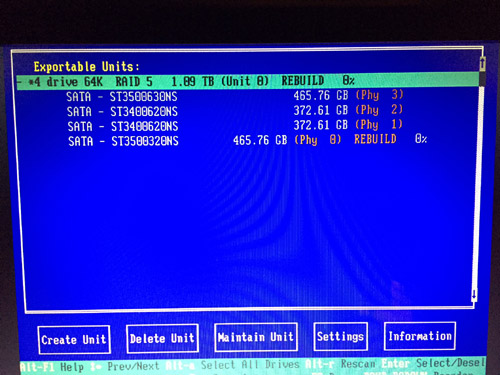
I exit but then nothing seems to happen other than the start up going nowhere as before. Or should one wait at that screen? I've tried both. Does getting into this setup imply that the RAID controller is in fact working?
Posted by Adam Martin (Member # 641) on 11-08-2017, 10:06 AM:
You have a mix of different drives in your RAID: 2x 400GB and 2x 500GB.
While this *should* not really matter to a hardware array (it *should* create an array defined by the smallest drive and ignore the extra space on the larger drives), this could be pissing something off in the Dolby software.
However, if the array was built when there were 4x 500GB drives, the 400GB drives will break it. Have you tried deleting the entire array from the RAID BIOS and recreating it (rather than just trying to rebuild) to ensure it builds the array using only 400GB of space on each drive? Note: Deleting the array will delete everything you have stored on it.
Posted by Steve Kraus (Member # 476) on 11-08-2017, 02:28 PM:
Of course I only replaced one drive so it was running with dissimilar drives all along. So I tried what you suggested, deleted and created. I saw the warning about data destruction and proceeded. But I didn't see it actually do anything and I am unclear when this action should occur...when I tell it to do this or after I exit with F8? Doesn't RAID creation take some time? Should something be displayed to indicate something happening. After exiting again, it goes to a blank screen. And rebooting with the CD in the drive (eventually) gives me a message about Linux and then it goes to a blank screen.
Posted by Dave Macaulay (Member # 813) on 11-08-2017, 04:18 PM:
Booting from the install cd - either upgrade or full install - should show console text saying what is happening. One of the first things is checking the RAID card firmware version and updating that if necessary (I have never had one do an upgrade, version has always been OK).
Are you sure the cd drive is before the boot ssd in bios setup? It may be trying to boot from a bad or corrupt ssd? First text is "uncompressing linux" I think, on all Linux servers. After that the boot crawl races by on a DSS, Doremi scrolls it slow enough to read some.
I am not sure about on a DSS but initializing a raid array usually takes some time with all physical drives churning. A Doremi with four 2TB drives takes several hours, my home NAS with two 2TB drives takes about 30 minutes but it is just raid 0 (I think, just mirroring anyway).
Posted by Adam Martin (Member # 641) on 11-08-2017, 04:19 PM:
The unit deletion and creation are immediate (following any warnings). Once the new unit is created, you should be able to Alt-R to rescan and it will show the RAID unit (now with a label of "Unit 0") and it may show "Verifying" or not. The RAID firmware version should not matter, as the install disk will set it to what Dolby wants, along with various settings such as weekly verification of the array.
It sounds like the RAID is okay, so working backward I would look at the flash memory that holds the OS on the DSS100. I'm not sure what it is since I don't have a 100 handy. Can you post a model number and/or photo of what's in there?
After the CD starts and shows ISOLINUX (later versions show a Dolby logo on the screen here), the screen should briefly go blank followed by
quote:
INIT: version 2.86 booting
(booting gobbledygook)
INIT: Entering runlevel: 2
Then it should show a hardware detection such as
quote:
no flash detected.
Running on a DSS200
Running Install CD
Dolby D-Cinema System Software Version 4.3.5 (13)
Checking the RAID controller firmware revision.
3Ware 9650 controller detected.
Erasing RAID partition data...done.
Searching for healthy RAID...found - will reuse.
Partitioning RAID...
If you see the ISOLINUX info and then nothing, I'm not sure what's causing it to hang. How long have you given it after it hangs there? Two minutes or two hours?
Spitballing ... What happens if you remove the flash memory and try to run the install disk? Removing the flash memory *might* make it think it's running on a DSS200 and it may try to install the OS on the RAID. I know that I can make a DSS220 think it's a DSS200 by adding a RAID card.
Posted by Steve Kraus (Member # 476) on 11-10-2017, 07:45 AM:
As I recall, on attempting to start from the CD, it says something about Debian Linux. When you say flash memory, do you mean the IDE SSD or is there something else?
Dave: I did do an experiment with all RAID drives pulled and the SSD cable unplugged and got the same line about Debian Linux which I accepted as proof it was in fact running from the CD since that would have to come from somewhere.
I'm thinking of taking all five drives to a PC and erasing them.
Posted by Marco Giustini (Member # 4544) on 11-11-2017, 05:38 AM:
The install disk will re-use the existing RAID parition if it finds it healthy. It may be worth removing the partitions and let the software re-create everything in case something went wrong (I believe you can wipe those partitions from the screen you posted above). Being a HW controller, it will take a few moments, then the RAID will be in a "initialising" state for a while but - if memory serves - you can use the RAID straight away.
Mixed drives won't affect your RAID. I personally don't like the idea but I've seen that all the time and it works.
Finally, you may have a slightly bad drive/s. I've seen many times RAID controllers getting confused by those almost-dead drives which will prevent rebuilding etc. If you have logs, check the SMART data and see if all drives are actually healthy. Failing that you can check the status via command prompt accessing the RAID console - but you'll need the SW running first.
If you are happy to delete your content your first step is definitely to reinstall.
Posted by Leo Enticknap (Member # 534) on 11-12-2017, 09:48 PM:
Agreed with Steve. If you don't need any of the content on the RAID, hook the drives to an Ubuntu PC and rewrite their partition tables using PartEd or GPartEd. The clean install ISO will then start afresh, and not be confused by anything that may have been on the RAID previously.
I once had to do this after replacing one bad drive in a 220. Even though I shut down the machine properly (ctrl/alt/F1, then ctrl/alt/del and wait for the fan surge - not just pulling the power cords), the boot process stalled before Show Manager came up after I'd replaced the center drive. Given that this machine was on a network with a TMS (and thus would be force fed through the network with all its DCPs, automation cues, etc. after a clean install and reconfig), I decided not to mess around, and nuked all three drives and then clean installed the software image. It's worked without any troubles ever since.
Posted by Steve Guttag (Member # 268) on 11-13-2017, 06:17 AM:
You can also wipe the drives using the "diskpart" utility in windows.
Posted by Steve Kraus (Member # 476) on 11-14-2017, 08:11 PM:
Are we having fun yet?
I took the RAID drives to another computer and ran DISKPART "clean all" on all four. I also did DISKPART "clean" on the SSD. Still not reloading the system. I can see it read the CD for a bit but all I get is a line about Debian Linux, then a black screen.
Posted by Carsten Kurz (Member # 5396) on 11-15-2017, 05:46 AM:
Change the cd drive, burn another CD, or source a dependable one from elsewhere. Could be an older version as well, just to check the boot/installer.
- Carsten
Posted by Steve Kraus (Member # 476) on 11-15-2017, 10:54 AM:
Maybe I will try a different drive or pull it and test it on another computer. But I had been working on the assumption that the optical drive is good because when I pulled all RAID drives AND disconnected the SSD, booting with the setup CD got me to that same line about Debian Linux and I don't know where it would be coming from if not the CD.
But I must fully eliminate each possibility one at a time. I have two different setup disks, both of which have been used on successfully at different times on my DSS200.
Posted by Stephan Shelley (Member # 8587) on 11-15-2017, 08:56 PM:
Have to ask, the upgrade/install disks your using are not ver 4.8.x is it. It will not work on a DSS 100
Posted by Steve Kraus (Member # 476) on 11-17-2017, 01:36 PM:
I have disks for 4.3.5(9) and 4.3.5(13).
After all the booting blather I see it read the optical drive and it ends up with this line. Then it goes black. No scroll of endless Linux and Dolby stuff.

My recent experiments as follows:
Connected the optical drive to a PC (with a USB adapter since the host did not support IDE) and it seemed to be fine.
Just for fun, put in a Windows XP Pro setup disk (full version not tied to any mfg). It only got as far as the Windows Setup starting line. I was actually hoping it would run and I'd be posting this from the DSS. More realistically, I was expecting it would try to set up and stop for lack of proper drivers. Tried it also with an actual HD in place of the SSD but I had issues getting that to work. (Also tried the DSS setup that way.) Not sure why it went no further but maybe something in the BIOS is custom to Dolby. I've seen postings on FT on both sides of the question about whether the BIOS is custom.
I put the SSD on a PC in place of that machine's HD...no other HD's connected for this experiment. I put in the DSS setup disk and it did actually try to load...with lots of errors but still. Finally got to the point where it was trying something that wasn't happening and it just started putting dots . . . . on the screen.
Next experiment will be to take the SSD to a PC, format it and make sure it can be written to. I think the experiment above says it's okay but who knows? Then clean it again.
I will also try a different HD cable on the DSS. Who knows. This whole thing could come down to that.
But that's where things are at.
Posted by Stephan Shelley (Member # 8587) on 11-17-2017, 01:41 PM:
Can you post a boot order screen like I did?
Prior to 4.3.5.x the operating system was on the flash IDE drive. Starting with 4.3.5.x it is on the raid with a pointer installed on the flash IDE drive. the flash drive remains as the boot device. It is possible you are seeing the remains of the operating system there on the flash drive.
Posted by Steve Kraus (Member # 476) on 11-18-2017, 02:36 AM:
Yes, I'll get a screen grab next time I'm there. It's definitely set for optical drive first. I did run Windows DISKPART "clean" on the SSD. Now doing a "clean all" for good measure.
Posted by Marco Giustini (Member # 4544) on 11-18-2017, 04:17 AM:
Diskpart should indeed clean everything but I agree with Stephan. If you see "ISOLINUX" it means it's booting from somewhere.
Did you try burning a new CDROM?
Posted by Steve Kraus (Member # 476) on 11-18-2017, 09:23 AM:
There are two CD/R's with two different versions. No reason to suspect both have gone bad. (Both have been used to successfully install the system on my regular server, the DSS200.) I did recently put one of them onto a PC where I substituted the DSS100's SSD for the normal HD and it did proceed to try to install. Unsuccessfully of course but I did see the reams of Linux and Dolby text scroll by before it ended in an endless series of dots. On the DSS100, it never gets past the line of text about Debian Linux. It just goes black.
This is what it looks like "installing" on a PC with the DSS SSD in place of the HD.
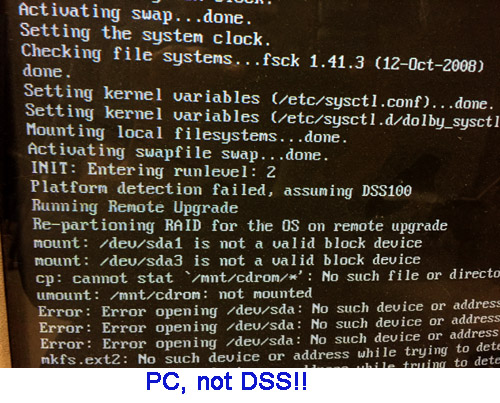
I especially like the "assuming DSS100" line. Does this tell us anything? No. Well, actually yes, in fact it does.
Besides that the CD is readable, it tells me that to get this far one only needs a motherboard, an optical drive and an SSD drive. The lack of the other components that make a DSS a DSS doesn't stop this stuff from scrolling up the screen. As I apparently have a functional motherboard and the SSD and optical drives check out okay on a PC (and the SSD has been cleaned) then there must be some issue with how the SSD connects. I will start looking in that direction. I note that this could also explain why the attempt to load WinXP failed without even getting started.
Posted by Adam Martin (Member # 641) on 11-18-2017, 10:37 AM:
Also in the BIOS, check that the appropriate drive ports are all enabled and try toggling any BIOS/UEFI boot mode setting.
Last night I replaced the CMOS battery on a Dell server and found that it strangely remembered some settings and forgot others, including the SATA port settings.
It would be useful (now, and for future reference) if someone with a working DSS100 handy could post a complete list of working BIOS settings.
Posted by Dave Macaulay (Member # 813) on 11-18-2017, 02:01 PM:
I don't think the disk is bad, but whaat about the DSS CD/DVD drive? They don't generally get used much and get stiff and dirty just sitting there.
And... don't boot from the install disk in a PC unless you disconnect the system drive - or connect a DSS SSD. It goes through the first bit of installing itself on your PC before it realizes "hey that's not a DSS!" and stops... but by then the system drive has been reformatted with assorted partitions formatted for Linux. And if it was your PC system drive... "was" is the operative term.
Posted by Steve Kraus (Member # 476) on 11-18-2017, 08:18 PM:
Thanks Dave but I did address all of those issues. The optical drive was attached to a PC and worked fine. The test of trying to "install" on a PC was done with the DSS100's SSD only in place of the normal HD.
Posted by Marco Giustini (Member # 4544) on 11-19-2017, 02:55 PM:
interesting.
What I would try
- Try burning another disc anyway
- Try removing the RAID cards and boot without them. It won't install but your disc is not even trying to load Linux.
- Re-seat DIMM modules
- Re-Seat all cables in the unit
- Does that motherboard have a "boot menu" option? You want to make sure it is indeed booting up from your DVD drive.
BTW, what happens if you boot it up without the disc in? Do you see anything on screen?
Posted by Marcel Birgelen (Member # 6801) on 11-19-2017, 11:59 PM:
The ISOLINUX line you see is from the bootloader on the CD-ROM. The fact it stops right there is an indication it cannot load and execute the kernel from the CD. If the CD is the right CD, your problem is most likely an incompatible or defective optical drive.
The scrolling text that follows roughly consists of two parts.
The first one is the Linux kernel itself, as it is initializing itself and it is probing for devices in the machine and loading the accompanying device drivers.
Once that's done, stuff gets handed over to "init", which will execute the necessary boot scripts to get your system up and running. It's also here where filesystems get mounted, IP addresses get set, daemons get loaded, etc.
During your experiment to install the DSS software on the PC, you get stuck in this part. The problem here is that Dolby's installer expects a very specific hardware layout. You'll be having a hard time matching those with what the installer expects.
In this case, it seemingly expects your CD-ROM to be on /dev/sda, but presumably, your SSD is there.
Posted by Steve Kraus (Member # 476) on 11-20-2017, 08:35 AM:
Not sure how the optical drive can be incompatible as it is the drive that was there. It's an old DSS that I acquired and I suppose someone could have replaced it with a non compatible device. I've never loaded the system on this DSS before so hypothetically that could be true but seems very unlikely. And it is reading the disk sufficiently to get that line about Linux.
As for the optical drive being defective, I did test it on a PC and it was fine. And, again, it does read enough to get that one line.
Marco: Booting with no disk shows the usual BIOS stuff (I have it currently set to show everything), then the 3WARE RAID installation, and then there is another press this to enter setup where, if you do, you get a choice whether to follow the BIOS boot selection or not among a few other things.
Posted by Dave Macaulay (Member # 813) on 11-20-2017, 01:42 PM:
I'm not sure if it's available for a DSS100, but can you try the FTP installation procedure?
Posted by Marco Giustini (Member # 4544) on 11-20-2017, 04:01 PM:
Dave,
FTP only works for updating. You'll need an OS to FTP and to run the file.
Interesting subject but I agree that there must be something with the CDROM disc or drive. I can't see why it would not load the kernel to be honest. I'd still try another disc even though it worked on a PC.
Posted by Mike Renlund (Member # 4675) on 11-20-2017, 05:29 PM:
You may be having issues because the motherboard battery is dead.
Replace it, then clear the CMOS by powering off the server and shorting JBT1 (right next to the battery).
Once cleared, the Boot features would be:
QuickBoot Mode: Enabled
Quiet Mode: Disabled
ACPI Mode: Yes
Enable Multimedia Timer: No
Power Button Behavior: Instant-Off
Resume on Modem Ring: On
Resume on PME#: On
PS2 KB/MS Wake Up: Disabled
Power Loss Control: Power On
Watch Dog: Disabled
Summary screen: Enabled
In the Bios, the boot priority order should be:
1: IDE CD: Pioneer DVD-RW DVR-112D-
2: USB KEY:
3: USB CDROM:
4: IDE 0: Transcend-(PM)
5: IDE 2:
6: PCI SCSI: 3ware Storage Controller
7: PCI BEV: IBA GE Slot 1200 v1228
There were some questions in the thread about how platform detection works when running the INSTALL disc. The installer looks to verify the make/model of the RAID card. If it cannot determine the make/model, it will default to DSS100.
We do have a full list of the BIOS settings. If you need it, contact CinemaSupport@dolby.com.
Posted by Steve Kraus (Member # 476) on 11-20-2017, 09:05 PM:
Thanks Mike. I did replace the battery but did not clear it so I do think there is something up with the BIOS settings as it seems the best explanation. I will try clearing it and making sure the settings are as described.
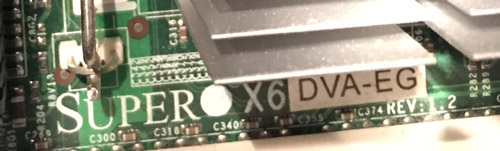
There was some discussion in another thread about different motherboards and whether a store-bought board with ordinary BIOS would work and I think the discussion was inconclusive. For the record this DSS100 has this one.
Marco: I have two different disks with different versions. Both have been used successfully in the past with my DSS200.
Posted by Marco Giustini (Member # 4544) on 11-21-2017, 07:33 AM:
Can you install a regular version of Linux on that machine?
I would definitely reset the BIOS to default and see what happens.
Did you try running the install with no RAID card installed and see if it goes any further?
Posted by Mike Renlund (Member # 4675) on 11-21-2017, 11:30 AM:
Using a store bought motherboard may work...I've never done it, so I don't know what the pitfalls are.
If you can get the same MB that Dolby used (the picture you showed is one of the models we used), we can provide the ISO of the BIOS (burn to a CD and install) so that you can try to get it as correct as possible.
Powered by Infopop Corporation
UBB.classicTM
6.3.1.2