This is topic BARCO LINK DECRYPTOR MODULE in forum Digital Cinema Forum at Film-Tech Forum ARCHIVE.


To visit this topic, use this URL:
https://ft-forum.com/ft/cgi-bin/ubb/ultimatebb.cgi?ubb=get_topic;f=16;t=003119

Posted by Fred Schoenfeld (Member # 2632) on 09-19-2017, 10:00 AM:
 
Does anyone have a 'fix' for a link decryptor module that has full logs and/or a dead internal battery, other than the trash can? Our dealer has quoted me a price of almost $2,000 for a replacement! Why didn't Barco mount the battery on the mother board instead of inside a sealed module? Up until this point, I rated the Barco as the best digital projector on the market, however they have fallen off the list for such a poor design of a product has a short useful life, costs so much to replace AND is not repairable even at the factory!!
 
Posted by Gordon McLeod (Member # 33) on 09-19-2017, 10:08 AM:
 
All Enigma boards have the battery sealed in them and are non replaceable (Barco Christie and NEC).
As long as the machine is powered every couple of months for a day there is no issue with them
 
Posted by Leo Enticknap (Member # 534) on 09-19-2017, 10:42 AM:
 
The Enigma board is not made by Barco, but by TI. Logs filling up and/or the battery dying is not a Barco-specific problem: we sell replacements for the other projector makes, too. I'm afraid that both of these faults are a bit like contracting rabies: once you start to experience symptoms, you're dead. You need to catch it before then. The battery is non replaceable (I could be wrong, but I think it's a supercap rather than a conventional battery), but, as Mark says, powering the board up frequently enough to prevent it from discharging totally is the solution.

This is a DCI-mandated security thing: I'm sure that neither Barco, Christie, nor NEC would have designed it this way if they'd had the choice; not least because the reaction of end users such as yourself is to blame the projector manufacturer when the certificate is lost and you're looking at a $2k bill to replace the board.

As for the logs, update to software version 1.8 before they fill up. There is a script that you can run from Dolby DSS servers that will download and clear out the logs under 1.6 or 1.7 (and possibly on other servers as well, but I don't know of any that have this feature), but once you've updated to 1.8, you don't need to worry about that problem again. So unless there's a known bad interaction between 1.8 and other components in your projector, I can't see why you would not want to do that.
 
Posted by Steve Guttag (Member # 268) on 09-19-2017, 06:29 PM:
 
Note, you can update to Enigma 1.8 even after you get the logs-full issue and that can free up the Enigma to gets its logs downloaded.

I don't know of any server manufacturer that has a script like Dolby's that will just go out and say, "give me 8192 logs (all of them) in order to flush the thing. The script works on ALL version of Enigma modules BUT the suddenly full Enigma is an internal Enigma issue with how it was constructed (16 banks of 512 logs) and how the earlier versions of the software handled them (would corrupt an entire bank if there was a single corruption in the bank). Enigma 1.8 put an end to that by allowing just the corrupted entry to be jumped over.

Where you can fault Barco is that they REFUSE to service a "bricked" Enigma rather than fixing/reloading the certificate. NEC, has always told me that they will indeed service an Enigma that bricks (repair exchange, you don't necessarily get yours back, you pay the price of a new one and then they credit back the difference once they determine what it cost to fix your old one.

I fault TI on this and the ICP that since they are the same identical parts in all three projector bands that one could not have a facility that could repair any/all of them rather than forcing the end user to succumb to the whims of any projector company. I think refusing to repair such expensive modules when often the problem is software related (ICP too...anyone not have one crash on a mere software update?).
 
Posted by Fred Schoenfeld (Member # 2632) on 10-18-2017, 05:46 PM:
 
from Steve:
quote: Steve Guttag
'Note, you can update to Enigma 1.8 even after you get the logs-full issue and that can free up the Enigma to gets its logs downloaded."
Thanks for that! Please point me to the correct site for the 1.8 update. Also, I would be willing to pay someone who has the knowledge and time to 'reset' my two modules that are non-operative at this time. Thanks to all fellow techs!
 
Posted by Leo Enticknap (Member # 534) on 10-18-2017, 07:47 PM:
 
Sorry to put a dampener on things, but Steve did write that updating the software on a full Enigma can unlock it, not will. I've tried it on an Enigma in an NEC, with no luck.

To obtain the update, go to barco.com, then click on "MyBarco login" towards the top right of the window, and then "register here." Once you're registered, you can download all the updates, patches and manuals for your model of projector. If you register your model of projector in your dashboard on the site, you can configure it to email you automatically whenever updates or Info-Ts (service bulletins) are published.

Unlike NEC, I believe that Barco will let you register on their support site as an end user, and don't necessarily require you to have done a tech's training course first. No guarantees, though. If your projector is under warranty, it could be that attempting the Enigma update yourself may invalidate it - if that's the case, I'd strongly suggest that you check with Barco first (or the vendor who sold you the projector, if that was an official Barco dealer).

The Enigma updating process is pretty simple (though you'll need to download and install Barco Communicator first), but I'd strongly suggest that you ensure that the projector's card cage is powered through a UPS before trying it. The potential exists to FUBAR (at least, BAR without returning them to Barco) your ICP and CCB if the power goes out during an update process, essentially bricking your projector until it receives attention from a service tech.
 
Posted by Dave Macaulay (Member # 813) on 10-18-2017, 08:13 PM:
 
The enigma update process through DC Update Companion in Barco Communicator is specific to that board. A power failure during updating may (will?) ruin your enigma but will not affect the ICP or other components. The end result is the same - no shows - but the damage not so dire.
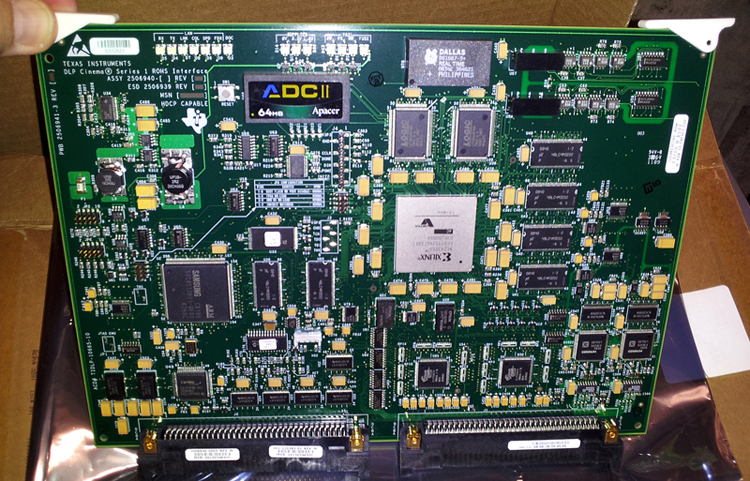
After updating one that's showing "logs full" to v1.8.24, if that revives it and it works afterward, you should do whatever is required in your server to empty the logs. I don't think the update empties it. With a Dolby DSS you can either wait for it to download 500+ after every show (this can delay tight scheduling) or run the script overnight.

However - a dead battery means lost decryption keys and you're buying a new one (or closing). I'm pretty sure Barco does not offer any revival service for discharged Enigma LD modules, although this must be possible.

The day you receive a new one, install it and test it. They must be charged periodically while on the shelf and we've had some arrive already dead. You should then leave the projector on for 48 hours to ensure the "new" one is fully charged up.
 
Posted by Carsten Kurz (Member # 5396) on 10-18-2017, 08:22 PM:
 
Fred - are you sure these two enigmas have been sitting in a projector during the last years and have been powered regularly? Then chances are high you can recover them with enigma firmware 1.8. As a matter of fact, enigma 1.8 came out three years ago to fix that dreadful log memory corruption issue for all projector manufacturers. Normally, it should be part of Barcos regular software updates, I'm wondering what your service company has been doing for you during the last 3 years...

- Carsten
 
Posted by Leo Enticknap (Member # 534) on 10-18-2017, 09:40 PM:
 
quote: Carsten Kurz
Normally, it should be part of Barcos regular software updates...
Enigma updates are not included in the main projector software/firmware update packages: you have to download and install them as a separate procedure. In the update wizard launched from Communicator, there is a pulldown menu to select projector or touch panel package, ICP, Enigma or ICMP (and possibly one or two other things that I can't remember), before you select the file.

Under "Maintenance Type C" (annual) for Series 2 Barcos, the service manual (for example, Barco part #R5905011, page 26) states "Check for the latest version of Barco and TI software" and "Upgrade the projector software with the latest version." OK, the Enigma card is made by TI, so theoretically this is flagging up that this should be checked and updated annually, but it isn't stated explicitly. So a service tech who prints out that list and then works through the items at an annual service visit might well check for an update for the main projector package, and just install that. In the last few months I've serviced Barcos in which I've found the main software to be a much more recent version than that of the ICP and (in the case of projectors that have them) Enigma card. I've also serviced Series 1 Barcos on which I've found the final version of the main package, but the TI board is still on 11.something.

quote: Dave Macaulay
A power failure during updating may (will?) ruin your enigma but will not affect the ICP or other components. The end result is the same - no shows - but the damage not so dire.
In theory, but I'd be worried that there is some sort of registry or other thing on the ICP and/or CCB that needs to be told that something else in the projector has had new software, or else wackiness will ensue. I really don't like doing any software or firmware flash updates on a machine that doesn't have a uninterruptible and surge protected power supply. Admittedly, your odds of getting unlucky are very long, but still.
 
Posted by Dave Macaulay (Member # 813) on 10-20-2017, 10:49 AM:
 
A Barco doesn't know what Enigma version is running until you power it up and the main software asks everything what it is. You can swap Enigma boards (regardless of installed version) freely with no issues except having to do the Dallas key dance.
We don't have many Barcos on a UPS, clients don't like paying the 208V or 240V UPS prices although we encourage it for B and C projectors. Input/Enigma cards are a rarity on the smaller (S&E) models (no provision for a UPS for electronics) as that leaves you with only SDI input.
 
Posted by Fred Schoenfeld (Member # 2632) on 10-25-2017, 08:06 PM:
 
Thanks to all for the valuable information. Another question regarding these boards: Does anyone have the pin-outs on either the mother board (Barco) or the link decryptor module to supply power to keep the internal battery alive? I do not want to take my working projector out of service just to charge (and possibly recover) my 2 old modules! Any help will be appreciated! Barco sells an external charger for about $500, which is crazy!!
 
Posted by Mark Gulbrandsen (Member # 72) on 10-25-2017, 08:17 PM:
 
Usually it's the Dallas Clock on these boards that eventually has it's internal battery die. They contain the battery, a clock and memory to store the certificate. Christie and I presume NEC also used them on all the series 1 board. They are standard keepers in all the electronics industry. I have GPS clocks with them and some other digital scopes. But in those cases they are field replaceable and generally only contain the memory for the customer settings. In this picture of this TI Processor board from a Christie, you can see the Dallas Clock top center. Even this is probably an off the shelf part, but whats saved in it may be proprietary.

 -
 
Posted by Carsten Kurz (Member # 5396) on 10-26-2017, 06:44 AM:
 
Fred - if your Enigmas had their battery depleted, you can not revive them by charging. The only way to know if they still work is by installing them into a projector. If you don't want to do this now, it may be a good idea to apply charging power to them until you find the time. The USL charger has a better price than the Barco. When talking about pricing, keep in mind these chargers are not targeted towards the individual cinema operator, but towards integrators and service techs. Not many cinemas store unused enigmas.

http://ftp.usl-inc.com/ftp/Products/EP-100/Documents/Manual/EP-100_manual_140206.pdf

- Carsten
 
Posted by Steve Guttag (Member # 268) on 10-26-2017, 06:50 AM:
 
Fred,

The USL (QSC) EP-100 is no more, unfortunately. You needed HDSDI board as well. The EP100 would power the HDSDI board and by extension, power the Enigma. I liked it because you also got the Enigma status LEDs so you KNEW that the Enigma was not showing a failure/loss of certificate/tamper...etc.

If all you want to do is keep it charged, you can do so with the itty bitty two conductor connector in the corner of the board. A 5-volt regulated supply to that connector should keep the board charged. That connector does NOT light up the LEDs so you have no idea if you are charging a dead board or not. Charging via that connector takes 48-72 hours to complete for a 6 month storage. What some people do is let them charge perpetually until needed. This is particularly true if you have several on a charging rack (the current draw is so low that one wall-wart type power cube can typically handle 5 or so boards (I have not measured the draw but that is how Barco does it with their absurdly priced "kit."
 
Posted by Fred Schoenfeld (Member # 2632) on 10-31-2017, 09:49 PM:
 
Steve,
Thanks for that great information! I do have a spare HDSDI board with the Decryptor board installed. I was able to apply 12 VDC to the two corner pins on this board which powered up the LEDs (on the HDSDI board) as well as the LEDs on the decryptor board.
Question now is: there are 4 LEDs on the link decryptor board: a green LED next to 3 red LEDs. What do the 3 red LEDs signify?
Thanks for you input! Power has been on for only a few minutes. I will leave it powered up for 3 to 4 days to see if there is any change to these LEDs.
 
Posted by System Notices (Member # 2357) on 10-19-2019, 08:46 AM:
 

It has been 717 days since the last post.


Posted by Carsten Kurz (Member # 5396) on 10-19-2019, 08:46 AM:
 
With regard to keeping an LD/Enigma board alive:

So, it's 12 volts for the HDSI board, and 5 volts for the Enigma/LD board itself?

Did anyone ever test out the 3pin J3 header? They are labeled 1-3, but I can't find which is which. It's probably easiest to test the voltage while it's powered by the HD-SDI or PIB board?

https://csrc.nist.rip/groups/STM/cmvp/documents/140-1/140sp/140sp1356.pdf
https://www.cryptsoft.com/fips140/vendors/140sp1356.pdf

- Carsten
 
Posted by Dave Macaulay (Member # 813) on 10-26-2019, 09:00 AM:
 
Again: you can not diagnose an Enigma board without installing it in a projector. Barco puts them on the SDI input card: remove that card with static safe handling. Undo the screws holding the module down, usually Torx screws (why, Barco?). Swap modules, make sure it seats fully on the connector blocks. Screws not required for a test. Install board, power up, and see what errors you get. Security errors are OK, you should not see LD not found or LD fail errors. You can authorize with the Dallas key (or button with smaller projectors) and password, and test that it plays content - any content but a full test requires playing something encrypted with a valid KDM.
If the board is dead (battery was allowed to discharge too much) ... I do not know of any way to revive it. Barco says a new one is required. Yes they are expensive. You can open the finned case to see what's inside: there are cover tamper switches in there that will kill a good module but if yours is dead that doesn't much matter. Not much to see but have a look if you're curious.
 
Posted by Carsten Kurz (Member # 5396) on 10-26-2019, 10:58 AM:
 
Sorry, my question was after pinout and proper voltage of the J3 connector in order to build a simple recharger.

- Carsten
 
Posted by Marcel Birgelen (Member # 6801) on 10-26-2019, 12:42 PM:
 
There really is no standard in such connectors, so the safest way would be to measure across them, in the hope that they're directly connected to the 12V and 5V bus and don't have any other switching in between them.

The only question is how you're going to measure them while in operation, but I guess you could put a lead on them and find some hole outward. Just make sure there is a connector at the other side too, not some loose wires that are easily shorted.

I guess you know the drill how to measure this kind of stuff, but just in case:

If you read ~12V you know one of them has to be +12V and the other ground. If you read ~5V, one of them has to be +5V and the other one ground. If you read ~7V, one of them is +12V and the other one +5V. That way you can easily find out what is what.
 
Posted by Leo Enticknap (Member # 534) on 10-26-2019, 01:14 PM:
 
quote: Dave Macaulay
...usually Torx screws (why, Barco?)...
Because if you try to undo a Philips that has been done up by a power tool manually and using the wrong Philips head, a high risk exists of stripping the head such that the screw ain't never coming out again (and if it has a countersunk head, you're really buggered, because you can't even brutalize it out with pliers). I've lost countless hours dealing with the consequences of that (the screws holding the hard drives in their cartridges in DSS200s being a prime example).

Barco have gone completely to Torx fasteners in the SP4K, and IMHO, that was a good decision. OK, you've got to remember to carry a T10, T15 and T20 head around in your toolbag, but personally, I feel that this is a small price to pay to do away with the stripped Philips head menace.
 
Posted by Stephan Shelley (Member # 8587) on 10-26-2019, 01:41 PM:
 
The Boxer tool sets are very handy and reasonably priced. The S-39M
set has the metric hex and torx bits Some metric sockets as well. You can get a third party extender for that long reach stuff.

http://www.boxertool.com/displayhandtools.htm

The S-39M is the last at the bottom. They also have a similar set with the security bits too.
 
Posted by Carsten Kurz (Member # 5396) on 10-26-2019, 01:42 PM:
 
As far as I know, some 'Enigma chargers' do not connect directly to the enigma board, but through an 'open' HDSDI or PIP board. So, it should be possible to measure the voltage/pinout while the Enigma is charged through it's 'mainboard'.

- Carsten
 
Posted by Marcel Birgelen (Member # 6801) on 10-26-2019, 01:43 PM:
 
quote: Leo Enticknap
Because if you try to undo a Philips that has been done up by a power tool manually and using the wrong Philips head, a high risk exists of stripping the head such that the screw ain't never coming out again (and if it has a countersunk head, you're really buggered, because you can't even brutalize it out with pliers). I've lost countless hours dealing with the consequences of that (the screws holding the hard drives in their cartridges in DSS200s being a prime example).
I've come to like torx screws too, because indeed, the wrong head and/or too much force with a powertool will strip those philips heads so much, it's often almost impossible to get them out. Also, once you've got them out, you really want to replace them with new ones, or else the next time you'll need to get them out will be even more "fun".

Like Leo, I've also spent too many hours on getting those kinds of crews out, including drilling them out. It's become like a plague, especially with all those low quality, unhardened China-made screws those days.

quote: Carsten Kurz
As far as I know, some 'Enigma chargers' do not connect directly to the enigma board, but through an 'open' HDSDI or PIP board. So, it should be possible to measure the voltage/pinout while the Enigma is charged through it's 'mainboard'.
The USL EP-100 connected to the HD-SDI board. But I don't think it's sufficient to just power that board, you also need to do a little magic to boot that board, in order for it to power the enigma board.

The USL solution also faked the input of the service doors, in order to keep the marriage. If that's not required, but you simply want to keep the keys within the enigma, I guess simply powering J3 with the appropriate input voltages should be sufficient.
 
Posted by Carsten Kurz (Member # 5396) on 10-26-2019, 02:35 PM:
 
quote: Marcel Birgelen
I guess simply powering J3 with the appropriate input voltages should be sufficient.
Well, 'appropriate input voltages' is what I'm after..

There is some FIPS documentation on different versions of Enigma boards available on the net, but while they mention the J3 connector for power, they don't offer any insight into pinout or voltage. Also, the board itself has no indications.

- Carsten
 
Posted by Frank Cox (Member # 6258) on 10-26-2019, 02:41 PM:
 
I've never understood why the rest of the world doesn't use Robertson screws. Outside of drywall screws, Robertson heads are pretty much all you see in the hardware stores and lumberyards around here, and there's a good reason for that.

They don't slip, they're self centering, and they're hard (but not impossible) to strip so they're great for driving with a drill or power screwdriver. And you can easily drive them with one hand, too.

And nobody outside of Canada has ever heard of them...
 
Posted by Marcel Birgelen (Member # 6801) on 10-26-2019, 03:37 PM:
 
Actually, you'll find Robertson screws, often marketed as "Quick Screws" over here too. I even have used them from time to time. I like the self-tapping ones, which really work well in combination with power tools. For all other applications, I think torx is equally fine and it's easier to find torx bit sets and other torx tools than Robertson/Quick Screw tools.

quote: Carsten Kurz
Well, 'appropriate input voltages' is what I'm after..

There is some FIPS documentation on different versions of Enigma boards available on the net, but while they mention the J3 connector for power, they don't offer any insight into pinout or voltage. Also, the board itself has no indications.

That's why you should try to measure over it while it's powered. [Wink]
 
Posted by Steve Guttag (Member # 268) on 10-26-2019, 04:49 PM:
 
Truth be told, the Barco screws (as used on the Enigma) are slotted/torx so you can use a ¼" straight blade driver to turn them.

I'm fine with Torx and have no love affair for Philips. Dolby tried by using Pozi-drive screws in lieu of Philips and I'm sure most people here didn't even realize that nor have Pozi-drive drivers. Pozi-drive screws can be recognized by their little mini-cross in addition to what looks like a regular Phillips. They too don't cam-out like a standard Phillips.

Had Robertson been introduced here, I'm sure I'd be okay with them. One nice thing about a 6-pointed screw like the Torx is one is less drawn to screws that don't match orientation (think wall plates with slotted screws where a sloppy installer has them all akimbo).

Back on topic, the Charger port on the Enigma is definitely for 5VDC. I'll check to see the polarity when I am next near a cable made to use it (we have them). That said, I've taken to charging our spare Enigmas with the now obsolete USL EP100. I apparently described this back about 2-years ago.
 
Posted by Carsten Kurz (Member # 5396) on 10-26-2019, 04:55 PM:
 
There is something here:

http://www.film-tech.com/cgi-bin/ubb/f16/t002139/p2.html

But I am not sure wether the pinout mentioned 'pin 1/3' is actually towards an enigma board (because the discussion is started around GORE boards/series 1).

Recently, there seems to be an increased need for enigma chargers, as it seems, some IMB installations demand the enigma board to be taken out of the projector. Instead of trashing them, owners would like to keep them charged. But the USL solution needs an HD-SDI board, and is no longer available, while the Barco solution is very expensive (is it still available at all?).

- Carsten
 
Posted by Marcel Birgelen (Member # 6801) on 10-26-2019, 05:31 PM:
 
A polarized header makes sense for a power connector. Also, a 3pin header of which only 2 are used isn't anything special.

It also makes sense to put your +5V on pin 1 and the ground on pin 3.

The lack of any indicators on the enigma boards itself doesn't inspire much confidence though, since you never know if your charger is working or not.

At least with the HD-SDI card you have a bunch of LEDs that give you some kind of basic status information.


Powered by Infopop Corporation
UBB.classicTM 6.3.1.2