This is topic Barco Red Line and Missing Color in forum Digital Cinema Forum at Film-Tech Forum ARCHIVE.
To visit this topic, use this URL:
https://ft-forum.com/ft/cgi-bin/ubb/ultimatebb.cgi?ubb=get_topic;f=16;t=003145
Posted by Jay Glaus (Member # 6011) on 10-26-2017, 04:40 PM:
Hi all,
One of my 23B's just started acting up.
About an 8th of the way up the screen, there is a horizontal red line. And the whole area below that line is completely absent of red. It's really apparent when you put the color bar pattern up.
I tried exercising all of the cards, thought maybe something just needed re seated but unfortunately no luck. This isn't just a playback problem, it is constant even when you have nothing playing.
I've heard that it can be a problem in the ICP or CCB, which I'm hoping it is as I'm afraid it is in the light engine, and thats never fun or cheap. I also heard from stories of past that it can be a backplane issue. The machine is 4 years old.
Just curious what everyones thoughts and experience was.
Posted by Marco Giustini (Member # 4544) on 10-26-2017, 06:55 PM:
swap the signal cables between Red and, say, green and see if the issue follows the engine or the electronics.
Posted by Leo Enticknap (Member # 534) on 10-26-2017, 11:17 PM:
I'm dealing with a similar problem on a DP2K-32B at the moment, only this time no green.
This projector appears to be somewhat jinxed, because at the start of September it started to project pixellated crap. This was eventually cured by replacing the backplane. All was then well for about six weeks, but a couple of days ago the green went totally out (green test pattern loaded = black screen). Tried swapping the ICP and CCB with no luck, then sent a diagnostics package to Barco, who were able to see from it that the green formatter board on the light engine had died.
We have a spare light engine with one dead pixel at the shop, and so tomorrow I'm going to put that in, to confirm for definite that this is the problem, before a new one is ordered.
Posted by Corey Witherow (Member # 10080) on 10-28-2017, 08:31 AM:
The quickest way to isolate an LE issue is to display an uncorrected test pattern via the measure colors menu in Communicator. If you see the same issue with these test patterns, it's a formatter issue.
Posted by Marco Giustini (Member # 4544) on 10-28-2017, 09:00 AM:
Swap the signal cables between green and another colour.
I have seen instances when what Corey (correctly) recommends was pointing to a LE issue but then it turned out to be an ICP issue.
Posted by Leo Enticknap (Member # 534) on 10-28-2017, 02:33 PM:
I'd already tried another ICP, with no change in symptom, before moving on to the light engine. But your point is well taken about the signal cable: useful to keep in mind as a confirmation tool if you don't have access to another, known good ICP to test with (e.g. if you're not a service tech who can borrow one from the shop, or if you don't have another projector with the same model of ICP in your theater).
Thanks to Corey's help in deciphering the log, it became clear that the light engine was the problem in my case, and swapping it out fixed it. Bad luck for the theater, though - a new ICP would have been a lot cheaper.
Posted by Steve Guttag (Member # 268) on 10-28-2017, 03:07 PM:
Also, don't discount the signal backplane. Any of the three can cause image anomalies (ICP, formatter, signal backplane).
Swapping cables will quickly/easily point to a bad formatter (problem stays with the color even though a different color is driving it from the ICP.
Using the color correction test has the formatter generate the color (full on) so yes, that will point to a bad formatter but it is very late in the processing stage.
I often troubleshoot by bisection...use the ICP (test patterns), if it is bad on the test pattern, it isn't the server or IMB. Some things are just obvious formatter problems, like a striped image.
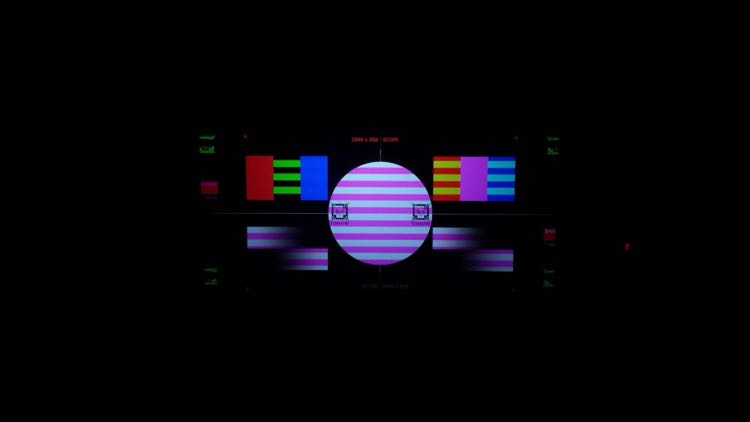
Looking at the primary swatches, either we are making a flag or green has an issue.
Another quick test I have for people, particularly if they are on screen is to push in on the ICP board and see if the problem either improves or changes. If it does, then ICP/Backplane jump to the top of the list.
Note, these test are not unique to Barco, Christie and NEC apply as well.
Posted by Leo Enticknap (Member # 534) on 10-30-2017, 08:16 AM:
quote: Steve Guttag
Also, don't discount the signal backplane.
In my case, the only reason I did is that the backplane in this particular projector had been replaced at the start of September, hence my comment that the projector appears to be jinxed. All the light engine to backplane connectors were snug when I checked them, too.
I was also wondering about SMPS wackiness that may have affected both, but the voltages in the diagnostics all looked OK.
Powered by Infopop Corporation
UBB.classicTM
6.3.1.2