This is topic CPL error Failure to parse CPL - help with error in forum Digital Cinema Forum at Film-Tech Forum ARCHIVE.
To visit this topic, use this URL:
https://ft-forum.com/ft/cgi-bin/ubb/ultimatebb.cgi?ubb=get_topic;f=16;t=003194
Posted by Steven Simpson (Member # 9885) on 01-05-2018, 07:52 AM:
Hi
I've just had a theater reach out to me with problems with a CRU DX115 drive not loading on their server and getting a “Failed to parse CPL” error, even though it had been used fine in other theaters before. The Interop DCP was created through DCPomatic and the drives are formatted by DCP Transfer from Cinematiq so formatted in a standard manner.
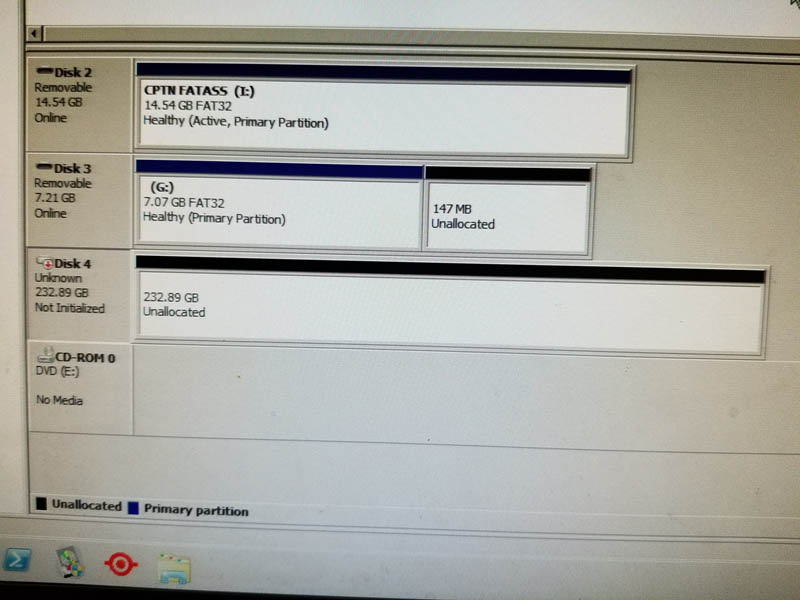
This is their first message with the attached image from the Windows server: “We received the CRU drive for your film. When we went to ingest the feature, our TMS could not locate the drive to ingest from. We tried to troubleshoot multiple causes and we believe that it the drive is formatting. Attached below is a screenshot from our TMS seemingly confirming our suspicion that the drive is not formatted and therefore not being recognized. !”
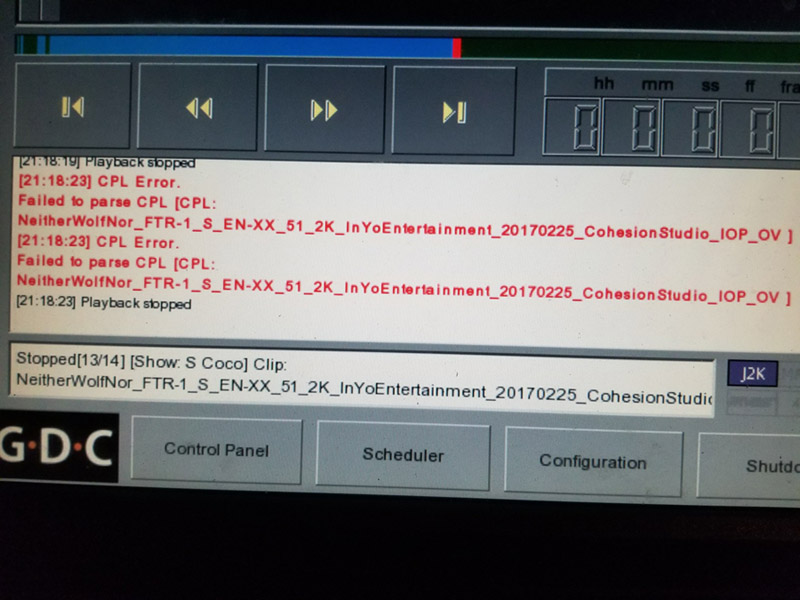
I asked them to check a couple of things and also try it directly in the projection system and got this reply with the image of the “Failed to parse CPL” error, which I don't find any direct info on when I google it. “I put it in to live play and initially green lit. When I went to try and play it, the file turned red and locked. I then rebooted the GDC box and it reloaded as green. When I went to hit play, I received an error. Attached is a picture of the error. This is not just a loose drive connection. Our TMS is a Windows server and Windows Disk Management shows the CRU drive as unallocated. We have an application for mounting Linux formatted drives, as ext2 is typically standard for DCP drives, but this did not recognize the drive either.”
I am at a bit of a loss as to what the error is referring to. Could it be as simple as some physical damage to the unit through transportation? Or is it some naming issue of the CPL that this system is having an error on? (we've been in about 125 theaters so far and not had this particular error before – not bad for a self-distributed release).
Many thanks for any suggestions.
Steve
Posted by Carsten Kurz (Member # 5396) on 01-05-2018, 09:16 AM:
I guess it is void to speculate - you have to send them a new drive, and try to get a hand on that problematic drive. The fact that windows drive manager does not recognize the drive as being formatted means nothing, as that is normal when you try to mount an ext drive in windows (even with ext reader software being present). I can only assume something happened to the drive over it's tour to various cinemas.
Even if this will probably turn out to be a drive issue, inquire the specific server and TMS type and software version, so you may be able to find a pattern if the issue turns up again.
We never had a dysfunctional drive at our own cinema, but it does happen also with drives from major mass duplicators. Drives on the move just fail or get corrupted occasionally. You have to be prepared and have backup drives at hand if that happens, and take the time for analysis later.
The only thing that caught my eye on this specific CPL is that the studio and facility names are exceptionally long (to prevent issues with file or path names being too long, abbreviated codes loosely managed by ISDCF are normally used).
http://isdcf.com/dcnc/home/appendix-5-studio-codes.html
http://isdcf.com/dcnc/home/appendix-6-facility-codes.html
In theory, your CPL could cause issues on a server with a whacky software version. But I guess it wouldn't prevent the drive from being recognized on the TMS server. Still, you should use abbreviated studio and facility codes in the future. That said, as other elemts of your CPL name are rather short and limited, the CPL name as a whole doesn't appear to me as being exceptionally long, so I doubt this causes the problem.
- Carsten
Posted by Steven Simpson (Member # 9885) on 01-06-2018, 08:58 AM:
Hi Carsten
Thanks so much for the help, that clarification is much appreciated. Replacement is on its way but as you say, it is always crucial to seek out any weak links in the workflow.
Best wishes
Steve
Posted by Leo Enticknap (Member # 534) on 01-06-2018, 10:00 AM:
Boot the drive on a Linux (e.g. Ubuntu or CentOS) PC and fsck it. That should tell you if there are any physical drive errors, such as bad sectors.
IIRC, it is a technical requirement in one or other of the standards that screen servers must not refuse to play a CPL just because it has a name that violates the ISDCF naming convention. Non-mission critical aspects might not work (e.g. displaying technical information longhand in a TMS status window), but the CPL should not refuse to play; hence the reason why so many low budget festival, kid-with-a-Mac entries are DCPs, the author of which didn't bother to change the default CPL name in the "save as" dialogue, e.g. "My DCP." You won't know what is in them until you play them, but they should play if they are valid in all other respects.
Posted by Carsten Kurz (Member # 5396) on 01-06-2018, 11:17 AM:
Leo - you are right that a malinformed DCNC name should never cause a CPL to be rejected - however, there had been a study by ISDCF members on allowed filename/path lengths, and it could be that very long CPL names would cause full path names to become invalid in certain OS's, so that relocating a specific file/CPL would fail if the server is not prepared to deal with this.
In this case, I don't consider the total CPL name as being exceptionally long, I just noticed studio and facility codes being longer than recommended by ISDCF.
- Carsten
Posted by Steve Guttag (Member # 268) on 01-06-2018, 06:25 PM:
Wouldn't it be nice if someone could make a Mac and PC program that would allow one to stick in a CPL (via CRU or USB) and show any of the DCI violations so a content creator could know where their problems are? It should check drive formatting as well as content and where the bits and pieces are stored. Too often people just check via the most handy DCinema server and think what they have will universally be playable.
This software could be used by festivals to check DCPs upon arrival. Any that don't pass are rejected (this would be known to all submitters so they should check themselves).
Posted by Leo Enticknap (Member # 534) on 01-06-2018, 07:42 PM:
I've actually floated the idea in the past of a "FestTMS" system, consisting of a very powerful laptop with a built-in BD drive, plus an external box containing, say, a 4-drive RAID and a CRU bay.
The laptop would have a dedicated, Linux based software image consisting of the OS plus the application. The application would enable DCPs to be ingested, either from CRU, USB or a network source (e.g. FTP) into the RAID, checking it for compliance with all the relevant standards in the process. This software would also be able to read the commonly encountered drives with formats that violate ISDCF rules (e.g. HFS+, NTFS), but which have otherwise valid DCPs on them.
You would be able to open individual festival projects, specifying which servers, projectors and audio systems (with their software versions) are installed in each of the houses that will be used for the fest. As each DCP is ingested to the RAID box, you specify which house it is scheduled to play in, and which are possible backups/last minute move destinations. The software will then say, "OK, but this DCP might not play in the Bijou screen 2 unless the server's software is updated to 4.9," or something like that.
At the end of the ingest process, it will give you a complete listing of what DCPs are good to play, what may need bugs resolving in the scheduled theater, which are suspect (e.g. called something like "My DCP," so you have to look at it to see what it is), what KDMs will be needed, etc. As you ingest KDMs into the system, it will track them. When the ingestion is done, it will enable you to write a single CRU drive (or multiple ones, if the total DCPs for each house exceeds 2TB), guaranteed ISDCF-compliant, containing all the content for each auditorium, which you then ship to the theater. It would also be able to upload via FTP, if the theater(s) support that.
During each night, the system could be able to copy the following day's content onto the laptop's internal storage, so the fest's technical director could then carry it around with him or her, ready for instant reingest via LAN in the event of accidental deletion from the screen server.
It would also include the facility to ingest BDs and other non-DCP content (e.g. ProRes) files, then automatically render DCPs from them and add them to the relevant theater's schedule and drive.
Such a system would be possible to build: the main investment would be in software development, and it's possible that there wouldn't be a large enough market for it. But I know a lot of people who would love to have such a thing, if it could be developed.
Posted by Carsten Kurz (Member # 5396) on 01-06-2018, 07:49 PM:
quote: Steve Guttag
Wouldn't it be nice if someone could make a Mac and PC program that would allow one to stick in a CPL (via CRU or USB) and show any of the DCI violations so a content creator could know where their problems are?
Wolfgang Woehls dcp_inspect does most of that.
https://github.com/wolfgangw/digital_cinema_tools/wiki
https://github.com/wolfgangw/backports#readme
A while ago I brought up the idea to make a Raspberry-PI image with a dcp_inspect installation that could turn any cheap PI2 or 3 into a plug'nplay DCP checker. Just add an old monitor, and maybe keyboard and mouse. No problem to hook up USB drives or CRU drives through movedocks.
Meanwhile, there is a webgui for dcp_inspect:
http://www.zweib.com/portfolio/medienproduktion/dcp-validator/
The trouble is - a formal check does not necessarily mean that a package will play successfully on a specific server/media block. And packages failing formally may still play without issues on all servers. Users would need to estimate the relevance of 'warnings' vs 'errors'. That said, staff dealing with these things do not necessarily need to be complete noobs.
- Carsten
Posted by Steve Guttag (Member # 268) on 01-06-2018, 08:52 PM:
If the package passes DCI criteria it should be playable on a DCI compliant server.
The fact that some DCPs can not be DCI compliant yet play on SOME server is irrelevant. (a nice feature of the server but should not factor into the content creator's work flow).
At a festival, it would be nice enough to have a straight up pass/not pass. It would be a "necessary but not sufficient" sort of test. That is, if it doesn't pass inspection, it is rejected out of hand. The content creator, using the same test should get the same results.
Posted by Carsten Kurz (Member # 5396) on 01-07-2018, 12:57 PM:
This approach already fails at frame rates like 50 and 60 fps, where you need to know the specific server and projector setup in oder to let it pass or fail - and we see many of those 'HFR' DCPs as festival entries.
Also, who defines the disc format? Prefer a 'whacky' ext drive created with an alien ext software,, or an NTFS drive, which has never been spec'd for DCI use, but is supported by all servers?
I have seen entry regulations for high profile festivals, no problem for these to set through very tough constraints (like delivery of two CRU drives, 24fps only, SMPTE), but that works for a special type of festival only.
- Carsten
Posted by Steve Guttag (Member # 268) on 01-07-2018, 06:55 PM:
DCI specifies the disc format.
If the content isn't within the DCI spec for frame rate/ratio, it would be up to the festival to know what it is that they support and the content suppliers should know if what they are supplying is HFR. Now not knowing that they have 30fps 16x9 and that isn't used by cinemas everywhere, yeah, they won't get that as much as they should. Fortunately, MOST servers support it but definitely not all.
The only safe way to be is to ensure you have a DCI compliant version of your title in addition to any "special" version.
Posted by Leo Enticknap (Member # 534) on 01-07-2018, 10:11 PM:
quote: Carsten Kurz
...no problem for these to set through very tough constraints (like delivery of two CRU drives, 24fps only, SMPTE), but that works for a special type of festival only.
For fests that only show substantially budgeted productions intended for cinema exhibition, that would work. For many others - including all but three of the 15-20 fests I used to oversee projection for at the American Cinematheque - they simply wouldn't get enough entries to make the event viable if they imposed that requirement and made it non-negotiable.
Powered by Infopop Corporation
UBB.classicTM
6.3.1.2