This is topic Dolby/Doremi releases software 2.8.18 in forum Digital Cinema Forum at Film-Tech Forum ARCHIVE.
To visit this topic, use this URL:
https://ft-forum.com/ft/cgi-bin/ubb/ultimatebb.cgi?ubb=get_topic;f=16;t=003205
Posted by Carsten Kurz (Member # 5396) on 01-19-2018, 03:09 PM:
2.8.18, among some smaller additions since 2.8.16, finally adds 4TB drive support. Would love to hear wether this is really true also for the most common Supermicro X7SBE board (not just the latest X10), and wether this works for both ingest as well as RAID drives.
----
3 Dolby DCP‐2000/DCP‐2K4/ShowVault software v2.8.18 release notes
Dolby DCP‐2000/DCP‐2K4/ShowVault software v2.8.18 includes new features, bug fixes, other improvements, and known issues.
3.1 Dolby DCP‐2000/DCP‐2K4/ShowVault software software v2.8.18 new features
Dolby DCP‐2000/DCP‐2K4/ShowVault software software v2.8.18 includes new features.
• Adds the ability to create a macro that enables and/or disables the CineLister schedule function.
[DCPLYR‐669 and DCPLYR‐2710]
• Adds hard disk drive (HDD) latency information for logging in the sensors.log. [DCPLYR‐3391]
• Adds support for 4 TB HDDs.
• Adds the ability to detect and notify if a solid state drive (SSD) is about to fail. [DCPLYR‐3691]
• Implements the web UI to notify if an SSD is failing. [DCPLYR‐3560]
• Implements a redundant array of independent disks (RAID) recovery/check pausing framework. [DCPLYR‐3545]
• Improves the performance of the RAID health checks and robustness. [DCPLYR‐3517]
3.2 Dolby DCP‐2000/DCP‐2K4/ShowVault software software v2.8.18
bug fixes
Dolby DCP‐2000/DCP‐2K4/ShowVault software software v2.8.18 includes bug fixes.
• Fixed an issue when creating a macro for a Dolby CP650, Dolby CP750, and Dolby CP850 using the embedded macro library located in the Macro Editor. The default type of the message was set to Binary whereas it should have been Text. [DCPLYR‐816]
• Fixed an issue where a potential timeout occurred at the ejection of an show playlist. [DCPLYR‐2705]
• Fixed a bug when converting the Supermicro X10 motherboard configuration from Video Electronics Standards Association (VESA) standard to ATI driver. [DCPLYR‐2850]
• Fixed an issue where the subtitle engine was rendering two frames earlier. [DCPLYR‐2958]
• Fixed an issue where the CaptiView Transmitter USB dongle was not reconfigured when plugged
into the digital cinema server. [DCPLYR‐3184]
• Fixed an issue where the RAID hotplug tool was incorrectly overwriting the raid.log file.
[DCPLYR‐3204]
• Fixed an error where the server did not extract SMPTE timedtext (as in subtitles/captions) from the Material Exchange Format (MXF) file that was incorrectly created using the same universally unique identifier (UUID) for the MXF file and the main eXtensible Markup Language inside the MXF files. [DCPLYR‐3418]
• Fixed an issue where the default subtitle fade-in and fade-out were not implemented in a SMPTE composition playlist (CPL). [DCPLYR‐3472]
• Fixed a rare issue where the subtitle engine crashed and failed to output subtitles. [DCPLYR‐3476]
• Fixed an issue where the auditorium number for the CaptiView Transmitter was not set on first configuration using the Device Manager. [DCPLYR‐3638]
• Fixed an issue where the auditorium number for the CaptiView Transmitter was not set on configuration changes performed in the Device Manager. [DCPLYR‐3639]
• Removed spam messages in update.log that were created by RAID pausing. [DCPLYR‐3654]
• Fixed an issue where the ownership group change was incorrect when performing a system
restore operation. [DCPLYR‐3676]
• Fixed an issue where a memory leak was present each time a caption was sent. [DCPLYR‐3695]
• Fixed an issue where the RAID incorrectly displayed as rebuilding after the installation of the software package. [DCPLYR‐3866]
3.3 Dolby DCP‐2000/DCP‐2K4/ShowVault software v2.8.18 other improvements
Dolby DCP‐2000/DCP‐2K4/ShowVault software v2.8.18 includes other improvements.
• Improved the odeticsd: fix auto restart code. [DCPLYR‐84]
• Reduced the verbosity of application programming interface (API) ValidateCPL and ValidateSPL logging to improve the readability of the drmplaylistd.log. [DCPLYR‐3079]
• Improved the bitrate of an ingest so that it is throttled down from 20 MB/s to 1 MB/s when playing High Bitrate (HBR) content. [DCPLYR‐3233]
• Improved the detailed report generation so that it now retrieves the XServer logs for troubleshooting purposes. [DCPLYR‐3417]
• Improved the closed caption engine so that it now processes iso8859-2 characters for closed caption displays. [DCPLYR‐3518]
• Added Eastern European charset mode for closed caption devices. [DCPLYR‐3521]
3.4 Dolby DCP‐2000/DCP‐2K4/ShowVault software v2.8.18 known
issues
Dolby DCP‐2000/DCP‐2K4/ShowVault software v2.8.18 has issues that are known to cause problems. Where applicable, suggested workarounds are provided.
Issue 1
If an show playlist (SPL) contains an intermission playlist with a determined rewind time set at the end of intermission (for example, two minutes), and then paused to re-locate to any timecode within the SPL, then the new locate timecode is offset by the preset rewind time (two
minutes in the example above). [DCPLYR‐382] Issue 2
The web UI is not supported on Dolby DCP‐2000 units with an Intel SE7221 motherboard.
---
Posted by Steve Guttag (Member # 268) on 01-19-2018, 03:49 PM:
Their latest approved HDD list shows 4TB drives for all of their DCP line of servers.
The only way to 2TB drives for the IMS2000/IMS3000 is via SSD. The IMS1000 is stuck at 1TB and spinning discs, for now.
Posted by Carsten Kurz (Member # 5396) on 01-19-2018, 04:40 PM:
That's 12TB usable capacity for a 2K4 or ShowVault when using all 4 HDD slots. Not bad. Also, some of the Doremi approved 4TB are not the most expensive drives either.
- Carsten
Posted by Pietro Clarici (Member # 4937) on 01-19-2018, 06:59 PM:
quote: Carsten Kurz
Also, some of the Doremi approved 4TB are not the most expensive drives either
Could you share the models? Dolby refuses to allow exhibitor/projectionist access to the new support portal, I'm stuck in 2016 as far as technical bulletin are concerned.
Posted by Nicolas Ibanez (Member # 8893) on 02-24-2018, 03:20 PM:
Where can anyone get the update? The theatre I manage has an IMS1000 Doremi Server, with an outdated software. Does Dolby/Doremi release the software freely or should I contact my seller?
Finally, the IMS1000 works ok, should I update it?
Thanks!
Nicolas.
Posted by Steve Guttag (Member # 268) on 02-24-2018, 07:10 PM:
You should seek your Dolby service provider for the update. The IMS1000 does require DRMs to update the firmware and security manager but not the "software" (GUI). The IMS1000 is at 2.6.7 on its software. My customers report that the web GUI is more responsive on the current software/firmware than previous versions. That was doubly the case for the IMS2000 users and it was already MUCH faster than an IMS1000.
Updating the DCP series to 2.8.18 gets a stable (and officially supported) web GUI. Note, the logo on the web gui changes to Dolby with this update.
Posted by Leo Enticknap (Member # 534) on 02-25-2018, 04:35 PM:
A Security Manager update was published last week, too:
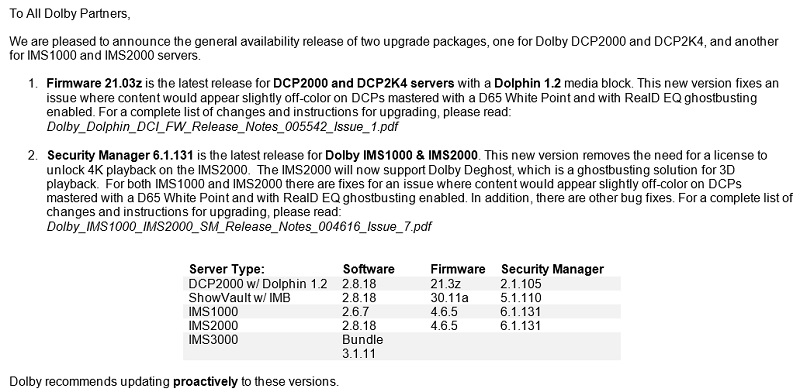
A note on DLMs: for Dolby and Doremi-branded servers, media blocks and IMSes, you can download them here, and you don't need to be registered; though the actual software and firmware files do require you either to be registered on dolbycustomer.com, or for Dolby to give you the password for their FTP site.
If you have an NEC-branded IMS1000 or 2000 (NP-90MS01 or 02), then the update files and DLMs have to come from NEC Cinema Support - if you enter the serial number into Dolby's site, it won't find anything. NEC is still officially issuing firmware 4.6.4, Security Manager 6.1.129 and software 2.8.16. I've installed 2.8.18 on an NEC-branded IMS2000 (you don't need a DLM to do that) we have in the shop, and it appeared to work OK with the older firmware and security manager that is still current for NEC.
Posted by Carsten Kurz (Member # 5396) on 02-25-2018, 04:50 PM:
As Dolby 3D doesn't suffer from ghosting, I assume 'Dolby Deghost' is applicable to polarization 3D systems that are not eligible for a RealD EQ/Ghostbusting license?
- Carsten
Posted by Mike Moreno (Member # 4887) on 03-01-2018, 02:44 PM:
i have a Doremi ShowVault with Software Version: 2.8.11-0.
I ussually get the upgrades with ftp doremi site but now i send an e mail to dolby asking for this new release.
they didnt answer the e mail .
i dont know if my server does not need this new version.
mike moreno
Posted by Carsten Kurz (Member # 5396) on 03-01-2018, 04:45 PM:
2.8.18 contains some decent fixes, so, I would have it installed.
See above for a list of fixes and enhancements.
The software is still available on the Doremi partner and ftp site.
- Carsten
Posted by Michal Matys (Member # 8614) on 04-29-2018, 03:46 AM:
Hello,
Any of you guys have link for the approved 4tb harddrives?
Posted by Steve Guttag (Member # 268) on 04-29-2018, 11:36 AM:
You need to be a registered user of Dolby Customer to have access to it.
Posted by Carsten Kurz (Member # 5396) on 04-29-2018, 03:10 PM:
The european Doremi support site also has this drive list now.
Michal, I assume you have the login for that site? Just enter '2018' in the search field there.
MG04ACA400E
MG04ACA400N
HUS726040ALA610
HUS726040ALE610
BTW - Doremi 2.8.19 is out, but there is only a very minor documented bug fix concerning an SSD health monitoring tool.
- Carsten
Posted by Danial Simmonds (Member # 4638) on 05-12-2018, 09:30 PM:
Anyone has fatal XIO error 104 connection reset by peer failed to start wdm / GUI doesn’t load on software 2.8.19? Particularly on the showvault sv3?
Powered by Infopop Corporation
UBB.classicTM
6.3.1.2