This is topic Dolby DSP100 Show Player stops suddenly whilst playing trailer in forum Digital Cinema Forum at Film-Tech Forum ARCHIVE.
To visit this topic, use this URL:
https://ft-forum.com/ft/cgi-bin/ubb/ultimatebb.cgi?ubb=get_topic;f=16;t=003207
Posted by Peter Foyster (Member # 9599) on 01-19-2018, 11:08 PM:
I am still using the DSS/DSP 100, for the most part, successfully.
There has been one occasion in the 3 seasons I have been running the cinema, when, last year, a trailer, provided by the Distributor as a download, caused the player to stop. This was verified by the fact that it happened three times at the same spot on the trailer. Removing the trailer sorted it. I have had no more problems until two nights ago.
Being unable to obtain a trailer for STAR WARS: THE LAST JEDI from the local Deluxe film exchange, I downloaded a HD trailer from “Dave’s Trailer Page”, converted it to a DCP and successfully screened it for the past couple of weeks to promote the movie which I will be screening next weekend.
On Thursday I was able to obtain the theatrical trailer, ingested it and commenced testing. About halfway through, the Show Player stopped and a connection error came up. A reboot and a manual stop on the player resumed the connection and I was able to successfully test the rest of the weekend’s shows.
Not wanting to take any chances, and with a screening looming the next night, I substituted the trailer that I had made.
During the show, the player stopped towards the end of the trailer that had successfully worked for the past couple of weeks. Again, after a reboot and a manual start, the Show continued without further problems. A test of that part of the show after the screening confirmed that it was, indeed, the trailer that caused the issue.
Without getting into a discussion as to the obsolete Show Player/ Show Store’s suitability as a doorstop/sea anchor, I am curious as to why, after all this time, two trailers simultaneously caused a problem, and even more curious as to why it involves somewhat related trailers (although not the same versions).
Whilst I can accept coincidences, I have the distinct feeling that there is a connection here somewhere. Is it possible that files from one or both trailers somehow interacted with each other or is there a simpler explanation?
My next test would be to play each trailer separately, confirming that they both cause the player to stop, delete the trailers from the server and re-ingest the official one, to see if the problem is still there.
It would be a relief, however, if a logical explanation could be provided to put my mind at ease.(well not really at ease; just one less thing to worry about!)
Posted by Stephan Shelley (Member # 8587) on 01-19-2018, 11:40 PM:
After it stopped playing did the DSP display anything like connecting or searching for show store. Also look at the disk activity lights on the front of the DSS and see if at the time it stops playing one light is staying green. It is possible you have a bad sector(s) and it is trying to fix the issue. Check the realocated sectors for the drives in system-theatre devices-show store. You can also download the logs and take them to the log analyzer and it will show the smart errors as well.
Posted by Peter Foyster (Member # 9599) on 01-20-2018, 12:52 AM:
Thanks Stephan
I did check the state of the raid after the first issue and everything checked out. The nature of the problem suggests to me that content is to blame rather than the Show Store or Player being at fault. As I said, I had a similar problem before that occurred only on a particular trailer and it went away after the trailer was removed.
Posted by Stephan Shelley (Member # 8587) on 01-20-2018, 02:43 AM:
Okay but a bad section of a disk could do the same thing. I had a DSS200 that the movie would freeze for about 20 or 30 seconds in the same spot and no reallocated sectors and no smart errors. Only way I caught the problem is I looked down at the disk lights and the bad disk was solid green the entire time the movie was frozen. The other 3 were normal.Replaced the disk and all was well.
I have two DSS/DSP 100s in service here at the Grand Lake. They are on our two 3D houses. I like that you can switch between dual projector and single projector from the menu on the DSP. One of the 3D houses is our main and largest house. Both are dual projector 3D.
Other than the usual disk drive issues I have had to replace several motherboards.
Posted by Marco Giustini (Member # 4544) on 01-20-2018, 05:50 AM:
Peter,
Unfortunately a "healthy" RAID does not mean that one drive is slowly failing in the background. Despite being a HW RAID, a single drive can and will stop the whole RAID just enough to crash the whole thing. Check the reallocated sector number for each drive - anything more than zero should flag a warning in your head! - and check the SMART data on the logs.
Once drives have been removed from the equation you can check the software: which version are you running?
Posted by Leo Enticknap (Member # 534) on 01-20-2018, 11:28 AM:
I had a similar problem just before Christmas. No reallocated sectors on any of the drives, and the SMART parameters were all OK on all the drives. A clean reinstall of the software (4.7.8.7) fixed the problem.
You'll need to ask Dolby for the clean install (as distinct from upgrade) ISO if you want to try that. Gotcha alert: if you do this, the clean installer does not ask you a "Do you really want to do this?" question. As soon as it starts to boot, it's unstoppable. So if you're not sure of your configuration settings, run the config script and make a note of what they are first, and ensure that you have external copies of all the DCPs and KDMs needed to reingest.
Posted by Stephan Shelley (Member # 8587) on 01-20-2018, 01:24 PM:
In addition to what Leo says all automation cues will be gone and all builtup shows and templates if you use them. You can backup serial automation cues with the serial script.
Posted by Marco Giustini (Member # 4544) on 01-20-2018, 01:54 PM:
I wouldn't consider a reinstall just yet. That should be the last option.
Posted by Leo Enticknap (Member # 534) on 01-20-2018, 02:51 PM:
Backing up automation cues can only be done on version 4.9 or later, and the DSS100 can't run it - the final version it will run (without hacking) is 4.7.
The one I clean installed was connected to a 200 that was acting as its TMS, so after the config settings were restored, it downloaded everything it needed through the LAN. Good point - if this is a standalone server, all content, SPLs, cues and configuration settings will need to be put back manually.
Posted by Stephan Shelley (Member # 8587) on 01-20-2018, 03:02 PM:
The "serial" script goes way back before 4.7.X You run it like you do the config script or unconfig script. It is a login followed by the usual password. It is just for the serial cues if you use them.
Posted by Peter Foyster (Member # 9599) on 01-20-2018, 07:23 PM:
Thanks Guys,
With the offending trailer removed the show ran perfectly last night.
I would have to check the version but its not all that recent. I have purchased a used Doremi server which will be installed at the end of the season in April so I just need to get through the next couple of months.
I would still like to hear anyone's view on whether content can cause these kinds of issues, or at least debunk the theory completely.
Posted by Frank Cox (Member # 6258) on 01-20-2018, 09:24 PM:
I have had a couple of occasions where a bad spot on a hard drive causes the movie to stutter. Every time the fix has been to send in the log and replace one of the hard drives after the service folks tell me which one is the bad one.
If your content is saved on the bad spot, then that's where the problem will occur. Your trailer is probably saved on the bad spot. If you were to delete it, then load that trailer again the problem will likely show up somewhere else.
Posted by Peter Foyster (Member # 9599) on 01-20-2018, 09:57 PM:
I guess for the moment I should leave the 2 trailers loaded. I will have to delete the features that I have screened recently to provide space for more. Does loaded content remain in the same place on the drive and new content just overwrite the space marked as deleted when content is removed? If the trailers that caused the stoppage remain then perhaps the problem sectors will not be accessed.
It is still a mystery as to why it has taken over 12 months for this issue to reappear and why it should be on 2 Star Wars trailers, loaded at different times.
Posted by Carsten Kurz (Member # 5396) on 01-21-2018, 06:00 PM:
Do you have any idea how old these drives are? Maybe it's time to replace them.
Where and when such issues occur is completely random. If the reason is actually bad sectors, you can not predict when certain content is placed on these disc areas.
- Carsten
Posted by Peter Foyster (Member # 9599) on 01-22-2018, 04:00 AM:
Well they would be the original drives, except for one which I replaced last year. The new one showed 7 crook sectors from the start but didn't seem to present a problem until recently when the drives were filled to near capacity.
I guess I should replace the replacement first and see if that cures the problem. The thing is that it is getting harder to get one of the "Dolby Server qualified" hard drives as many are now obsolete.
If I can get through the next couple of months I will be replacing the server so don't want to throw too much money at something that will be dumped anyway.
If I did decide to replace all the drives, how long would I need to leave a drive before changing the next one? I assume that by changing one at a time over a longer period it would obviate the need for re-installing the software and losing the existing content.
For the moment I will test run each piece of content ingested to make sure it is going to run.
If I delete a couple of features to make room for more, would further content be unable to fill that space on the drive or could the offending piece of content theoretically be moved to another location on the drives in the process?
I was hoping that by leaving the trailers they would prevent other content from being saved in that location on the drive.
I should add that I have been leaving the server on all the time, rather than re-booting every night as was the case previously.I have had to reboot a couple of times in order to get the connection back when it stopped on a piece of content.
Posted by Carsten Kurz (Member # 5396) on 01-22-2018, 06:10 AM:
Peter - there is an updated version of Dolbys approved drive list. Aside from that, many drives officially not approved will still work (choose an explicit NAS drive). They shouldn't be too expensive, you can find NAS compliant drives in the 2TB range well below 100US$. What's the size of the current drives?
Although the DSS100 is certainly approaching the end of it's life cycle, I wouldn't retire it just because of some problematic drives. What type of projector is connected to it?
Keep in mind, these were only trailers, easy to get rid of or omit. What if a full feature suffers the same issue, and you may not be able to relocate it to disc areas without that problem?
- Carsten
Posted by Peter Foyster (Member # 9599) on 01-22-2018, 06:51 AM:
Thanks Carsten,
The drives are 500gb I believe.
The projector is a temporary loan, a Christie CP2000 M, I think, awaiting the installation of an old Christie CP2000 SB which comes with a full complement of spares. I like the loan machine as it has standby mode which I leave it in between shows. I also have an NEC 1600C sitting on the floor awaiting disposal, as the light engine and a few other bits need replacing after a power surge. A nice machine when it is running but has been rather problematic.It may yet find a home in our local cinema and TV Museum as a static display. It is rather good at that.
Peter
Posted by Steve Guttag (Member # 268) on 01-22-2018, 07:16 AM:
For a DSS100, I'd put in new 1TB drives. Dolby is no longer "approving" 1TB drives (in the 3.5" form factor as used by the DSS line). The DSS servers are pretty good about running with most anything. That said, I would look at either HGST Enterprise grade or Western Digital "Gold" "WD1005FBYZ". I'd also invest in getting System 4.7 on that server (you'll likely need to purchase a software update to 4.7 for the DSP100). Your drive related problems will likely vanish.
Posted by Peter Foyster (Member # 9599) on 01-22-2018, 07:44 AM:
Thanks Steve,
A relatively local Computer store advertises the WD1005FBYZ in stock at a good price.
If I were to install just the one to start with, I realise that the system will only recognise the smallest drive size. Should it continue to work with the three smaller drives until I either add more new drives or change the server?
Can anyone say how long I should run the server before I add a second drive?
I can't afford to lose my content, or for that matter my server, because of updating a drive.
Updating the software would definitely have to wait until the outdoor cinema season end. I assume that if I did end up changing all the drives and updating the software, the system would then recognise them as 1TB drives
Posted by Carsten Kurz (Member # 5396) on 01-22-2018, 07:52 AM:
Peter - what software version is the DSS100 running now?
Yes, you may replace the 500GB drives one by one with 1TB drives (but make sure you buy all 4 new drives at once). Initially, the RAID will not increase it's size, but when you re-init it later, it will double.
I don't know if you are able to identify that drive issue in the logs (look up SYSTEM - THEATRE DEVICES), so, maybe you can find only the problematic one and replace that first.
Then, change one drive per day, leave the server running over night. However, not every Dolby system version will do an automatic rebuild, hence my question about the version you are running. It could be very ancient...
- Carsten
Posted by Peter Foyster (Member # 9599) on 01-22-2018, 08:15 AM:
Thanks Carsten,
How critical is buying all four drives at once? I was going to first replace the drive that I replaced last year and see how it goes from there.
I will get the software version number when I go to the cinema tomorrow. It may be a while before I reply as I am going to very busy at the cinema all day.
Posted by Carsten Kurz (Member # 5396) on 01-22-2018, 08:44 AM:
Well, it's just that you should try to get 4 identical drives if possible.
Are these problematic trailers still on your RAID? You may be able to track down the disc that causes this issue in SYSTEM-THEATRE DEVICES, and only replace that drive. As a matter of fact, if ALL 4 drives in your RAID are still working (that is, the RAID is marked as healthy), you may even get rid of the halting and identify the drive by pulling it from the RAID. As it may be, a RAID working with only 3 fully healthy drives may actually perform better than a RAID with 4 drives with one of them having reliability issues. Of course, you lose failure redundancy with 3 drives, so pulling one should only be a short term measure to analyze the issue or find the faulty drive.
- Carsten
Posted by Steve Guttag (Member # 268) on 01-22-2018, 12:48 PM:
Peter,
Your game plan SHOULD be: Procure a suitable sized HDD to back up your entire server (with 500GB drives you are at 1.2TB total storage so a 2TB drive will do it but you could go bigger and have a 4TB drive since they are not that much money anymore). Put that drive in a CRU chassis and proceed to offload your content. Note, if you have a suitable computer with enough storage capacity, you could FTP over the entire "Generated Packages" folder to get the content off.
Then take out the 4 drives and mark them and keep them as a set. Why? Because you can ALWAYS just put them back in as a set and the server will wake up as if it was never done.
Put in new 1TB drives as a set (4 of them). You will NEED the "INSTALL" disc version of the software you are using. Again, I recommend moving up to the current version of 4.7 (the latest that will run on a DSS/DSP100. This will ensure that your RAID card gets whatever updates are available to it for the larger drives. That said, if you are on a Pre-DCI version like 4.3.5.9 (my favorite), by all means, stay there for now but you will STILL need the Install version of that software to configure the drives and load the OS on.
That would be your safest bet (keep the original drives as a set so they could be merely reinstalled and staying the same software/firmware though you may run into issues if it is old enough).
As others have noted, you'll need to back up your serial commands (if any) and note how your server was configured (if it is different than Dolby's default configurations). You'll still need to run the "config" script to specify your projector make/model.
I would NOT merely change drives one at a time. You are going keep problems that way too. One thing running an Install disc does is flush problems away.
Posted by Leo Enticknap (Member # 534) on 01-22-2018, 04:37 PM:
quote: Steve Guttag
Note, if you have a suitable computer with enough storage capacity, you could FTP over the entire "Generated Packages" folder to get the content off.
That could take a very long time, unless
A - the connection is wired, and just through a dumb switch, not a router
B - the connection is gigabit (so through the theater network interface, not auditorium, which I believe is only 10/100, on some hardware revisions of the DSS100, at least)
C - the destination computer's LAN card supports jumbo packets, and the DSS's theatre network card is configured to use jumbo packets
But yes, if all of the above are "checks," then offloading the content that way is the easiest option, especially if you don't have a spare CRU cartridge to hand. Using a USB hard drive will take a helluva long time.
Posted by Peter Foyster (Member # 9599) on 01-23-2018, 01:07 AM:
Thanks guys,
I will have to keep this brief as I have just come back from the cinema and need to return for a show tonight. It is a 90 minute round trip.
The Show store software version is 4.3.5.9 and the Show Player 4.0.8.10.
I checked the RAID array again and noticed that in addition to 7 re-allocated sectors on Drive 4 there is now 1 re-allocated sector on drive 3.
I thought that, following Carsten's advice I would purchase 4 new drives and install them one at a time, to avoid having to have a re-install, a lengthy and very costly exercise for me.
Now that Steve and Leo have added to the mix, I am not so sure any more. The fact is that I have purchased a second hand Doremi Server and was going to have it installed in April. Perhaps that is what I should eventually be replacing the drives in and getting a software update for.
So, whether to replace the drives and carry on until the Doremi is installed or persist with the Dolby server.
One thing I like about the DSS100 is the CRU drive bay , whereas the Doremi can only ingest via USB, which is going to slow things down a bit.
At the moment I am running every piece of content before screening to provide some assurance that it won't stop on me.
I will have to give this some more thought on how to proceed. It really comes down to time and, unfortunately, money.
Posted by Steve Guttag (Member # 268) on 01-23-2018, 06:00 AM:
4.3.5.9 is a very good version and quite stable. As such, that is where I'd start. Seriously, if you need to keep your content. Purchase a suitable sized drive and mount it into a CRU chassis (they are typically under $100US). I don't recall if the Dolby software had the CRU formatting script in it at that point getting the drive formatted properly may be a bit of a trick. If you know how to login on the Command Line interface (CLI) as an Administrator, then if you go to the scripts directory, if the script: formatStore.sh is there then you can likely have the DSS100 format the "new" CRU drive you will create. Note, it takes a while to format a drive this way. I did a 4TB drive and it was just over 20 minutes and there are not friendly little progress numbers letting you know what is going on. You just see the amber LED winking on the CRU bay letting you know it is busy. Once done, however, the CRU will mount.
Once you back your content up, install the new 1TB drives and run the INSTALL disc for 4.3.5.9 and you should be good to go to transfer content back.
Personally, I'd take a DSS100/DSP100 over Doremi anything, but that is just my opinion. What the Doremi brings is more compatibility with improperly formatted/made DCPs but with nasty interface that is quirky, to say the least.
Posted by Carsten Kurz (Member # 5396) on 01-23-2018, 06:49 AM:
Sounds as if that Doremi will be an IMS, as Peter mentions 'no CRU'? However, no IMS will work with the projectors he mentions...
With the DSS100 staying at 4.3.5.9, he'll probably be in trouble soon when SMPTE DCPs will become the norm.
Steve - it may be a piece of cake for you to do fresh installs, but for Peter, giving credit to his abilities, availability of proper setup discs, and his options to have techs on site, I don't think it's a good idea.
If the problematic trailer is still on the RAID, I would try to isolate the drive that is problematic by pulling it, playing, reinsert, pull another, etc., until he found the one that is/may be causing the issue. Then first exchange that drive. And of course start with the one that shows the most bad sectors. It appears that his systems otherwise is doing well, so why should he do a full reinstall, if a drive swap can possibly fix the issue?
- Carsten
Posted by Leo Enticknap (Member # 534) on 01-23-2018, 08:03 AM:
quote: Carsten Kurz
Sounds as if that Doremi will be an IMS, as Peter mentions 'no CRU'? However, no IMS will work with the projectors he mentions...
The DCP2000 does not have a built-in CRU reader, so we could be talking about one of those. One could be added either by using an external reader connected by USB2, or by FTP network ingest from a PC with a built-in SATA one. I guess it could be possible to add an eSATA card to the Doremi's motherboard, and add a CRU reader that way, if USB2 ingest speed is a problem, but I don't know how the software would react to that.
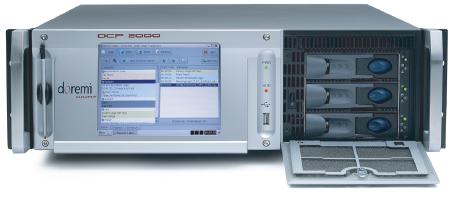
The other thing Peter will need to check, given that he's still running a pre-DCI version of the server software (4.3), is that his projector will support Cinelink II TLS link encryption. I'm not a Christie expert at all: I'm afraid that I don't even know if the CP2000M is Series 1 or 2. According to Christie's website, it is discontinued and was launched in 2009, so I'm guessing 1.
Peter - this issue is to do with the way the image data is encrypted as it passes through the dual SDI wires from the server's media block and the projector's secure input board. Very early digital cinema projectors can only use a method called Cinelink II DH, that DCI later outlawed, claiming that it isn't secure enough. As a result of this, later versions of server software (in the case of Dolby DSS servers, versions later than 4.3) do not support it. The most commonly used method now is Cinelink II TLS, but a few server and projector combinations that don't support DH can use Cinelink I.
You can see which method you currently have in use, by going to the system > theatre devices tab in Show Manager, and looking under the entry for the DSP100 show player. If the link encryption method says Cinelink II TLS, you have no problem, and can update the server's software, and/or replace the server, without worrying about this.
If it says Cinelink I or Cinelink II DH, then you could have a problem. In this scenario, it's important to consult a Christie expert to be sure that your projector can use TLS, before upgrading the server software to anything later than 4.3, or replacing the server with another one that might have a software version that cannot do TLS, such as the Doremi you're thinking of installing.
Posted by Carsten Kurz (Member # 5396) on 01-23-2018, 08:31 AM:
A CRU-less DCP-2000 may be expanded with an external SATA slot, there is even the official part still available from Dolby I think. However, anyone with decent computer building skills can insert a standard cable/slot available on ebay or other places, as it operates driver less on one of the free SATA connectors on the mainboard. The cheapest way then to proceed is to use a CRU Movedock, as the older, cheaper USB 2.0 MoveDocks ones offer a SATA connector on the back in addition to USB (the most recent v.3 MoveDock with USB 3.0. offers eSATA again, but at a price).
The Christie CP2000 units are all series 1, but their compatibility with the necessary encryption protocol is based on their board set, a nice wrap-up is here:
http://www.film-tech.com/ubb/f16/t001506.html
Another issue not being mentioned so far is that Peter is from Australia. Australia is a PAL (25fps) country. It may be that quite a few ads/trailers/shorts/features he receives are 25p. As the DSP100 does not support 25 frames per second in J2C/DCP (and never will), it is possible that some of the issues he experiences with the unit are caused by this (of course not those he mentions with the StarWars Trailers).
The Doremi, admittedly has the more clunky GUI, but at least doesn't suffer from that issue and will play 25fps content fine.
If Peter doesn't have to sell the DSS100/DSP100 in order to finance the Doremi, he should probably keep both.
Again, so far, Peter seems to do fine with his DOLBY, and the only issue so far seems to be a tipsy disc. So, as a short term measure, I would try to identify and change only this disc. This is also something that Peter has performed in the past, so he certainly is able to do it again without external help.
- Carsten
Posted by Peter Foyster (Member # 9599) on 01-23-2018, 09:31 AM:
Thanks Guys,
I just got home from the cinema where I was greeted earlier by 2 red LED drive lights and a warning that the RAID was degraded. I had left the server earlier in the day ingesting Star Wars: the Last Jedi for this weekend.( what has Star Wars got against me!!)The panic set in as I had a huge show ahead of me this evening.
The system showed that Drive 3 was the most degraded, however it appears that drive 4 which was actually a new replacement drive last year was not "As" seriously degraded and this was a timely warning to take action. I was able to get through the show as drive 4 was actually flashing orange.
So the first thing will be to get down to the computer shop and try to pick up 4 of the drives that Steve suggested. I'm not sure how long it will take to rebuild the array but hopefully by replacing drive 3 I can at least get through the next show on Thursday.
I guess the trailers stopping was just the first warning of things to come, which you guys obviously could see even if I couldn't.
One of the issues with the Dolby unit is that it will only play DCPs at 24fps so I have to convert any videos that I need to create a DCP for before running DCP-O-Matic. It won't even ingest a dcp running at 25fps.
The main reason for going with the Doremi is that I can get local service and replacement parts. I do like the Dolby Server and would prefer to keep it but I think it is just too old.
Posted by Marco Giustini (Member # 4544) on 01-23-2018, 12:23 PM:
When rebuilding a raid there is always a good chance to Lose the raid altogether. In your case the likeliness is even higher as you have two drives showing issues. Save your content before you go ahead!
Posted by Carsten Kurz (Member # 5396) on 01-23-2018, 06:23 PM:
Yes, that could happen (due to increased load on the remaining discs during the RAID repair). But I guess Peter is now on his own.
I don't remember in which software version the Dolby was enabled to fix RAID issues by itself. Before, you had to do it manually. But as Peter wrote, he changed one drive before, so he probably knows what to do.
At least it seems he just ingested the StarWars 8 dcp, so, worst case, he would need to setup the system from scratch and create a new RAID with his 4 new discs, and he'll be able to reingest that flic afterwards and be up and running again within a decent amount of time. In that case, I just hope he'll be able to source a setup disc for the DSS100.
- Carsten
Posted by Peter Foyster (Member # 9599) on 01-23-2018, 08:42 PM:
I have picked up 2 drives and another two will be available in the morning.
I actually have a show on Thursday night (tomorrow) so am just hoping I can successfully rebuild the raid by replacing the faulty drive. Drive 4 has some issues but it still allowed the show to run last night.
I guess I won't know until I put the drive in and reboot the server. Fingers crossed!
Posted by Carsten Kurz (Member # 5396) on 01-23-2018, 09:21 PM:
Chances are that the fourth drive will not fail completely, as it is relatively new. Drives with bad sectors can live for years. But honestly, that is somewhere between a vague hope and wishful thinking.
Take your time, and yes, fingers crossed.
In the long run, it is probably not a bad idea to have your own CRU drive to make backups - you will be able to use the same drive with the Doremi as well.
- Carsten
Posted by Leo Enticknap (Member # 534) on 01-23-2018, 10:05 PM:
quote: Carsten Kurz
I just hope he'll be able to source a setup disc for the DSS100.
Peter will need to register on dolbycustomer.com if he hasn't already. Once he has an account, he'll need to open a support ticket and ask for a clean install ISO image file for the software version he wants. Once he has it, it's a case of burning that image to a CD, putting the CD in the DSS100's drive, and rebooting the server.
Even before he does that, he can look up the serial number (four digits) of his DSP100 here, to see the latest version of the software his unit is entitled to without an upgrade license and KDM. It'll be the final version that was released while his unit was still under warranty, which may be a more recent one than the 4.3 variant he's currently running.
An update KDM for the DSP100 will be needed. If he wants to install a more recent software version than Dolby's site is currently offering him a KDM for, he'll need to buy a license through a Dolby cinema products dealer in his territory.
However, please do check that the projector supports Cinelink II TLS before trying to upgrade to a more recent version than 4.3. I have a vague recollection of Steve or someone writing that the DSP100 can be downgraded back to 4.3 from a later version if necessary. That certainly isn't the case with a cat862 media block in a DSS200: upgrading it beyond 4.3 is a one-way ticket. In any case, I'd suggest checking out the TLS situation first, and if in any doubt, clean installing 4.3 again.
Posted by Peter Foyster (Member # 9599) on 01-24-2018, 01:31 AM:
Well, I swapped out drive 3 and rebooted the server.The system then showed drive 4 as drive 3, however the rebuild RAID option was no longer greyed out so I ran it. After 2 hours I had 4 green lights and a healthy RAID. Drive 4 still shows the 7 reallocated sectors that it has since I put it in over a year ago.That will be the next one to change and then one every few days until all four are replaced.
I assume that I can just perform the same action for each subsequent drive: power off the server, replace the drive, reboot and then rebuild RAID. Although there are no longer any errors I assume that it will rebuild by virtue of a new unformatted drive.
I am going back later to test the weekend shows so hopefully Star Wars won't wreak it's revenge!!
By the way, the projector is a CP2000 ZX, my mind was obviously elsewhere. It is a nice projector, reminds me of the NEC a bit.
I did try to register with Dolby but was knocked back. It would seem that being a cinema owner/operator does not qualify one for an account.
Posted by Marco Giustini (Member # 4544) on 01-24-2018, 04:02 AM:
It sounds a little weird that a DSS100 can finish a rebuild process in just 2 hours. Does the RAID status says "healthy" on the Server (if memory serves) page? I would also not reboot the server once a drive has been replaced. Next one, remove the bad drive, wait till it's identified as missing, plug the new one, wait till it's identified as present and start the rebuild process on the same SERVER page I mentioned - unless it starts automatically.
Posted by Carsten Kurz (Member # 5396) on 01-24-2018, 06:11 AM:
This is an outdated version of the DSS software. Not all Dolby software versions had automatic RAID Repair, someone with deeper knowledge about 4.3 should chime in.
Leo - Dolby is picky about which people to allow into their customer portal. Don't know why, but typically, all non-US applications from ordinary endusers are refused.
With 500GB drives, a repair may indeed go this fast I guess. While it's still an outdated server, the RAID controller does the job all on it's own.
Peter - yes, go on like this. Give the system enough time to recover, I'd say one drive every 1 or 2 days. It's up to you wether after some time then you source the necessary setup CD for a clean install to increase the RAID size, or if you simply leave it that way until you receive the Doremi. Would you mind having a look at the drive you changed, the manufacturing date?
- Carsten
Posted by Leo Enticknap (Member # 534) on 01-24-2018, 07:48 AM:
quote: Carsten Kurz
Leo - Dolby is picky about which people to allow into their customer portal. Don't know why, but typically, all non-US applications from ordinary endusers are refused.
In my previous job, as a rank-and-file projectionist, I was allowed to register and download updates for my DSS200s. But I was in the US. Strange - I wonder why they don't mind American end users updating their servers directly, but don't want end users in other territories doing so.
If I were in Dolby's shoes, I'd want as many units in the field running the current software version as possible, in order to minimize both the number of helpdesk tickets caused by people running outdated software versions, and the reputational damage that end users being affected by the bugs in older software versions risks causing.
Posted by Peter Foyster (Member # 9599) on 01-24-2018, 08:11 AM:
I don't know why it should be considered weird.The manual suggested an hour or more to rebuild the RAID. When completed the RAID status was healthy All the content I tested afterwards ran fine, including Star Wars VIII.
Marco - are you saying I should remove and replace drives whilst the server is powered ? There are actually no "Bad" drives anymore, replacing the 500gb drives with the 1tb ones is more a precaution as this is now two of the original drives that have gone bad, so the idea is to get in before the other two die. Why do you say I should not reboot the server once a drive has been replaced? (if you just mean immediately after replacing I did not do that and did not intend to until I was ready to replace the next drive.)
Carsten- I will check out the drive that I removed for the date. Do you agree that I first power down the server and then remove the drive and replace it with the new one, or remove the drive whilst the server is on and wait for it to complain?
I'm not sure if I am going to re-install the software before the outdoor season ends as there really is not enough time between shows, apart from the fact that I don't know where to source it. If I do go to the Doremi, I can perhaps re-use the new drives, which means I will end up with a spare as well.
Posted by Carsten Kurz (Member # 5396) on 01-24-2018, 09:17 AM:
Peter - you should listen to Steve on that, although in principle I guess it makes no difference wether you shut down or do it with the server running. Some whacky drives may actually die when powercycling, so, in case one is already on thin ice, it may be advisable to not power them down. The Dolby server is built to allow hard drive hot swapping. One of my early Dolby manuals suggests the server to be shut down when replacing drives, while a later revision allows a change to be performed while the server is running. The early manual also has a passage on RAID repair to be performed manually after a reboot in RAID BIOS, while the later manual explains that the rebuild is performed automatically after drive swap. This later manual is for software version 4.2, while the earlier one is for software 4.1.2, so, you should be safe running 4.3.5.9.
Again, I myself have NO personal experience with an DSS100. I am not so picky about powercycling servers - never had a disc die during a powercycle, so, personally, I WOULD power down the server before changing the disc, but you don't have to follow that.
Do you power down your server daily, or do you leave it running over night? Note that there is a difference between actually powercycling and a 'soft' reboot (Ctrl+Alt+F1 followed by Ctrl+Alt+Del).
- Carsten
Posted by Peter Foyster (Member # 9599) on 01-24-2018, 09:34 AM:
Carsten- When I first took over the cinema it was the custom to power down every night, including the projector, and cold re-boot every day.
When I replaced the projector I went to leaving everything on, except the sound processor and amps, and also put the projector in standby mode.
I guess there is an argument for both methods. Perhaps the constantly spinning discs are finally starting to show their age, hence the problems I have been having.
Peter
Posted by Sam D. Chavez (Member # 1841) on 01-24-2018, 10:13 AM:
We've always hot plugged these drives as they are certainly capable. We do it overnight so there is no chance of glitching by doing it during the show.
Posted by Peter Foyster (Member # 9599) on 01-25-2018, 06:51 PM:
Sam -
I hot swapped another drive (the one showing 7 reallocated sectors) last night after the show and left it to rebuild the raid. After removing the old drive the system recognised the missing drive as degraded and after putting in the new drive I was able to start the rebuild.
Carsten -
The date code on the old drive is 10353 which, depending on the decoder one uses, is late February 2010.
I made up a 20 second clip yesterday to include in the show and ingested it. When I went to test it the Show Player lost communication again and I had to reboot the system. I did not try again, and left the clip out altogether and the show ran faultlessly ( apart from young kids jumping on the deckchairs, breaking a chain fence, tearing branches off the trees, and one even thought it funny to steal a padlock from outside my bio box. All the while, the parents just ignoring them).
Posted by Leo Enticknap (Member # 534) on 01-25-2018, 07:19 PM:
They sound like little angels. I recently answered a phone enquiry asking if we sold screen repair kits, "...you know, like the ones for bicycle tires, with, like, a white patch and some glue." It turned out that some kids had been running around in front of the screen while Star Wars was playing, adding some live action to the light saber scenes by waving blow torches at each other. The flame from one of them went through the screen.
Posted by Peter Foyster (Member # 9599) on 01-25-2018, 10:13 PM:
I also had some kids with powerful torches, waving them about and causing white flashes in the trees.
And this was for Coco! Star Wars doesn't start until tonight.
Well it tends to take my mind off my server problems for a while.
Posted by Stephan Shelley (Member # 8587) on 01-25-2018, 10:53 PM:
You said the DSP disconnected. What did the display on the DSP say? Connecting in white or searching for showstore is an indication of a network issue between the player and the store. If it says error securing connection to projector then it is an auditorium network issue. The Dolby log analyzer will show the showplayer network issue.
Posted by Peter Foyster (Member # 9599) on 01-25-2018, 11:09 PM:
Stephan - It showed an error connecting to Showstore. When I rebooted it came up white at first but once I had selected some content it was fine.
This only happens on certain pieces of content, like the two Star Wars Trailers and the 20 second clip that I loaded. Other than that the Shows play back just fine.
The two problematic drives have now been replaced. I will also be replacing the other two which are 8 years old. Once that is done, if the problem persists I will have to look at a software update I guess.
Posted by Steve Guttag (Member # 268) on 01-27-2018, 02:05 PM:
Peter/Carsten,
There are multiple reasons why I've harped on doing a full install, despite it being the greater effort. You have no idea if there are things corrupt on that server. it is 7-8 years old. So, if all you do is swap drives and rebuild, yes you do get rid of drive related issues though you now have an unbalanced RAID (different read/write speeds between drives until all four are done), you have not done anything for what may have gone bad in these years on the OS itself. I've seen Show Store just bind itself in knots when this happens. If you have ANY CPLs that have a negative running time, a DSS server will, over a period of days, proceed to commit suicide. It just has to be present on the server. It doesn't have to be used. That has been fixed by not back in 4.3 days. I only encountered that one in my "Art Houses" that had more home-made and non-Hollywood made DCPs.
I would also replace the Link cable between the DSP100 and the DSS100 (factory original on that cable was green but it may not be anymore). Also, since I've seen it happen) that cable should go directly between the DSP100 and the DSS100 without ANY switches (or splices) between. It is on its own private network JUST for those two to move data (movie).
Posted by Carsten Kurz (Member # 5396) on 01-27-2018, 08:58 PM:
I understand that Steve, but in this situation, it may have been the better decision to first get rid of the whacky drives in order to secure operations. Peter can do the clean reinstall any time after he finished playing SW8, then expanding the RAID.
If he never did a clean install before, he may get stuck with an unusable server and no one near to help him.
- Carsten
Posted by Peter Foyster (Member # 9599) on 01-27-2018, 10:07 PM:
Thanks Guys
I replaced the second of the two problematic drives a couple of days ago and then last night swapped one of the other drives. The LEDs were all orange for a short time and then went green as it started the RAID rebuild.
Assuming that all has gone well when I return this evening I will wait another 48 hours and replace the last drive.
There have been no presentation problems so far but I will be happier when the drives have all been replaced and are all the same type.
Steve - I am not sure what you meant by "has been fixed by not back in 4.3 days".
Peter
Posted by Marco Giustini (Member # 4544) on 01-28-2018, 04:31 AM:
Peter, do not assume! Check the status of the RAID! It will say "rebuilding" while it's rebuilding. Healthy/verifying when it's done.
If you replace a second drive while rebuilding, you lose the server.
Posted by Ioannis Syrogiannis (Member # 3235) on 01-28-2018, 07:51 AM:
If it was me, I would go for Steve's suggestion of full install.
Yet, there are three significant issues that would have to be taken care of in advance:
Firstly, the copying of the "generatedPackages" folder, preferably by FTP-ing via the Theatre network and copying the whole thing*. A copy, an export to a CRU would be fine for the reingesting to the DSS100, but not for ingesting again to the DCP2000, come April. Either way, a network transfer would have to take place, most probably an external disk involved as well.
Secondly, Peter obtaining the installation CD (iso) of 4.3.5.9 and verifying the operability of the DVD drive. Some unused DVD drives on such devices might have their tray stuck, for instance, needing to manually/mechanically open it. You can fill the list of possible bad conditions of a DSS100/DSS200 DVD drive yourselves. For better or for worse, Dolby having the policy that it has with overseas account applications, creates a predicament to be addressed. (And I should know.)
Finally, checking the configuration settings to be reused after the installation and familiarizing himself with the whole configuration procedure.
Who would want an awkward "now what" moment before a server without projector automation cues or, maybe, no connection to the projector, due to -say- a different auditorium number not set accordingly?
*Leo, as far as I have seen, no DCP FTP utilization can take place via the auditorium network.
Posted by Leo Enticknap (Member # 534) on 01-28-2018, 10:36 AM:
Yes it can - in the config script go to change network settings > advanced settings, then select management network = auditorium. It is set to theater by factory default.
quote: Peter Foyster
Steve - I am not sure what you meant by "has been fixed by not back in 4.3 days".
That the bug Steve describes, whereby if a CPL is corrupted in the database, the database will gradually become more corrupt over time until eventually, the server is unusable, is present in version 4.3, but had been fixed in 4.7.
Posted by Steve Guttag (Member # 268) on 01-28-2018, 03:09 PM:
It wasn't a corrupted file so much as a malformed file by the thing that authored it. I suppose it could be described as corrupted though I think of corrupted files as ones that used to be okay but something happened to them.
As for FTP transfers, without changing the "management" port, you CAN FTP to EITHER Auditorium or Theatre ports (I've done it MANY MANY times). What you have to be careful of is that if a show is in progress, you best not FTP a movie on the same port that the server is talking to the projector with. That is one of the reasons for the dual ports and to keep high volume transfers off the port that is used for continuous communication. Unlike others, Dolby always used 1000 base-T ports for both.
The Management designator really has to do with Jupiter client and if the server is set up as a Dolby TMS type system.
Note, you can VNC to either port as well (regardless of management designation).
Posted by Peter Foyster (Member # 9599) on 02-01-2018, 03:07 AM:
The last drive went in a couple of nights ago and I have subsequently ingested 3 features, 2 trailers and several home made clips ranging in length from 5 to 30 seconds, including a remake of the clip that stopped the Show Player the other day, requiring a reboot.
All tested perfectly. The next thing will be to back up the system and install the new software version. This will have to be done on a date yet to be determined.
I realise there is no guarantee that a problem won't surface before that time, however I simply don't have the time or resources to have that work done as yet.
Thanks again to all you guys for your assistance in helping me through this stressful period.
Peter
Posted by Carsten Kurz (Member # 5396) on 02-04-2018, 11:43 AM:
Peter - since you mention you are doing your own DCP trailers occasionally and use a Dolby DSS - make sure you use either DCP-o-matic stable 2.10.5, or the very latest test release (>2.11.34). Test versions from 2.11.23 to 2.11.33 had playback issues on Dolby DSS and Barco ICMP servers.
Regards - Carsten
Posted by Steve Guttag (Member # 268) on 02-04-2018, 02:17 PM:
Has there been any problems with the latest DOM version on Win7/64? (Crashing/shutting down)?
Posted by Carsten Kurz (Member # 5396) on 02-04-2018, 02:24 PM:
Not that I know, however, the latest test version 2.11.47 is only out since two days or so. Latest stable 2.10.5 is from April 2017
There do not seem to be major issues, though, as the WIN7/64 is the one with the most downloads and installs, and issues that hit the majority of systems would be reported quickly.
However, there is always a risk that strange/broken content, video, audio, etc. may cause a crash or other unexpected behavior.
- Carsten
Posted by Peter Foyster (Member # 9599) on 02-04-2018, 07:09 PM:
Thanks Carsten
I am currently using Version 2.9.27
I shall check out 2.10.5 to start with, unless you think I should just go straight to 2.11.34.
Posted by Carsten Kurz (Member # 5396) on 02-05-2018, 08:36 AM:
I'd say, go with 2.10.5 for now. Next stable release 2.12 is due within a few days if all goes right, you could also wait until then. Just wanted to make sure you are not using those 2.11.x versions that cause trouble on Dolby servers.
- Carsten
Posted by Peter Foyster (Member # 9599) on 05-08-2018, 08:02 AM:
Well... the outdoor screening season is over and I got through without any more server problems.
With a full software install in mind, I purchased another Western Digital Gold WD1005FBYZ and mounted it in a CRU DX115 case. As I don't have the Linux system on my computer (Windows7 64 bit), I downloaded a utility that was supposed to format the drive as EXT3. After much stuffing around it appeared to have successfully formatted the drive.
The intention is to copy across critical content to this drive before doing the software upgrade.
When I loaded the drive into the CRU bay on the DSS100 I got the usual blue light and then a solid yellow light. When I went to content there was no indication that there was a drive present and the arrow to copy content across from the raid was grayed out.
I was unable to clear the yellow LED and just had to take the drive out and reboot the server.
Is there an easy way to format this drive so that it will be visible to the DSS100 and allow me to copy content across, or am I missing some vital step here?
Posted by Dave Macaulay (Member # 813) on 05-08-2018, 08:47 AM:
EXT2/3 formatting is not entirely easy on a non-Linux system. I have not managed to get a drive readable in Linux by formatting in Windows using ext2fsd. And Dolby doesn't let you have a shell prompt to use the Linux formatting tools. Even formatting on another Linux system is not guaranteed for someone with limited Linux skills (ie me), I get drives formatted and recognized but without write permissions. I really don't understand chmod. And Linux man pages are written to only make sense to people that already know the subject.
How much content do you need to export? I would take a 1TB distribition drive or 500GB if that's all you have and it's big enough), delete anything on it with ext2fsd on windows, then use it for your backup. Either return the drive when you're done - distributors wipe them when reloading - or "lose" it.
Posted by Brad Miller (Member # 2) on 05-08-2018, 09:01 AM:
The DSS200 can write to an NTFS drive. Not sure about the DSS100, but I'll bet it can.
Connect the SATA drive to a Windows system and just give it a good old fashioned NTFS formatting and then pop it in a CRU bay and see if you can offload your content. My guess is it will work fine.
Alternatively just FTP into the server across the network and copy the "generated packages" out.
Posted by Steve Guttag (Member # 268) on 05-08-2018, 12:31 PM:
On a Dolby DSS server, you can format the drive in the CRU bay itself.
You have to get to the command line <CTL><ALT><F1>.
Login to the Administrator level
Change directory to scripts.
Use the formatStore.sh command with the argument "removable" (without the quotes) to format a CRU.
It has been awhile since I've used it so there may be additional bits like:
./formatStore.sh localhost removable
It will format the CRU with EXT2 with the proper inode size and everything. Be prepared, it isn't a fast process so depending on your drive size, this could be half an hour process and the CLI doesn't give progress...you'll just see the amber LED winking until it is done. When the CLI returns the cursor to you, it is done.
Posted by Peter Foyster (Member # 9599) on 05-10-2018, 08:52 AM:
I don't have an administrator password. When I let the support guy from the east go I was left to fend for myself.
I did format the drive as NTFS but the DSS100 refuses to copy content across. I do have an old Linux formatted drive that I copied stuff to but because of its age I am not confident that I can rely on it not to fail.
Posted by Stephan Shelley (Member # 8587) on 05-10-2018, 05:04 PM:
Depending on the age of the software the 100 will read and write to NTFS drives. I successfully formatted a usb hard drive to ext3 on a windows machine and can use it with the 100. The FTP rout to a laptop with lots of storage is a good route. If the laptop network port is gigabit it gives a fast transfer rate.
Posted by Leo Enticknap (Member # 534) on 05-12-2018, 10:00 PM:
Yes, if the switches between the laptop and the DSS are also gigabit, and ideally, support jumbo packets as well. Earlier in the spring I was sent to a 4-plex that was complaining of slow transfers between the TMS and the screen servers "ever since we opened." The reason why was that the media network switch was an ancient 10/100 one, and the volume of traffic going through it was also likely overwhelming it. Once it was replaced with one of the Zyxel managed gigabit switches that we typically supply with new installs, the transfer speed increased from around 6-7 hours to transfer a feature, to about 20 minutes.
I tried the ./formatStore.sh command for the first time on a DSL100 last week. I needed to outgest some stuff from it to a USB stick quickly. Unfortunately, it didn't work: it said "Starting to format...", then the USB stick flashed for a few seconds, then the command prompt came back, with no message saying that it had actually done it. The left arrow button in the network content tab was grayed out, and so it can't have formatted the stick properly. The DSL was on the latest software version (4.9.1.18).
Posted by Kris Verhanneman (Member # 5562) on 05-13-2018, 05:41 AM:
Hello, a simple way to format the drive under "linux" is to run a try version of ubuntu on your regular pc. This should not affect your normal windows OS. No scripting or passwords required.
Posted by Peter Foyster (Member # 9599) on 05-13-2018, 06:15 AM:
I am currently formatting the drive again as NTFS and will copy a small DCP file onto it to take to the cinema to see if it is recognised.
When I last tried it the arrow was grayed out as described by Leo.
If this does not work I may have to try Kris's suggestion of installing Ubuntu on one of my PCs and reformatting the drive.
The idea is that once I have put all the stuff back on the RAID after a software update, I can reformat it and will have a spare drive. That is if I don't get the old Doremi installed instead.
Posted by Leo Enticknap (Member # 534) on 05-13-2018, 10:45 AM:
quote: Kris Verhanneman
Hello, a simple way to format the drive under "linux" is to run a try version of ubuntu on your regular pc. This should not affect your normal windows OS. No scripting or passwords required.
Yes, but there is a gotcha.
If you use GPartEd under Ubuntu, there is one aspect of the ISDCF spec for DCP distribution media that it won't let you do, which is to define an inode size of 128 bytes. GPartEd will use 256, and there is no way to change that.
To create a compliant volume in Ubuntu, you need to open a terminal window (ctrl+alt+T), and then (with elevated privileges):
mke2fs -t ext3 -I 128 /dev/sdXY
However, the DSS100 is OK with 265-byte inodes in my experience, and so if Peter just partitions and formats a drive using GPartEd, it should be OK. Remember to create a new partition table as MBR (not GPT) first, and then your ext2 or ext3 partition, occupying the entire drive. If you choose ext3, the formatting stage can take some time, depending on the size of the drive.
Posted by Carsten Kurz (Member # 5396) on 05-13-2018, 05:36 PM:
I usually format my drives with a GPARTED bootable USB stick. Yes, the GPARTED GUI has no option to force inode 128 with the built-in format option, but you can still create an MBR partition table and single partition with the GUI, then use your own shell command for the proper format. However, the unexperienced user will usually have a hard time to identify the proper linux device name for the disc he wants to format. This is in no way intuitive. The GPARTED GUI makes it a bit easier.
Yes, in this case, the DSS100 will probably be okay with the default inode size of 256. Also, the Doremi later on will have no problem with that.
Posted by Peter Foyster (Member # 9599) on 05-14-2018, 07:22 AM:
Um....Not having the faintest idea what you are talking about I guess I will just stick with the windows formatted disk.
Posted by Carsten Kurz (Member # 5396) on 05-14-2018, 07:53 AM:
Have you been successful with exporting DCPs to that NTFS disc? Reading and writing are two different things - especially since your DSS100 is on an outdated software version. Many servers happily read DCPs from NTFS discs, but, again, depending on their software version, will not write to NTFS.
If that is too much trouble for you to format an ext2/ext3 disc yourself, you may be able to find someone who is able to format a disc under Linux for you, according to the mentioned specs. It may be, though, that your DSS100 also needs some specific access rights settings before it can actually copy files to that drive. I don't know if these things are documented somewhere, and if, wether they hold true for your 4.3.5 software version.
Yes, this is a bit complicated. Due to a special pecularity with the Dolby, an export done on the DSS100 to a disc can only be reingested onto another Dolby. That is fine until your only plan is to reingest that content onto the same DSS100 after a software upgrade or fresh install. If you plan to reingest these backups onto your new Doremi later on, that will fail. In that case, you need to connect to the Dolby from another computer with an ftp client and copy the generated packages content - that will give complete DCPs that can be ingested on any server later on.
Yes, all that is not intuitive, unfortunately...
Honestly - since your DSS100 now seems to work flawlessly, why not just leave it as it is and wait for the Doremi to show up? You may of course still need some way to transfer/backup your content if you want to transfer your 4 new discs from the DSS100 into the Doremi...
Without these discs to be reused in the Doremi, you could actually connect the Doremi and the Dolby with a network cable and transfer the content directly, as the Dolby runs an ftp sever, and the Doremi can act as an ftp client. Do you know already what type of discs will be in that Doremi server? Capacity?
All that said - it doesn't appear that you're in a hurry currently, so, take your time, and prepare well...and if possible, keep that DSS100/DSP100 as a spare. I don't think you can make much money out of it in Australia anyway, with the 25fps issue, and SMPTE DCPs coming up now.
- Carsten
Posted by Kevin Fairchild (Member # 4985) on 05-14-2018, 12:05 PM:
How much content do you need to backup? A USB flash drive would likely be the easiest to use.
Also, remember to backup your automation settings.
Posted by Peter Foyster (Member # 9599) on 05-14-2018, 09:47 PM:
I have put a few smaller items on a USB stick, however there are a couple of feature films that I want to retain as I may want to screen them again and it would be easier just to get a KDM rather than have to get the DCP sent over to me.
I have also just received an email, purporting to be from Dolby Singapore, stating that;
"Deluxe is asking to check if sites with DSS/DSP100 servers are upgraded to 4.7.8.7, so they can stop shipping INTEROP DCPs.
Will you kindly perform upgrade and let me know it’s done?"
The email came via a contact form on our website. It is probably genuine but I am wary about responding to this type of email.
Either way, I guess I am going to have to make a decision soon on which way to go.
This leads to another question; Would it be possible to link the Doremi (an early DCP2000) and the DSS100 to enable me to ingest via the DSS CRU bay rather than the much slower USB input on the Doremi? I know that finding an alternative to the USB 2.0 on the Doremi was alluded to in earlier postings but not necessarily using the DSS as a CRU bay.
Posted by Carsten Kurz (Member # 5396) on 05-15-2018, 04:07 AM:
Hi Peter,
no, there is no direct way to ingest from the DSS100 CRU bay into the Doremi - not unless you are first ingesting into the DSS100, and then into the Doremi over the network (which takes as much time as going through USB from the start).
However, you can equip your Doremi with a cheap eSata slot connector, and connect a CRU MoveDock to it. That will give you full eSATA speed. The standard MoveDock will offer USB2.0 and SATA ports. Note there is a a specific USB 3.0 type that offers no SATA port, stay away from that one. I guess you have seen MoveDocks before, some distributors ship them with their drives. I understand that some distributors even allow to keep them on site free of charge.
You may source this eSATA slot connector bracket from general computer stores, ebay, etc., but Dolby has it on their Doremi parts list as well (actually still comparably cheap).
e.g. https://www.ebay.com/itm/Computer-Case-Baffle-Internal-SATA-to-ESATA-External-PCI-Slot-C able-Bracket-New/232075850680?hash=item3608cc73b8:g:qCgAAOSwknJX0b97
Regarding the recommended update to 4.7 - what type of projector do you have again, is that still the Christie CP2000ZX? You need to make sure it has a specific board set before you upgrade. Actually, this could be the case as well for the Doremi. Don't upgrade until you have sorted out the cinelink version your projector supports. Again, take your time.
Have you performed the SMPTE DCP tests?
http://isdcf.com/t/SMPTE-DCP-Tests/
The subtitles will not work with Dolby 4.3.5. How often do you play movies that use subtitles/captions?
- Carsten
Posted by Mike Renlund (Member # 4675) on 05-15-2018, 06:13 AM:
Hi Peter, Yes Dolby and Deluxe are working together to ensure that DSS/DSP100 servers are upgraded to system 4.7.8.7 so that they can play SMPTE content with encrypted timed-text.
The goal is to ensure that you don't have a dark screen by receiving content that you cannot play.
Feel free to respond to that email, or respond to CinemaSupport@dolby.com to let us know that you are upgraded, or need help or ask questions of our team.
Mike Renlund
Dolby Laboratories
Posted by Peter Foyster (Member # 9599) on 05-15-2018, 08:14 AM:
Thanks Mike,
The cinema is closed until November and I will either upgrade the DSS/DSP100 before then or setup the Doremi. I will remember to respond to the email at that time.
Carsten,
Yes it is the Christie CP2000ZX. I notice from the lamp replacement log that it is at least as old as the NEC1600C that it replaced, around 2009. From what I have seen of the Doremi server there appears to be a couple of spare slots in the back where I assume the eSata slot connector can go. I do have a CRU docking station with a sata port so this may be just what I need. I have got used to being able to load the average feature in an hour or less and would not really like to have to wait around for an ingest via a USB 2.0 port.
I will certainly be taking my time, It is about 6 months before the cinema opens again. I might have to try and get a real job in the meantime. ![[Smile]](smile.gif)
Peter
Posted by Carsten Kurz (Member # 5396) on 05-15-2018, 05:01 PM:
Peter - talk with an experienced tech, talk with Dolby. Before you upgrade your server, make sure your projector is compatible with cinelink II/TLS. If you upgrade without consideration, the updated server may no longer be able to work with your series I projector. That is true for both the DSS100 AND the Doremi. As soon as you update your server to a DCI compatible version, it will only play encrypted content if your projector supports Cinelink II/TLS. Chances are high that your ZX will be compatible, but better educate yourself before.
e.g.:
Dolby System 4.7.0 release notes:
...
Issue 2
Installing the upgrade on a system that is connected to a Series 1 projector that contains an incompatible interface board cannot playback content. These projectors do not support the CineLinkTM II TLS protocol. If you have a Series 1 projector, be sure that it supports CineLink II TLS before installing the upgrade. In addition, some Series 1 projectors that have the correct interface board may fail to connect to a DSS via TLS due to an internal problem. For details, contact your projector manufacturer for information regarding the TI Series 1 Certificate Recovery Procedure.
---
Worse - on a Doremi, there is no way back to a previously working software version, it's a one-way-ticket. What if your new/used Doremi server already has a DCI compatible software/firmware installed?
For the DSS100, I believe you can revert back to 4.3.5. if necessary.
You have plenty of time to sort it out.
- Carsten
Posted by Leo Enticknap (Member # 534) on 05-16-2018, 07:41 AM:
Checking out the projector's TLS compatibility (i.e. whether the hardware supports it, and if so, if the certificate is OK or needs to be recovered) could be done remotely, if Peter can get a PC into the booth that is connected both to the management network and the Internet. Running Teamviewer or Windows Remote Desktop and using a combination of a VNC client and a terminal program (e.g. PuTTY), it's completely do-able. I've done it several times. If he could arrange that, he wouldn't need to fly a tech in from out of town.
But agreed with Carsten - don't send the DSS100/DSP100 to the e-waste dumpster until you've verified that the Doremi works with the Christie, either out of the box or after TLS certificate recovery.
My understanding is also that a DSP100's software version can be downgraded from a DCI-compliant version to pre-DCI. I know of no other media block for which this is possible.
Posted by Peter Foyster (Member # 9599) on 05-18-2018, 03:07 AM:
I have been advised that the Doremi server can already play SMPTE DCPs and was actually connected to my projector prior to me obtaining it.
I have also had some luck with the hard drive. Using Easeus partition manager I was finally able to format the 1TB to Linux Ext2 on my PC. For some reason it formatted only about 492Gb and showed that the other half was used. The drive was previously formatted as NTFS and had a small DCP file on it. Still, I have been able to copy across content from the DSS100 each of which is only a few Gb in size but for some reason an 80Gb feature fails.
Posted by Carsten Kurz (Member # 5396) on 05-18-2018, 05:59 AM:
You may have been unaware of EaseUS offering to protect the existing data and create a second ext2 partition using only the unused space (or splitting the available capacity in half). You may need to erase that disc completely first before you recreate a full size ext2 partition.
I have no idea how solid EaseUS write operations are. I know that, to my knowledge, it is the only windows application that actually allows to format/create an ext2 drive. There are quite a few other applications/drivers that allow to read/write, but only EaseUS can actually create an ext2 drive under windows.
I still prefer a bootable GPARTED to format discs. It is entirely possible that the format EaseUS creates (or the specific format it chose in your case) is not compatible with the DSS100's expectations.
- Carsten
Posted by Peter Foyster (Member # 9599) on 10-10-2018, 09:03 AM:
With the new outdoor cinema season commencing next month I have finally had the DSS/DSP100 software upgraded.
We did the full install successfully and I am presently reloading stuff that I had saved prior to the upgrade.
The only disappointment was that with four new 1TB drives the raid capacity did not increase as I was led to believe would happen.
I assumed that the array would reconfigure automatically but I guess that is not the case.
Posted by Carsten Kurz (Member # 5396) on 10-10-2018, 04:03 PM:
If you had 500G drives before, and put in 1TB drives, you should have twice the capacity AFTER you formatted the whole RAID. It doesn't expand by itself when you add new drives. Didn't you reinit the RAID when doing the software upgrade?
- Carsten
Posted by Stephan Shelley (Member # 8587) on 10-10-2018, 05:31 PM:
The DSS 100 only recognizes 500 GB of a 1 TB drive. You will not get more space with a DSS 100 even with a clean install. It is a limitation of the RAID controller.
Posted by Carsten Kurz (Member # 5396) on 10-10-2018, 06:01 PM:
WHAT?
Posted by Peter Foyster (Member # 9599) on 10-10-2018, 07:16 PM:
Really???
Posted by Adam Martin (Member # 641) on 10-10-2018, 08:27 PM:
There is a DSS100 holding my office door open and it has 1TB drives and definitely using all of the available space. RAID controller is an AMCC/3ware 9550SXU-4LP.
Posted by Leo Enticknap (Member # 534) on 10-10-2018, 09:51 PM:
I look after one with 4 x 1TB drives, and it sees a total RAID content partition capacity of something like 2.7TB. It's on 4.7.8.7. Maybe this limitation was something to do with an earlier version of the RAID controller firmware, that was updated as part of the an upgrade package somewhere along the line?
Posted by Stephan Shelley (Member # 8587) on 10-10-2018, 09:54 PM:
While you can put larger drives in and they will work your only going get 1 TB usable space with the stock raid controller they came with.
Posted by Steve Guttag (Member # 268) on 10-11-2018, 07:11 AM:
Stephen, you are just plain wrong here. The very earliest of DSS100s had the limitation of not being able to go beyond 500GB...however the vast majority of DSS100s can go up to 1TB drives (and possibly beyond). 100% of our DSS100s have put in 1TB drives and enjoy the same 2.78 RAID 5 capacity.
Posted by Peter Foyster (Member # 9599) on 10-11-2018, 07:55 AM:
So does this mean that I have a very early DSS100?
Posted by Leo Enticknap (Member # 534) on 10-11-2018, 08:28 AM:
It could do. I'm guessing that this restriction was either because the very early models had a physically different model of RAID controller card, or an earlier firmware on the card which imposed that restriction.
Did you do a "clean install" of 4.7.8.7 with four new 1TB drives in place? If so, and it's only seeing 500GB per drive, then it looks like you do have one of these early models.
If so, you could look at the RAID card and see what model it is. If it isn't a 3ware 9550SXU-4LP (the model Adam confirms can handle 1TB drives), snag a used one (they're on Ebay for next to nothing), and install it.
Posted by Peter Foyster (Member # 9599) on 10-11-2018, 08:40 AM:
Thanks Leo.
Well, I do have a spare DSS100 for parts so I might have a look and see which controller it has.
Posted by Peter Foyster (Member # 9599) on 10-11-2018, 10:24 AM:
I should mention that, yes, we did the full install that wiped all the content (which I had backed up).
The server, when booting up, recognizes that there are four 1TB drives, so I guess it must be the firmware like you say.
I have also downloaded the SMPTE test file and obtained a key from Deluxe so I will be able to test the system in due course, as was suggested in earlier posts. At the moment the screen is covered with scaffolding and has been stripped ready for repainting.
Posted by Leo Enticknap (Member # 534) on 10-11-2018, 12:12 PM:
The only other possibility I can think of is that the RAID controller had already configured a 4 x 500GB RAID when you did the 4.7.8.7 clean install. Therefore, the install process found valid partitions, reformatted and reused them, rather than reinitialize the entire RAID.
If that is what happened, the solution is in the RAID controller's setup screen. During the boot process, when the RAID controller initializes (the screen where you see the listing of drives, that appears for about 3-5 seconds), it'll say something like "press F4 for setup" (if memory serves me correctly it's F4, but I can't remember for certain). Do so, and it'll take you into the RAID controller's configuration options. In there you can delete the existing RAID configuration and create a new one, which will use all the space on the 1TB drives.
Once that is done, run the clean install ISO CD again, and you should be all set.
Posted by Steve Guttag (Member # 268) on 10-11-2018, 12:55 PM:
I would also "clean" the disks so that the RAID card does NOT see a preconfigured RAID there (can be done by any Windows PC that has a USB to SATA adapter using the diskpart utility.
Posted by Stephan Shelley (Member # 8587) on 10-11-2018, 03:30 PM:
There was a raid firmware update way back maybe the limitation was changed then.
I know there is a raid firmware update with some of the more recent DSS 200 software that allows full use of 3tb drives.
Posted by Mike Renlund (Member # 4675) on 10-11-2018, 04:05 PM:
The DSS100 uses the 9550 raid card. You can delete the array from the RAID bios and then use the INSTALL ISO to create the RAID and install the software.
The system will use the full available size of the 1TB drives. The concern is that the RAID rebuild after a degraded event will take more than 10 hours. Because of the slower hardware we don't recommend playing content while rebuilding. This makes it more difficult to use drives of this size.
I think we even tested with 2TB drives, but that was around 18-20 hours on a rebuild. We didn't test with drives larger than that.
Powered by Infopop Corporation
UBB.classicTM
6.3.1.2