This is topic NC1200C & BluRay Issue in forum Digital Cinema Forum at Film-Tech Forum ARCHIVE.
To visit this topic, use this URL:
https://ft-forum.com/ft/cgi-bin/ubb/ultimatebb.cgi?ubb=get_topic;f=16;t=003211
Posted by Steve Kraus (Member # 476) on 01-24-2018, 05:17 PM:
I have an NEC NC1200C projector which, as a Series 2 machine, is HDCP compliant on the DVI inputs. (Digital Cinema runs off a Dolby DSS200 with media block inside the server.) Everything connects to the projector via a NC-80LB01 input block.
I connect a Sony BD player to the projector via an HDMI to DVI cable (no electronics; it's just a cable). Yesterday I went to view a known ordinary commercial BD and was surprised to see the image covered in blue sparklies that looked like video noise, especially in black or darker areas.
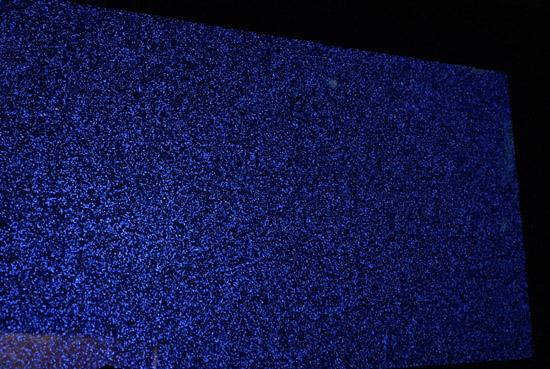
I tried a different BD and same result. I fired up a backup player and moved the cable over to it (same projector input). That image looked fine.
So it's the player, right?
But going back to the Sony for source, I moved the DVI end of the cable from DVI-A to DVI-B, pressed a preset associated with that input and that looked okay. That input is usually connected to a DVD player and is configured a little differently so I wondered if that might have some bearing. So back to the DVI-A input with the sparklies. I then went to the setup program and to the settings for that preset button. I edited the input to change it from DVI-A to DVI-B. Of course the image disappears. I moved the cable over to DVI-B and get my image back and it's fine. No sparklies.
So that would point to an issue with that input.
But if it was an issue with that input, why did not not effect the alternate BD player when it was plugged in there?
(Playback from the server has been fine.)
Posted by Leo Enticknap (Member # 534) on 01-24-2018, 09:09 PM:
So if I understand this correctly:
- The Sony hooked to DVI-A is TARFU
- The Sony (and anything else) hooked to DVI-B is OK
- Anything else hooked to DVI-A is OK
I'd guess something to do with HDCP handshaking not happening, or the NEC input board not recognizing the EDID of the player. But you'd expect that to affect both DVI inputs.
All I can suggest are the usual first line suggestions for a weird issue like this: pull and reseat the SIB, then reflash the software.
One of the pins making an intermittent contact is the only other thing I can think of. If you strain relieve the DVI plug by holding it, or just wiggle it a bit, does it handshake and start to show a picture?
Posted by Steve Kraus (Member # 476) on 01-25-2018, 01:33 AM:
The picture *is* there in all of this. In the photo I have paused the deck on a black frame. If it was an HDCP issue there'd be no picture. I did wiggle the cable to no effect but it's the same cable when I used the backup player. I will try some other HDMI sources. And try the player with a tv.
Posted by Steve Guttag (Member # 268) on 01-25-2018, 06:37 AM:
Sony players are notorious for having compatibility issues (look at Christie's most recent updates...Sony players are mentioned in why the PIB gets it updates).
Current NEC firmware is 4.221 on that projector. I'd give it a try, it is a safe update). I'd also make sure your Sony is on its latest firmware version. Then let us know how it went.
Posted by Steve Kraus (Member # 476) on 01-25-2018, 09:32 AM:
But this player predates the DC projector by years. In fact it's on its second drive.* I don't think compatibility would change. I have a few other HDMI sources to look at on that input.
* My previous setup required analog component output -- something no longer available since Analog Sunset -- and internal 6 channel audio decoding, thus the incentive to keep this player in service.
Posted by Steve Guttag (Member # 268) on 01-25-2018, 12:21 PM:
You're welcomed to argue or disagree. I've just found, when dealing with Blu-ray players, start with making sure everything is on the latest version. Do it or not, it is no skin off of me. Its output might be right on the edge and one port can deal while the other can't. You could try using an HDMI DA as a buffer amp to and see if that clears it up.
Posted by Carsten Kurz (Member # 5396) on 01-25-2018, 04:42 PM:
Are you sure no one fiddled with the players setup menu?
I guess things like that just happen. It may have worked earlier because some minute tolerances just lined up, a cable or connector now is worn out, etc. Certainly not the everyday issue, but it happens. I would first try some sort of HDMI signal regenerator, as Steve suggests, a line driver, splitter/matrix, etc. Also try to reset the player to factory defaults.
Which Sony player is it?
- Carsten
Posted by Steve Kraus (Member # 476) on 01-26-2018, 12:13 AM:
BDP-S550
I'm pretty certain now it is the player's connector.
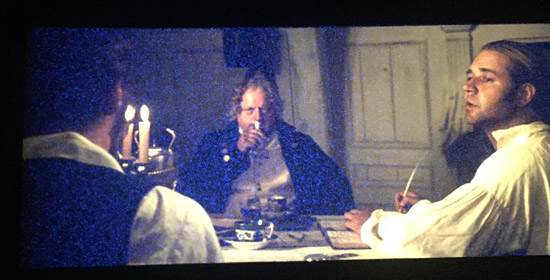
Although it was repeatable from Tuesday to Wednesday and entirely consistent when it appeared and did not, this morning I could not get it to misbehave at all. Then after much playing around and trying various things I finally saw the issue when wiggling the HDMI end of the cable although it took a bit to get it to stay "bad." I then tried moving the DVI end from DVI A to DVI B, and editing my preset button to B. This time the problem was apparent on B as well. Why not before I do not know since moving that end of the cable didn't seem like it would physically affect the player end but apparently it did.
For the record this is what it looked like with an image.
Posted by Carsten Kurz (Member # 5396) on 01-26-2018, 05:18 AM:
We use a Sony 550 here as well. Still a very good player with some very useful features that you don't find on many other players...
But, yes, an aged/worn out connector may cause this.
- Carsten
Posted by Marco Giustini (Member # 4544) on 01-26-2018, 05:39 AM:
I have seen that before but it was via extenders/adaptors and it turned out to be a noisy line/connection. Apparently HDMI will start showing speckles of blue before losing connection entirely.
I would try another cable and/or clean the sockets with some contact cleaner (spray dry cleaner in the socket, then plug/unplug the plug a few times to clean the contacts. I'd do that with equipment off and on both BD and projector).
Posted by Steve Guttag (Member # 268) on 01-26-2018, 06:08 AM:
I had the 570 but the transport started to fail and wouldn't play everything well. It was indeed a good player that I got a LOT of use from. I hated to lose it because it was a pre-sunset player though, honestly, that has become a non-issue too (for me).
Posted by Steve Kraus (Member # 476) on 01-26-2018, 08:44 AM:
Before D-Cinema, I was using a Panasonic projector that required analog component video. With the CP500 lacking a digital input, I needed a player with built-in audio decoding to feed the 500's 6-track input. Also, this player can suppress on-screen symbols which, as you recall, Oppo refused to do until they got so much flack about it they issued an update that provided the option.
I always had a problem with this player in that certain "burned" BDs would not play. Of course, I pre-tested all disks for revenue shows in advance, the whole disk if possible. But if a disk was not available in advance, I would box up the home machine and bring it down just in case. I finally bought a backup machine. I considered the Oppo but with on-screen symbols at the time I felt the Sony would be superior on screen and I didn't want to spend the money on an Oppo just to have it be the backup. Today I would probably opt for one. I got a cheapo which had component output despite being after Digital Sunset.
Anyway, one time the player simply died mid show and I had to finish on the backup. I suspected the drive but didn't want to spend the money on a new one not being sure. My research indicated another Sony had the same drive and I got one for peanuts off eBay. It tested okay so I did a drive transplant and revived my existing player with all the features I needed. If it had failed I would have put the drive back and had a working another player minus the features.
I now go into the CP750 via fiber and I really miss the built-in decoder as I didn't have to think if it's DTS or Dolby. Naturally the 750 handles the latter and not the former. If I want proper decoding (not fold-down to two channels and Pro-Logic expansion) I have to use an external decoder. Multi-channel off the deck creates a loud ground loop hum that I have not been able to isolate.
Powered by Infopop Corporation
UBB.classicTM
6.3.1.2