This is topic DM8 Plus Software Download in forum Digital Cinema Forum at Film-Tech Forum ARCHIVE.
To visit this topic, use this URL:
https://ft-forum.com/ft/cgi-bin/ubb/ultimatebb.cgi?ubb=get_topic;f=16;t=003218
Posted by Dan Judge (Member # 8175) on 02-04-2018, 07:11 AM:
If anyone can point me in the direction or share a link for the 64bit version of the software for the DM8+ i would be very thankful.
For a while there has been an issue with our set up where the DM8 will start back up with the last input that was selected. IDEALLY, this would be set to input 5, which is our main AV system (we have the DCP on a different input).
Can anyone help?
Posted by Dave Macaulay (Member # 813) on 02-04-2018, 08:28 AM:
PM sent to you
Posted by Leo Enticknap (Member # 534) on 02-05-2018, 08:03 AM:
I don't know if Dave covered this in his PM, but if you're using a later version of Windows than 7, the software might not install properly, giving you a driver error (won't install unsigned drivers).
There is a workaround for this to force 8, 8.1 and 10 to install the driver anyways, but I can't remember how to do it.
Posted by Carsten Kurz (Member # 5396) on 02-05-2018, 08:33 AM:
It's a general procedure for modern windows variants, google for 'installing unsigned drivers'.
- Carsten
Posted by Gordon McLeod (Member # 33) on 02-05-2018, 10:40 AM:
To continue on the driver rant
After every win10 major update the drivers for the PCA, The PSA and the D2 do not work are in fact deleteed
wish there was a way to make windows leave them alone or these manufactures get the drivers signed
Posted by Sean McKinnon (Member # 612) on 02-05-2018, 12:47 PM:
Gordon,
Have you or anyone else had the issue where if your PC goes into screen saver mode (where you have to log back in with your password) it will no longer "see" the D2 controller unless you restart with driver signature enforcement disabled? If so is there any known work around?
Posted by Gordon McLeod (Member # 33) on 02-05-2018, 02:11 PM:
Not had that problem yet
but as Leslie our IT guru keeps telling me "for what they charge for this gear they should provide signed drivers as it is not that expensive to do"
Posted by Mike Renlund (Member # 4675) on 02-06-2018, 11:43 AM:
Dolby has just released to www.dolbycustomer.com new 64-bit versions of some applications, now with signed USB drivers. The following software has been released:
Dolby Software Update
Dolby Media Block
Dolby CP750
Dolby DMA8Plus
Dolby NA10 Setup
Dolby DFC100
Enjoy.
Mike Renlund
Dolby
Posted by Steve Guttag (Member # 268) on 02-06-2018, 05:43 PM:
Awesome!
Win10 still is very evil though. Who owns their computer? Why can't one declare that they just don't WANT the stupid updates?
Posted by Leo Enticknap (Member # 534) on 02-07-2018, 08:29 AM:
At the risk of going off topic, IMHO, the improvements in 10 over 7 vastly outweigh the drawbacks, of which the involuntary updates (unless you have an enterprise license as distinct from a consumer version, which gives you a lot more flexibility as to when and how to update) is the biggest.
The idea is basically that consumers act as the guinea pigs for new bug fixes, and then when Microsoft is convinced that they work reliably on a critical mass of PCs in the field, then they release them to the (supposedly) more mission critical machines running enterprise versions. They did give us the update from 7 for free, and so I suppose they needed to fund that somehow. However, I do believe that they should have been a little more honest about their business model. Same goes for the targeted ads, etc. - though you can turn all of that stuff off, if you're prepared to educate yourself as to how to do so. With most Android and Apple equivalents, you can't.
Very good news that the Dolby apps for their older hardware (much of which is still in revenue earning service, because it was so well designed and made to start with) are now available for W10 without hacks or workarounds being needed.
Posted by Steve Guttag (Member # 268) on 02-07-2018, 12:05 PM:
I'll continue the Off topic briefly...just what are the "benefits" to Win10, as it pertains to working on cinema equipment?
Posted by Dave Macaulay (Member # 813) on 02-07-2018, 12:55 PM:
What were the benefits of Vista , Win 7, or Win8 over XP?
Mostly it's about support, MS doesn't update the "obsolete" ones and there have been some pretty major security bugs "fixed" over the years.
I will probably hold on to 7 way too long. I do work with some 10 systems and have almost figured out how to do the common things but some "features" still plain annoy me. Not getting as steaming homicidal mad as if I'm forced to try and use a Mac, but not very happy.
Posted by Steve Guttag (Member # 268) on 02-07-2018, 02:41 PM:
Vista? None. 8? None unless you were on the touchy-feely computers (hence both should have been skipped). 7 brought about compatibility with programs that XP didn't run. That is what got me to Win7 is when XP wasn't a supported OS or because my XP was a 32 bit OS and the program required 64 bit.
Conversely, Microsoft is forcing an OS update that software developers don't seem to be requiring yet. I have no plans to switch to Win10, especially until they realize who owns the computer. You don't get to invade my computer unless I say you can (updates). On Win7, I do allow my laptop to find out about updates but they are not allowed to download, let alone install until I say they can. If I'm in the field, I don't need the laptop, at the direction of Microsoft, to take me off line until it is done doing its thing or to consume bandwidth while I'm trying to get a theatre on line. It's MY computer, not Microsoft's.
Posted by Scott Norwood (Member # 30) on 02-07-2018, 03:32 PM:
Agreed with everything that Steve said above.
There actually is a 64-bit version of WinXP, but it was poorly supported by hardware manufacturers and never became a mainstream product.
Posted by Carsten Kurz (Member # 5396) on 02-07-2018, 07:21 PM:
You can disable the windows update service for WIN10 in Administration/Services. Pro (not just Enterprise ) versions allow you to postpone feature upgrades through a GUI setting.
Not that this makes me switching to WIN10, I'll be staying on 7 as long as possible, just as I did with XP.
- Carsten
Posted by Leo Enticknap (Member # 534) on 02-07-2018, 10:19 PM:
quote: Steve Guttag
I'll continue the Off topic briefly...just what are the "benefits" to Win10, as it pertains to working on cinema equipment?
- It boots up more quickly (on the laptop I use most frequently, probably around a 20 second time saving from power button to using an application program).
- Much less bloaty than 7. I've seen a big speed/responsiveness improvement with 10 installed on older computers, especially with the "allow apps to run in the background" feature disabled. 10 runs comfortably on a machine with only 4GB of RAM; 7 really needs 8 to avoid pagefile use slowing things down noticeably.
- On two computers that I've upgraded from 7 to 10, network (wired) transfer speeds seem to have improved significantly.
- The Windows 7 habit of filling the C: drive up with tempfiles and general detritus seems to be gone with 10. I'm not having to run the disc cleanup wizard every week or so, or delete tens of gigabytes from C:/Windows/Temp all the time.
- Many more drivers for commonly used peripherals (e.g. printers and scanners) are either built into 10, or downloaded and installed almost instantly when the device is connected.
- In almost two years of using 10, I have not experienced a single BSOD. That probably happened to me two or three times a year with 7.
Posted by Steve Guttag (Member # 268) on 02-08-2018, 06:21 AM:
No lie Leo, I've just not had the problems with Win7 you have had. BSOD has happened to me maybe 3 times total on Win 7 and only recently (I suspect a Microsoft Update caused it). Going to an SSD drive will yield a better boot up time and if boot up time is your metric, go with a Mac, my Mac boot up is orders fo magnitudes faster than my PC.
The bottom line is, I CONSTANTLY hear of and have to deal with Win10 problems that I don't have on Win7. Drivers that stop working, heck even persistent static routes stop working.
Carsten thinks that one can disable the updates...you can't. Read up on it...people have tried most everything and it still seems to happen (short of staying off the internet). You can slow it down and put up road blocks but it will get around them. I've read of configurations, resource editing...you name it and Bill Gates gets around it. What the Eff is wrong with what Win7 provided? A simple, "let me decide what and when to update." You can let it do its thing, let it download but wait for my okay, let it search but don't download or simply do NOTHING. Perhaps I have a purpose built computer that runs ONE program and never needs updating. I come back to...IT IS MY COMPUTER, not Microsoft's.
Posted by Leslie Hartmier (Member # 7053) on 02-08-2018, 01:56 PM:
Yes, I do not disagree with the comments in the main (derailing the topic as they might), but I have a number of things to contribute:
1) My home computer is one that I force updates BEFORE Windows attempts to do them, so that they are done on my schedule.
2) If you connect your device on only using WiFi, you can ignore 100% of all updates by simply opening your settings, going into Network & Internet, selecting your WiFi connection, and telling it that it is a metered connection, and it will never attempt Windows updates. Just make sure that if you choose to connect to a non-WiFi connection that has an internet connection that you will not disconnect, that you have forced the updates (god help you), or you have nothing to do for a long time, and have the time to check in on it to 'help it finish up'.
3) If you have a taste for adventure, do the following:
a) Use the Windows key + R keyboard shortcut to open the Run command.
b) Type regedit, and click OK to open the Registry.
Browse the following path:
HKEY_LOCAL_MACHINE\SOFTWARE\Policies\Microsoft\Windows
c) Right-click the Windows (folder) key, select New, and then click Key.
d) Name the new key WindowsUpdate and press Enter.
e) Right-click the newly created key, select new, and click Key.
f) Name the new key AU and press Enter.
g) Inside the newly created key, right-click on the right side, select New, and click on DWORD (32-bit) Value.
h) Name the new key AUOptions and press Enter.
i) Double-click the newly created key and change its value using one of the following options:
- 2 - "Notify for download and notify for install."
- 3 - "Auto download and notify for install."
- 4 - "Auto download and schedule the install."
- 5 - "Allow local admin to choose settings."
j) Click OK.
k) Close the Registry to complete the task.
Best choice is 2 - Notify for download and notify for install.
Even if you do none of these, make sure you set your Active Hours to a time when you are guaranteed not to be using your machine, like 3 am to 6 am, or whatever works for you.
Major updates, such as the Fall Creators Update can be deferred up to 365 days from the release or 365 days from the release plus 4 months if you use 'Current Branch for Business' inside Settings\Update & Security\Advanced Options\ under "Choose when updates are installed"
You can also set Ethernet to Metered as well, even in Windows 10 Home (which has limited abilities to defer or prevent updates), and it will prevent all updates as well.
There are downsides to doing any of this (just like in Windows 7), but that is not the purpose of this post, and frankly, no one asked me in the first place, so you do you.
Leslie
Posted by Marco Giustini (Member # 4544) on 02-08-2018, 03:52 PM:
the registry hack which has been suggested is just part of the group policy (search "edit group policy" and navigate to Computer Configuration - Administrative Templates - Windows Components - Windows Update - Configure automatic updates) . If you are on a PRO version, you an just navigate to the option and let windows warn about updates but not download or install them. All my computers have this option enabled.
That being said, MS have just lost their mind with those updates.
Posted by Steve Guttag (Member # 268) on 02-08-2018, 03:54 PM:
There are NO hours of the day/night that I might not being doing service (often I'm working Midnight to Noon for PM calls). I've heard that even modifying the register isn't sure-fire nor declaring that everything is metered. Have YOU tested these?
Posted by Leslie Hartmier (Member # 7053) on 02-08-2018, 04:01 PM:
I can confirm that they work.
One of my tablets has never been updated due to the metering thing (Windows 10 Home - full disclosure, I don't do a lot with that tablet, due to not updating it, but it works fine for my controlling projectors, etc, and downloading firmware, warranty licenses, etc on the internet - I just don't go anywhere fishy with that gizmo), and my work computer has the registry hack, and has never updated itself on its own (Windows 10 Pro).
All that said, if you are satisfied with Windows 7, why change?
If something bugs you about W7, then that is the time for soul searching.
Leslie
Posted by Steve Guttag (Member # 268) on 02-08-2018, 05:21 PM:
EXACTLY!
Thanks for the info on the Win10 non-update schemes. Everything I had looked up and via friends that have tried hacks have failed so I had given up hope.
Posted by Leo Enticknap (Member # 534) on 02-10-2018, 12:46 PM:
I guess I just don't consider the involuntary update thing as much of problem as some do. Like Leslie, I tell it to update before starting to use the computer for something mission critical.
The only time it was a significant problem was if I left some DCPs rendering overnight, only to come back in the morning and find that it had updated and rebooted itself halfway through. If it's a Premiere/CuteDCP render there's no way around that, other than to make sure that all the pending updates are done and cleared before starting a job; DCP-o-Matic renders I do in Ubuntu anyway, which doesn't do that.
I am impressed at the extent to which W10 has given older hardware a new lease of life. It's definitely leaner and faster than 7. All my computers are dual boot (i.e. two separate OS partitions) Windows/Ubuntu. I only use Windows when I need to use software for which there isn't a Debian/Gnome Linux version and which won't work reliably under WINE, which basically means Adobe Creative Suite, some cinema applications (e.g. the Q-Sys applications and Barco Communicator, the Linux version for which is buggy and unreliable), Outlook, and some of the more advanced features of Microsoft Word that aren't replicated properly or at all in Libre Office. But when I do have to use Windows, 10 is, in my experience, a definite overall improvement from 7.
Posted by Steve Guttag (Member # 268) on 02-10-2018, 01:03 PM:
You are in the distinct minority there Leo. I'm not saying you shouldn't be happy with what works for you though. I can definitely tell when a customer has gone to Win10...things just become unreliable...which is to say now, things are more unreliable than before Win10.
As for updates, I come back to IT IS MY COMPUTER! I DECIDE WHEN IT UPDATES. I shouldn't have to "get it out of the way" first. On my field laptop that DOES connect to the internet, I tend to update when I'm in the office (or at home) and let it have the night to do whatever but not so much as download anything in the field. When I'm in the field, the meter is running and ANY time/bandwidth that MS takes to do an update of any time is offensive and potentially expensive. Furthermore, it is just down right rude.
At some point, I suppose I'll make the switch to Win10 or something past Win7 but that day has not arrived for me.
I'm not as enamored with Linux Distros as others seem to be either. They all feel like hacks and clearly designed around people that are in on the various CLIs to get them going and other Linux insider info. Ubuntu has been many times less stable for me than Win7, let alone OSX. I've tried a few other distros and, like beer, they all suck for me. The LDXE (light-weight desktop environment) has its moments but it is a Windows wannabe. Linux seems fine for custom environments but it isn't ready for prime-time compared to Mac/Win and likely will never have the support of the big two. It feels very DOS like to me with all of the TSR conflicts that came with it. No thanks.
Posted by Carsten Kurz (Member # 5396) on 02-10-2018, 03:06 PM:
We have a ticket machine, and a presentation machine. These need to work when we are open. No way to have automatic updates enabled under these conditions. An automatic reboot during the preshow, or with a queue of people waiting to buy tickets? A recent WIN10 update screwed ATI drivers. No, thank you...
- Carsten
Posted by Marco Giustini (Member # 4544) on 02-11-2018, 05:33 AM:
While I understand why MS have switched to this behaviour - just yesterday I read a very interesting article on the matter that basically explains how MS had to introduce new features 3 years before they were actually shipped with the following version of their OS and if there was a delay, it would be 6 years before it could reach the customer! - they MUST give the user total control of how the machine updates.
I am cool with a scenario where Windows forces the upgrades after months the user have skipped them but there MUST be an EASY way to just tell the PC what Steve just said: "I am working, do not bother me, do not do anything in the background, I need all the available resources".
ALSO, Windows update CANNOT use 100% of the available bandwidth preventing you from browsing!! That's a joke!
Posted by Carsten Kurz (Member # 5396) on 02-11-2018, 07:40 AM:
I guess they also want to prevent huge virus/ransomware waves like WannaCry and being held responsible, by enabling themselves to shell out fixes as quickly and unconditional as possible.
- Carsten
Posted by Marco Giustini (Member # 4544) on 02-11-2018, 09:09 AM:
The regular updates, yes.
The 6/12 months whole OS update should be because of what I mentioned.
I kind of understand them, I can just imagine how many people just disabled the updates in W7 so they don’t have to spend time upgrading. But what they’ve done with W10 is way too much.
Posted by Steve Guttag (Member # 268) on 02-11-2018, 09:59 AM:
No, No NO!!!!!
It is MY COMPUTER, there is no situation where THEY should be able to force an update...I don't give a damn if it is 8 years later with zero updates, they don't get to update MY computer. If I'm running a stable computer that say only has to run one 3rd party program and it hasn't changed, I DON'T need an update nor do I want one. I want stability. I come back to...IT IS MY COMPUTER. How simple a concept is that?
If MS is worried about security breaches and being sued, put it in the TOS fo the software. If you disable regular updates, MS can't be held responsible for not providing said security fixes.
Posted by Carsten Kurz (Member # 5396) on 02-11-2018, 11:38 AM:
If it was only your computer, MS would probably not care. But as most machines are constantly on the internet, it is no longer just a personal issue. Maybe automatically disable all network connections when the system is behind on important updates.
- Carsten
Posted by Leo Enticknap (Member # 534) on 02-11-2018, 12:32 PM:
Agreed with Carsten. The "It's my computer, and I have the right never to update it" position is analogous to "It's my car, and I have the right never to replace the tires and brake pads." Doubtless Microsoft are afraid that they would be the target of a lawsuit, or already have been, resulting from an unpatched Windows installation falling victim to malware that disrupted a mission critical operation.
It's like the theater I encountered recently in which their projector and server had not had a software or firmware update since it was installed in 2013, and had refused to allow us to install one at every single planned maintenance visit since, asserting the "if it ain't broke, don't fix it" mantra. Then, one day, we got an emergency call because the subtitles wouldn't appear on an SMPTE DCP, and 450 customers were demanding a refund.
Posted by Martin McCaffery (Member # 37) on 02-11-2018, 12:35 PM:
Your computer, for now. The migration to the cloud, like it or not, will probably mean you just rent a portal in the near future. Like MaBell before the breakup.
Posted by Ioannis Syrogiannis (Member # 3235) on 02-11-2018, 01:03 PM:
quote: Leo Enticknap
The "It's my computer, and I have the right never to update it" position is analogous to "It's my car, and I have the right never to replace the tires and brake pads."
In the other hand, if I never update the software of a system, I don't put in serious danger the lives of me and many others.
In a personal computer, even more, where there are ways to ensure that the system's health may be restored, if compromised.
I find nobody here to suggest not ever updating a system.
Even more, a cinema projection system like the one in the example.
If you think about it in such manner, don't you also find the analogy to be somewhat exaggerating?
Posted by Gordon McLeod (Member # 33) on 02-11-2018, 02:57 PM:
On the issue of patches for software
WRITE IT RIGHT THE FIRST TIME!!!!!
Posted by Marco Giustini (Member # 4544) on 02-11-2018, 04:10 PM:
I see Steve’s point but I’m with Carsten on this. Yes, MS have lost their
Mind with the endless upgrades they are shovelling down our systems every other day. But I see why they’ve designed W10 to allow the most critical updates even with no user consensus.
It’s a complex subject. And I see both parties’ point. MS is dealing with millions of systems out there and I see why they want control. I don’t really see an alternative. You, Steve, are an exception as you know what you’re doing with your PC. The remaining 99% would just put their PC and their LAN to in danger.
In fact MS could let you disable the updates if Ethernet devices were disabled as well.
Gordon,
I watched a video of a former MS employee once. He claimed to be parte of the test team and claimed that now users were MS’ testers. Indeed it seems that very little testing is performed nowadays on software but with the plethora of different systems, platforms, software and hardware - not to mention users and hackers - that Windows have to deal with it’s impossible to design a system that does not require updates - I reckon
Posted by Steve Guttag (Member # 268) on 02-11-2018, 04:51 PM:
Marco (and the rest)...Microsoft has no leg to stand on. The simple option of disable updates, in its various levels, is the solution they already had. By default, the systems ship reay to update automatically. If YOU want to change that, then YOU take the responsibility of that outcome. It isn't like MS has an aversion to popping up a big fat warning when you do something they don't recommend. You click "I'll take the responsibility" and move on. It is simple and would work for everyone. It is the same as the automatic Firewall. There are times, when troubleshooting, that the fast thing is to defeat it (to rule out a firewall conflict)...it will put up a defeatable warning flag while the firewall is down.
To put this in our industry. Let's say you have a TMS/LMS system, take the prevalent TCC by Hollywood Software (aka Cinedigm). The vast majority are running on Windows Server 2003 (they also have a Server 2008 based approved image). It doesn't matter that it is running on an antiquated OS because they are running ONE program (or a collection of the same program). The only updates are via Hollywood software and the advantage of this is that their system in their office exactly matches EVERY field system. Once MS updates go on, you can get conflicts as the MS updates are trying to fix/protect things that don't apply. The TMS isn't supposed to be used for surfing and is reasonably locked down (wakes up to a user shell so they never are in the Windows environment). I sure wouldn't want that sort of program being forced into updates. I maintain quite a few of those systems and I just don't have much in the way of problems from them (anymore). In fact, it has gotten very stable for us in recent months as some TCC patches were directed at improving the responsiveness with Dolby DSS servers.
But even in the field with a conventional laptop that runs proprietary programs, it is MY computer and I'll decide when and where it gets its updates. Because it does connect to the interwebs some, I do keep it reasonably current, including antivirus software. BTW...have you noticed on a Windows computer (going back about as far as Win3), the more you allow MS to update, the SLOWER the boot up is? Another reason to restrict MS...they don't care about what they do to your productivity. I'm sure Win10 proponents will say that they've fixed that but Win10 hasn't been out long enough to really know its long-term effects. Its short-term effects, for me have been nasty with things that stop working suddenly have Billy got in there.
Posted by Carsten Kurz (Member # 5396) on 02-12-2018, 08:19 AM:
Steve - you are free to never receive Updates for a WIN10 machine - just never plug it into the interweb and you are safe. The moment you participate, you have a responsibility.
Yes, that responsibility may a first be with Microsoft to provide fault-free 100% software, but, as it stands, this doesn't work. If there was a known thread circulating around, as has happened in the past, you would expect your OS or AV company to spread fixes/updates as quickly and as efficient as possible. That doesn't work if people postpone or disable updates.
Again, I am not a fan of that, but the rationale behind it makes sense for the majority of users, as long as that majority threatens itself by being connected with software that has considerable security holes. You can step out of that scheme, but then, don't connect.
- Carsten
Posted by Steve Guttag (Member # 268) on 02-12-2018, 08:52 AM:
I absolutely disagree. Just because I plug into the internet has no bearing if I should then allow updates. Naturally, I can't blame MS for a virus that infects the OS because I prevented a patch that would have prevented it. But that is my risk to take. As I said, for things I do connect to the internet, I do keep them updated, on my terms. Though one could say that the TCC servers do have internet connectivity but NOBODY is surfing the web on them. They are only accessed via VPN. In the close to 9-years I've had them in service, not one virus has infected them and, as I said, stability has improved (due to Hollywood Software's continued development).
Posted by Carsten Kurz (Member # 5396) on 02-12-2018, 08:54 AM:
Steve - rest assured, MS doesn't target you specifically with that update scheme. There are probably zillions of users who do not even have a clue that there is something like security updates.
- Carsten
Posted by Steve Guttag (Member # 268) on 02-12-2018, 11:38 AM:
Carsten, I DO realize that. I don't object to the shipping default position of the updates is "automatic." That takes care of the zillions of people. For those that have reason to run their equipment their way, back off and let them, at their own risk. This is a problem THEY created because they already had the solution in prior OS versions. It is Microsoft that broke it.
Posted by Marco Giustini (Member # 4544) on 02-12-2018, 02:50 PM:
The problem is that there is also a Zillion users selecting “never notify or download updates” in W7 because it saves them the hassle of upgrading. That causes their system to become infected/unsafe and It then goes on the big pie chart that says that “xx% of PC running Windows are unsafe”.
Unfortunately I don’t see a solution for that - besides maybe allowing not to update on an enterprise version, but I guess you can already do that via group policy as I said so I don’t really see a big issue here.
Posted by Scott Norwood (Member # 30) on 02-12-2018, 03:09 PM:
I am completely on Steve's side here. I prefer stable systems that stay that way to ones that self-mutate at random. Some proprietary software requires particular patch sets in order to receive vendor support, and the current MS scheme breaks that. As another example, some users need to do long-term number-crunching work and cannot simply reboot at will.
Remember, too, that Windows 10 is effectively the only operating system that forces patches on users. No one else has ever done this before on any sort of scale, and for good reason.
In any case, I believe that they should make self-patching the default, but allow users to opt-out of it at will.
The right way to distribute operating system updates would be to allow users options for no patches, security patches only (essentially the LTSB scheme, which should be made available to consumers); security and bug fix patches; and security patches, bug fix patches, and feature enhancements. Unfortunately, no vendor has really offered this as such (SGI's IRIX came close, though, with separate "feature stream" and "maintenance stream" releases.)
Posted by Steve Guttag (Member # 268) on 02-12-2018, 03:52 PM:
Marco, your argument doesn't hold. The only thing that becomes unsafe is my personal property. Even if it connects to the web. Presuming YOU have all of the latest Microsoftdom, you're protected. It isn't like vaccinations where if you choose to not vaccinate due to some pseudo-science belief YOU could infect someone that has a weakened immune system. Each computer is an island with whatever security it chooses to have. Microsoft can control Apple, let alone Linux. Heck, someone could write a code that uses Linux as the carrier to infect Windows (so the Linux machines don't show the symptoms but if they connect into a network with a Windows machine, it attacks).
There simply is zero argument to the requirement for updates beyond good-practice. But that is an individual choice based on their circumstances.
Legally, I don't think Microsoft would have a good case in the US (I can't speak for any other country). While they may have a TOS clause, I doubt it gives them the option of suspending the use of one's computer due to lack of updates/patches. That is what they would have to seek in order to force updates, which is tantamount to stealing hardware (rendering it useless) because you disallowed updates. I wouldn't want to argue that case. I REALLY wouldn't want to argue that case if it happened to a government entity. Air-gaped machines naturally would never see the webs (or shouldn't). As I recall, the US government is one reason that WinXP hung around much longer than MS wanted it to.
I will NEVER accept that Microsoft should require a degree of hacking in order to prevent updates. It smells of a class-action law-suit waiting to happen. What is so stupid about it all is that the solution exists and Microsoft already had it.
Posted by Marco Giustini (Member # 4544) on 02-12-2018, 04:03 PM:
It’s not hacking. Group policy is in the administrative section and has a proper official GUI.
MS make money selling Windows. If Windows proves unsafe because Zillion of users disable the updates, MS remove that option. It makes sense to me.
But I still would like to stress out that I am a firmly believer that MS have lost their mind with those upgrades!!
Posted by Steve Guttag (Member # 268) on 02-12-2018, 08:47 PM:
Care to post screenshots of that UI? Here is one of my Win7Home (running on my Mac via Parallels):
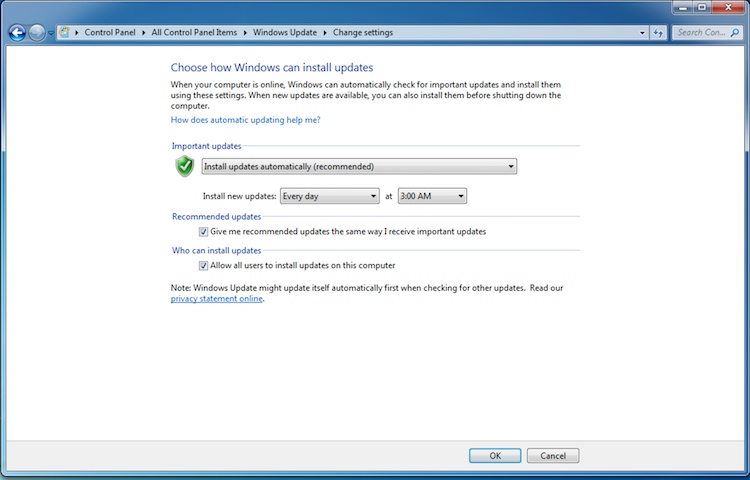
It is pretty straight forward and is up to the user. It isn't right on the desktop, as the title bar shows, one does have to go to "Control Panels" and dig their way in but it is a pretty logical order.
Has it been MS' claim that a major flaw in their product is people not getting the updates they require? I don't doubt that the lack up timely updates has caused issues.
Heck, I'm responsible for ensuring our customers are properly updated to avoid issues (i.e. SMPTE packages, Captions working, Engimas not bricking...what have you). Then again, I only do updates twice per year unless a critical update comes out to address a specific and necessary issue (ADA related or the Enigma bricking). Part of what I do, however, is also evaluate each update for what it potentially benefits, what it potentially harms to determine if we are going to go to that version. We also "beta" test new software in select locations that KNOW they are the first to receive it to ensure we don't cause a mass-epidemic. As, I'm sure you are aware, we've done beta testing in the real sense of various software whereas they are often working on software to address specific complaints we have made.
With an OS update, it could be a full time job keeping up with what all of the updates are doing and what benefits or harm they bring. I generally do NOT like to be the first to receive a new version of anything (and that is across the board). Apple comes out with a new iOS...that's nice...call me when .1 comes out to fix all of the .0 bugs.
Posted by Marco Giustini (Member # 4544) on 02-13-2018, 01:09 AM:
I’ll do when I’m on my PC but it’s easy to google.
It’s not on Windows home and not under control panel but under administrative tools - or you can just call it via RUN. It is not ‘obvious’ but again that’s the whole point.
I’ve altrady agreed that MS are pushing too hard on updates, we are on the same frequency on this. I have fun as a user who enjoys tinkering with IT but from a professional standpoint it’s a nightmare. And to be honest, I have four W10 PCs at home and every 6 months I have to update them all... not fun, particularly on slow machines.
Posted by Steve Guttag (Member # 268) on 02-13-2018, 04:46 AM:
So people who run home versions of Win10 don't own their computers? Why not? The screen shot I posted was from the home version of Win7.
Posted by Leo Enticknap (Member # 534) on 02-13-2018, 07:56 AM:
quote: Steve Guttag
The only thing that becomes unsafe is my personal property. Even if it connects to the web.
Not necessarily, if your computer involuntarily (on the part of its owner) becomes part of a malicious botnet. If it hasn't happened already, I suspect that it's only a matter of time before the victim of a malicious botnet who suffered a significant loss (e.g. an entire office building is affected by ransomware), is able to identify the source of the infection and tries a lawsuit. If that infection were made possible by an unpatched operating system, the producer of that OS could be named as a co-defendant, especially if an argument could be made that they could have done more to ensure that their software was kept up to date. My guess is that by making it impossible to prevent updating altogether unless you keep your computer disconnected from the Internet or "go under the hood" to disable that functionality, Microsoft are covering their corporate ass against that possibility.
quote: Steve Guttag
While they may have a TOS clause, I doubt it gives them the option of suspending the use of one's computer due to lack of updates/patches. That is what they would have to seek in order to force updates, which is tantamount to stealing hardware (rendering it useless) because you disallowed updates.
It's not tantamount to stealing hardware, because you only own the hardware free and clear, not the software that runs on it. If you're sad and geeky enough to read the small print that 99.99% of the population click OK to during the Windows installation process after barely a glance, you'll see that you are in fact buying an in perpetuity license to use Windows, not outright ownership of your copy. Microsoft asserts the right to revoke that license at any time and for any reason, limited only by the laws of the jurisdiction in force. If you don't like that business model, you are free to install a Linux distro, Hackintosh or whatever else you like on your computer.
The lawsuit a couple of years ago in Oregon in which a small business owner sued Microsoft because the update from 7 to 10 buggered her PC was based on a different premise: she accepted Microsoft's assurance that the update process would not affect the functionality of the computer or any of the applications software or drivers running on it (the "upgrade assistant" had told her that it had checked her W7 installation and that the update would be OK), and therefore consented to the changes. In fact, they made her computer unusable, and the judge decided, quite rightly, that Microsoft was responsible for the losses resulting from that.
Posted by Steve Guttag (Member # 268) on 02-13-2018, 08:52 AM:
Leo,
If that office is up to date on its patches and antivirus software, how would an outsider's computer infect it? If anything, it would see the issue, clamp down and identify the source. If MS updates don't protect the good user that always takes the updates, then the updates themselves and their anti virus values are suspect.
As for hardware stealing...the TOS clause that people go clicking about is only as valid as a court would hold it to be. They can write anything they want. it isn't necessarily enforceable. I'm well aware of the software being a mere license to use. In cinema, the ticket is a limited license to see a single performance.
However, revoking of said license due to prevention of software update would be a tough one in court to defend. I wouldn't want to be MS on that one. I couldn't envision the situation where they'd do it either. Their recourse is pretty cut and dried. If your computer acts flaky or not at all and you block the updates, well that is on the user...unless they put in an Apple esque routine that degrades the performance based on the length of time between communication with the mothership. That I wouldn't put past them. Then you get a rush each time your computer updates with an improved performance.
Posted by Scott Norwood (Member # 30) on 02-13-2018, 10:38 AM:
If liability is such a concern, then why does no other operating system vendor do this?
The whole forced-installation thing would be more defensible if it were limited to security patches. In the case of Windows 10, it is not--MS keeps trying to force feature "enhancements" as well.
Posted by Marco Giustini (Member # 4544) on 02-13-2018, 12:06 PM:
Scott
I keep saying that I too believe MS have lost their
Mind with the updates ![[Wink]](wink.gif)
Steve
I guess we disagree on this. You do own your computer. MS will keep it up to date. You cannot disable updates (via GUI) on W Home. You also cannot access the kernel and change it’s programming or install Windows on a Linux partition but you don’t seem concerned about that.
I repeat: MS are pushing this update thing way too far but I see why they’re doing that.
Other vendors don’t force updates (also) because they don’t have 400 million Systems around.
Posted by Steve Guttag (Member # 268) on 02-13-2018, 12:29 PM:
I'm not concerned with that which has not caused me harm. I am concerned with that which has. I don't consider blocking updates as altering the program, which altering the Kernel would be.
Posted by Colin Brant (Member # 10162) on 11-06-2018, 09:56 AM:
Hi All,
I'm reading this thread and troubleshooting an audio problem ahead of a film fest opening tomorrow, with the first tech check today at 4:30 pm PST. The basic setup is a NEC 900c with GDC IMB and a Dolby DMA8Plus feeding the soundboard in this performance space (w/ no center or surround speakers). The technicians who set up the DCP system yesterday said that there is probably a problem with the breakout snake (db25 --> 6 x XLR) and that there wanst much they could do, at least not in the time that we had. Now they are gone and I need to figure out why SL is cross talking with L channel at full intensity!!
Just requested a dolby account login via link found in this thread to get the DMA8 setup software which I hope will help me either deactivate the surround channels cross-talking or do a proper downmix. Any thoughts on what else to try? Any guidance is appreciated!
Posted by Carsten Kurz (Member # 5396) on 11-06-2018, 04:41 PM:
My first guess would be a short in that snake between L and SL. That would mean, not only is SL on L, but L on SL on their respective XLRs. Do you have a channel test DCP, or a multimeter to check the wiring? If there is no short between either XLR, THEN I would suspect a software issue. However, to my knowledge, there is no setup option on the gear involved to mix two channels into one. However, yes, you should be able to deactivate SL both in the server and the DMA8 as a quick fix.
- Carsten
Posted by Bruce Cloutier (Member # 9615) on 11-07-2018, 06:37 AM:
All of this is one reason why I have moved the systems that I can to a flavor of Linux. I think it was on about the 5th or 6th time I was being forced to buy Office for my own computer and that my only option seemed to be paying for yet another monthly subscription that I called it quits on MS. I just got tired of reaching for my credit card to perpetuate the pain.
Yeah, unfortunately many applications are only available to run under Windows. Those companies need to migrate. I suspect they will at some point. I am not sure Linux is any answer either.
Having said that, our Support Tool for the JNIOR is only available in a Windows version. A rewrite to make it OS independent has been on the ToDo list for a while. The priority on that needs to be elevated. It would be helpful if those of you running Linux and running the Support Tool under a Windows emulator send us an inquiry on that.
I know that Linux doesn't get you away from the update woes and it has its own security issues and vulnerabilities. It's why we developed our own OS for JNIOR.
Sorry, I didn't mean to fan the flames here.
Posted by Leo Enticknap (Member # 534) on 11-07-2018, 08:43 AM:
Abandoning Windows altogether is like cable TV and cord cutting - many of us can do without it 90% of the time, but not 100%. At home, we continue to bend over and take it up the tailpipe from the cable monster, because I don't want to lose Fox News and my wife doesn't want to lose HGTV. We probably watch them for 2-3 hours a week at most, but still can't bring ourselves to cut the cord. If those two channels were available as standalone subscriptions for delivery via Roku or any other IPTV solution, we'd go for that like a shot, because we never watch about 148 of the 150 or so channels in our cable package. But until then...
All three of the PCs I use regularly (main home PC, laptop, and DCP render machine) are dual boot Windows 10/Ubuntu. I probably use Ubuntu about 50-60% of the time. But there are things I just can't do with it, that I need to do. Libre Office doesn't handle tables containing form fields in Word documents properly, and I use documents like this a lot. Adobe stuff is not available for Linux/Debian, and I use Premiere, Audition and Acrobat Pro heavily.
As for Dolby stuff, most of their control apps will work under WINE in Ubuntu for IP access to the device, but obviously, the USB drivers won't. I haven't tried the JNIOR support tool under WINE, but will try to do so when I get a chance.
Posted by Colin Brant (Member # 10162) on 11-09-2018, 04:14 PM:
Thank you Carsten for the response and info. I wanted to follow up and update just a few details:
1) In my original post, I stated that the L and Ls channels were cross-talking into the L speaker at full intensity. BUT, what is actually happening is the L and Ls channels are cross-talking at equal intensities, but falling about 10db lower than C and R screen channel speakers. In addition to this, there is a noticeably higher noise floor through the L speaker, which is, of course, made worse when we pad the C and R channels to compensate for this problem.
2) I talked to Dolby support and they also hypothesize that this is a cable problem. But still havent been able to get a new snake.
3) On day #1 we were getting Ls in the L speaker, but now it is Rs getting in. This made me/us think it might be a Software-based issue.
4) We swapped units and got same results, so back to thinking it's a cable problem. I'll try to find an opening in the schedule today to put my multimeter on the cable and see what's going on there. Is the destructive act of snipping say Pin 4 & 15 a reasonable course of action? Again, this theater only has L, R and Subwoofer speakers.
A quick question about the DMA8Plus: Can I disable a particular audio channel or group? I don't see any reference to this in the manual or software.
Thank you!
Posted by Carsten Kurz (Member # 5396) on 11-09-2018, 06:00 PM:
I would try to pry open the DB25 shell. I soldered some of these snakes myself, and I can easily think of ways how this can happen when trying to squeeze that many wires around the db25 connector.
- Carsten
Posted by Stephan Shelley (Member # 8587) on 11-09-2018, 08:25 PM:
I am one of techs that did the install and I did open up the DB25 shell. It is not the soldier type of connect but the one where you crimp the pins and then insert them. I did not see any cross talk there. It is possible a pin(s) are in the wrong place. Did not have a connection diagram at the time.
Posted by Carsten Kurz (Member # 5396) on 11-10-2018, 08:03 AM:
Reduced level crosstalk can easily happen with symmetrical audio when you mix one of either + or -.
- Carsten
Posted by Carsten Kurz (Member # 5396) on 11-10-2018, 09:52 AM:
And by the way, Odyssey has all important pinouts covered.
analog:
http://www.odyssey-products.com/new/resources/DB25_Analog_Audio_Pinouts.pdf
digital:
http://www.odyssey-products.com/new/resources/DB25_Digital_Audio_Pinouts.pdf
- Carsten
Posted by Ioannis Syrogiannis (Member # 3235) on 11-10-2018, 12:19 PM:
I guess, by reading again, that since you have DP25 connector to XLR, there is no monitor in between the DMA8 plus and the amplifiers.
You write that you changed units, DMA8 plus units, I guess...
So, we may guess that it's not a problem in the DMA8 plus DB25 socket. (Something that could be possible, after all. Remember that the outputs are males and males are a bit more receptive to accidents and issues than females.)
The way I imagine it, it is more probable for a problem to derive from the shields of the cables, than the plus. Yet, in DMA8 plus analog out, the L,Ls and Rs are one next to another...
Carsten, I think that the PDFs you link to are for the inputs.
Posted by Carsten Kurz (Member # 5396) on 11-10-2018, 12:45 PM:
Hi Ioannis, makes no difference for DB25. The document for analog connections establishes output and input references for gear following these pinouts.
- Carsten
Posted by Stephan Shelley (Member # 8587) on 11-10-2018, 01:36 PM:
That is great if one has an internet connection on site.In this case I did not.
Posted by Ioannis Syrogiannis (Member # 3235) on 11-10-2018, 01:51 PM:
You are right Carsten, I can see that now.
Powered by Infopop Corporation
UBB.classicTM
6.3.1.2