This is topic Control AP20 from GDC SX2000? in forum Digital Cinema Forum at Film-Tech Forum ARCHIVE.
To visit this topic, use this URL:
https://ft-forum.com/ft/cgi-bin/ubb/ultimatebb.cgi?ubb=get_topic;f=16;t=003225
Posted by Carsten Kurz (Member # 5396) on 02-13-2018, 02:32 PM:
How would you typically control an AP20 from a GDC SX2000 server? The GDC has some device modules for automations, JNIOR, CP650, USL JSD/DAX, etc - does current software also implement such a module for an AP20? The manual does not show a generic configurable TCP method to control networked gear, but I am sure it exists?
- Carsten
Posted by Steve Guttag (Member # 268) on 02-13-2018, 03:30 PM:
You can create your own custom Network Socket. (Configuration>Automation>Devices>Add)
Note, you'll need a password to get beyond Configuration.
Once there you can define the TCP or UDP address, port...etc. and then proceed to build up the command list you need.
GDC doesn't have the ability to just load in devices like Doremi or Barco (once created). You have to do it yourself manually. Now, once in, you can clone a configuration but it is an all or nothing thing.
Posted by Carsten Kurz (Member # 5396) on 02-13-2018, 03:52 PM:
Thanx Steve!
- Carsten
Posted by Mark Gulbrandsen (Member # 72) on 02-14-2018, 05:10 PM:
If it doesn't exist you can either edit or create new ones in the root of the OS. Good luck getting them to give you THAT password though.
Mark
Posted by Sam D. Chavez (Member # 1841) on 02-14-2018, 05:17 PM:
What a trooper! Back at work already.
Posted by Steve Guttag (Member # 268) on 02-14-2018, 06:51 PM:
What Mark stated is not entirely accurate. The included devices are embedded. Configurations, including custom devices...that is another story.
Posted by Carsten Kurz (Member # 5396) on 02-19-2018, 07:37 PM:
As it seems, recent GDC software releases does have a dedicated AP20 device library built-in. At least that's what GDC said. It's not in the current manuals. As the AP20 only allows to access formats through their user settable names, that interface device would either need a way to enter these preexisting format names, or force the installer to change AP20 format names to those configured in the library. Of course, the basic socket communication way of doing it is still available.
- Carsten
Posted by Steve Guttag (Member # 268) on 02-20-2018, 05:55 AM:
I can confirm that reasonably current software DOES include the AP20 and fear not, you can create your own FORMATs and MACROs:
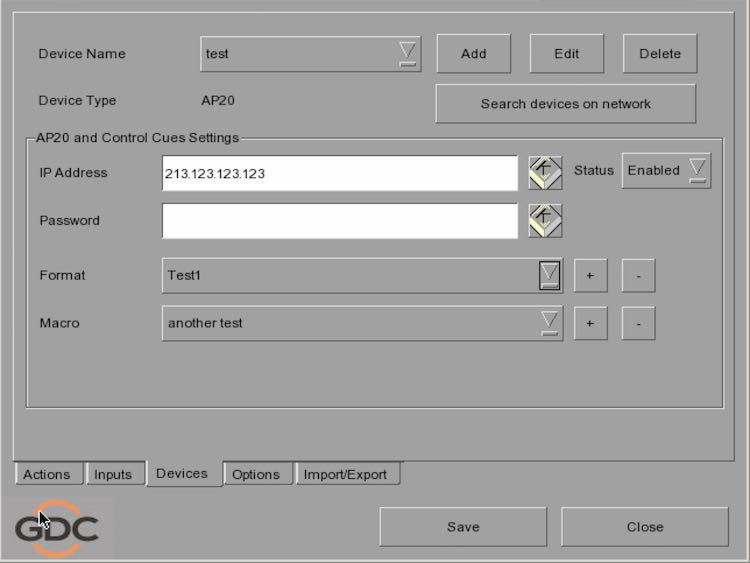
So I think they have you covered. Again, if you save your configuration, you can always reload it into another system. One thing I do with GDCs (and configurations in general) is I keep configurations since I find it easier to delete off the formats that don't apply to a site than to re-enter stuff again.
Posted by Carsten Kurz (Member # 5396) on 02-20-2018, 04:27 PM:
Thanks for that screenshot Steve. More than GDC was able to supply.
- Carsten
Posted by Mark Gulbrandsen (Member # 72) on 02-21-2018, 11:51 AM:
quote: Steve Guttag
What Mark stated is not entirely accurate.
Actually, you can go into the root and create entirely new functions that don't exist and add devices and device functions if they are known that are not in the GDC Library. Was trained how to do that a long time ago during original GDC training.
quote: Sam D. Chavez
What a trooper! Back at work already.
Just remotely for a couple more weeks, then I can go back in the field.
Mark
Posted by Steve Guttag (Member # 268) on 02-21-2018, 08:40 PM:
What is not entirely accurate is that you cannot create a new device as in create a new device library.
What you CAN do is modify the automation configuration file to put your new device in it and add in different functions, as you stated.
However, when you are done, you have the full configuration file, with your modifications. This file would be clonable. BUT what do you don't get to do is isolate the AP20 processor and merely have a file to add in an AP20 ot any server.
Posted by Carsten Kurz (Member # 5396) on 02-22-2018, 06:00 AM:
Good to see you're back, Mark!
- Carsten
Powered by Infopop Corporation
UBB.classicTM
6.3.1.2