This is topic NC1200C issue in forum Digital Cinema Forum at Film-Tech Forum ARCHIVE.
To visit this topic, use this URL:
https://ft-forum.com/ft/cgi-bin/ubb/ultimatebb.cgi?ubb=get_topic;f=16;t=003226
Posted by Steve Kraus (Member # 476) on 02-15-2018, 03:09 PM:
I have an NEC NC1200C with a Dolby DSS200 server the media block (Cat.862) in the server. The server runs 24/7 with occasional reboots. Projector is shut down at the end of a day and restarted as needed. There is no library server as I only run one screen.
This morning, on starting up the projector I got this warning on the projector LCD display.
Warning!
CommE Fail(000000:Conn=2)->->DLP
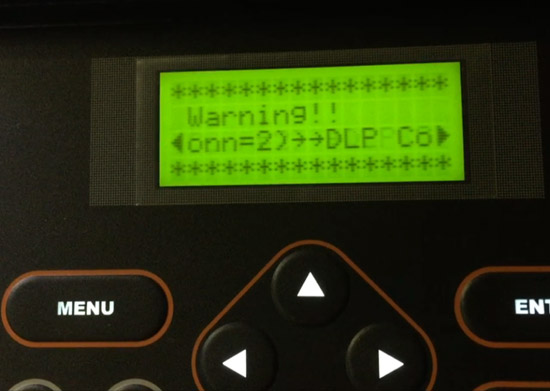
(During this time the normal error on the server when the projector is off about unable to connect to transport remained)
I powered down the projector and restarted. This time there was no error on the LCD. But still no connection to server.
I did try connecting the ethernet directly from projector to server (it normally goes through a switch where there is a connection to the booth router) but this made no difference.
I powered down the projector and restarted again, banging on it a little in case it was one of those card seating issues.
Again, no change. No LCD error but no connection to projector.
I then powered down the server and after waiting long enough to make sure the Cat.862 was fully dead, restarted it.
Eventually connection to the projector was reestablished. But for some reason it had 516 security logs to download first.
OK after that and I ran a screening.
When it ended instead of about 2 seconds of "Downloading Security Logs" it hung on that for a long time.
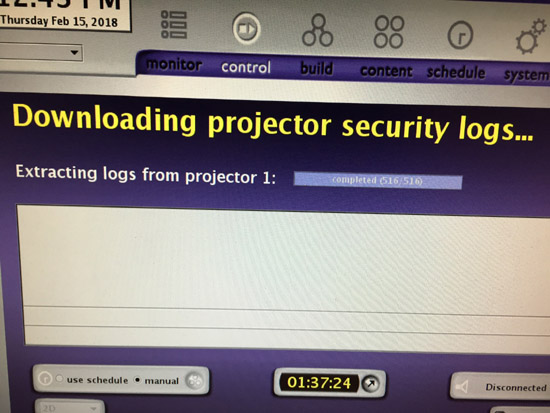
Maybe I wasn't patient enough because after a couple of minutes I tried restarting the projector yet again and once again all those logs to download and once again it seemed to hang a long time on the last one but did eventually finish.
So what is going on and what should I do?
Posted by Mark Gulbrandsen (Member # 72) on 02-15-2018, 03:52 PM:
Your security logs were full. There is a way to manually empty them on the Dolby but it's been so long I forgot. It can take some time to download them.
Mark
Posted by Steve Guttag (Member # 268) on 02-15-2018, 04:56 PM:
When the DSS200 saw the security event (or thought there was), it went into lock-down mode (needed to power cycle). It will then, automatically download all 8192 logs but approximately 512 of them at a time after each show (16 shows).
You can expedite the process by running a 5-second show (one blank) every 5 minutes until all of the logs are cleared.
Posted by Steve Kraus (Member # 476) on 02-15-2018, 05:09 PM:
Fair enough; that sounds familiar.
But what was the initital issue and what should I do to prevent a reoccurrence?
Posted by Leo Enticknap (Member # 534) on 02-15-2018, 05:24 PM:
quote: Mark Gulbrandsen
There is a way to manually empty them on the Dolby but it's been so long I forgot.
As luck would have it, I did one last week and so it's fresh in my mind.
- Press ctrl+alt+F1 if using a locally attached keyboard, or establish an SSH connection to the server if working remotely (e.g. using PuTTY).
- Enter the administrator username and password, then enter the following commands:
[hostname]:~$ cd scripts
[hostname]:~/scripts$ ./getAllProjectorLogs.sh localhost
The Dolby documentation warns that the process can take up to two hours, during which transport (DCP playback) will be unavailable. However, the longest I've had it take is 45-50 minutes, and that was with over 8,000 entries in the log.
Posted by Steve Kraus (Member # 476) on 02-15-2018, 05:49 PM:
Does that empty them for good (until they accumulate again) or if there is another security-related reboot and then it's 8192 all over again?
Posted by Leo Enticknap (Member # 534) on 02-15-2018, 05:56 PM:
It should empty them for good, with one gotcha. This feature was introduced into 4.7 of the software, but on that version it'll still download 516 logs once more after the next playback (after the complete purge). This was fixed in 4.8.something (can't remember which, sorry): from that version on, it's emptied for good, period.
Probably a good idea to cold reboot the server, cat862 and projector (because the Enigma card is in the projector) after doing the log "cleanse," though.
Posted by Steve Kraus (Member # 476) on 02-15-2018, 06:11 PM:
Any idea about the initial issue?
Posted by Leo Enticknap (Member # 534) on 02-15-2018, 06:34 PM:
Looks like it could be something to do with the projector's internal router. From the service manual:


If the LAN connection between the Enigma card and the DSS200 were disrupted such that it couldn't download the logs, or that process were interrupted, then I guess the two symptoms are consistent with each other.
Since I started as a service tech in June last year, I've had to replace two router cards that went bad in Series 2 NECs: both projectors were around five years old. They die frequently enough that we keep one in stock, ready to ship (or take with us if one of our techs is to do the field installation) at any time. Let's hope that this was a one-off glitch (power brownout during the log download process, maybe?), but if you see "Router verify fail" on the LCD when you power up your projector one day, that's what's happened.
Posted by Steve Guttag (Member # 268) on 02-15-2018, 06:45 PM:
I have never found that after using the getAllLogs command was issued that it didn't run the 512 logs again for the next 16 shows.
As for "for good" no...anytime a DSS server "sees" what it thinks is a security tamper issue, it will download the logs again.
What versions are you on of DSS and NEC?
Posted by Leo Enticknap (Member # 534) on 02-15-2018, 06:54 PM:
Bug fix in 4.8.1:
quote: Release notes for 4.9.0.96, page 18
DC-12525: Fixed a CAT862 issue where the projector logs were unnecessarily downloaded again after running the getAllProjectorLogs script.
But I guess that's under normal circumstances, not in response to a tamper alarm.
Posted by Steve Guttag (Member # 268) on 02-15-2018, 07:01 PM:
Yes, I know they've claimed to have fixed it. I have not personally found that to be the case. Once Enigma 1.8 came out, it fell off my radar of important things to worry about.
Posted by Steve Kraus (Member # 476) on 02-15-2018, 08:49 PM:
About 2 months ago I had an error on boot which might be related. I think it said ICMP or something like that. I rebooted the projector but I might have been too quick because when I looked back on the server it had gone to Downloading Security Logs so I don't know if that could be happening during that error or it somehow how was resolved. Obviously that froze when I shut down the projector.
Rebooting the projector cleared the error but it would not reconnect to the server. From what I gather in this thread it's expected that the server will need to be recycled. I did that but it came back with "Disconnected." Another cycling of the projector and it was finally back to normal.
Seems like something is starting to fail.
DSS200 is running 4.3.5.13 that I put on when a media block replacement would not let me stay with 4.3.5.9 lest I downgrade its software.
Not sure about the NEC; will look next time I am there. But as I avoid changes when things are running well which they were it's never been updated since I got it and that was mid 2012. No doubt it's long overdue.
But this apparent hardware issue scares me. As a screening room with one screen I don't have the option of moving the audience next door. I might have to replace something just to be safe.
Posted by Carsten Kurz (Member # 5396) on 02-15-2018, 09:20 PM:
I see CommE failures on our NC900 every few months, always during power-up. So far, a full projector shutdown always got rid of it, without any server issues (Doremi, in that case). As it happens so rarely and always fully unexpected, we could never track down the reason, or wether there is a special power-up sequence that triggers it. I believe it's the occasional software glitch.
Steve - you need to update the NEC software ASAP. You are running an outdated enigma software version which could darken your screen anytime. Please check the NEC software version and take care that the enigma is updated to 1.8 as soon as possible. You can leave the Dolby as it is, but do update the NEC!
Should be at least NEC S2 4.214 (includes Enigma 1.8), latest NEC pack I believe is 4.219. Enigma 1.8 solves log memory corruption/full issues.
Maybe you should also source a replacement for the internal router, they seem to fail quite often on the NECs.
- Carsten
Posted by Leo Enticknap (Member # 534) on 02-15-2018, 09:48 PM:
The latest (that I'm aware of) is 4.221. Agreed with Carsten that updating to Enigma 1.8 is a very good idea, though if the logs are purged on 1.6, it should be a long time before the screen going blank is a risk.
I stress that mentioning the internal router card is just a guess, based on what I saw in the service manual: I personally have not encountered that CommE error before. I've had to replace two failed routers, one in a 900 and the other in a 3240. They're not at all difficult to swap out, but if the router card does die completely, then the projector is totally unusable until it's replaced. The symptom in both cases was a "router verify fail" (or similar wording) error on the LCD, and a red tail light. Might be an idea to pull a log from your projector and see if there any router-related entries in the error section.
As long as you're only playing Interop, unsubtitled DCPs, you'll probably get away with leaving the Dolby software untouched.
Posted by Steve Guttag (Member # 268) on 02-16-2018, 06:32 AM:
4.221 is indeed current. However, I have not had favorable experiences with it or the mating DCC. I've had it crash numerous times. 4.220 runs the current DCC and has not been as unstable. 4.221 just adds another lamp or so to 4.220. I'd say that the minimum NEC software to be on is 4.217. The differences between 4.217 and 4.221 are just the lamps it recognizes as certified lamps in most S2 projectors.
As for Dolby DSS, 4.9.0.96 is current but I do think that 4.9.1 will be hitting the streets pretty soon. 4.9 is definitely a worthwhile update. 4.3.5.9 remains the most stable of all Dolby DSS versions but it will not work with SMPTE packages with encrypted captions (it will show the movie, not the captions). It is a "snapshot" of what things were like back then so any changes in the SMPTE packages as it has evolved are not represented in it.
All of that said, I don't think what you experienced is software related. I think it is DCinema related. having to reboot things seems to be a way of life. Reseating ICP boards also seems rather common (all three DLP brands). FWIW, I notice a significant upswing in ICP oddities when the humidity changes, particularly towards the dry season (winter).
Posted by Leo Enticknap (Member # 534) on 02-16-2018, 09:21 AM:
My impression is that heat cycling really pummels the electronics in digital cinema projectors. Most of the problems I've had which have either been fixed by pulling and reconnecting something, or replacing a hardware component, have been on the larger projectors with bigger bulbs, e.g. Barco 32Bs and NEC 2500s and 3240s. You're pumping a lot of heat and UV into a very small space, and then reducing the temperature a lot afterwards.
Posted by Steve Kraus (Member # 476) on 02-16-2018, 09:47 AM:
So what is my best course of action? Besides updating NEC but not to the very latest (4.217 or can one just update Enigma alone?)
Should I enter and reseat a few boards? Obtain and replace router? I've never been inside so there is the concern of getting it going again after triggering various tamper alerts. Should I find a local tech? Strong? Recommendations? Business is in the toilet (break-even right now) but that's all the more reason to spend avoid disaster.
I can certainly live with a periodic reboot IF that is sure to resolve it but naturally I'm worried about this disrupting a show. It does seem to make some sense that 5.5 years of temperature cycling could result in a poor connection on some board.
What is the deal with SMPTE? Is that still coming or will they stay interop? I presume what I have won't handle them. So there is that as well.
And on another matter, I put my DSS100 issue aside as we got into the holiday season but will be revisiting it soon as having a backup for server will give me a little confidence. Wish I had a backup projector! I never had to finish a film show on one machine but there was always that option and I kept 6K reels handy just in case.
Posted by Carsten Kurz (Member # 5396) on 02-16-2018, 10:20 AM:
I would not be too nervous, but you definitly need to bring the Enigma up to date. There is no reason not to update the NEC to something in the 4.217 to 4.219 range.
Somehow your business must be prepared for being down one or two days at least, because something simply breaks some day. As the internal router turns out to be a common point of failure, just get one to be on the safe side. Did you ever reseat boards, clear a security tamper yourself, perform a remarriage? If not, 'Id say make yourself familiar with these procedures so you can fix minor issues on your own.
For a DSS200 and with a series 2 projector, I see no reason not to switch to 4.9. Yes, 4.8.x had quite a few glitches, but if you want to screen current and future DCPs, you should update. SMPTE is definitly coming, they won't stay with Interop. No need to hurry with the DSS upgrade, though, you can easily wait until a solid 4.9 version is communicated through this forum (it appears though that 4.9.0.96 is quite usable).
However, staying on Enigma 1.6 is a real risc. You are really lucky it did not hit you already. At a certain point in time, that would have taken your screen down for more than 1 or two days, and it would have been an expensive repair as well.
- Carsten
Posted by Steve Kraus (Member # 476) on 02-16-2018, 10:59 AM:
No, not counting the lamphouse, I've never been inside at all except the front when I changed the connection to put electronics on an an IEC cord so it can run on a fulltime UPS for filtration purposes. There was security reset of some sort for that.
Yes, if I'm down, I'm down and the clients (the studios & their publicists) would book elsewhere. Worst of all would be a show that fails while underway while second worst would be a projector that doesn't start when people are on their way. I'm usually starting up an hour or two before showtime.
The key is being as absolutely reliable as is possible including cancelling well in advance if something breaks so the publicists can tell their guests the screening will be held elsewhere.
In mid 2014 the Cat.862 did not survive a *reboot. Luckily it happened on over a weekend and there was nothing needing the server until Thursday. This was back when Dolby would still RXO them. I fixed it on Tuesday. I think I lost two shows; one an inquiry for Wednesday and I decided not to chance it. And upon hearing I was down, Thursday moved to a theatre just to be safe, a decision I concurred with.
*The Cat.862, unresponsive even to a direct connection, had no LEDs lit so probably the on-board regulator(s) had failed. It was after a routine reboot after running a month or two.
Posted by Leo Enticknap (Member # 534) on 02-16-2018, 11:39 AM:
You can simply update the Enigma board on its own, using the .pkg file within the NEC bundle, and the TI ICP and Enigma tool. However, I couldn't say whether Enigma version 1.8 will be problematic when used with much older components of the rest of the NEC package.
I have Dolby 4.9.0.96 in use in several sites, both with cat862 and cat745s, none of which have reported any software-related problems. You will need to buy a KDM in order to update a cat862-based system. Per this site's convention, I'm not going to quote the actual price, but it is not a significant amount. Any Dolby cinema products dealer can sell you one.
Agreed with Carsten. If you are absolutely mission critical, and the loss of a show would be economically catastrophic for you, then, IMHO, you have two options, from which you can choose either, both, or a combination. Option A is self-sufficiency: train yourself to maintain and repair your server and projector, and keep spares in stock of known weak point parts, or identify vendors that can get those parts to you within an acceptable timescale.
One route to option A could be to have a service tech come to you for a day and train you in stuff like bulb replacements, pulling and reseating boards, clearing tamper alarms, understanding what's in the logs: in short, planned maintenance and first line troubleshooting.
Option B is to sign a service contract with a local (or even not so local, if that makes sense) service vendor who guarantees a response time that would be acceptable to you. A service contract that includes a mix of remote monitoring and troubleshooting (we do it by installing an Internet-connected PC in the customer's booth, and use Teamviewer to communicate with LAN-connected equipment), combined with rapid response capability to the actual site if necessary, might be something you'd like to look at.
One other thing to throw out there is that if you, or a service tech you call in, need to go to equipment vendors for support, one of the first things they'll ask is what software or firmware version the equipment is running, and if it isn't the current version, they may tell you to update to the current version before being willing to troubleshoot with you any further. Some will do this even if the problem clearly has nothing to do with software.
So, while I am sympathetic to the "if it ain't broke, don't fix it" approach to software and firmware updating, please keep in mind that when old software does cause something to go wrong, you may have little or no warning.
Posted by Carsten Kurz (Member # 5396) on 02-16-2018, 11:39 AM:
I'd say, as a screening room, you definitely will need full SMPTE support sooner (not later). Chances are high you will receive features earlier, or different packages from the main distribution. If something doesn't work, you're among the first to experience it, and it will be embarassing to explain you are running very outdated software (even if you have the 'if it ain't broke, don't fix it!' explanation).
I'm not saying you always have to be on the latest software - but you have the benefit to find out on this forum from the many users and experienced techs when it is safe to install a specific version.
- Carsten
Posted by Steve Guttag (Member # 268) on 02-16-2018, 12:35 PM:
4.3.5.13 DOES support SMPTE packages and likely he has run them as Disney has been doing SMPTE now for over a year and others have started as well.
It is just that it is a 6-year old "snapshot" of the SMPTE definition or an interpretation of that definition.
4.9.0 is more stable than 4.8 except 4.8.10.4, which is about equivalent in stability. 4.9.0.96 is what just about all of our customers are on. It is quite stable though I think Jupiter client is a bit sluggish and it can be slow to update some fields...overall a winner.
Posted by Mark Gulbrandsen (Member # 72) on 02-16-2018, 01:00 PM:
quote: Leo Enticknap
My impression is that heat cycling really pummels the electronics in digital cinema projectors.
I don't see this happen in NEC S-2 stuff at all. I have locations that leave equipment on 24/7, but more places that shut down completely every night. The reliability with NEC/GDC and USL has been the same very low rate at all locations. I can't speak of the other brands since I went exclusively with those brands when major conversions began. The latest failure was an NC-1200 rectifier in Nevada, but it was one from a batch of San-Rex rectifiers that all fail eventually. Its twin failed three years ago. That makes a total of 6 NEC projector component failures I've had in NEC in seven years. I have also never had a single fan fail of it's own accord, but I have replaced some AC-On and Power-On fans in the oldest projectors as a precaution, and it's very easy to do.
Mark
Posted by Leo Enticknap (Member # 534) on 02-16-2018, 01:42 PM:
quote: Steve Guttag
It is just that it is a 6-year old "snapshot" of the SMPTE definition or an interpretation of that definition.
And, IIRC, some significant aspects of that definition changed in 2014, especially around subtitles.
As a very rough rule of thumb, you stand a good chance of getting away with playing SMPTE DCPs on servers and/or projectors with ancient software, unless it has subtitles or captions, in which case all bets are off.
Posted by Steve Kraus (Member # 476) on 02-16-2018, 03:03 PM:
I tried the script but I don't think my version has it. Can I get back to the regular GUI without rebooting?
Funny that Disney is mentioned. Yesterday I got a couple of Disney DCPs for an upcoming screening, both IOP, but different creation dates. Today I got yet another one and it's SMPTE.
Posted by Carsten Kurz (Member # 5396) on 02-16-2018, 03:26 PM:
SMPTE does not mean a simple formal distinction, it's still in transitional phase. Try to play the current ISDCF SMPTE test DCP, and the Dolby on 4.3x will fail on the subtitles. Disney was one of the first companies who tried SMPTE on wide releases, even for non-ATMOS DCPs.
Keep in mind, subtitles, or captions, are not only used to subtitle foreign language movies, they also show up often as declarative elements in 'ordinary' feature or to translate short foreign language passages. I'ts probably rarely a show killer if they don't show up, but in a screeningroom, it may still become obvious to the audience that something is missing.
- Carsten
Posted by Leo Enticknap (Member # 534) on 02-16-2018, 05:07 PM:
Ctrl + alt + F8 to get back to the GUI.
The Enigma purge log script was introduced in version 4.7 of the Dolby DSS software, so if you're on 4.3 it won't be there - sorry.
Posted by Steve Guttag (Member # 268) on 02-16-2018, 05:40 PM:
Most subtitles that are used for brief instances to allow the original language are burned in (for the US, at least) so it is likely that the 4.3 version will pose an issue there. Honestly, Id have version for 4.9 at the ready. I'll quote you an upgrade fee off-line. I have one site that is on 4.3.5.9 and on top of the pedestal there is a "break in case of emergency" sort of thing to immediately get them up to what was current the last time I was there. This site has had zero server issues since it was installed a long time ago and they want to run that version.
Hey Boys and Girls...NEC has been cooking up another version 4.222! It only really affects the NC3200 and NC3240 projectors (new lamps).
They have also finally issued the new version of DCC for the "series 3" projectors like the 3541L. It does NOT work with legacy projectors.
I believe some series 3 projectors also have new firmware versions available.
Posted by Leo Enticknap (Member # 534) on 02-16-2018, 06:24 PM:
I really wish that NEC would follow Barco's lead and issue one, single Communicator app for every single one of its projectors. The one, tinsy downside to this is that the Barco Communicator installer file is pretty big (over 100mb for 5.10), and keeps growing with every revision; but that's an insignificant price to pay for the convenience of not having to mess around with multiple versions. At the moment I have to have three NEC DCCs on my laptop: whatever was the last Series 1 version, 5.1.8.0 for most Series 2s, and the unique one for the 1040L.
Posted by Steve Kraus (Member # 476) on 02-16-2018, 06:28 PM:
Thanks; I will msg you. I wonder if I have ever played anything with subtitles that were not burned in.
I actually tried CTRL-ALT-F8 and unless I mis-typed I got a screenful of Linux commands and it didn't go back to the GUI. I remember seeing the word PURGE. It didn't seem like it was doing anything (no busy-ness on the RAID other than the usual flashes every few seconds). I gave up and rebooted.
Posted by Leo Enticknap (Member # 534) on 02-16-2018, 08:52 PM:
Ctrl + alt + F7? Might be misremembering. It's certainly ctrl + alt + something in that neighborhood. Sorry.
Posted by Carsten Kurz (Member # 5396) on 02-16-2018, 10:08 PM:
Hitting CTRL+ALT+F8 simultaneously to go back to the Show Manager GUI should work, even in 4.3.x
- Carsten
Posted by Marcel Birgelen (Member # 6801) on 02-17-2018, 05:40 AM:
With (Ctrl-)Alt-Fx (where x is the number of the F-key) you switch between the so-called "virtual terminals", your GUI, running on top of X-Windows runs on one of those virtual terminals (VTI). An SSH session actually also opens a "virtual terminal" session for you, with a specific number that's not accessible via the F-keys.
This is a leftover from the good-old UNIX days, where you had the big super-computer and a bunch of teletype terminals connected to it over a simple, serial connection.
Posted by Steve Kraus (Member # 476) on 02-17-2018, 07:18 AM:
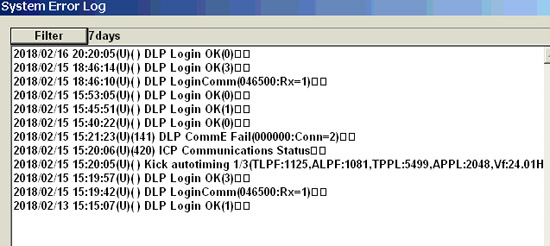
Here is the NEC's error log from the other morning in case that helps.
Posted by Steve Kraus (Member # 476) on 02-19-2018, 05:08 PM:
Although presumably not related to last week's projector issue, since SMPTE DCPs came up in the discussion, I did some checking and last year we ran 5 under 4.3.5.13, all Disney. Last month we had one from LGF. (I cannot say we ran it as it was a guild show that no one came to. I did watch a bit and it was fine.)
Last week the Mouse sent me 2 interop DCPs of different dates for an upcoming screening so I ingested the later date. Two days later a SMPTE DCP for this screening arrived. Keys came in today for the SMPTE version.
Posted by Carsten Kurz (Member # 5396) on 02-19-2018, 07:08 PM:
As I wrote, SMPTE DCP is not a new thing. All servers support basic SMPTE wrapping for years. At the same time, it is not just a tag. It comprises a range of changes and extensions, and in reality, is still a moving target, they are forming lowest common denominator SMPTE dialects to allow existing equipment to deal with them. Still, there is a reason why Dolby didn't stop at 4.3.5.13 and are now at 4.9.x.
- Carsten
Posted by Steve Kraus (Member # 476) on 02-19-2018, 08:20 PM:
I should mention that the other night I left the NEC powered up so I could play around with running a bunch of dummy shows as Steve suggested but from home. I lost track of how many I ran before it went back to normal but it was a lot less than 16. Maybe 8-10 or so.
Posted by Dave Macaulay (Member # 813) on 02-19-2018, 08:58 PM:
"I really wish that NEC would follow Barco's lead and issue one, single Communicator app for every single one of its projectors."
Not at all related to NEC but... Communicator is getting a bit chubby for the Barco touchpanel, it reboots rather often and unpredictably on recent versions. A button that works usually just triggers a reboot now and then, some things always reboot that didn't before (delete a file and exit file manager). Even the PC version freezes and crashes more than with "old" versions. I think maybe stay at v4.x if you have no ICMP or laser systems?
Posted by Mark Gulbrandsen (Member # 72) on 02-21-2018, 12:03 PM:
Should only be two versions of DCC. One for NC Series Xenon and one for Laser NC Series. I would not want them combined as I do not like their laser projectors.
Mark
Powered by Infopop Corporation
UBB.classicTM
6.3.1.2