This is topic Chromacity variation in forum Digital Cinema Forum at Film-Tech Forum ARCHIVE.
To visit this topic, use this URL:
https://ft-forum.com/ft/cgi-bin/ubb/ultimatebb.cgi?ubb=get_topic;f=16;t=003230
Posted by Lucas Iaccarino (Member # 8762) on 02-16-2018, 01:52 PM:
Hello;
I`m having some issues with a Screen at a Venue. I made some tests, and I found out that the white is not the same values across the screen. I`m sure that the left side of the screen is greenish that the right side, that seems more reddish. I`m not sure if is because the luminance is not uniform - 9 fL (Left) VS 10 fL (Right) - a calibration issue - The convergence test showed that the Blue DMD is a little offset - or something worst, like a dying engine.
I´m attaching a cellphone picture, but it can be lightly notice.
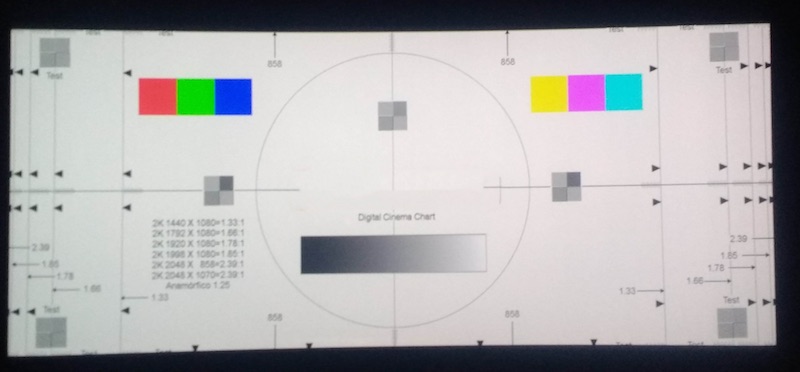
Thank you!
Posted by Carsten Kurz (Member # 5396) on 02-16-2018, 03:20 PM:
Another stunning example of people mistaking their Sonys for a DLP.
Lucas - this projector is not a DLP, as it is an industry-known fact that only Sony systems exhibit such behavior!
Honestly - what type of projector is it, and how old is it? Has it ever been serviced/cleaned?
- Carsten
Posted by Dave Macaulay (Member # 813) on 02-17-2018, 04:37 PM:
Yes Sony projectors tend to have odd color artifacts.
For S2 DLP projectors the TI ICP can use a "SCC_LUT" file that corrects for color shift across the image. It is a pain to create but not impossible. I think most use a default file with no correction, a Barco .69" chip projector comes with a factory generated file for its light engine.
Posted by Steve Guttag (Member # 268) on 02-17-2018, 05:11 PM:
Barco 4K light Engines also come with a LUT-SCC file (downloadable if you have the LIGHT ENGINE serial number (not the projector serial number).
As for creating one on a Barco, they have a wizard so if you have a good meter (PR-655 or better) then creating one isn't that hard either.
Posted by Lucas Iaccarino (Member # 8762) on 02-19-2018, 10:13 AM:
Hello, thanks for the answers!
I`m familiar with DLP technology and I searched across internet before making this post
This is a Christie CP2220, I`m not sure how old it is but not more than 4 years and being deeply cleaned 2 weeks ago.
I also thinks it`s about color correction, and probably a default file being used. Dave, do you think it`s possible to make a LUT to correct this? Do you have any material to read about this?
Thanks agaiN!
Posted by Carsten Kurz (Member # 5396) on 02-19-2018, 11:25 AM:
On a CP2220, I suppose a misalignment is the cause of this issue, maybe that happened during the recent cleaning. Did you notice this issue already before the cleaning, or was the cleaning ordered because of this issue?
- Carsten
Posted by Lucas Iaccarino (Member # 8762) on 02-19-2018, 11:48 AM:
I didn`t check it before the cleaning... Do you mean that maybe the DMD are misalignmented because the cleaning?
Thanks!
Posted by Carsten Kurz (Member # 5396) on 02-19-2018, 12:58 PM:
Maybe the integrator rod, cold mirror, or some of the relaying lenses. I'd try to contact Christie about this - I wouldn't trust an ordinary tech on this.
I think there was a discussion a while ago about reasons for DLP color uniformity issues, calibration LUTs etc., if I remember right, only Barco allows to create them yourself, and they may not even be available for 1.2" or 0.98" DLP units, only for 4k and S2K.
http://www.film-tech.com/cgi-bin/ubb/ultimatebb.cgi?ubb=get_topic;f=16;t=003178#000005
- Carsten
Posted by Lucas Iaccarino (Member # 8762) on 02-19-2018, 01:14 PM:
Thanks you very much! I will check it out and let you know
Regards!
Powered by Infopop Corporation
UBB.classicTM
6.3.1.2