This is topic Windows and timekeeping in forum Digital Cinema Forum at Film-Tech Forum ARCHIVE.
To visit this topic, use this URL:
https://ft-forum.com/ft/cgi-bin/ubb/ultimatebb.cgi?ubb=get_topic;f=16;t=003240
Posted by Frank Cox (Member # 6258) on 03-03-2018, 05:35 PM:
I've mentioned here before that my GDC server never managed to keep anything close to the correct time, to the point where it was off by about an hour.
I purchased a cheap laptop (the Costco weekly special) and the last time the tech was here someone from GDC logged into the server and set the time, and I had the tech set up the laptop as a ntp server to tell the cinema server what time it is on an ongoing basis.
And I had a nice accurate clock on the server for some months, but lately I've noticed that it's slipping again and a few days ago it was about three minutes behind.
That laptop serves no purpose other than to tell the cinema server what time it is, so it always just sits there on its login screen. Since it had apparently stopped doing its job I thought I would try logging into it and see if that made it start working again.
And now my cinema server shows the correct time once again.
The lesson learned there is to keep that Windows laptop logged in. I know nothing about Windows, while I have several computers that laptop in my projection room is the only one that runs Windows, but had assumed it would work like Linux, where services like an ntp server will just work without requiring anything like a logged in user. My mistake there, I guess.
Posted by David Stambaugh (Member # 1102) on 03-03-2018, 06:18 PM:
Is the laptop running a timekeeping app, as opposed to a service? There are free or cheap utilities for Windows that allow it to treat apps as services that start whether or not anyone is logged in. I’m out of the IT game now but what you want should be very doable.
EDIT: This might help. https://www.howtogeek.com/50786/using-srvstart-to-run-any-application-as-a-windows-service/
Posted by David Stambaugh (Member # 1102) on 03-03-2018, 08:00 PM:
I’ve used this. It works very well. Free trial version is available.
http://www.firedaemon.com/product/firedaemon-pro
Posted by John Thomas (Member # 6509) on 03-03-2018, 09:22 PM:
Had the same problem with a few different LMS's last year. The solution was to open command prompt and run the following:
sc triggerinfo w32time start/networkon stop/networkoff
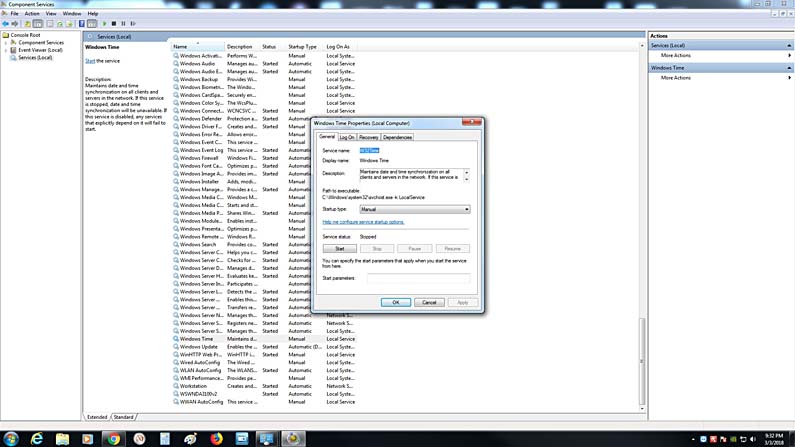
And then open up Services and set the Windows Time service to automatic. You should be good to go from here.
We took over some buildings and found the LMS's periodically would stop serving NTP. Caused a lot of headaches with things not being synced up with NCM triggers. It seems Windows' default trigger for the time service to start is when a domain is joined (i.e. when you log in). This command changes the trigger to be as soon as there is network activity.
Posted by Mark Gulbrandsen (Member # 72) on 03-03-2018, 10:34 PM:
At a couple locations I used a GPS receiver to lock the Windoez TMS computer so it keeps perfect time since INternet was very unreliable. ONe site doesn't even have internet. Normally one just uses the Windoez Time Service that's built into Windoez. My TMS sites except two all do it this way. Note that you must set the operating parameters of Windoez TIme to what GDC requires.
Posted by Adam Martin (Member # 641) on 03-03-2018, 10:42 PM:
Windows does a horrible job of keeping time. It doesn't even use standard NTP protocol. Since you don't use the laptop for anything else, you'd be better off installing some flavor of Linux and running NTP that way.
Posted by Mark Gulbrandsen (Member # 72) on 03-04-2018, 12:06 PM:
quote: Adam Martin
Windows does a horrible job of keeping time.
No issues here at all with it working on GDC TMS's as long as it is synced regularly to an accurate time reference, be it a GPS clock or time-a.nist.gov which is typically what I use as the reference. If the TMS is not regularly synced then you are at the mercy of the Server motherboard clock reference. Some are pretty good and others are not.
Mark
Powered by Infopop Corporation
UBB.classicTM
6.3.1.2