This is topic Sony SRX-R320 - security issue Media Block in forum Digital Cinema Forum at Film-Tech Forum ARCHIVE.
To visit this topic, use this URL:
https://ft-forum.com/ft/cgi-bin/ubb/ultimatebb.cgi?ubb=get_topic;f=16;t=003241
Posted by Alexandre Pereira (Member # 9295) on 03-04-2018, 12:37 PM:
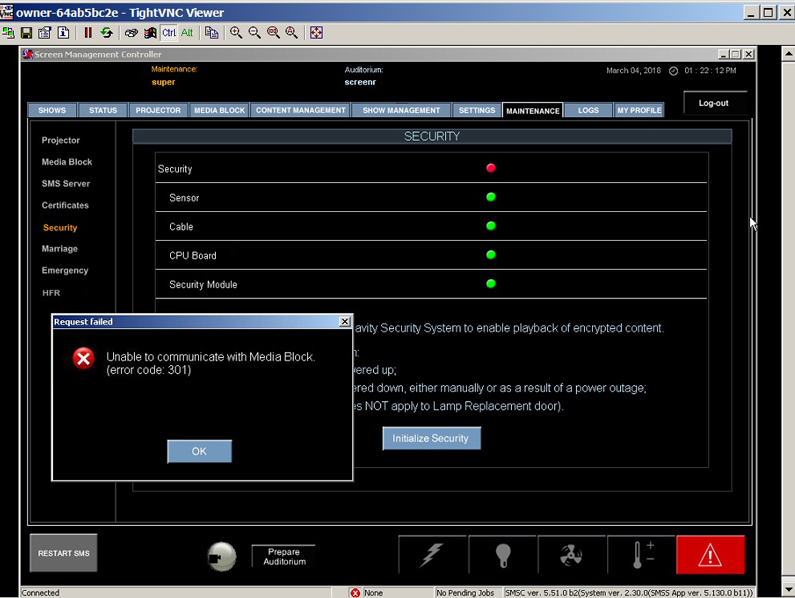
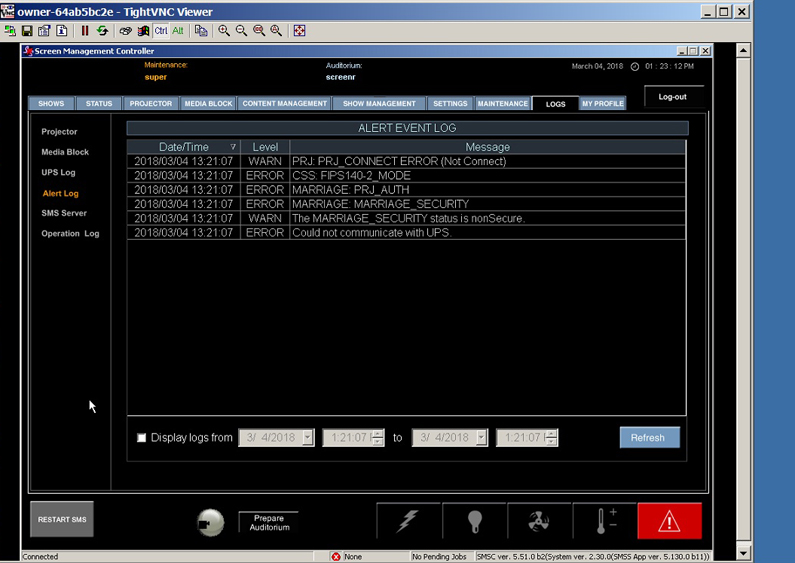
Last night there was an extended power outage. When the Sony was restarted everything came up fine expect the security will not reset. Error is - Unable to communicate with Media Block: Error 301 - has anyone experienced this problem? It seems to be that the Media Block cannot find the projector. I have attached the message and the log file. Otherwise the projector works and there is access to all functions through the SMS Controller and directly at the Sony.
Posted by Alexandre Pereira (Member # 9295) on 03-05-2018, 11:31 AM:
FIXED! Network IP conflict. My lesson is to keep an organized network. The SRX-R320 is accessible through the main network to run the SMSController from the front desk. When the power went out and the projector was restarted it exposed a network IP conflict. This is why the marriage was not possible. Removed the projector from the network - restarted and reset the marriage through the touch panel and it was fine.
Posted by Ken Lackner (Member # 1002) on 03-05-2018, 12:38 PM:
Typically, the communication between the Media Block and projector head are on an internal network that is completely separate from and not accessible through the theater network. The IP addresses on this internal network will all be 192.168.1.x. EVERY projector and EVERY media block in the building will have the same IP address. An IP conflict on the theater network will not affect communication between these devices. The SMS also has an external, user-configurable IP address for connecting to the theater newtork. But if there was a conflict here, you woudn't even be able to log into the SMS through SMSC, I would think. Also note that SMSC talks to and controls the SMS which, in turn, controls the projector head; SMSC does not directly control the projector head. (That's what SRX Controller is for.) Have you done something different with the network scheme, where the projector head (not the SMS!) is, in fact, connected to the theater network and has a unique IP address?
I have, however, seen weird issues where a Sony will just refuse to reset security for no apparent reason, and a full power cycle of the MB and projector head solves the issue. It seems like that is what happened here.
Posted by Alexandre Pereira (Member # 9295) on 03-05-2018, 10:15 PM:
In my case I believe the issue is the sloppy network set up that I have - 192.168.2.xx is being used by one of my routers with DHCP. The Media Server is on 192.168.2.10 so as a fellow Film-Tech-er said "wackiness ensues". I definitely have to fix this mess.
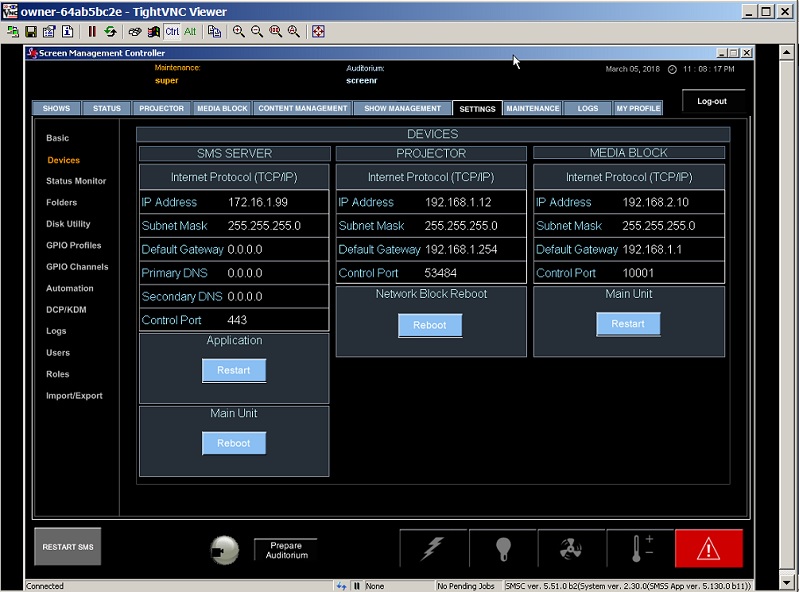
Adding hack to hackdom - yes the projector head was connected to the network - was using it to reset some settings with the SRX Controller through IP.
Posted by Dave Macaulay (Member # 813) on 03-05-2018, 10:31 PM:
It's not "best practice" but there's no iron clad rule against having projection equipment on your site network. The problem, as you've found, is that the people administering the network in small operations rarely know what they're doing. Configuring your router's DHCP space and setting static addresses outside of it is pretty basic common sense... but I see it ignored regularly. Fine if your projection system is up, DHCP routers will have address conflict avoidance and won't assign an address with a static device already on it... but nothing stops a router from assigning your projector's address when the projector is powered off. Power it up and the conflict causes mucho trouble. This usually happens after a power failure, just to cause maximum confusion.
Posted by William Kucharski (Member # 7246) on 03-07-2018, 10:42 AM:
More to the point, a device on the 192.168.2 subnet with a netmask of 255.255.255.0 will never be able to reach a default gateway at 192.168.1.1, and your device on the 192.168.1 subnet shows the default gateway is 192.168.1.254.
Posted by Carsten Kurz (Member # 5396) on 03-07-2018, 06:20 PM:
These are all dedicated ports, neither projector nor media block needs to see a gateway.
SMS talks to media block and projector head over dedicated connections.
- Carsten
Powered by Infopop Corporation
UBB.classicTM
6.3.1.2